hamburger-menu icon
เลือกภาษา

Motion to Dismiss Form – Fillable PDF Ready to Use

  1. ภาษา ภาษาอังกฤษ
  2. ประเทศ สหรัฐอเมริกา
  3. กิจกรรม Legal Forms
  4. แผนก Judiciary
Motion to Dismiss Form – Fillable PDF Ready to Use

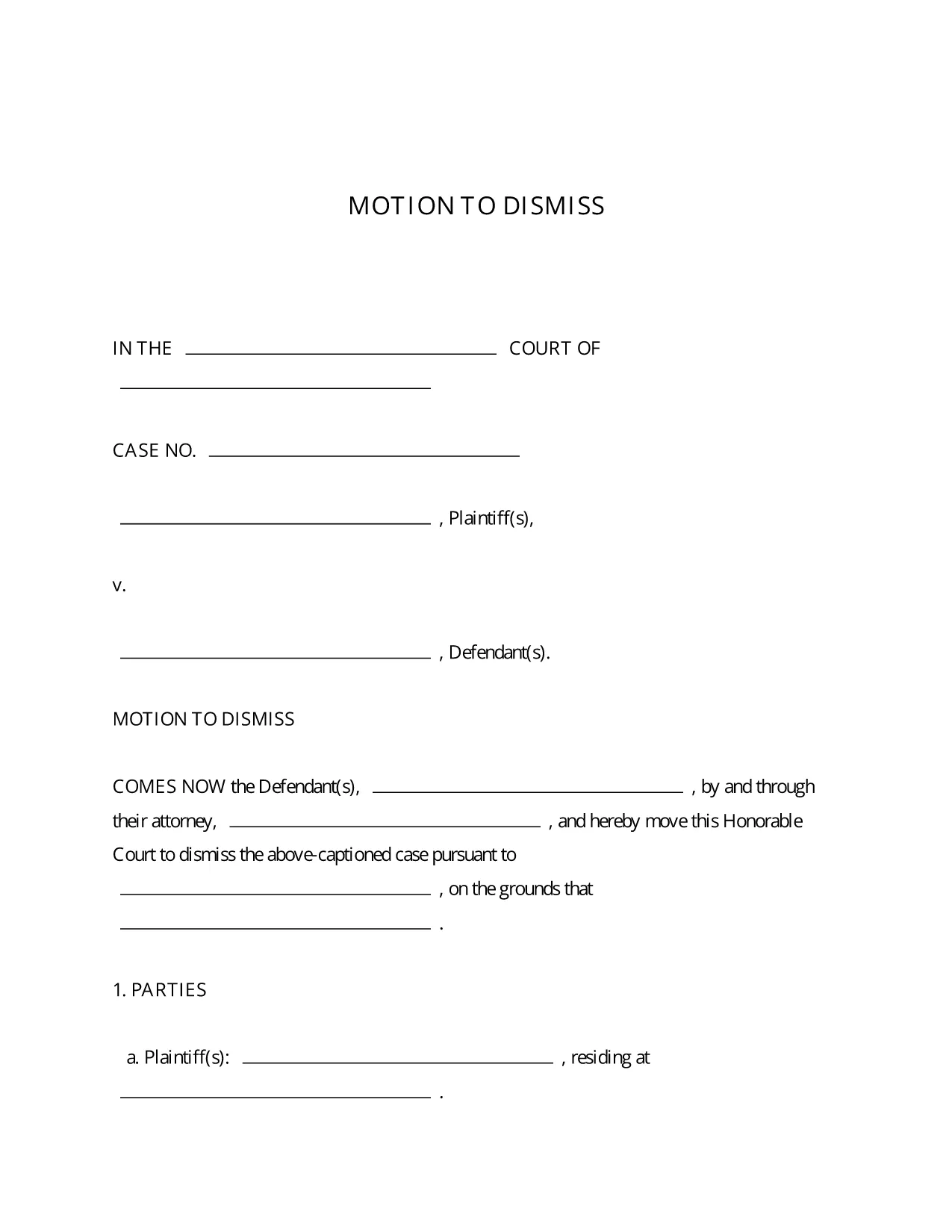
A Motion to Dismiss is a formal request to the court to throw out a case before trial. Whether you’re citing lack of jurisdiction, failure to state a claim, or an expired statute of limitations, the right template saves you time and ensures every required element is included.

What Is a Motion to Dismiss?

The motion asks the judge to dismiss the plaintiff’s complaint for legal reasons. It is typically filed early in the litigation process and must follow the procedural rules of the jurisdiction where the case is pending.

Key Sections of the Motion to Dismiss Form

  • Caption: Court name, case number, and parties.
  • Introduction: Brief statement of the request.
  • Grounds for Dismissal: Detailed legal reasons with citations.
  • Conclusion & Relief Sought: What you want the court to order.
  • Signature Block: Attorney’s signature, bar number, and contact info.

How to Fill Out the Fillable PDF in Seconds

Instead of downloading the PDF and opening a separate editor, simply click the “Fill out this form” button on this page. The Formize PDF Filler app loads instantly, letting you type directly into each field, add your signature, and save the completed document with one click.

Common Mistakes to Avoid

  • Leaving required fields blank – the court will reject an incomplete motion.
  • Using the wrong jurisdictional language – double‑check the local rules.
  • Failing to attach supporting case law or statutes.
  • Missing the signature block or bar number.

Download, Complete, and Submit Your Motion

Once you’ve filled out the form, download the finished PDF, print it (if required), and file it with the clerk of the court. Many courts now accept electronic filing, so you can upload the PDF directly from your computer.

This fillable Motion to Dismiss PDF is free, fully editable, and compliant with standard court formatting requirements.

คำถามที่พบบ่อย
  • Is the Motion to Dismiss form free to use?

    Yes, the fillable PDF provided here is completely free and can be used for any civil case in U.S. courts.

  • Do I need Adobe Acrobat to edit the form?

    No. The Formize PDF Filler works in any modern browser, so you can edit the form without installing additional software.

  • Can I file the completed motion electronically?

    Most U.S. courts accept electronic filing (e‑filing). After downloading the completed PDF, follow your court’s e‑filing portal instructions.

  • What if my jurisdiction has different formatting rules?

    The template follows the most common federal and state formatting guidelines. Review your local court rules and adjust font size or margin settings if needed.

  • How long does it take to complete the form?

    With the fillable PDF and Formize Filler, most users finish in 5‑10 minutes, depending on the complexity of the legal arguments.

  • Can I save my progress and return later?

    Yes. Use the “Save” button in Formize PDF Filler to store a draft in your account, then reopen it whenever you’re ready.

  • Do I need a lawyer to use this form?

    While the form is designed for self‑representation, it’s advisable to have an attorney review your motion to ensure legal accuracy.

ทำอย่างไร

วิธีกรอก motion to dismiss form ฟรีทางออนไลน์ใน 5 ขั้นตอนง่ายๆ:

  1. 1
    Click the Fill‑out Button
    Press the “Fill out this form” button on the page to launch Formize PDF Filler.
  2. 2
    Wait for the Filler to Load
    The app loads in seconds; you’ll see editable fields appear directly in your browser.
  3. 3
    Enter Your Information
    Type the case details, grounds for dismissal, and any supporting citations into the highlighted fields.
  4. 4
    Add Your Signature
    Use the built‑in e‑signature tool to sign the document securely.
  5. 5
    Save or Download
    Click “Save” to store the completed PDF in your Formize account, or “Download” to get a copy for filing.
สร้างแอป PDF Filler
เกี่ยวกับ

เทมเพลต motion to dismiss form

ด้วยชุดคุณสมบัติดั้งเดิมสำหรับการดูและกรอกเอกสาร PDF รวมกับประโยชน์ของเว็บแอปพลิเคชันและเค้าโครงที่ตอบสนอง คุณสามารถสร้าง motion to dismiss form ให้เสร็จภายในไม่กี่นาที

คุณสมบัติ

PDF ฟิลเลอร์

วิธีที่ง่ายที่สุดในการกรอกแบบฟอร์ม PDF ทางออนไลน์

  • กรอก motion to dismiss form อย่างรวดเร็ว
    กำลังมองหาวิธีเติม motion to dismiss form ทางออนไลน์อย่างรวดเร็วอยู่ใช่ไหม ด้วยตัวกรอกแบบฟอร์ม PDF ออนไลน์ฟรีของเรา คุณจะรู้วิธีแก้ไขและกรอกเอกสาร PDF นี้ในเวลาไม่ถึงนาที
  • โปรแกรมแก้ไข PDF ออนไลน์ที่ใช้งานง่าย
    เบื่อกับการพิมพ์ไฟล์ PDF เพื่อให้คุณสามารถแก้ไขได้ก่อนที่จะสแกนซ้ำและส่งกลับหรือไม่? แก้ไขเอกสาร PDF ออนไลน์ฟรี ใช้โปรแกรมแก้ไข PDF ออนไลน์ของเราเพื่อประหยัดเวลาและกระดาษ
  • เครื่องมือที่ยอดเยี่ยมสำหรับทุกแพลตฟอร์ม
    สงสัยวิธีเติม motion to dismiss form บน Mac หรืออาจใช้ตัวเติม PDF ฟรีได้อย่างไร เครื่องมือ PDF ออนไลน์ของเราทำงานได้บนทุกแพลตฟอร์ม
  • การจัดเก็บไฟล์ที่ปลอดภัย
    ไฟล์ "motion to dismiss form" ที่เสร็จสมบูรณ์จะถูกจัดเก็บไว้ในฐานข้อมูลที่ปลอดภัยซึ่งจัดการโดย Amazon Cloud hosting คุณสามารถลบไฟล์ของคุณออกจากระบบของเราได้ตลอดเวลา ไม่ว่าในกรณีใด ไฟล์เหล่านี้จะถูกลบโดยอัตโนมัติหลังจากผ่านไป 24 ชั่วโมง
  • สนทนากับ motion to dismiss form
    แชทกับ "motion to dismiss form" บน Chatize ที่เป็นผู้ช่วยอ่าน PDF ฟรี ถามคำถามและรับคำตอบจาก "motion to dismiss form" เพียงคลิกที่ปุ่ม แชทด้วยเอกสาร ด้านบน

ลบเซสชันการบรรจุ

ลบเซสชันการกรอกข้อมูลที่เลือกหรือไม่?ในกรณีนี้ความคืบหน้าในการกรอกแบบฟอร์มจะหายไป

ลบเซสชันการแก้ไข

ลบเซสชันการแก้ไขที่เลือกหรือไม่ ในกรณีนี้ ความคืบหน้าในการสร้างและแก้ไขแบบฟอร์มจะหายไป