hamburger-menu icon
เลือกภาษา

UST‑6 Application Form – Fillable PDF

  1. ภาษา ภาษาอังกฤษ
  2. ประเทศ สหรัฐอเมริกา
  3. กิจกรรม Environmental Compliance
  4. แผนก North Carolina Department of Environmental Quality
UST‑6 Application Form – Fillable PDF

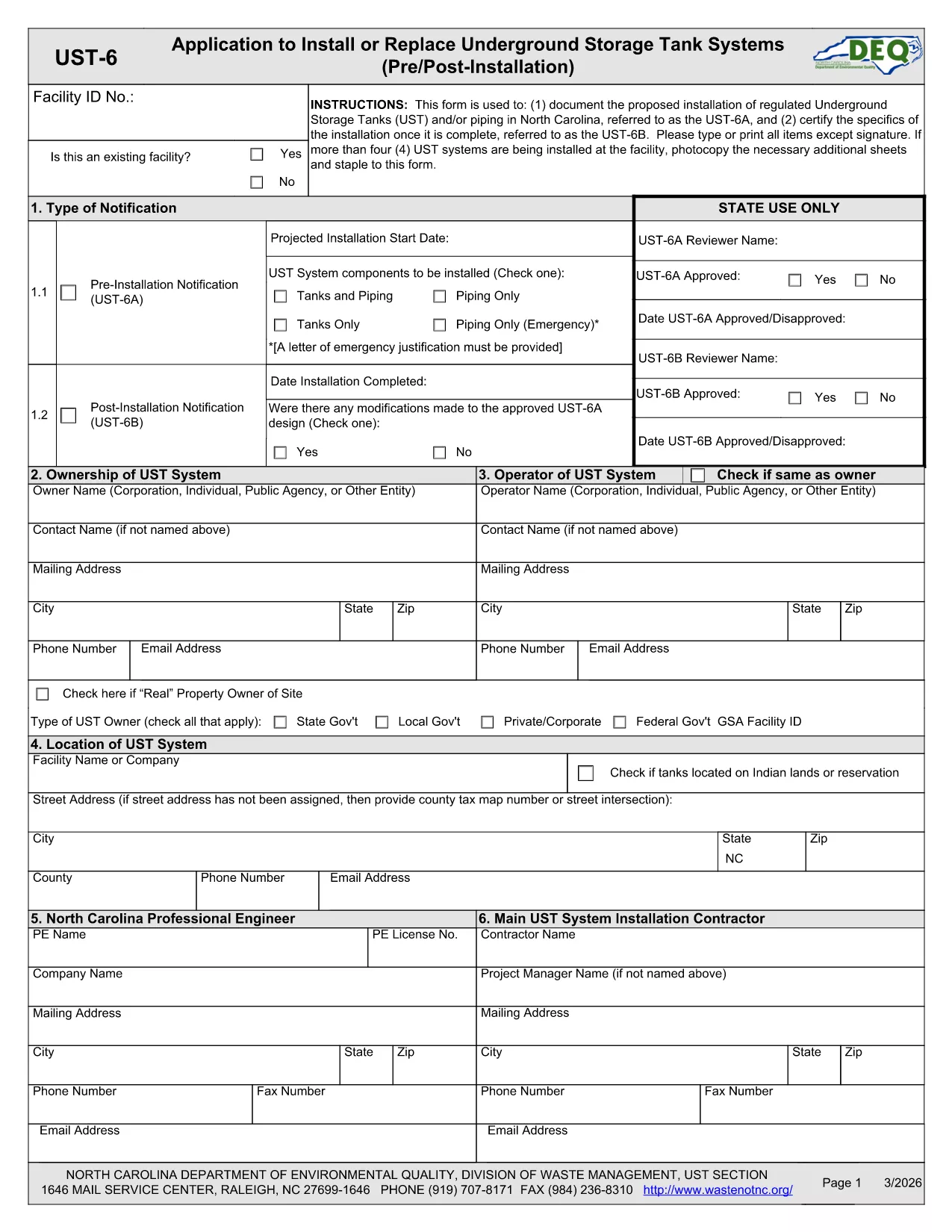
The UST‑6 Application Form is required by the North Carolina Department of Environmental Quality (DEQ) for owners and operators of underground storage tanks (USTs) who need to certify pre‑installation information, report modifications, or request approvals. This page gives you everything you need to download, fill out, and submit the form quickly using Formize’s online PDF filler.

What is the UST‑6 Form?

The UST‑6 is a certification and pre‑installation questionnaire that ensures UST systems meet state environmental standards. It collects details about tank location, design, materials, and compliance measures. Submitting a correctly completed UST‑6 helps avoid penalties and keeps your operation compliant with North Carolina regulations.

How to Fill Out the UST‑6 Online

Instead of printing the PDF and using a third‑party editor, simply click the "Fill out this form" button on this page. The Formize PDF Filler app will load directly in your browser, allowing you to type, select dates, and sign electronically.

Common Mistakes to Avoid

  • Leaving required fields blank – the filler will highlight missing information before you can submit.
  • Using outdated tank specifications – double‑check that the data matches the most recent engineering drawings.
  • Forgetting to attach supporting documents – upload any required permits or inspection reports in the designated attachment sections.

Download the Fillable PDF

If you prefer to work offline, you can download the official UST‑6 PDF using the link below. The file is fully fillable with standard PDF readers, but we recommend the online Formize filler for a smoother experience.

Download UST‑6 Application Form (PDF)

FAQs About the UST‑6 Application

Find quick answers to the most common questions below. If you need further assistance, consult the DEQ guidance documents linked on the form.

คำถามที่พบบ่อย
  • What is the purpose of the UST‑6 form?

    The UST‑6 certifies that a new or modified underground storage tank complies with North Carolina environmental regulations before installation.

  • Can I submit the form electronically?

    Yes. After filling it out with Formize, you can download the completed PDF and upload it through the DEQ online portal, or print and mail it if required.

  • Do I need a digital signature?

    A digital signature is accepted for most submissions. Use the signature field in the Formize filler to add your electronic signature.

  • What supporting documents are required?

    Attach tank design drawings, installation permits, and any previous inspection reports as specified in the attachment sections of the form.

  • Is there a fee to file the UST‑6?

    The UST‑6 itself does not carry a filing fee, but DEQ may charge processing fees for related permits or inspections.

  • How long does it take to process the form?

    Processing time varies, but DEQ typically reviews a completed UST‑6 within 10‑15 business days after receipt.

  • What if I make a mistake after submitting?

    Contact the DEQ UST program office to request a correction. You may need to submit an amended UST‑6 with a cover letter explaining the changes.

  • Can I save my progress and return later?

    Yes. The Formize filler lets you save a draft locally on your computer and resume editing at any time before final submission.

ทำอย่างไร

วิธีกรอก UST-6 form ฟรีทางออนไลน์ใน 5 ขั้นตอนง่ายๆ:

  1. 1
    Click the Fill Out Button
    On this page, click the "Fill out this form" button to launch the Formize PDF Filler.
  2. 2
    Wait for the Filler to Load
    The browser will open the fillable PDF inside the Formize app – no download required.
  3. 3
    Complete All Required Fields
    Enter the requested information, select dates, and use the drop‑down menus where applicable.
  4. 4
    Review and Sign
    Check each section for completeness, then add your electronic signature in the designated field.
  5. 5
    Submit or Save
    When finished, click "Submit" to send the form to DEQ (if supported) or download the completed PDF for manual submission.
สร้างแอป PDF Filler
เกี่ยวกับ

เทมเพลต UST-6 form

ด้วยชุดคุณสมบัติดั้งเดิมสำหรับการดูและกรอกเอกสาร PDF รวมกับประโยชน์ของเว็บแอปพลิเคชันและเค้าโครงที่ตอบสนอง คุณสามารถสร้าง UST-6 form ให้เสร็จภายในไม่กี่นาที

คุณสมบัติ

PDF ฟิลเลอร์

วิธีที่ง่ายที่สุดในการกรอกแบบฟอร์ม PDF ทางออนไลน์

  • กรอก UST-6 form อย่างรวดเร็ว
    กำลังมองหาวิธีเติม UST-6 form ทางออนไลน์อย่างรวดเร็วอยู่ใช่ไหม ด้วยตัวกรอกแบบฟอร์ม PDF ออนไลน์ฟรีของเรา คุณจะรู้วิธีแก้ไขและกรอกเอกสาร PDF นี้ในเวลาไม่ถึงนาที
  • โปรแกรมแก้ไข PDF ออนไลน์ที่ใช้งานง่าย
    เบื่อกับการพิมพ์ไฟล์ PDF เพื่อให้คุณสามารถแก้ไขได้ก่อนที่จะสแกนซ้ำและส่งกลับหรือไม่? แก้ไขเอกสาร PDF ออนไลน์ฟรี ใช้โปรแกรมแก้ไข PDF ออนไลน์ของเราเพื่อประหยัดเวลาและกระดาษ
  • เครื่องมือที่ยอดเยี่ยมสำหรับทุกแพลตฟอร์ม
    สงสัยวิธีเติม UST-6 form บน Mac หรืออาจใช้ตัวเติม PDF ฟรีได้อย่างไร เครื่องมือ PDF ออนไลน์ของเราทำงานได้บนทุกแพลตฟอร์ม
  • การจัดเก็บไฟล์ที่ปลอดภัย
    ไฟล์ "UST-6 form" ที่เสร็จสมบูรณ์จะถูกจัดเก็บไว้ในฐานข้อมูลที่ปลอดภัยซึ่งจัดการโดย Amazon Cloud hosting คุณสามารถลบไฟล์ของคุณออกจากระบบของเราได้ตลอดเวลา ไม่ว่าในกรณีใด ไฟล์เหล่านี้จะถูกลบโดยอัตโนมัติหลังจากผ่านไป 24 ชั่วโมง
  • สนทนากับ UST-6 form
    แชทกับ "UST-6 form" บน Chatize ที่เป็นผู้ช่วยอ่าน PDF ฟรี ถามคำถามและรับคำตอบจาก "UST-6 form" เพียงคลิกที่ปุ่ม แชทด้วยเอกสาร ด้านบน

ลบเซสชันการบรรจุ

ลบเซสชันการกรอกข้อมูลที่เลือกหรือไม่?ในกรณีนี้ความคืบหน้าในการกรอกแบบฟอร์มจะหายไป

ลบเซสชันการแก้ไข

ลบเซสชันการแก้ไขที่เลือกหรือไม่ ในกรณีนี้ ความคืบหน้าในการสร้างและแก้ไขแบบฟอร์มจะหายไป