
hamburger-menu icon
เลือกภาษา

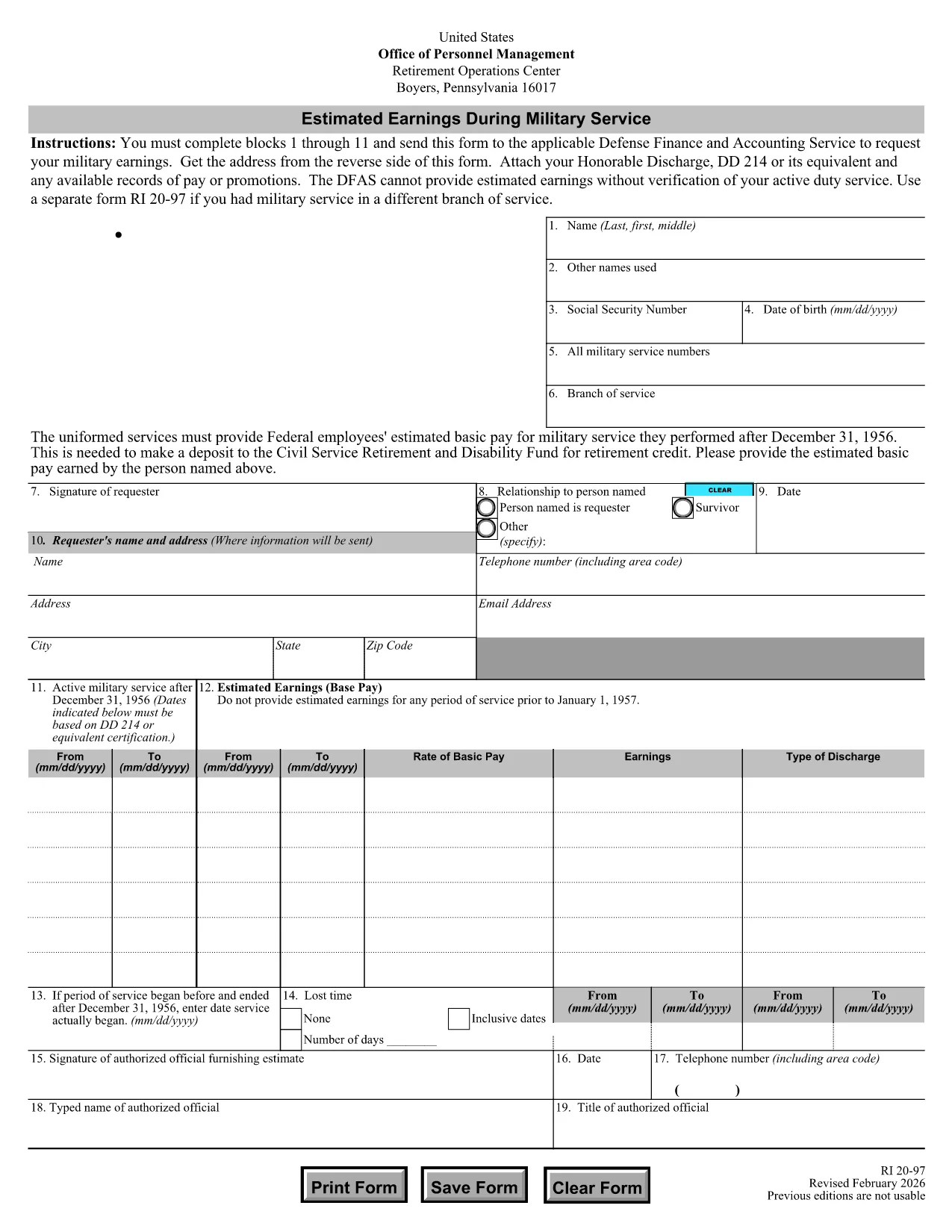
The RI 20-97 is the U.S. Office of Personnel Management (OPM) form used to request an estimate of your military earnings for retirement credit. Federal employees who have served in the armed forces use this form to ensure their service pay is counted toward their civil service pension.

What Is the RI 20-97 Form?

This official PDF, provided by OPM, captures personal details, service dates, pay grade, and any special pay received. Once completed, the form is sent to the Defense Finance and Accounting Service (DFAS) for calculation.

How to Complete the RI 20-97 Online with Formize

Instead of downloading, printing, and scanning, you can fill out the form directly on our site:

  1. Click the "Fill out this form" button below.
  2. The Formize PDF Filler app loads the fillable RI 20-97 template.
  3. Enter your information in each field (blocks 1‑11).
  4. Upload supporting documents such as your DD‑214.
  5. Review, e‑sign, and submit the form securely.

Common Mistakes & Tips for a Successful Submission

  • Missing DD‑214: The form will be rejected if you don’t attach a copy of your discharge papers.
  • Incorrect Service Dates: Double‑check start and end dates; even a one‑day error can delay processing.
  • Skipping Optional Fields: Fill in all optional fields when applicable; they help DFAS calculate a more accurate estimate.
  • Signature Errors: Both electronic and wet signatures are accepted – make sure the signature field is not left blank.

Supporting Documents You’ll Need

Prepare these items before you start:

  • DD‑214 or official military service record
  • Pay statements or promotion orders (if available)
  • Any previous RI 20‑97 submissions for reference

Where to Send Your Completed Form

After you finish the online fill, the Formize app will give you two options:

  • Download a PDF copy to mail to DFAS
  • Securely upload the completed form directly to DFAS through the provided portal link

Following these steps ensures your military earnings are counted toward your federal retirement benefits.

คำถามที่พบบ่อย
  • Who needs to fill out the RI 20-97 form?

    Any current or former federal employee who served in the U.S. military and wants their service earnings counted toward their civil service retirement credit.

  • Can I use a wet signature on the RI 20-97?

    Yes. Both electronic and wet signatures are accepted. If you print the form, sign it, and mail it, DFAS will process it without issue.

  • What if I don’t have my DD‑214?

    The DD‑214 is required for verification. If it’s lost, request a replacement from the National Archives before submitting the RI 20‑97.

  • How long does DFAS take to calculate my earnings?

    Processing typically takes 2‑4 weeks after receipt of a complete, correctly signed RI 20‑97 with all supporting documents.

  • Is the Formize filler secure?

    Yes. Formize uses SSL encryption and complies with federal data‑privacy standards, ensuring your personal and military information is protected.

  • Do I need to fill out every field?

    All mandatory fields (blocks 1‑11) must be completed. Optional fields should be filled when applicable to improve accuracy.

  • Can I submit the form directly to DFAS from Formize?

    After completing the form, you can either download a PDF to mail or use the secure upload link provided by Formize to send it directly to DFAS.

  • What is the difference between the RI 20‑97 and the RI‑20‑97‑2023 version?

    The content is the same; the year in the file name reflects the most recent revision. All versions are accepted by DFAS as long as they are the official OPM form.

ทำอย่างไร

วิธีกรอก RI 20-97 ฟรีทางออนไลน์ใน 5 ขั้นตอนง่ายๆ:

  1. 1
    Open the Fillable Form
    Click the "Fill out this form" button on the page. The Formize PDF Filler will load the RI 20-97 template instantly.
  2. 2
    Enter Your Information
    Complete fields 1 through 11 with accurate personal and service details. Use dropdowns and date pickers for consistency.
  3. 3
    Attach Supporting Documents
    Upload your DD‑214 and any pay records using the attachment area. The system validates file types before you proceed.
  4. 4
    Review and Sign
    Double‑check every entry, then add an electronic signature or upload a scanned wet signature as required.
  5. 5
    Submit or Download
    Choose to submit directly to DFAS through the secure portal, or download the completed PDF to mail it yourself.
สร้างแอป PDF Filler
เกี่ยวกับ

แบบฟอร์มสำนักงานบริหารงานบุคคล (OPM)

RI 20-97 เป็นหนึ่งในแบบฟอร์มอย่างเป็นทางการที่ใช้โดยสำนักงานบริหารงานบุคคลของสหรัฐอเมริกา ซึ่งเป็นหน่วยงานอิสระของรัฐบาลกลางที่รับผิดชอบในการจัดการกำลังแรงงานราชการและผลประโยชน์ของพนักงานของรัฐบาลกลาง OPM กำหนดนโยบายและข้อบังคับที่เกี่ยวข้องกับการจ้างงานของรัฐบาลกลาง บริหารจัดการโครงการบุคลากรต่างๆ และให้บริการแก่พนักงานของรัฐบาลกลาง ผู้เกษียณอายุ และผู้สมัครงาน

นี่คือตัวอย่างแบบฟอร์มสำนักงานบริหารงานบุคคล:

แบบฟอร์มมาตรฐาน 86 (SF-86) : แบบฟอร์มนี้ใช้สำหรับกระบวนการตรวจสอบภูมิหลังสำหรับบุคคลที่ยื่นขอการตรวจตราด้านความปลอดภัย โดยรวบรวมข้อมูลส่วนบุคคล การจ้างงาน การศึกษา และข้อมูลทางการเงินที่ครอบคลุม รวมถึงรายละเอียดเกี่ยวกับการติดต่อและกิจกรรมในต่างประเทศ

แบบฟอร์มมาตรฐาน 2809 (SF-2809) : แบบฟอร์มนี้ใช้เพื่อลงทะเบียนในโครงการสวัสดิการสุขภาพของพนักงานของรัฐบาลกลาง (FEHB) ซึ่งให้ความคุ้มครองด้านสุขภาพแก่พนักงานของรัฐบาลกลาง ผู้เกษียณอายุ และสมาชิกในครอบครัวที่มีสิทธิ์

แบบฟอร์มมาตรฐาน 2817 (SF-2817): แบบฟอร์มนี้ใช้เพื่อสมัครเพื่อรับความคุ้มครองต่อเนื่องภายใต้โครงการประกันทันตกรรมและการมองเห็นของพนักงานของรัฐบาลกลาง (FEDVIP) หลังจากเกษียณอายุหรือแยกออกจากราชการของรัฐบาลกลาง

แบบฟอร์มมาตรฐาน 3107 (SF-3107) : แบบฟอร์มนี้ใช้เพื่อขอรับสวัสดิการเกษียณอายุตามระบบการเกษียณอายุของข้าราชการพลเรือน (CSRS)

แบบฟอร์มมาตรฐาน 2801 (SF-2801) : แบบฟอร์มนี้ใช้เพื่อสมัครขอรับผลประโยชน์เมื่อเกษียณอายุภายใต้ระบบการเกษียณอายุของพนักงานของรัฐบาลกลาง (FERS)

แบบฟอร์มมาตรฐาน 15 (SF-15) : แบบฟอร์มนี้ใช้เพื่อสมัครตามความต้องการของทหารผ่านศึกในการจ้างงานของรัฐบาลกลาง มันถูกส่งโดยทหารผ่านศึกหรือสมาชิกในครอบครัวที่มีสิทธิ์แสวงหาโอกาสการจ้างงานในรัฐบาลกลาง

ตัวอย่างเหล่านี้แสดงถึงแบบฟอร์ม OPM ทั่วไปที่ใช้ในบริบทของการจ้างงานของรัฐบาลกลางและผลประโยชน์ของพนักงาน อย่างไรก็ตาม OPM มีแบบฟอร์มอื่นๆ มากมายที่เกี่ยวข้องกับโครงการบุคลากร การเกษียณอายุ การประกันภัย และลักษณะอื่นๆ ของการจ้างงานของรัฐบาลกลาง แบบฟอร์มเฉพาะที่กำหนดอาจแตกต่างกันไปขึ้นอยู่กับลักษณะของธุรกรรม โปรแกรม หรือผลประโยชน์ที่ต้องการ ขอแนะนำให้ปรึกษาเว็บไซต์อย่างเป็นทางการของสำนักงานการจัดการบุคลากรแห่งสหรัฐอเมริกา (www.opm.gov) หรือขอคำแนะนำจาก OPM หรือบุคลากรฝ่ายทรัพยากรบุคคลที่เกี่ยวข้องเพื่อรับข้อมูลที่ถูกต้องและทันเวลา ข้อมูลล่าสุดเกี่ยวกับแบบฟอร์ม OPM เฉพาะที่เกี่ยวข้องกับการจ้างงานของรัฐบาลกลางหรือความต้องการที่เกี่ยวข้องกับผลประโยชน์

คุณสมบัติ

PDF ฟิลเลอร์

วิธีที่ง่ายที่สุดในการกรอกแบบฟอร์ม PDF ทางออนไลน์

  • กรอก RI 20-97 อย่างรวดเร็ว
    กำลังมองหาวิธีเติม RI 20-97 ทางออนไลน์อย่างรวดเร็วอยู่ใช่ไหม ด้วยตัวกรอกแบบฟอร์ม PDF ออนไลน์ฟรีของเรา คุณจะรู้วิธีแก้ไขและกรอกเอกสาร PDF นี้ในเวลาไม่ถึงนาที
  • โปรแกรมแก้ไข PDF ออนไลน์ที่ใช้งานง่าย
    เบื่อกับการพิมพ์ไฟล์ PDF เพื่อให้คุณสามารถแก้ไขได้ก่อนที่จะสแกนซ้ำและส่งกลับหรือไม่? แก้ไขเอกสาร PDF ออนไลน์ฟรี ใช้โปรแกรมแก้ไข PDF ออนไลน์ของเราเพื่อประหยัดเวลาและกระดาษ
  • เครื่องมือที่ยอดเยี่ยมสำหรับทุกแพลตฟอร์ม
    สงสัยวิธีเติม RI 20-97 บน Mac หรืออาจใช้ตัวเติม PDF ฟรีได้อย่างไร เครื่องมือ PDF ออนไลน์ของเราทำงานได้บนทุกแพลตฟอร์ม
  • การจัดเก็บไฟล์ที่ปลอดภัย
    ไฟล์ "RI 20-97" ที่เสร็จสมบูรณ์จะถูกจัดเก็บไว้ในฐานข้อมูลที่ปลอดภัยซึ่งจัดการโดย Amazon Cloud hosting คุณสามารถลบไฟล์ของคุณออกจากระบบของเราได้ตลอดเวลา ไม่ว่าในกรณีใด ไฟล์เหล่านี้จะถูกลบโดยอัตโนมัติหลังจากผ่านไป 24 ชั่วโมง
  • สนทนากับ RI 20-97
    แชทกับ "RI 20-97" บน Chatize ที่เป็นผู้ช่วยอ่าน PDF ฟรี ถามคำถามและรับคำตอบจาก "RI 20-97" เพียงคลิกที่ปุ่ม แชทด้วยเอกสาร ด้านบน

ลบเซสชันการบรรจุ

ลบเซสชันการกรอกข้อมูลที่เลือกหรือไม่?ในกรณีนี้ความคืบหน้าในการกรอกแบบฟอร์มจะหายไป

ลบเซสชันการแก้ไข

ลบเซสชันการแก้ไขที่เลือกหรือไม่ ในกรณีนี้ ความคืบหน้าในการสร้างและแก้ไขแบบฟอร์มจะหายไป