
hamburger-menu icon
เลือกภาษา

SF 3103 Register of Separations and Transfers – Fillable PDF

  1. ภาษา ภาษาอังกฤษ
  2. ประเทศ สหรัฐอเมริกา
  3. แผนก สำนักบริหารงานบุคคล
  4. ภาค แบบฟอร์มมาตรฐาน
SF 3103 Register of Separations and Transfers – Fillable PDF

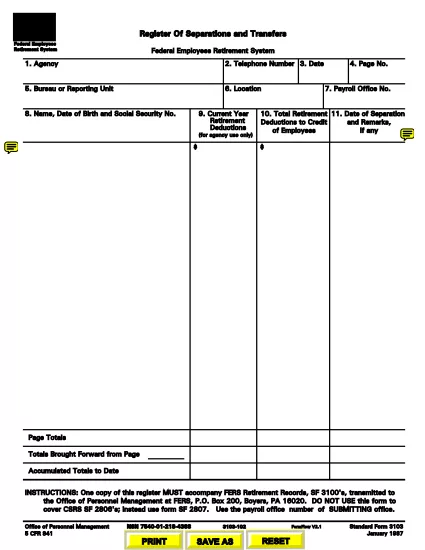
The SF 3103 Register of Separations and Transfers is the official United States Office of Personnel Management (OPM) form used to record federal employee separations, transfers, retirements, and related actions. This page provides a direct link to the fillable PDF, step‑by‑step instructions for completing it online, and answers to the most common questions.

What Is the SF 3103 Form?

SF 3103 is required whenever a federal employee leaves an agency, changes positions, or is transferred to another department. The form captures essential data such as employee name, Social Security number, dates of service, and the type of action (retirement, resignation, death, etc.). Accurate completion is critical for payroll processing, benefits administration, and official personnel records.

How to Complete the SF 3103 Online with Formize

Instead of printing, scanning, or using a separate PDF editor, you can fill out the form directly on our site using the Formize PDF Filler app. Follow the simple steps below:

  1. Click the green "Fill out this form" button on this page.
  2. The Formize PDF Filler loads the SF 3103 PDF in your browser.
  3. Enter the required information into each fillable field. The interface validates dates and numeric entries to reduce errors.
  4. When you finish, click Save & Download to get a completed PDF copy.
  5. Print the PDF (if a hard copy is required) and mail it to the address listed on the form, or submit electronically according to your agency’s policy.

Common Mistakes to Avoid

  • Incorrect SSN or DOB: Double‑check these numbers; a typo can delay benefits.
  • Leaving required fields blank: The Formize validator will highlight missing data before you can save.
  • Using the wrong form version: Ensure you are using the latest SF 3103 (PDF link provided below).
  • Not signing the form: After downloading, print and sign the designated signature block before submission.

Where to Submit the Completed Form

Submit the signed SF 3103 to the Office of Personnel Management at:

U.S. Office of Personnel Management
FERS Retirement Records, SF3100’s
P.O. Box 200
Boyers, PA 16020

Alternatively, follow any agency‑specific electronic submission instructions.

FAQs About SF 3103

Below are answers to the most frequently asked questions about this form.

คำถามที่พบบ่อย
  • Do I need to print the SF 3103 after filling it online?

    Yes. The form must be signed in ink. After using Formize, download, print, and sign before mailing it to OPM.

  • Can I submit the SF 3103 electronically?

    Some agencies accept an electronic PDF with a digital signature. Check your agency’s policy; otherwise, mail the hard‑copy.

  • What happens if I enter the wrong Social Security number?

    An incorrect SSN can delay retirement benefits and payroll adjustments. Verify the number before saving the form.

  • Is there a fee to use the Formize PDF Filler?

    No. Formize provides the fillable PDF free of charge for all federal forms.

  • How often is the SF 3103 updated?

    OPM releases revisions as needed. The link on this page always points to the latest official version.

  • Can I save my progress and return later?

    Yes. Formize lets you download a partially completed PDF, which you can reopen and finish later.

  • What should I do if I make a mistake after signing?

    Correct the error on a new copy of the form, sign again, and submit the revised version.

ทำอย่างไร

วิธีกรอก SF 3103 ฟรีทางออนไลน์ใน 5 ขั้นตอนง่ายๆ:

  1. 1
    Open the Fillable Form
    Click the "Fill out this form" button to launch the Formize PDF Filler app.
  2. 2
    Enter Your Information
    Complete each highlighted field. The app checks for required data and correct formats.
  3. 3
    Save and Download
    When all fields are filled, click "Save & Download" to get a completed PDF copy.
  4. 4
    Print and Sign
    Print the downloaded PDF, sign the signature block, and attach any required attachments.
  5. 5
    Submit to OPM
    Mail the signed form to the OPM address provided, or follow your agency’s electronic submission process.
สร้างแอป PDF Filler
เกี่ยวกับ

แบบฟอร์มสำนักงานบริหารงานบุคคล (OPM)

SF 3103 เป็นหนึ่งในแบบฟอร์มอย่างเป็นทางการที่ใช้โดยสำนักงานบริหารงานบุคคลของสหรัฐอเมริกา ซึ่งเป็นหน่วยงานอิสระของรัฐบาลกลางที่รับผิดชอบในการจัดการกำลังแรงงานราชการและผลประโยชน์ของพนักงานของรัฐบาลกลาง OPM กำหนดนโยบายและข้อบังคับที่เกี่ยวข้องกับการจ้างงานของรัฐบาลกลาง บริหารจัดการโครงการบุคลากรต่างๆ และให้บริการแก่พนักงานของรัฐบาลกลาง ผู้เกษียณอายุ และผู้สมัครงาน

นี่คือตัวอย่างแบบฟอร์มสำนักงานบริหารงานบุคคล:

แบบฟอร์มมาตรฐาน 86 (SF-86) : แบบฟอร์มนี้ใช้สำหรับกระบวนการตรวจสอบภูมิหลังสำหรับบุคคลที่ยื่นขอการตรวจตราด้านความปลอดภัย โดยรวบรวมข้อมูลส่วนบุคคล การจ้างงาน การศึกษา และข้อมูลทางการเงินที่ครอบคลุม รวมถึงรายละเอียดเกี่ยวกับการติดต่อและกิจกรรมในต่างประเทศ

แบบฟอร์มมาตรฐาน 2809 (SF-2809) : แบบฟอร์มนี้ใช้เพื่อลงทะเบียนในโครงการสวัสดิการสุขภาพของพนักงานของรัฐบาลกลาง (FEHB) ซึ่งให้ความคุ้มครองด้านสุขภาพแก่พนักงานของรัฐบาลกลาง ผู้เกษียณอายุ และสมาชิกในครอบครัวที่มีสิทธิ์

แบบฟอร์มมาตรฐาน 2817 (SF-2817): แบบฟอร์มนี้ใช้เพื่อสมัครเพื่อรับความคุ้มครองต่อเนื่องภายใต้โครงการประกันทันตกรรมและการมองเห็นของพนักงานของรัฐบาลกลาง (FEDVIP) หลังจากเกษียณอายุหรือแยกออกจากราชการของรัฐบาลกลาง

แบบฟอร์มมาตรฐาน 3107 (SF-3107) : แบบฟอร์มนี้ใช้เพื่อขอรับสวัสดิการเกษียณอายุตามระบบการเกษียณอายุของข้าราชการพลเรือน (CSRS)

แบบฟอร์มมาตรฐาน 2801 (SF-2801) : แบบฟอร์มนี้ใช้เพื่อสมัครขอรับผลประโยชน์เมื่อเกษียณอายุภายใต้ระบบการเกษียณอายุของพนักงานของรัฐบาลกลาง (FERS)

แบบฟอร์มมาตรฐาน 15 (SF-15) : แบบฟอร์มนี้ใช้เพื่อสมัครตามความต้องการของทหารผ่านศึกในการจ้างงานของรัฐบาลกลาง มันถูกส่งโดยทหารผ่านศึกหรือสมาชิกในครอบครัวที่มีสิทธิ์แสวงหาโอกาสการจ้างงานในรัฐบาลกลาง

ตัวอย่างเหล่านี้แสดงถึงแบบฟอร์ม OPM ทั่วไปที่ใช้ในบริบทของการจ้างงานของรัฐบาลกลางและผลประโยชน์ของพนักงาน อย่างไรก็ตาม OPM มีแบบฟอร์มอื่นๆ มากมายที่เกี่ยวข้องกับโครงการบุคลากร การเกษียณอายุ การประกันภัย และลักษณะอื่นๆ ของการจ้างงานของรัฐบาลกลาง แบบฟอร์มเฉพาะที่กำหนดอาจแตกต่างกันไปขึ้นอยู่กับลักษณะของธุรกรรม โปรแกรม หรือผลประโยชน์ที่ต้องการ ขอแนะนำให้ปรึกษาเว็บไซต์อย่างเป็นทางการของสำนักงานการจัดการบุคลากรแห่งสหรัฐอเมริกา (www.opm.gov) หรือขอคำแนะนำจาก OPM หรือบุคลากรฝ่ายทรัพยากรบุคคลที่เกี่ยวข้องเพื่อรับข้อมูลที่ถูกต้องและทันเวลา ข้อมูลล่าสุดเกี่ยวกับแบบฟอร์ม OPM เฉพาะที่เกี่ยวข้องกับการจ้างงานของรัฐบาลกลางหรือความต้องการที่เกี่ยวข้องกับผลประโยชน์

คุณสมบัติ

PDF ฟิลเลอร์

วิธีที่ง่ายที่สุดในการกรอกแบบฟอร์ม PDF ทางออนไลน์

  • กรอก SF 3103 อย่างรวดเร็ว
    กำลังมองหาวิธีเติม SF 3103 ทางออนไลน์อย่างรวดเร็วอยู่ใช่ไหม ด้วยตัวกรอกแบบฟอร์ม PDF ออนไลน์ฟรีของเรา คุณจะรู้วิธีแก้ไขและกรอกเอกสาร PDF นี้ในเวลาไม่ถึงนาที
  • โปรแกรมแก้ไข PDF ออนไลน์ที่ใช้งานง่าย
    เบื่อกับการพิมพ์ไฟล์ PDF เพื่อให้คุณสามารถแก้ไขได้ก่อนที่จะสแกนซ้ำและส่งกลับหรือไม่? แก้ไขเอกสาร PDF ออนไลน์ฟรี ใช้โปรแกรมแก้ไข PDF ออนไลน์ของเราเพื่อประหยัดเวลาและกระดาษ
  • เครื่องมือที่ยอดเยี่ยมสำหรับทุกแพลตฟอร์ม
    สงสัยวิธีเติม SF 3103 บน Mac หรืออาจใช้ตัวเติม PDF ฟรีได้อย่างไร เครื่องมือ PDF ออนไลน์ของเราทำงานได้บนทุกแพลตฟอร์ม
  • การจัดเก็บไฟล์ที่ปลอดภัย
    ไฟล์ "SF 3103" ที่เสร็จสมบูรณ์จะถูกจัดเก็บไว้ในฐานข้อมูลที่ปลอดภัยซึ่งจัดการโดย Amazon Cloud hosting คุณสามารถลบไฟล์ของคุณออกจากระบบของเราได้ตลอดเวลา ไม่ว่าในกรณีใด ไฟล์เหล่านี้จะถูกลบโดยอัตโนมัติหลังจากผ่านไป 24 ชั่วโมง
  • สนทนากับ SF 3103
    แชทกับ "SF 3103" บน Chatize ที่เป็นผู้ช่วยอ่าน PDF ฟรี ถามคำถามและรับคำตอบจาก "SF 3103" เพียงคลิกที่ปุ่ม แชทด้วยเอกสาร ด้านบน

ลบเซสชันการบรรจุ

ลบเซสชันการกรอกข้อมูลที่เลือกหรือไม่?ในกรณีนี้ความคืบหน้าในการกรอกแบบฟอร์มจะหายไป

ลบเซสชันการแก้ไข

ลบเซสชันการแก้ไขที่เลือกหรือไม่ ในกรณีนี้ ความคืบหน้าในการสร้างและแก้ไขแบบฟอร์มจะหายไป