
hamburger-menu icon
เลือกภาษา

DS-64 Statement Regarding a Lost or Stolen U.S. Passport (Fillable PDF)

  1. ภาษา ภาษาอังกฤษ
  2. ประเทศ สหรัฐอเมริกา
  3. กิจกรรม หนังสือเดินทาง
DS-64 Statement Regarding a Lost or Stolen U.S. Passport (Fillable PDF)

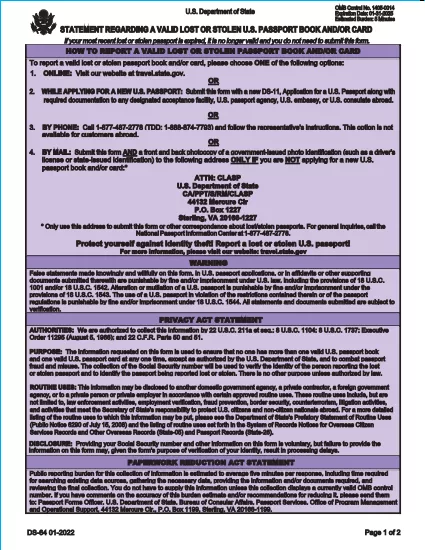
The DS-64 is the official U.S. Department of State form used to report a lost or stolen passport. Once submitted, the passport is immediately invalidated, preventing fraud and protecting your identity.

What Is the DS-64 Form?

DS-64, titled Statement Regarding a Lost or Stolen Passport, collects personal details, passport information, and a description of how the passport was lost or stolen. It is required whether you plan to request a replacement (DS‑11) or simply need the record of loss.

Why Use Formize’s Fillable PDF Filler?

  • Instant online filling: No need to download, print, and hand‑write.
  • Auto‑save: Your progress is saved in the browser, so you never lose data.
  • Error‑checking: Real‑time validation reduces mistakes.
  • Secure: All data stays on your device; Formize never stores personal information.

Step‑by‑Step Guide to Complete DS-64

Follow the simple steps below to fill, sign, and download the form.

Common Mistakes to Avoid

  • Leaving the passport number blank when you know it – the number is essential for cancellation.
  • Using colored ink or handwritten corrections – Formize requires black‑ink digital entry.
  • Forgetting to indicate whether you are submitting a replacement application (DS‑11).

Where to Submit Your Completed Form

After you download the completed DS‑64 PDF, you can:

  • Mail it to the address printed on the form if you are not applying for a new passport.
  • Include it with your DS‑11 application when requesting a replacement.
  • Submit it in person at a regional passport agency.

There is no fee to submit DS‑64 alone; fees apply only when you request a replacement passport.

คำถามที่พบบ่อย
  • Can I submit DS‑64 online?

    No. The DS‑64 must be printed, signed, and submitted by mail or in person. Formize only provides a fillable PDF to simplify completion.

  • Is there a fee to file DS‑64?

    There is no fee to report a lost or stolen passport with DS‑64. Fees apply only when you request a replacement passport.

  • What if I don’t know my passport number?

    Enter ‘Unknown’ in the passport number field and provide as much other identifying information as possible.

  • Do I need a notary for DS‑64?

    No. The form only requires your signature; notarization is not required.

  • How long does it take for the passport to be invalidated?

    Once the State Department receives the DS‑64, the passport is typically canceled within a few business days.

  • Can a parent fill out DS‑64 for a minor?

    Yes. A parent or legal guardian may complete the form on behalf of a minor, signing in the appropriate section.

  • What should I do if my passport was expired when it was lost?

    You do not need to submit DS‑64 for an expired passport, but you may still do so to have a record of the loss.

  • Will I receive confirmation that my passport is canceled?

    The State Department does not send a formal confirmation, but the passport will be marked as invalid in their system.

ทำอย่างไร

วิธีกรอก DS-64 ฟรีทางออนไลน์ใน 5 ขั้นตอนง่ายๆ:

  1. 1
    Open the Fillable Form
    Click the **Fill out this form** button on the page. The Formize PDF Filler app will load instantly in your browser.
  2. 2
    Enter Your Information
    Type your personal details, passport number, and loss description directly into the fields. All required fields are highlighted.
  3. 3
    Review & Sign
    Use the built‑in signature tool to sign the form digitally, then review each section for accuracy.
  4. 4
    Download or Print
    When you’re satisfied, click **Download PDF** to save a copy or **Print** to produce a hard copy for mailing.
  5. 5
    Submit the Form
    Mail or bring the completed DS‑64 to the address shown on the form, or attach it to your DS‑11 replacement application.
สร้างแอป PDF Filler
เกี่ยวกับ

แบบฟอร์มหนังสือเดินทาง

DS-64 เป็นหนึ่งในแบบฟอร์มหนังสือเดินทางที่เป็นเอกสารที่ใช้ในการยื่นขอหนังสือเดินทาง ซึ่งเป็นเอกสารการเดินทางที่รับรองตัวตนและสัญชาติของผู้ถือและอนุญาตให้เดินทางระหว่างประเทศได้ แบบฟอร์มหนังสือเดินทางอาจแตกต่างกันไปขึ้นอยู่กับประเทศที่ออกหนังสือเดินทาง แต่โดยทั่วไปจะมีข้อมูลส่วนบุคคลเกี่ยวกับผู้สมัคร เช่น ชื่อ วันเกิด และสถานที่เกิด ตลอดจนข้อมูลเกี่ยวกับพ่อแม่ของผู้สมัครและหนังสือเดินทางหรือเอกสารการเดินทางก่อนหน้านี้ .

ในสหรัฐอเมริกา แบบฟอร์มหนังสือเดินทางที่พบบ่อยที่สุด 2 แบบฟอร์มคือ DS-11 และ DS-82 แบบฟอร์ม DS-11 ใช้สำหรับผู้สมัครครั้งแรก ผู้เยาว์ หรือบุคคลที่ไม่มีสิทธิ์ใช้แบบฟอร์ม DS-82 แบบฟอร์ม DS-82 ใช้สำหรับการต่ออายุหนังสือเดินทางทางไปรษณีย์สำหรับผู้สมัครที่มีสิทธิ์ แบบฟอร์มทั้งสองกำหนดให้ผู้สมัครต้องให้ข้อมูลส่วนตัวและเอกสารประกอบ เช่น รูปถ่ายหนังสือเดินทางและหลักฐานการเป็นพลเมือง

ประเทศอื่นๆ อาจมีรูปแบบหนังสือเดินทางและข้อกำหนดที่แตกต่างกันไป แต่โดยทั่วไปแล้วกระบวนการพื้นฐานเกี่ยวข้องกับการกรอกใบสมัครหนังสือเดินทาง จัดเตรียมเอกสารประกอบ และเข้ารับการสัมภาษณ์กับเจ้าหน้าที่หนังสือเดินทาง ณ สถานที่ราชการหรือสถานทูต โปรดทราบว่าขั้นตอนการสมัครหนังสือเดินทางอาจใช้เวลาหลายสัปดาห์หรือหลายเดือน ดังนั้นขอแนะนำให้สมัครล่วงหน้าก่อนการเดินทางที่วางแผนไว้

คุณสมบัติ

PDF ฟิลเลอร์

วิธีที่ง่ายที่สุดในการกรอกแบบฟอร์ม PDF ทางออนไลน์

  • กรอก DS-64 อย่างรวดเร็ว
    กำลังมองหาวิธีเติม DS-64 ทางออนไลน์อย่างรวดเร็วอยู่ใช่ไหม ด้วยตัวกรอกแบบฟอร์ม PDF ออนไลน์ฟรีของเรา คุณจะรู้วิธีแก้ไขและกรอกเอกสาร PDF นี้ในเวลาไม่ถึงนาที
  • โปรแกรมแก้ไข PDF ออนไลน์ที่ใช้งานง่าย
    เบื่อกับการพิมพ์ไฟล์ PDF เพื่อให้คุณสามารถแก้ไขได้ก่อนที่จะสแกนซ้ำและส่งกลับหรือไม่? แก้ไขเอกสาร PDF ออนไลน์ฟรี ใช้โปรแกรมแก้ไข PDF ออนไลน์ของเราเพื่อประหยัดเวลาและกระดาษ
  • เครื่องมือที่ยอดเยี่ยมสำหรับทุกแพลตฟอร์ม
    สงสัยวิธีเติม DS-64 บน Mac หรืออาจใช้ตัวเติม PDF ฟรีได้อย่างไร เครื่องมือ PDF ออนไลน์ของเราทำงานได้บนทุกแพลตฟอร์ม
  • การจัดเก็บไฟล์ที่ปลอดภัย
    ไฟล์ "DS-64" ที่เสร็จสมบูรณ์จะถูกจัดเก็บไว้ในฐานข้อมูลที่ปลอดภัยซึ่งจัดการโดย Amazon Cloud hosting คุณสามารถลบไฟล์ของคุณออกจากระบบของเราได้ตลอดเวลา ไม่ว่าในกรณีใด ไฟล์เหล่านี้จะถูกลบโดยอัตโนมัติหลังจากผ่านไป 24 ชั่วโมง
  • สนทนากับ DS-64
    แชทกับ "DS-64" บน Chatize ที่เป็นผู้ช่วยอ่าน PDF ฟรี ถามคำถามและรับคำตอบจาก "DS-64" เพียงคลิกที่ปุ่ม แชทด้วยเอกสาร ด้านบน

ลบเซสชันการบรรจุ

ลบเซสชันการกรอกข้อมูลที่เลือกหรือไม่?ในกรณีนี้ความคืบหน้าในการกรอกแบบฟอร์มจะหายไป

ลบเซสชันการแก้ไข

ลบเซสชันการแก้ไขที่เลือกหรือไม่ ในกรณีนี้ ความคืบหน้าในการสร้างและแก้ไขแบบฟอร์มจะหายไป