
hamburger-menu icon
เลือกภาษา

U.S. Passport Renewal Application (Form DS‑82) – Fillable PDF

  1. ภาษา ภาษาอังกฤษ
  2. ประเทศ สหรัฐอเมริกา
  3. กิจกรรม หนังสือเดินทาง
U.S. Passport Renewal Application (Form DS‑82) – Fillable PDF

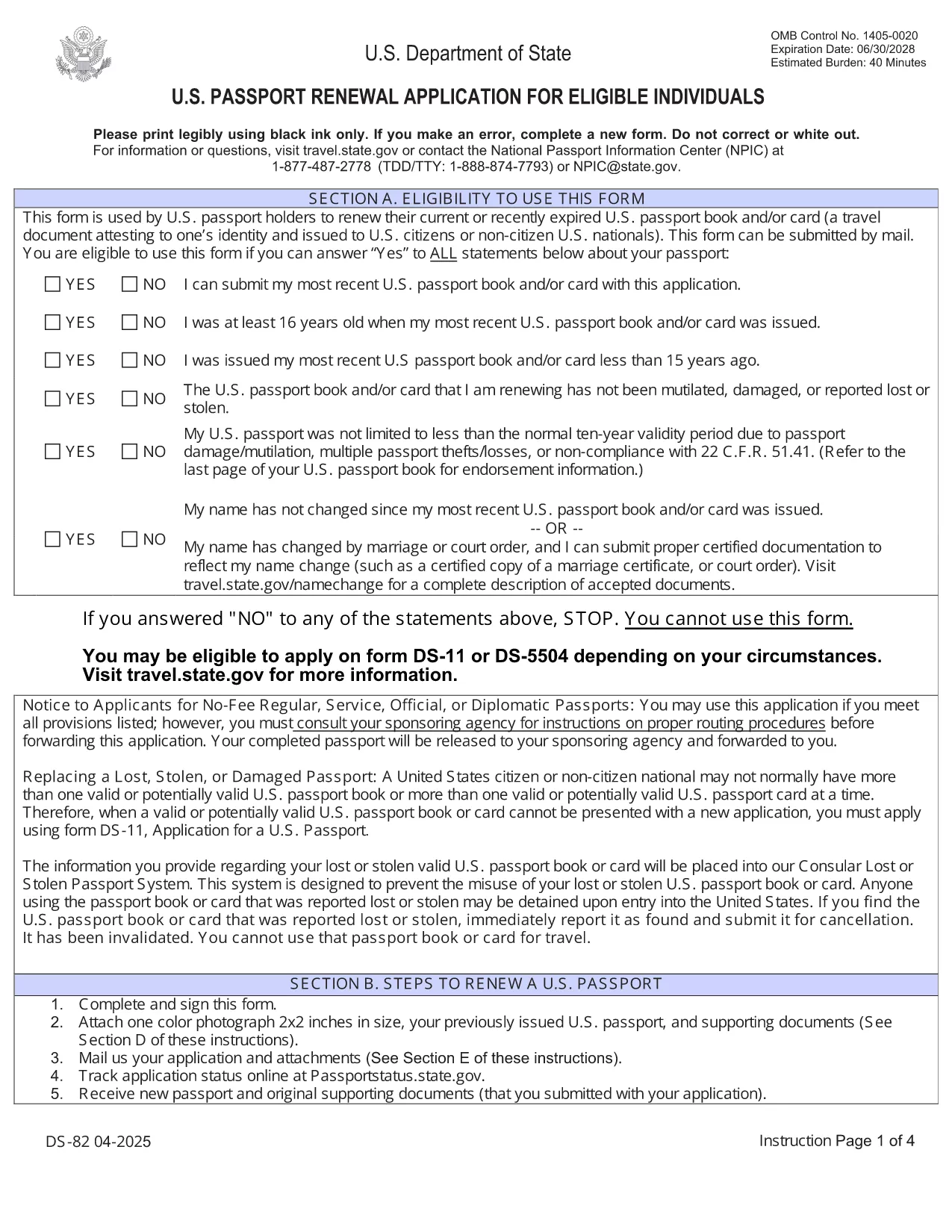
Need to renew your U.S. passport quickly and without errors? The DS‑82 is the official application for eligible individuals. Our fillable PDF, powered by the Formize PDF Filler, lets you complete the form directly in your browser, save a copy, and print it ready for submission.

Why Use the Fillable DS‑82 Form

  • Instant online editing: No need to print, write, scan, or fax.
  • Auto‑validation: Formize checks required fields and formatting as you type.
  • Secure storage: Save a digital copy for future reference.
  • Time‑saving: Complete the entire application in minutes.

How to Complete the DS‑82 Online with Formize

Just click the "Fill out this form" button below and wait for the Formize PDF Filler app to load. The interface mirrors the official DS‑82 layout, so you’ll know exactly where each piece of information belongs.

Common Mistakes to Avoid

  • Leaving the Middle Name field blank when you have one – it must match your current legal name.
  • Submitting an expired passport photo (must be taken within the last 6 months).
  • Forgetting to sign the form – an unsigned DS‑82 is rejected.
  • Using a non‑U.S. mailing address without a proper explanation.

Where to Submit Your Renewal

After completing and printing the form, mail it with your current passport, a new passport photo, and the renewal fee to the address listed on the U.S. Department of State website. If you’re using a passport acceptance facility, bring the printed form and supporting documents.

Frequently Asked Questions

Explore the most common questions below. If you need more help, the State Department’s official site has detailed guidance.

คำถามที่พบบ่อย
  • Who can use the DS‑82 form?

    U.S. citizens with a passport that is still valid or expired less than 5 years ago, and who can submit the same name and personal data as on the current passport.

  • Can I renew my passport if my name changed?

    Yes, but you must also submit a legal name‑change document (marriage certificate, court order, etc.) along with the DS‑82.

  • How long does the renewal process take?

    Standard processing is about 8‑11 weeks. Expedited service (for an additional fee) reduces the time to 5‑7 weeks.

  • Do I need to bring my old passport?

    Yes. Your current passport must be submitted with the DS‑82; it will be returned to you after processing.

  • What photo requirements apply?

    The photo must be 2×2 inches, taken within the last 6 months, on a plain white background, and show a full‑face view.

  • Is the Formize filler secure?

    Yes. Formize uses HTTPS encryption and does not store any personal data after you download or print the completed PDF.

ทำอย่างไร

วิธีกรอก DS-82 ฟรีทางออนไลน์ใน 5 ขั้นตอนง่ายๆ:

  1. 1
    Open the Fillable Form
    Click the "Fill out this form" button on the page. The Formize PDF Filler will open in a new tab.
  2. 2
    Wait for the Filler to Load
    Allow a few seconds for the app to initialize. You’ll see the DS‑82 layout with editable fields.
  3. 3
    Enter Your Information
    Fill in each field exactly as it appears on your current passport and supporting documents. Required fields are marked with an asterisk.
  4. 4
    Review and Validate
    Use the built‑in validation to check for missing or incorrectly formatted entries. Correct any highlighted issues.
  5. 5
    Save, Print, and Submit
    Save a digital copy, then print the completed form. Mail it with your passport, photo, and fee to the address provided by the U.S. Department of State.
สร้างแอป PDF Filler
เกี่ยวกับ

แบบฟอร์มหนังสือเดินทาง

DS-82 เป็นหนึ่งในแบบฟอร์มหนังสือเดินทางที่เป็นเอกสารที่ใช้ในการยื่นขอหนังสือเดินทาง ซึ่งเป็นเอกสารการเดินทางที่รับรองตัวตนและสัญชาติของผู้ถือและอนุญาตให้เดินทางระหว่างประเทศได้ แบบฟอร์มหนังสือเดินทางอาจแตกต่างกันไปขึ้นอยู่กับประเทศที่ออกหนังสือเดินทาง แต่โดยทั่วไปจะมีข้อมูลส่วนบุคคลเกี่ยวกับผู้สมัคร เช่น ชื่อ วันเกิด และสถานที่เกิด ตลอดจนข้อมูลเกี่ยวกับพ่อแม่ของผู้สมัครและหนังสือเดินทางหรือเอกสารการเดินทางก่อนหน้านี้ .

ในสหรัฐอเมริกา แบบฟอร์มหนังสือเดินทางที่พบบ่อยที่สุด 2 แบบฟอร์มคือ DS-11 และ DS-82 แบบฟอร์ม DS-11 ใช้สำหรับผู้สมัครครั้งแรก ผู้เยาว์ หรือบุคคลที่ไม่มีสิทธิ์ใช้แบบฟอร์ม DS-82 แบบฟอร์ม DS-82 ใช้สำหรับการต่ออายุหนังสือเดินทางทางไปรษณีย์สำหรับผู้สมัครที่มีสิทธิ์ แบบฟอร์มทั้งสองกำหนดให้ผู้สมัครต้องให้ข้อมูลส่วนตัวและเอกสารประกอบ เช่น รูปถ่ายหนังสือเดินทางและหลักฐานการเป็นพลเมือง

ประเทศอื่นๆ อาจมีรูปแบบหนังสือเดินทางและข้อกำหนดที่แตกต่างกันไป แต่โดยทั่วไปแล้วกระบวนการพื้นฐานเกี่ยวข้องกับการกรอกใบสมัครหนังสือเดินทาง จัดเตรียมเอกสารประกอบ และเข้ารับการสัมภาษณ์กับเจ้าหน้าที่หนังสือเดินทาง ณ สถานที่ราชการหรือสถานทูต โปรดทราบว่าขั้นตอนการสมัครหนังสือเดินทางอาจใช้เวลาหลายสัปดาห์หรือหลายเดือน ดังนั้นขอแนะนำให้สมัครล่วงหน้าก่อนการเดินทางที่วางแผนไว้

คุณสมบัติ

PDF ฟิลเลอร์

วิธีที่ง่ายที่สุดในการกรอกแบบฟอร์ม PDF ทางออนไลน์

  • กรอก DS-82 อย่างรวดเร็ว
    กำลังมองหาวิธีเติม DS-82 ทางออนไลน์อย่างรวดเร็วอยู่ใช่ไหม ด้วยตัวกรอกแบบฟอร์ม PDF ออนไลน์ฟรีของเรา คุณจะรู้วิธีแก้ไขและกรอกเอกสาร PDF นี้ในเวลาไม่ถึงนาที
  • โปรแกรมแก้ไข PDF ออนไลน์ที่ใช้งานง่าย
    เบื่อกับการพิมพ์ไฟล์ PDF เพื่อให้คุณสามารถแก้ไขได้ก่อนที่จะสแกนซ้ำและส่งกลับหรือไม่? แก้ไขเอกสาร PDF ออนไลน์ฟรี ใช้โปรแกรมแก้ไข PDF ออนไลน์ของเราเพื่อประหยัดเวลาและกระดาษ
  • เครื่องมือที่ยอดเยี่ยมสำหรับทุกแพลตฟอร์ม
    สงสัยวิธีเติม DS-82 บน Mac หรืออาจใช้ตัวเติม PDF ฟรีได้อย่างไร เครื่องมือ PDF ออนไลน์ของเราทำงานได้บนทุกแพลตฟอร์ม
  • การจัดเก็บไฟล์ที่ปลอดภัย
    ไฟล์ "DS-82" ที่เสร็จสมบูรณ์จะถูกจัดเก็บไว้ในฐานข้อมูลที่ปลอดภัยซึ่งจัดการโดย Amazon Cloud hosting คุณสามารถลบไฟล์ของคุณออกจากระบบของเราได้ตลอดเวลา ไม่ว่าในกรณีใด ไฟล์เหล่านี้จะถูกลบโดยอัตโนมัติหลังจากผ่านไป 24 ชั่วโมง
  • สนทนากับ DS-82
    แชทกับ "DS-82" บน Chatize ที่เป็นผู้ช่วยอ่าน PDF ฟรี ถามคำถามและรับคำตอบจาก "DS-82" เพียงคลิกที่ปุ่ม แชทด้วยเอกสาร ด้านบน

ลบเซสชันการบรรจุ

ลบเซสชันการกรอกข้อมูลที่เลือกหรือไม่?ในกรณีนี้ความคืบหน้าในการกรอกแบบฟอร์มจะหายไป

ลบเซสชันการแก้ไข

ลบเซสชันการแก้ไขที่เลือกหรือไม่ ในกรณีนี้ ความคืบหน้าในการสร้างและแก้ไขแบบฟอร์มจะหายไป