hamburger-menu icon
เลือกภาษา

Form 15D – Direct Deposit of Benefits (Fillable PDF)

  1. ประเทศ สหรัฐอเมริกา
  2. ภาษา ภาษาอังกฤษ
  3. กิจกรรม Retirement Benefits
  4. แผนก Retirement
Form 15D – Direct Deposit of Benefits (Fillable PDF)

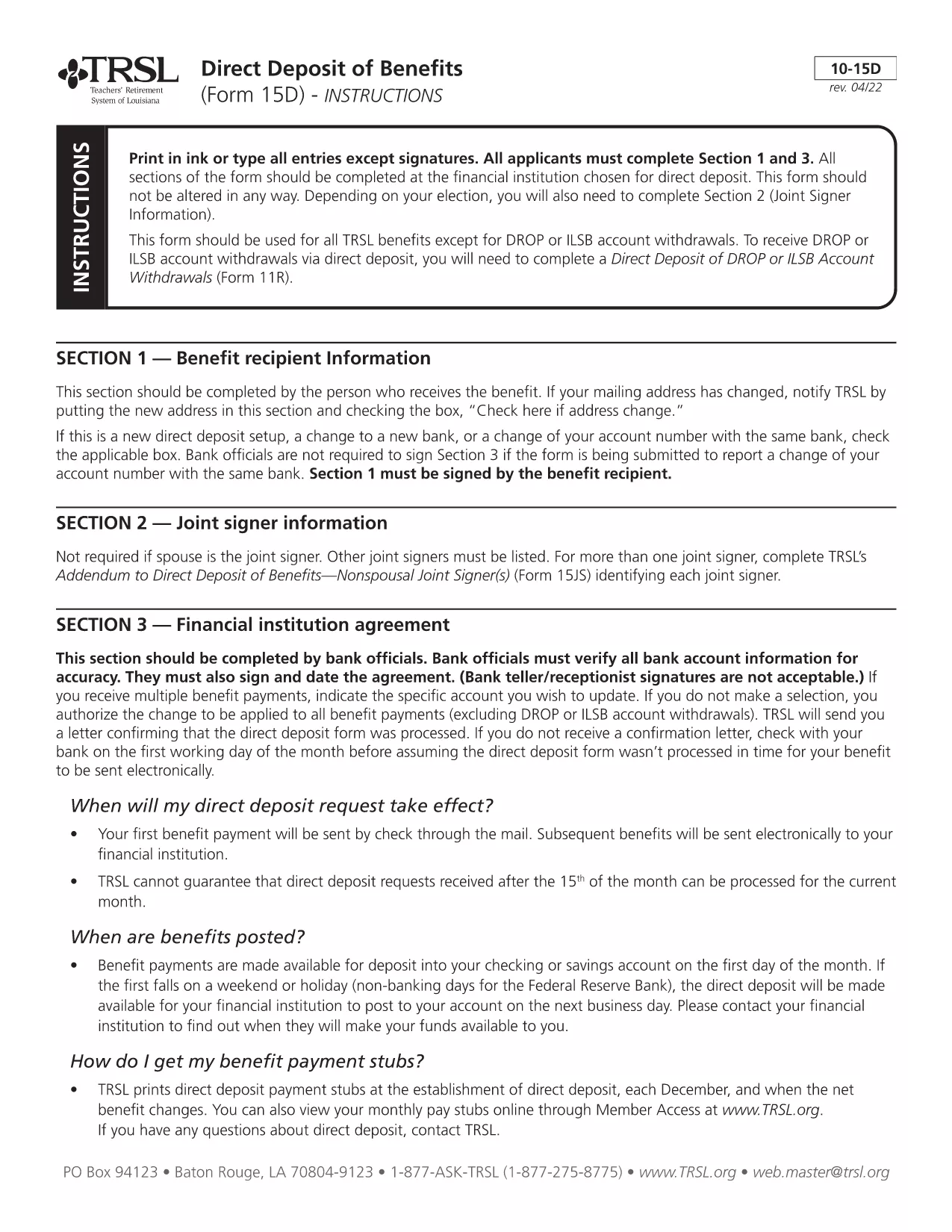
Form 15D is the official "Direct Deposit of Benefits" form used by the Teachers' Retirement System of Louisiana (TRSL). It allows retirees to have their monthly pension, annuity, or other retirement payments deposited directly into a bank account of their choice.

Using a fillable PDF version saves you time, reduces errors, and eliminates the need for printing, scanning, or mailing paper copies. Our Formize platform loads the PDF in the browser, lets you type directly into each field, and saves a completed copy that you can submit electronically.

  • Fast processing: Forms received by the 15th of the month are usually processed for the next month’s payment.
  • Secure handling: Your banking information stays encrypted while you work in the browser.
  • Editable anytime: Save the partially‑filled form and return later to finish.

Below you’ll find step‑by‑step instructions, tips to avoid common errors, and answers to the most frequently asked questions.

คำถามที่พบบ่อย
  • Do I need Adobe Acrobat to fill out Form 15D?

    No. The Formize PDF Filler works in any modern browser, so you don’t need Acrobat or any extra software.

  • Can I change my bank account after submitting Form 15D?

    Yes. Submit a new, updated Form 15D with the revised routing and account numbers. TRSL processes updates the same way as the original form.

  • What if I make a mistake while filling out the form?

    You can clear any field by selecting it and pressing Delete, or use the "Reset" button to start over before saving.

  • Is the information I enter secure?

    All data is encrypted in transit (HTTPS) and never stored on our servers after you download the completed PDF.

  • When will my direct‑deposit start after I submit Form 15D?

    TRSL typically processes forms received by the 15th of the month for the following month’s payment. Allow a few business days for verification.

ทำอย่างไร

วิธีกรอก Form 15D ฟรีทางออนไลน์ใน 4 ขั้นตอนง่ายๆ:

  1. 1
    Step 1 – Click the Fill‑out button
    On this page, click the blue "Fill out this form" button. The Formize PDF Filler will open in a new tab.
  2. 2
    Step 2 – Wait for the Formize PDF Filler to load
    The filler loads the fillable version of Form 15D directly from the secure server. This usually takes a few seconds.
  3. 3
    Step 3 – Enter your banking information
    Type your bank name, routing number, and account number into the highlighted fields. Double‑check each number for accuracy.
  4. 4
    Step 4 – Review, save, and submit
    Use the built‑in preview to verify all entries. Click "Save" to download a copy for your records, then follow TRSL’s submission instructions (mail or upload to the TRSL portal).
สร้างแอป PDF Filler
เกี่ยวกับ

เทมเพลต Form 15D

ด้วยชุดคุณสมบัติดั้งเดิมสำหรับการดูและกรอกเอกสาร PDF รวมกับประโยชน์ของเว็บแอปพลิเคชันและเค้าโครงที่ตอบสนอง คุณสามารถสร้าง Form 15D ให้เสร็จภายในไม่กี่นาที

คุณสมบัติ

PDF ฟิลเลอร์

วิธีที่ง่ายที่สุดในการกรอกแบบฟอร์ม PDF ทางออนไลน์

  • กรอก Form 15D อย่างรวดเร็ว
    กำลังมองหาวิธีเติม Form 15D ทางออนไลน์อย่างรวดเร็วอยู่ใช่ไหม ด้วยตัวกรอกแบบฟอร์ม PDF ออนไลน์ฟรีของเรา คุณจะรู้วิธีแก้ไขและกรอกเอกสาร PDF นี้ในเวลาไม่ถึงนาที
  • โปรแกรมแก้ไข PDF ออนไลน์ที่ใช้งานง่าย
    เบื่อกับการพิมพ์ไฟล์ PDF เพื่อให้คุณสามารถแก้ไขได้ก่อนที่จะสแกนซ้ำและส่งกลับหรือไม่? แก้ไขเอกสาร PDF ออนไลน์ฟรี ใช้โปรแกรมแก้ไข PDF ออนไลน์ของเราเพื่อประหยัดเวลาและกระดาษ
  • เครื่องมือที่ยอดเยี่ยมสำหรับทุกแพลตฟอร์ม
    สงสัยวิธีเติม Form 15D บน Mac หรืออาจใช้ตัวเติม PDF ฟรีได้อย่างไร เครื่องมือ PDF ออนไลน์ของเราทำงานได้บนทุกแพลตฟอร์ม
  • การจัดเก็บไฟล์ที่ปลอดภัย
    ไฟล์ "Form 15D" ที่เสร็จสมบูรณ์จะถูกจัดเก็บไว้ในฐานข้อมูลที่ปลอดภัยซึ่งจัดการโดย Amazon Cloud hosting คุณสามารถลบไฟล์ของคุณออกจากระบบของเราได้ตลอดเวลา ไม่ว่าในกรณีใด ไฟล์เหล่านี้จะถูกลบโดยอัตโนมัติหลังจากผ่านไป 24 ชั่วโมง
  • สนทนากับ Form 15D
    แชทกับ "Form 15D" บน Chatize ที่เป็นผู้ช่วยอ่าน PDF ฟรี ถามคำถามและรับคำตอบจาก "Form 15D" เพียงคลิกที่ปุ่ม แชทด้วยเอกสาร ด้านบน

ลบเซสชันการบรรจุ

ลบเซสชันการกรอกข้อมูลที่เลือกหรือไม่?ในกรณีนี้ความคืบหน้าในการกรอกแบบฟอร์มจะหายไป

ลบเซสชันการแก้ไข

ลบเซสชันการแก้ไขที่เลือกหรือไม่ ในกรณีนี้ ความคืบหน้าในการสร้างและแก้ไขแบบฟอร์มจะหายไป