
hamburger-menu icon
เลือกภาษา

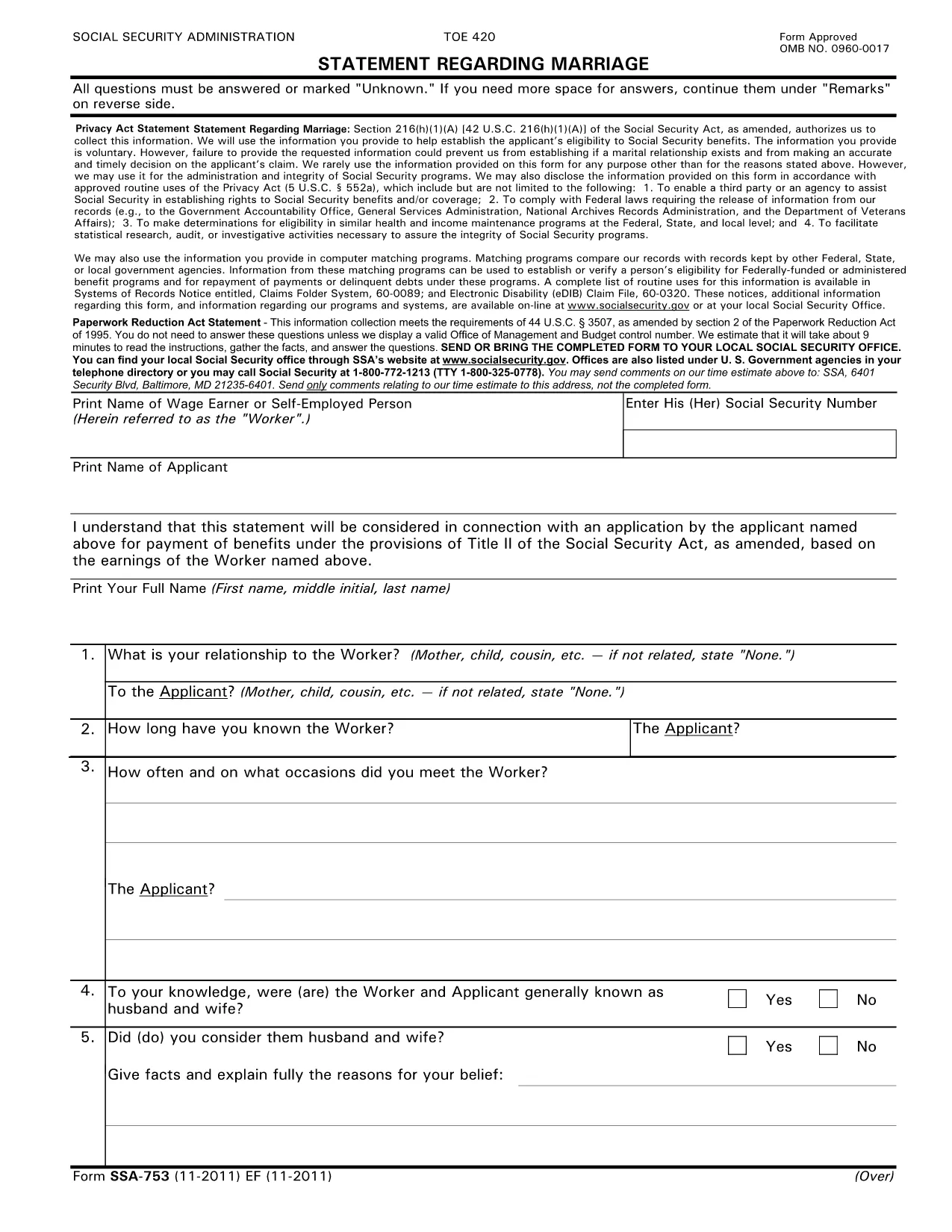
SSA-753 Statement Regarding Marriage – Fillable PDF

  1. ภาษา ภาษาอังกฤษ
  2. ประเทศ สหรัฐอเมริกา
  3. กิจกรรม ประกันสังคม
กรอกแบบฟอร์มนี้
SSA-753 Statement Regarding Marriage – Fillable PDF

The SSA-753 Statement Regarding Marriage is the Social Security Administration’s official form used to report a change in marital status. Whether you’re getting married, divorced, or widowed, this form helps the SSA determine your eligibility for benefits.

What Is the SSA-753 Form?

The SSA-753 collects basic personal information, details about the marriage, and the impact on Social Security benefits. It is required for:

  • Applying for spousal or survivor benefits
  • Updating your existing benefit record
  • Confirming eligibility for a spouse’s retirement or disability benefits

How to Complete the SSA-753 Online

Instead of printing and scanning, you can fill the form directly on our site using the Formize PDF Filler. The process is quick, secure, and saves you a trip to the post office.

Common Mistakes to Avoid

  • Leaving required fields blank – the form will not submit if any required field is empty.
  • Incorrect dates – double‑check the marriage or divorce date; errors can delay benefit processing.
  • Mismatched signatures – the applicant and spouse (if applicable) must sign exactly as shown on the Social Security card.

Where to Submit the Completed Form

After you finish, you can:

  • Download the completed PDF and mail it to your local Social Security office.
  • Print and bring it in person during your next SSA appointment.

Download the Official PDF

If you prefer the original document, you can download the official SSA‑753 PDF directly from the Social Security Administration’s archive.

คำถามที่พบบ่อย
  • Do I need a PDF editor to fill out SSA-753?

    No. With Formize you can fill the form online in your browser—no additional software required.

  • Is the online filler secure?

    Yes. All data is encrypted in transit and processed on a secure server before you download or print the completed form.

  • Can I save my progress and return later?

    The Formize filler auto‑saves your entries, but you must download the PDF before closing the browser to keep a permanent copy.

  • What if I make a mistake?

    You can edit any field at any time before you submit. Simply click the field and correct the information.

  • Where do I mail the completed SSA-753?

    Send the finished form to your local Social Security office. Addresses are listed on the SSA website under “Contact Us.”

  • Is there a fee to use the Formize PDF Filler?

    No. Filling out the SSA-753 with Formize is completely free.

  • Do I need to print the form after filling it online?

    Printing is recommended if you plan to mail the form. You can also present the printed copy at an SSA office.

ทำอย่างไร

วิธีกรอก SSA-753 ฟรีทางออนไลน์ใน 4 ขั้นตอนง่ายๆ:

  1. 1
    Click the Fill‑out Button
    Press the “Fill out this form” button below to launch the Formize PDF Filler.
  2. 2
    Wait for the Filler to Load
    A few seconds will pass while the secure online editor initializes.
  3. 3
    Complete Each Field
    Enter your information directly into the fillable fields. The app saves your changes automatically.
  4. 4
    Submit or Download
    When finished, either submit the form to the SSA via mail or download the completed PDF for your records.
สร้างแอป PDF Filler
เกี่ยวกับ

แบบฟอร์มประกันสังคม

SSA-753 เป็นหนึ่งในแบบฟอร์มประกันสังคมที่เป็นเอกสารที่ใช้ในการยื่นขอสวัสดิการและบริการต่างๆ ที่จัดทำโดย United States Social Security Administration (SSA) SSA เป็นหน่วยงานรัฐบาลกลางที่บริหารจัดการโปรแกรมที่ออกแบบมาเพื่อให้ความช่วยเหลือทางการเงินแก่บุคคลและครอบครัวที่มีสิทธิ์ รวมถึงสวัสดิการเกษียณอายุ ผลประโยชน์ทุพพลภาพ ผลประโยชน์ผู้รอดชีวิต และรายได้เสริมด้านความปลอดภัย (SSI)

แบบฟอร์มประกันสังคมทั่วไป ได้แก่ :

ใบสมัครขอรับสวัสดิการเกษียณอายุประกันสังคม: แบบฟอร์มนี้ใช้เพื่อขอรับสวัสดิการเกษียณอายุตามประวัติการทำงานและรายได้ของแต่ละบุคคล

ใบสมัครสวัสดิการทุพพลภาพประกันสังคม: แบบฟอร์มนี้ใช้สำหรับสมัครขอรับสวัสดิการทุพพลภาพ หากบุคคลมีสภาพร่างกายหรือจิตใจที่ขัดขวางการทำงาน

ใบสมัครขอรับสวัสดิการผู้รอดชีวิตจากประกันสังคม: แบบฟอร์มนี้ใช้สำหรับยื่นขอรับสวัสดิการผู้รอดชีวิต หากคู่สมรสหรือบิดามารดาของบุคคลนั้นถึงแก่กรรมและพวกเขามีสิทธิ์ได้รับสวัสดิการผู้รอดชีวิต

ใบสมัครลงทะเบียน Medicare: แบบฟอร์มนี้ใช้เพื่อลงทะเบียนใน Medicare ซึ่งเป็นโครงการประกันสุขภาพของรัฐบาลกลางสำหรับบุคคลที่มีอายุมากกว่า 65 ปีและผู้ที่มีความทุพพลภาพหรือเงื่อนไขทางการแพทย์บางอย่าง

แบบฟอร์มการเปลี่ยนแปลงที่อยู่: แบบฟอร์มนี้ใช้เพื่ออัปเดตที่อยู่ของบุคคลด้วย SSA

แบบฟอร์มขอบันทึกรายได้: แบบฟอร์มนี้ใช้เพื่อขอสำเนาบันทึกรายได้ของแต่ละบุคคล ซึ่งจะใช้ในการคำนวณสวัสดิการประกันสังคม

สามารถกรอกแบบฟอร์มเหล่านี้ทางออนไลน์ ทางไปรษณีย์ หรือด้วยตนเองที่สำนักงานประกันสังคมในพื้นที่ สิ่งสำคัญคือต้องตรวจสอบอย่างรอบคอบและกรอกแบบฟอร์มที่จำเป็นทั้งหมดเพื่อให้แน่ใจว่าการประมวลผลผลประโยชน์ประกันสังคมเป็นไปอย่างทันท่วงทีและถูกต้อง

คุณสมบัติ

PDF ฟิลเลอร์

วิธีที่ง่ายที่สุดในการกรอกแบบฟอร์ม PDF ทางออนไลน์

  • กรอก SSA-753 อย่างรวดเร็ว
    กำลังมองหาวิธีเติม SSA-753 ทางออนไลน์อย่างรวดเร็วอยู่ใช่ไหม ด้วยตัวกรอกแบบฟอร์ม PDF ออนไลน์ฟรีของเรา คุณจะรู้วิธีแก้ไขและกรอกเอกสาร PDF นี้ในเวลาไม่ถึงนาที
  • โปรแกรมแก้ไข PDF ออนไลน์ที่ใช้งานง่าย
    เบื่อกับการพิมพ์ไฟล์ PDF เพื่อให้คุณสามารถแก้ไขได้ก่อนที่จะสแกนซ้ำและส่งกลับหรือไม่? แก้ไขเอกสาร PDF ออนไลน์ฟรี ใช้โปรแกรมแก้ไข PDF ออนไลน์ของเราเพื่อประหยัดเวลาและกระดาษ
  • เครื่องมือที่ยอดเยี่ยมสำหรับทุกแพลตฟอร์ม
    สงสัยวิธีเติม SSA-753 บน Mac หรืออาจใช้ตัวเติม PDF ฟรีได้อย่างไร เครื่องมือ PDF ออนไลน์ของเราทำงานได้บนทุกแพลตฟอร์ม
  • การจัดเก็บไฟล์ที่ปลอดภัย
    ไฟล์ "SSA-753" ที่เสร็จสมบูรณ์จะถูกจัดเก็บไว้ในฐานข้อมูลที่ปลอดภัยซึ่งจัดการโดย Amazon Cloud hosting คุณสามารถลบไฟล์ของคุณออกจากระบบของเราได้ตลอดเวลา ไม่ว่าในกรณีใด ไฟล์เหล่านี้จะถูกลบโดยอัตโนมัติหลังจากผ่านไป 24 ชั่วโมง
  • สนทนากับ SSA-753
    แชทกับ "SSA-753" บน Chatize ที่เป็นผู้ช่วยอ่าน PDF ฟรี ถามคำถามและรับคำตอบจาก "SSA-753" เพียงคลิกที่ปุ่ม แชทด้วยเอกสาร ด้านบน

ลบเซสชันการบรรจุ

ลบเซสชันการกรอกข้อมูลที่เลือกหรือไม่?ในกรณีนี้ความคืบหน้าในการกรอกแบบฟอร์มจะหายไป

ลบเซสชันการแก้ไข

ลบเซสชันการแก้ไขที่เลือกหรือไม่ ในกรณีนี้ ความคืบหน้าในการสร้างและแก้ไขแบบฟอร์มจะหายไป