hamburger-menu icon
เลือกภาษา

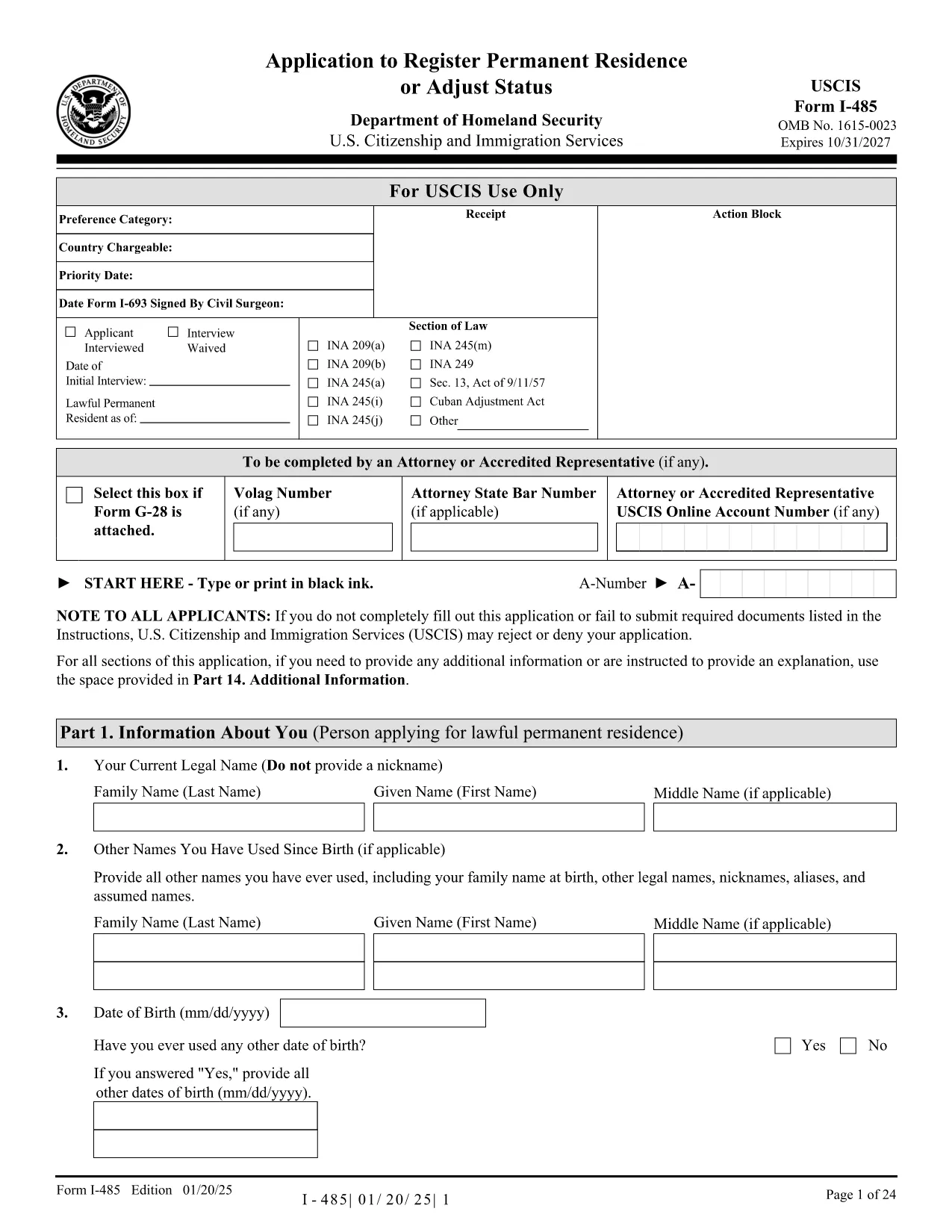
The Form I-485 (Application to Register Permanent Residence or Adjust Status) is the official USCIS document used by individuals inside the United States to apply for a green card. Our fillable PDF version lets you complete the form electronically, save time, and reduce errors.

Using the Formize PDF Filler, you can type directly into each field, add electronic signatures, and download a completed copy ready for mailing to USCIS. No extra software is required – simply click the button, wait for the filler to load, and start entering your information.

Key benefits of the fillable I-485 PDF:

  • Accurate data entry with built‑in validation.
  • Instant preview of the completed form.
  • Easy saving and printing for submission.
  • Secure handling of personal information.

Below you’ll find step‑by‑step instructions, common pitfalls to watch out for, and a checklist of supporting documents you’ll need to attach when you file your application.

คำถามที่พบบ่อย
  • Can I file Form I-485 online?

    Online filing is currently limited to certain employment‑based categories. For most applicants, the paper version (the fillable PDF) must be completed and mailed.

  • Do I need to submit Form I-693 with my I-485?

    Yes. The medical examination report (Form I-693) must be submitted in a sealed envelope from a civil surgeon along with your I-485.

  • What is the filing fee for Form I-485?

    The fee varies by category. Check the USCIS Fee Schedule for the most up‑to‑date amount before you submit your application.

  • How many pages should the PDF have?

    Use the official PDF from USCIS (all pages must be from the same edition). Missing or mismatched pages can cause a rejection.

  • Can I edit the form after I download it?

    Yes, as long as you use the fillable version before signing. Once you add an electronic signature, further edits will invalidate the signature.

  • Do I need a lawyer to complete I-485?

    A lawyer is not required, but many applicants choose legal assistance to ensure accuracy and completeness.

ทำอย่างไร

วิธีกรอก I-485 form ฟรีทางออนไลน์ใน 5 ขั้นตอนง่ายๆ:

  1. 1
    Open the Fillable Form
    Click the “Fill out this form” button on the page. The Formize PDF Filler app will load in a new window.
  2. 2
    Enter Your Information
    Type directly into each field. The filler validates dates, numbers, and required entries as you go.
  3. 3
    Add Your Electronic Signature
    When you reach the signature section, use the built‑in signature tool to sign electronically.
  4. 4
    Review and Save
    Check the completed form for any errors, then click “Save” to download the finished PDF to your computer.
  5. 5
    Print and Submit
    Print the saved PDF, attach all required supporting documents, and mail the package to the USCIS address listed in the form instructions.
สร้างแอป PDF Filler
เกี่ยวกับ

เทมเพลต I-485 form

ด้วยชุดคุณสมบัติดั้งเดิมสำหรับการดูและกรอกเอกสาร PDF รวมกับประโยชน์ของเว็บแอปพลิเคชันและเค้าโครงที่ตอบสนอง คุณสามารถสร้าง I-485 form ให้เสร็จภายในไม่กี่นาที

คุณสมบัติ

PDF ฟิลเลอร์

วิธีที่ง่ายที่สุดในการกรอกแบบฟอร์ม PDF ทางออนไลน์

  • กรอก I-485 form อย่างรวดเร็ว
    กำลังมองหาวิธีเติม I-485 form ทางออนไลน์อย่างรวดเร็วอยู่ใช่ไหม ด้วยตัวกรอกแบบฟอร์ม PDF ออนไลน์ฟรีของเรา คุณจะรู้วิธีแก้ไขและกรอกเอกสาร PDF นี้ในเวลาไม่ถึงนาที
  • โปรแกรมแก้ไข PDF ออนไลน์ที่ใช้งานง่าย
    เบื่อกับการพิมพ์ไฟล์ PDF เพื่อให้คุณสามารถแก้ไขได้ก่อนที่จะสแกนซ้ำและส่งกลับหรือไม่? แก้ไขเอกสาร PDF ออนไลน์ฟรี ใช้โปรแกรมแก้ไข PDF ออนไลน์ของเราเพื่อประหยัดเวลาและกระดาษ
  • เครื่องมือที่ยอดเยี่ยมสำหรับทุกแพลตฟอร์ม
    สงสัยวิธีเติม I-485 form บน Mac หรืออาจใช้ตัวเติม PDF ฟรีได้อย่างไร เครื่องมือ PDF ออนไลน์ของเราทำงานได้บนทุกแพลตฟอร์ม
  • การจัดเก็บไฟล์ที่ปลอดภัย
    ไฟล์ "I-485 form" ที่เสร็จสมบูรณ์จะถูกจัดเก็บไว้ในฐานข้อมูลที่ปลอดภัยซึ่งจัดการโดย Amazon Cloud hosting คุณสามารถลบไฟล์ของคุณออกจากระบบของเราได้ตลอดเวลา ไม่ว่าในกรณีใด ไฟล์เหล่านี้จะถูกลบโดยอัตโนมัติหลังจากผ่านไป 24 ชั่วโมง
  • สนทนากับ I-485 form
    แชทกับ "I-485 form" บน Chatize ที่เป็นผู้ช่วยอ่าน PDF ฟรี ถามคำถามและรับคำตอบจาก "I-485 form" เพียงคลิกที่ปุ่ม แชทด้วยเอกสาร ด้านบน

ลบเซสชันการบรรจุ

ลบเซสชันการกรอกข้อมูลที่เลือกหรือไม่?ในกรณีนี้ความคืบหน้าในการกรอกแบบฟอร์มจะหายไป

ลบเซสชันการแก้ไข

ลบเซสชันการแก้ไขที่เลือกหรือไม่ ในกรณีนี้ ความคืบหน้าในการสร้างและแก้ไขแบบฟอร์มจะหายไป