hamburger-menu icon
เลือกภาษา

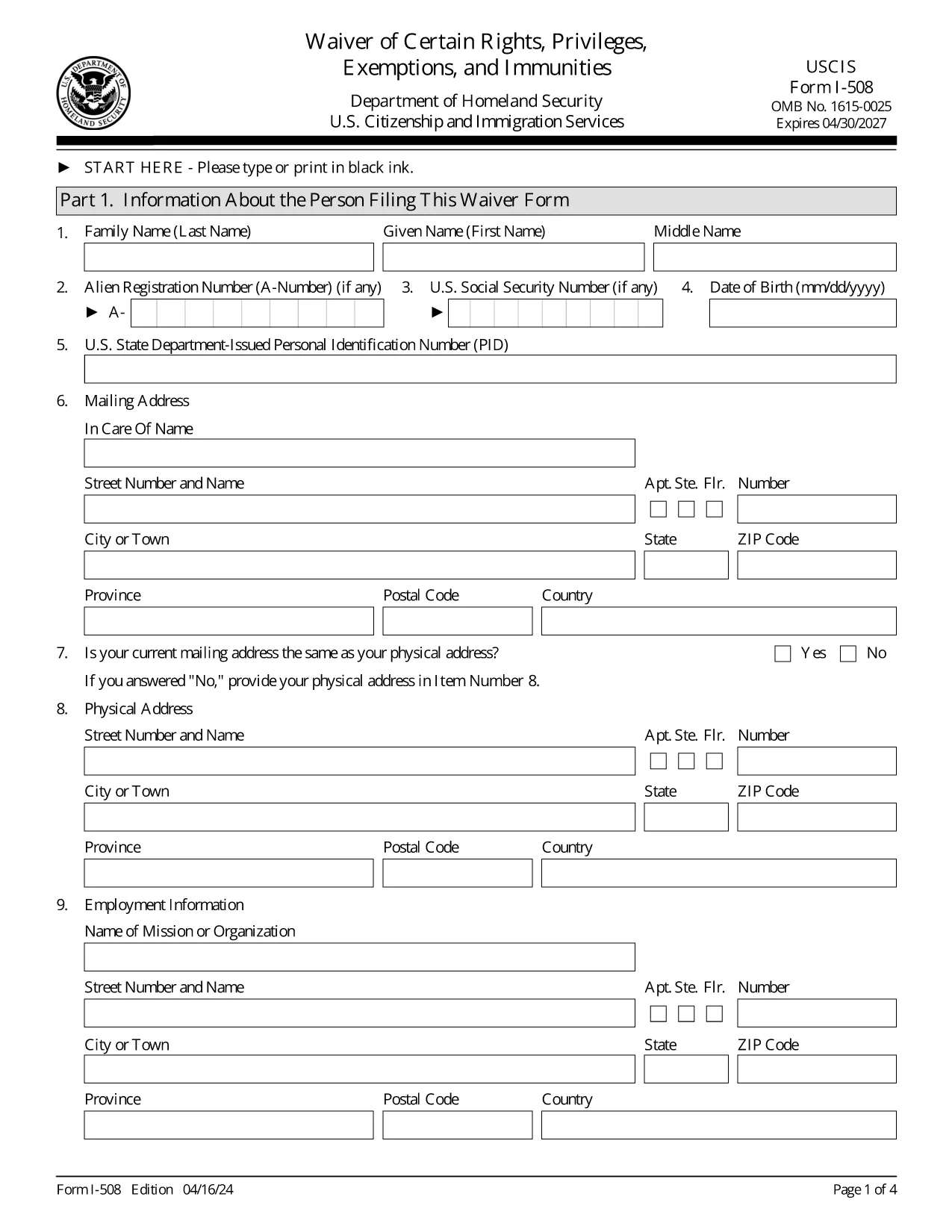
The USCIS Form I-508 is a request to waive diplomatic rights, privileges, exemptions, and immunities for non‑U.S. citizens employed by foreign governments or international organizations. It is required when you hold an occupational status that would otherwise qualify you for A, G, or E nonimmigrant status.

What Is Form I-508?

This waiver allows you to retain your current immigration status (e.g., lawful permanent resident) while working for a foreign mission. It is mandated by Section 247(b) of the Immigration and Nationality Act (INA). If you do not submit a signed I‑508, USCIS may automatically convert your status to the appropriate diplomatic category.

How to Fill Out I-508 Using Formize

Instead of downloading, printing, and editing a PDF, simply click the “Fill out this form” button on our page. The Formize PDF Filler app loads the official USCIS document and lets you complete every field online.

Common Mistakes to Avoid

  • Leaving any required field blank – the form will not submit.
  • Using the wrong edition date – make sure the bottom of each page shows the 04/16/24 edition.
  • Forgetting to sign the certification section – an unsigned form is rejected.
  • Uploading a PDF from a different edition – only the official USCIS version works.

Where to File the Completed Waiver

File the completed I‑508 with the USCIS office handling your primary immigration application:

  • If you are filing with Form I‑131 (Travel Document), submit I‑508 to the same office.
  • If you are adjusting status (Form I‑485), file I‑508 with that office.

Need More Help?

Review USCIS filing tips, double‑check the edition date, and ensure every page is included. The Formize platform saves your progress, so you can review before final submission.

คำถามที่พบบ่อย
  • Who must file Form I-508?

    Anyone who is a non‑U.S. citizen working for a foreign government mission or international organization and who would otherwise qualify for A, G, or E nonimmigrant status.

  • Can I submit I-508 electronically?

    USCIS currently requires a printed and signed PDF. Use Formize to fill the form, then print and sign before mailing.

  • What happens if I don’t file I-508?

    USCIS will automatically convert your status to the appropriate diplomatic category, which may affect your eligibility for adjustment of status.

  • Is there a filing fee for Form I-508?

    No separate fee is listed for I-508; any applicable fees are covered under the primary application (e.g., I‑131 or I‑485).

  • How do I know I have the correct edition of the form?

    The bottom of each page shows the edition date. The latest edition (04/16/24) is the one provided by USCIS and used by Formize.

  • Can I edit a saved Formize I-508 later?

    Yes. Your work is saved in your Formize account, allowing you to return, edit, and re‑download the form at any time before final submission.

ทำอย่างไร

วิธีกรอก I-508 ฟรีทางออนไลน์ใน 5 ขั้นตอนง่ายๆ:

  1. 1
    Open the Fillable Form
    Click the “Fill out this form” button on the page. The Formize PDF Filler app will load the official I-508 document.
  2. 2
    Complete Each Section
    Enter your personal information, employment details, and waiver statements. All fields are required; the app highlights any missing data.
  3. 3
    Review & Sign
    Use the built‑in review mode to verify every answer. Add your electronic signature in the certification box.
  4. 4
    Save or Download
    When you’re satisfied, click “Save” to store the filled form in your account or “Download” to get a PDF copy for filing.
  5. 5
    Submit to USCIS
    Print the final PDF (if required) and mail it to the USCIS office handling your case, following the filing instructions on the form.
สร้างแอป PDF Filler
เกี่ยวกับ

เทมเพลต I-508

ด้วยชุดคุณสมบัติดั้งเดิมสำหรับการดูและกรอกเอกสาร PDF รวมกับประโยชน์ของเว็บแอปพลิเคชันและเค้าโครงที่ตอบสนอง คุณสามารถสร้าง I-508 ให้เสร็จภายในไม่กี่นาที

คุณสมบัติ

PDF ฟิลเลอร์

วิธีที่ง่ายที่สุดในการกรอกแบบฟอร์ม PDF ทางออนไลน์

  • กรอก I-508 อย่างรวดเร็ว
    กำลังมองหาวิธีเติม I-508 ทางออนไลน์อย่างรวดเร็วอยู่ใช่ไหม ด้วยตัวกรอกแบบฟอร์ม PDF ออนไลน์ฟรีของเรา คุณจะรู้วิธีแก้ไขและกรอกเอกสาร PDF นี้ในเวลาไม่ถึงนาที
  • โปรแกรมแก้ไข PDF ออนไลน์ที่ใช้งานง่าย
    เบื่อกับการพิมพ์ไฟล์ PDF เพื่อให้คุณสามารถแก้ไขได้ก่อนที่จะสแกนซ้ำและส่งกลับหรือไม่? แก้ไขเอกสาร PDF ออนไลน์ฟรี ใช้โปรแกรมแก้ไข PDF ออนไลน์ของเราเพื่อประหยัดเวลาและกระดาษ
  • เครื่องมือที่ยอดเยี่ยมสำหรับทุกแพลตฟอร์ม
    สงสัยวิธีเติม I-508 บน Mac หรืออาจใช้ตัวเติม PDF ฟรีได้อย่างไร เครื่องมือ PDF ออนไลน์ของเราทำงานได้บนทุกแพลตฟอร์ม
  • การจัดเก็บไฟล์ที่ปลอดภัย
    ไฟล์ "I-508" ที่เสร็จสมบูรณ์จะถูกจัดเก็บไว้ในฐานข้อมูลที่ปลอดภัยซึ่งจัดการโดย Amazon Cloud hosting คุณสามารถลบไฟล์ของคุณออกจากระบบของเราได้ตลอดเวลา ไม่ว่าในกรณีใด ไฟล์เหล่านี้จะถูกลบโดยอัตโนมัติหลังจากผ่านไป 24 ชั่วโมง
  • สนทนากับ I-508
    แชทกับ "I-508" บน Chatize ที่เป็นผู้ช่วยอ่าน PDF ฟรี ถามคำถามและรับคำตอบจาก "I-508" เพียงคลิกที่ปุ่ม แชทด้วยเอกสาร ด้านบน

ลบเซสชันการบรรจุ

ลบเซสชันการกรอกข้อมูลที่เลือกหรือไม่?ในกรณีนี้ความคืบหน้าในการกรอกแบบฟอร์มจะหายไป

ลบเซสชันการแก้ไข

ลบเซสชันการแก้ไขที่เลือกหรือไม่ ในกรณีนี้ ความคืบหน้าในการสร้างและแก้ไขแบบฟอร์มจะหายไป