hamburger-menu icon
เลือกภาษา

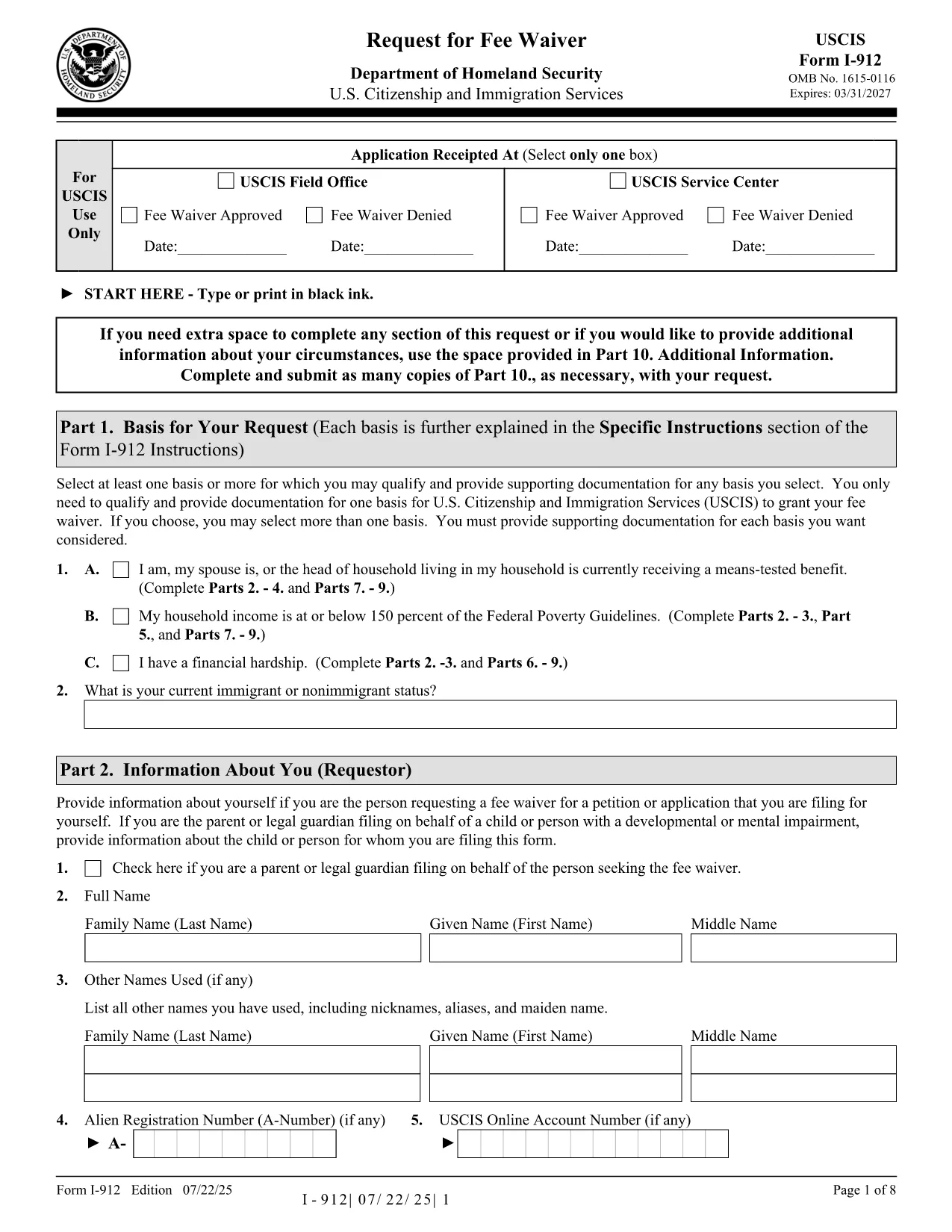
The USCIS Form I-912, Request for Fee Waiver lets you ask for a waiver of filing fees when you cannot afford them. With Formize you can fill the official PDF directly in your browser—no printer, scanner, or PDF editor required.

What Is Form I-912?

Form I-912 is used alongside an immigration application (e.g., N-400, I-130) to demonstrate financial hardship. You must attach it to the primary form before the USCIS receives the application.

How to Complete the I-912 Fee Waiver Online

Our fillable version mirrors the exact layout of the USCIS PDF, ensuring your submission is accepted.

Common Mistakes to Avoid

  • Leaving the signature line blank – USCIS rejects unsigned forms.
  • Submitting a PDF from a different edition – always use the latest edition linked below.
  • Missing supporting documents – include proof of income, public benefits, or a letter explaining your situation.

Where to Submit Your Completed Form

Attach the completed I-912 to the immigration form you are filing and mail it to the address listed in that form’s instructions, or upload it via your USCIS online account.

คำถามที่พบบ่อย
  • Who is eligible for an I-912 fee waiver?

    Anyone who can demonstrate an inability to pay the filing fee, including recipients of means‑tested public benefits, low‑income households, or those facing financial hardship.

  • Do I need to submit the I-912 before the main application?

    Yes. Attach the completed I-912 to your immigration form before USCIS receives the primary application. Late submissions are rejected.

  • Can I submit a digital signature?

    USCIS accepts a digital signature created with the Formize PDF Filler. Ensure the signature field is filled before downloading or uploading the form.

  • What supporting documents should I include?

    Include recent tax returns, benefit award letters, pay stubs, or a letter from a social services agency that confirms your current financial situation.

  • Is the fillable PDF the same as the official USCIS version?

    Yes. The fillable version is an exact replica of the official USCIS PDF (edition dated 07/22/25), so USCIS will accept it without issue.

ทำอย่างไร

วิธีกรอก I-912 ฟรีทางออนไลน์ใน 4 ขั้นตอนง่ายๆ:

  1. 1
    Open the Fillable Form
    Click the “Fill out this form” button on the page. The Formize PDF Filler loads instantly in your browser.
  2. 2
    Enter Your Information
    Type directly into each field—income, household size, and reason for the waiver. The interface validates required fields in real time.
  3. 3
    Review and Sign
    Double‑check all entries, then add your digital signature using the built‑in signature tool.
  4. 4
    Save or Submit
    Download the completed PDF for your records or upload it with your immigration application through your USCIS account.
สร้างแอป PDF Filler
เกี่ยวกับ

เทมเพลต I-912

ด้วยชุดคุณสมบัติดั้งเดิมสำหรับการดูและกรอกเอกสาร PDF รวมกับประโยชน์ของเว็บแอปพลิเคชันและเค้าโครงที่ตอบสนอง คุณสามารถสร้าง I-912 ให้เสร็จภายในไม่กี่นาที

คุณสมบัติ

PDF ฟิลเลอร์

วิธีที่ง่ายที่สุดในการกรอกแบบฟอร์ม PDF ทางออนไลน์

  • กรอก I-912 อย่างรวดเร็ว
    กำลังมองหาวิธีเติม I-912 ทางออนไลน์อย่างรวดเร็วอยู่ใช่ไหม ด้วยตัวกรอกแบบฟอร์ม PDF ออนไลน์ฟรีของเรา คุณจะรู้วิธีแก้ไขและกรอกเอกสาร PDF นี้ในเวลาไม่ถึงนาที
  • โปรแกรมแก้ไข PDF ออนไลน์ที่ใช้งานง่าย
    เบื่อกับการพิมพ์ไฟล์ PDF เพื่อให้คุณสามารถแก้ไขได้ก่อนที่จะสแกนซ้ำและส่งกลับหรือไม่? แก้ไขเอกสาร PDF ออนไลน์ฟรี ใช้โปรแกรมแก้ไข PDF ออนไลน์ของเราเพื่อประหยัดเวลาและกระดาษ
  • เครื่องมือที่ยอดเยี่ยมสำหรับทุกแพลตฟอร์ม
    สงสัยวิธีเติม I-912 บน Mac หรืออาจใช้ตัวเติม PDF ฟรีได้อย่างไร เครื่องมือ PDF ออนไลน์ของเราทำงานได้บนทุกแพลตฟอร์ม
  • การจัดเก็บไฟล์ที่ปลอดภัย
    ไฟล์ "I-912" ที่เสร็จสมบูรณ์จะถูกจัดเก็บไว้ในฐานข้อมูลที่ปลอดภัยซึ่งจัดการโดย Amazon Cloud hosting คุณสามารถลบไฟล์ของคุณออกจากระบบของเราได้ตลอดเวลา ไม่ว่าในกรณีใด ไฟล์เหล่านี้จะถูกลบโดยอัตโนมัติหลังจากผ่านไป 24 ชั่วโมง
  • สนทนากับ I-912
    แชทกับ "I-912" บน Chatize ที่เป็นผู้ช่วยอ่าน PDF ฟรี ถามคำถามและรับคำตอบจาก "I-912" เพียงคลิกที่ปุ่ม แชทด้วยเอกสาร ด้านบน

ลบเซสชันการบรรจุ

ลบเซสชันการกรอกข้อมูลที่เลือกหรือไม่?ในกรณีนี้ความคืบหน้าในการกรอกแบบฟอร์มจะหายไป

ลบเซสชันการแก้ไข

ลบเซสชันการแก้ไขที่เลือกหรือไม่ ในกรณีนี้ ความคืบหน้าในการสร้างและแก้ไขแบบฟอร์มจะหายไป