hamburger-menu icon
เลือกภาษา

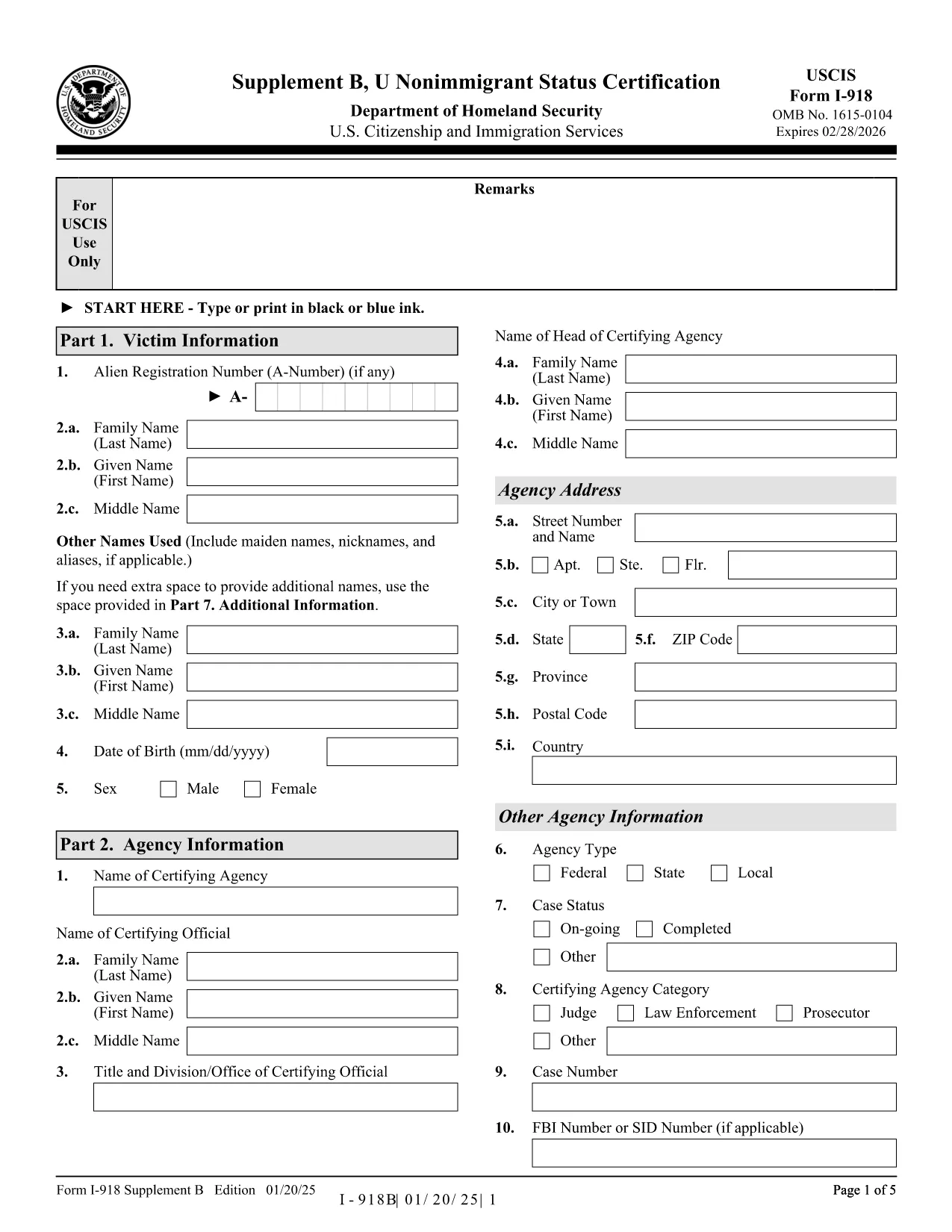
The Form I-918 Supplement B (U Nonimmigrant Status Certification) is used by a designated certifying official to confirm that a victim of a qualifying crime is eligible for U‑visa status. This form is a crucial part of the U‑visa petition (Form I-918) and must be completed accurately before submission to USCIS.

What Is Form I-918 Supplement B?

This supplement collects detailed information about the victim, the crime, and the law‑enforcement agency’s certification that the victim has been helpful, is willing to cooperate, and suffers substantial physical or mental abuse. The form is signed by a certifying official from a law‑enforcement agency, a prosecutor, or an authorized non‑governmental organization.

How to Complete the Fillable I-918 Supplement B Online

Instead of downloading, printing, and scanning, you can fill the form directly in your browser:

  1. Click the "Fill out this form" button on this page.
  2. The Formize PDF Filler app will load the official I-918 Supplement B PDF.
  3. Enter all required information in the highlighted fields. The filler automatically saves your progress.
  4. When you reach the signature field, use the built‑in e‑signature tool or print, sign, and scan the final page.
  5. Download the completed PDF and attach it to your Form I-918 petition package.

Common Mistakes to Avoid When Filling the Form

  • Leaving optional fields blank when the instructions require "N/A".
  • Using an incorrect date format (MM/DD/YYYY) – USCIS rejects inconsistent dates.
  • Failing to include the victim’s full legal name exactly as it appears on other immigration documents.
  • Not providing the certifying official’s title and agency contact information.
  • Submitting a scanned signature that is unreadable or cropped.

Where to Submit the Certified Form

After completing the fillable PDF, attach it to your Form I-918 packet and mail it to the USCIS lockbox address listed in the official instructions. If you are filing with an immigration attorney, give them the completed PDF for final review.

Download the Official PDF

For reference or offline use, you can also download the official, unfilled PDF directly from USCIS:

Download I-918 Supplement B (PDF)

Using Formize’s fillable version saves time, reduces errors, and ensures the document is USCIS‑compliant.

คำถามที่พบบ่อย
  • Who can sign Form I-918 Supplement B?

    A designated certifying official – such as a law‑enforcement officer, prosecutor, or authorized non‑governmental organization – must sign and certify the victim’s eligibility.

  • Can I submit a partially completed Supplement B?

    No. USCIS will reject the petition if any required field is missing or left incomplete.

  • Do I need to attach supporting documents to Supplement B?

    Only attach the supplementary evidence required by the main Form I-918 (e.g., police reports, medical records). The certification itself does not need extra attachments.

  • Is an electronic signature accepted?

    USCIS accepts electronic signatures on the fillable PDF as long as they are clear and legible. For added assurance, many users print, sign, and scan the signature page.

  • What if the certifying official’s information changes after signing?

    The official must provide an updated, signed Supplement B. Do not amend a previously signed form.

  • How long does it take USCIS to process the certification?

    The certification is reviewed as part of the overall I-918 petition. Processing times vary, but the certification itself does not add separate processing time.

  • Can I fill out the form on a mobile device?

    Yes. The Formize PDF Filler works on most modern smartphones and tablets, but a desktop provides a clearer view for detailed fields.

  • Is there a fee to download the fillable PDF?

    No. The fillable version is free on Formize. USCIS does not charge a fee for the Supplement B itself; the fee is attached to Form I-918.

ทำอย่างไร

วิธีกรอก I-918 Supplement B ฟรีทางออนไลน์ใน 5 ขั้นตอนง่ายๆ:

  1. 1
    Open the Fillable Form
    Click the "Fill out this form" button on this page to launch the Formize PDF Filler.
  2. 2
    Enter All Required Information
    Fill each highlighted field with accurate data. The filler auto‑saves as you type.
  3. 3
    Add the Certifying Official’s Signature
    Use the built‑in e‑signature tool, or print, sign, and re‑upload the signed page.
  4. 4
    Download the Completed PDF
    When the form is complete, click "Download" to save the certified PDF to your computer.
  5. 5
    Attach to Your I-918 Petition
    Include the completed Supplement B with Form I-918 and mail the packet to the USCIS lockbox address.
สร้างแอป PDF Filler
เกี่ยวกับ

เทมเพลต I-918 Supplement B

ด้วยชุดคุณสมบัติดั้งเดิมสำหรับการดูและกรอกเอกสาร PDF รวมกับประโยชน์ของเว็บแอปพลิเคชันและเค้าโครงที่ตอบสนอง คุณสามารถสร้าง I-918 Supplement B ให้เสร็จภายในไม่กี่นาที

คุณสมบัติ

PDF ฟิลเลอร์

วิธีที่ง่ายที่สุดในการกรอกแบบฟอร์ม PDF ทางออนไลน์

  • กรอก I-918 Supplement B อย่างรวดเร็ว
    กำลังมองหาวิธีเติม I-918 Supplement B ทางออนไลน์อย่างรวดเร็วอยู่ใช่ไหม ด้วยตัวกรอกแบบฟอร์ม PDF ออนไลน์ฟรีของเรา คุณจะรู้วิธีแก้ไขและกรอกเอกสาร PDF นี้ในเวลาไม่ถึงนาที
  • โปรแกรมแก้ไข PDF ออนไลน์ที่ใช้งานง่าย
    เบื่อกับการพิมพ์ไฟล์ PDF เพื่อให้คุณสามารถแก้ไขได้ก่อนที่จะสแกนซ้ำและส่งกลับหรือไม่? แก้ไขเอกสาร PDF ออนไลน์ฟรี ใช้โปรแกรมแก้ไข PDF ออนไลน์ของเราเพื่อประหยัดเวลาและกระดาษ
  • เครื่องมือที่ยอดเยี่ยมสำหรับทุกแพลตฟอร์ม
    สงสัยวิธีเติม I-918 Supplement B บน Mac หรืออาจใช้ตัวเติม PDF ฟรีได้อย่างไร เครื่องมือ PDF ออนไลน์ของเราทำงานได้บนทุกแพลตฟอร์ม
  • การจัดเก็บไฟล์ที่ปลอดภัย
    ไฟล์ "I-918 Supplement B" ที่เสร็จสมบูรณ์จะถูกจัดเก็บไว้ในฐานข้อมูลที่ปลอดภัยซึ่งจัดการโดย Amazon Cloud hosting คุณสามารถลบไฟล์ของคุณออกจากระบบของเราได้ตลอดเวลา ไม่ว่าในกรณีใด ไฟล์เหล่านี้จะถูกลบโดยอัตโนมัติหลังจากผ่านไป 24 ชั่วโมง
  • สนทนากับ I-918 Supplement B
    แชทกับ "I-918 Supplement B" บน Chatize ที่เป็นผู้ช่วยอ่าน PDF ฟรี ถามคำถามและรับคำตอบจาก "I-918 Supplement B" เพียงคลิกที่ปุ่ม แชทด้วยเอกสาร ด้านบน

ลบเซสชันการบรรจุ

ลบเซสชันการกรอกข้อมูลที่เลือกหรือไม่?ในกรณีนี้ความคืบหน้าในการกรอกแบบฟอร์มจะหายไป

ลบเซสชันการแก้ไข

ลบเซสชันการแก้ไขที่เลือกหรือไม่ ในกรณีนี้ ความคืบหน้าในการสร้างและแก้ไขแบบฟอร์มจะหายไป