hamburger-menu icon
เลือกภาษา

USDA TM-11 Export Certificate – Fillable PDF Form

  1. ภาษา ภาษาอังกฤษ
  2. ประเทศ สหรัฐอเมริกา
  3. กิจกรรม Agriculture
  4. แผนก USDA
USDA TM-11 Export Certificate – Fillable PDF Form

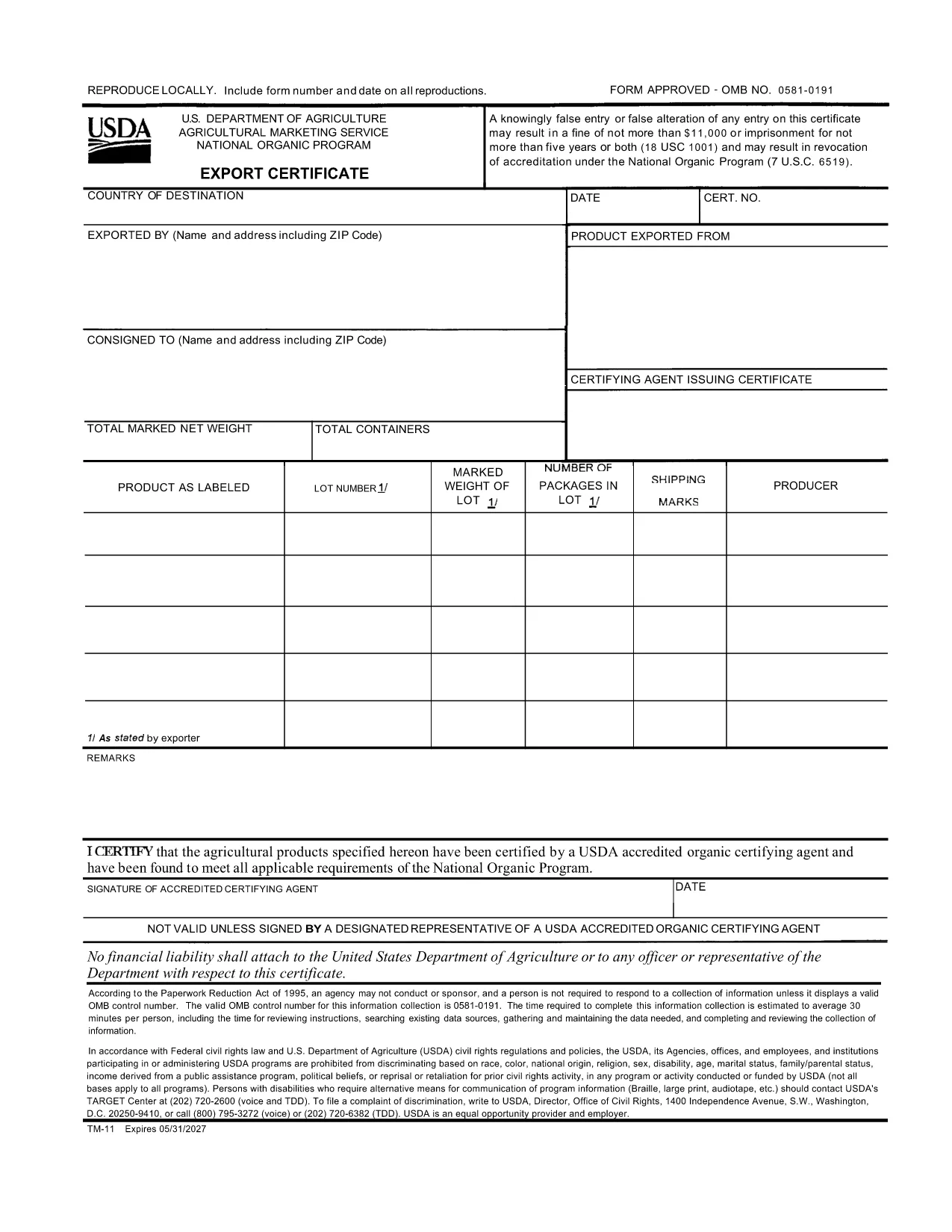
The TM-11 Export Certificate is the USDA‑approved document required for exporting organic products to certain foreign markets. Whether you are shipping to Taiwan, Japan, or other USDA‑recognized trade partners, a correctly completed TM-11 ensures your shipment meets all organic compliance standards.

What Is the TM-11 Export Certificate?

Form TM‑11 is issued by the U.S. Department of Agriculture (USDA) Agricultural Marketing Service (AMS). It verifies that the goods being exported comply with the organic regulations of both the United States and the destination country. The form must be signed by an accredited certifying agent (ACA) and accompany the shipment.

How to Complete the TM-11 Form Online

With Formize’s built‑in PDF filler, you can complete the TM‑11 without downloading any software. Just click the “Fill out this form” button, wait for the Formize PDF Filler to load, and start entering your information directly in the browser.

Common Mistakes to Avoid

  • Leaving required fields blank – every section marked with an asterisk must be completed.
  • Incorrect certification numbers – double‑check the ACA’s certification number before submitting.
  • Signature errors – the ACA must sign the form electronically or print, sign, and scan the final PDF.
  • Mismatched product descriptions – ensure the product name matches the USDA organic certification.

Download the Fillable PDF Instantly

Click the button below to open the official USDA TM‑11 PDF in the Formize filler. When you finish, download the completed form and attach it to your export documentation package.

คำถามที่พบบ่อย
  • What is the purpose of Form TM‑11?

    Form TM‑11 serves as the official USDA Export Certificate for organic products, confirming compliance with U.S. and foreign organic standards.

  • Can I sign the TM‑11 electronically?

    Yes. The Formize filler allows electronic signatures for the exporter. The certifying agent must still provide a handwritten signature or an approved electronic signature.

  • Do I need a separate PDF for each shipment?

    A new TM‑11 must be completed for each export batch. Re‑using an old certificate can lead to compliance violations.

  • Is the TM‑11 form free to download?

    Yes. The USDA provides the TM‑11 PDF at no cost. Formize hosts the fillable version for free use.

  • What countries accept the USDA TM‑11?

    Countries with USDA organic trade agreements—such as Taiwan, Japan, and others listed in the USDA Export Arrangement—accept the TM‑11.

  • What if I make a mistake after submitting?

    Correct the error on a new TM‑11 form and attach it to the shipment. Keep both the original and corrected copies for records.

ทำอย่างไร

วิธีกรอก TM-11 ฟรีทางออนไลน์ใน 3 ขั้นตอนง่ายๆ:

  1. 1
    Open the TM-11 Form
    Click the “Fill out this form” button on this page. The Formize PDF Filler will load directly in your browser.
  2. 2
    Enter Your Information
    Fill in each required field—exporter details, product description, destination country, and certification numbers.
  3. 3
    Save and Download
    When all fields are completed, click “Save” to download the filled PDF. Attach the file to your export paperwork.
สร้างแอป PDF Filler
เกี่ยวกับ

เทมเพลต TM-11

ด้วยชุดคุณสมบัติดั้งเดิมสำหรับการดูและกรอกเอกสาร PDF รวมกับประโยชน์ของเว็บแอปพลิเคชันและเค้าโครงที่ตอบสนอง คุณสามารถสร้าง TM-11 ให้เสร็จภายในไม่กี่นาที

คุณสมบัติ

PDF ฟิลเลอร์

วิธีที่ง่ายที่สุดในการกรอกแบบฟอร์ม PDF ทางออนไลน์

  • กรอก TM-11 อย่างรวดเร็ว
    กำลังมองหาวิธีเติม TM-11 ทางออนไลน์อย่างรวดเร็วอยู่ใช่ไหม ด้วยตัวกรอกแบบฟอร์ม PDF ออนไลน์ฟรีของเรา คุณจะรู้วิธีแก้ไขและกรอกเอกสาร PDF นี้ในเวลาไม่ถึงนาที
  • โปรแกรมแก้ไข PDF ออนไลน์ที่ใช้งานง่าย
    เบื่อกับการพิมพ์ไฟล์ PDF เพื่อให้คุณสามารถแก้ไขได้ก่อนที่จะสแกนซ้ำและส่งกลับหรือไม่? แก้ไขเอกสาร PDF ออนไลน์ฟรี ใช้โปรแกรมแก้ไข PDF ออนไลน์ของเราเพื่อประหยัดเวลาและกระดาษ
  • เครื่องมือที่ยอดเยี่ยมสำหรับทุกแพลตฟอร์ม
    สงสัยวิธีเติม TM-11 บน Mac หรืออาจใช้ตัวเติม PDF ฟรีได้อย่างไร เครื่องมือ PDF ออนไลน์ของเราทำงานได้บนทุกแพลตฟอร์ม
  • การจัดเก็บไฟล์ที่ปลอดภัย
    ไฟล์ "TM-11" ที่เสร็จสมบูรณ์จะถูกจัดเก็บไว้ในฐานข้อมูลที่ปลอดภัยซึ่งจัดการโดย Amazon Cloud hosting คุณสามารถลบไฟล์ของคุณออกจากระบบของเราได้ตลอดเวลา ไม่ว่าในกรณีใด ไฟล์เหล่านี้จะถูกลบโดยอัตโนมัติหลังจากผ่านไป 24 ชั่วโมง
  • สนทนากับ TM-11
    แชทกับ "TM-11" บน Chatize ที่เป็นผู้ช่วยอ่าน PDF ฟรี ถามคำถามและรับคำตอบจาก "TM-11" เพียงคลิกที่ปุ่ม แชทด้วยเอกสาร ด้านบน

ลบเซสชันการบรรจุ

ลบเซสชันการกรอกข้อมูลที่เลือกหรือไม่?ในกรณีนี้ความคืบหน้าในการกรอกแบบฟอร์มจะหายไป

ลบเซสชันการแก้ไข

ลบเซสชันการแก้ไขที่เลือกหรือไม่ ในกรณีนี้ ความคืบหน้าในการสร้างและแก้ไขแบบฟอร์มจะหายไป