
hamburger-menu icon
เลือกภาษา

Arizona Form 36-0100 – Vehicle for Hire Application (Fillable PDF)

  1. ภาษา ภาษาอังกฤษ
  2. ประเทศ สหรัฐอเมริกา
  3. กิจกรรม ทะเบียนรถ
  4. สถานะ แอริโซนา
Arizona Form 36-0100 – Vehicle for Hire Application (Fillable PDF)

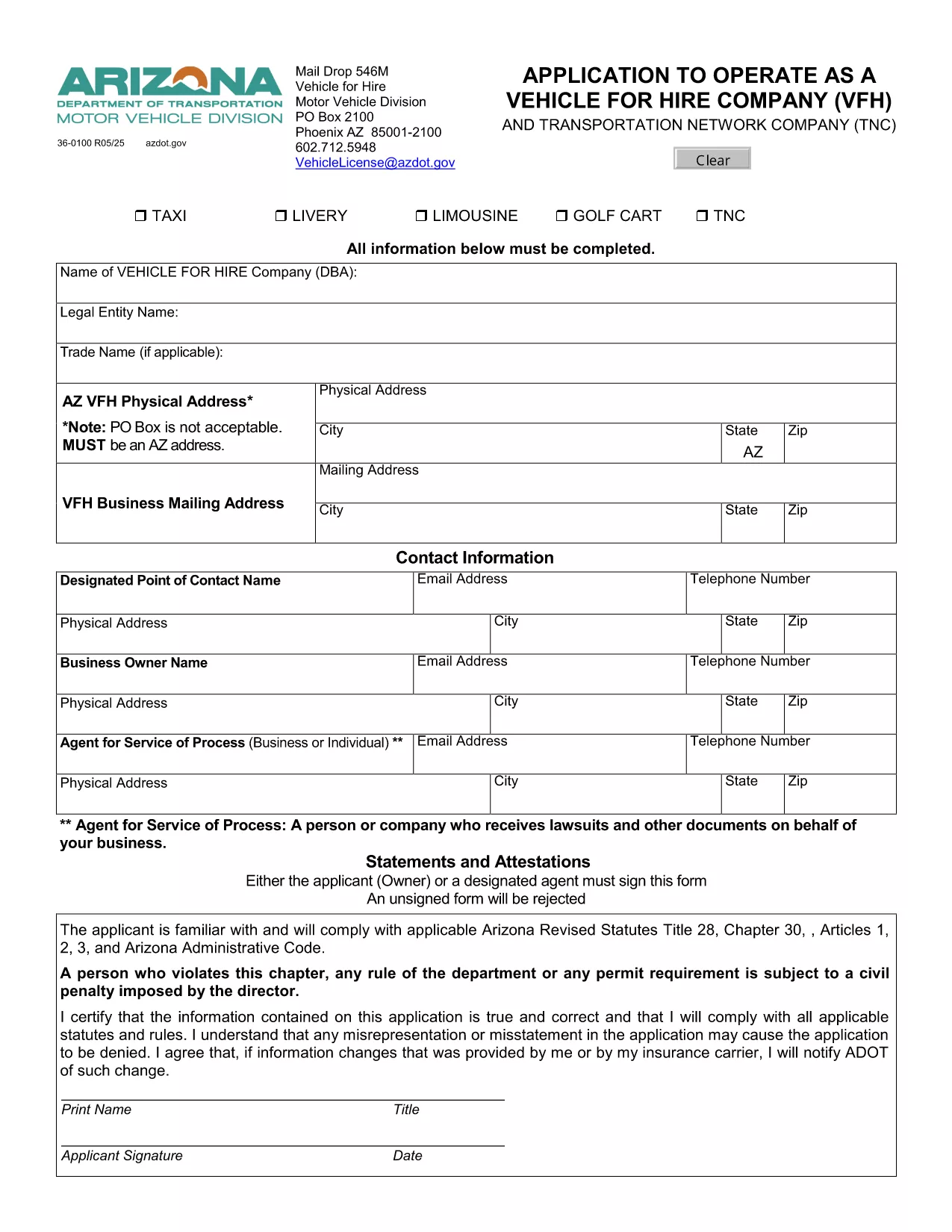
Form 36-0100 is the official Arizona Department of Transportation (ADOT) application used by individuals and companies that want to operate a vehicle for hire, such as taxis, rideshare services, or limousine companies. This fillable PDF lets you enter all required information directly in your browser, save a copy, and print a signed version for submission.

What Is Form 36-0100?

The form collects essential details about the applicant, the vehicle(s), insurance coverage, and compliance with state safety regulations. It is required before any vehicle can be legally used for commercial passenger transport in Arizona.

How to Complete the Fillable Form Online

Instead of downloading the PDF and opening it in a separate editor, simply click the “Fill out this form” button on this page. The Formize PDF Filler app will load instantly, allowing you to:

  • Enter text into every field using your keyboard.
  • Select dates, checkboxes, and dropdown options.
  • Save your progress and return later if needed.
  • Export a completed, printable PDF with one click.

Common Mistakes to Avoid

  • Leaving required fields blank: The form will highlight missing information before you can submit.
  • Using non‑black ink for signatures: Print the final PDF and sign with a black pen as required by ADOT.
  • Submitting outdated insurance documents: Verify that your policy dates cover the entire period you intend to operate.

Where to Submit Your Completed Form

After printing and signing, mail the form to:

Vehicle for Hire Division
Arizona Department of Transportation
PO Box 2100
Phoenix, AZ 85001‑2100

Or deliver it in person to any ADOT Motor Vehicle Division office.

Need More Help?

If you have questions about eligibility, insurance requirements, or the submission process, contact the ADOT Vehicle Licensing Unit at VehicleLicense@azdot.gov or call 602‑712‑5948.

คำถามที่พบบ่อย
  • Is Form 36-0100 available in a fillable format?

    Yes. On this page you can fill it out online with the Formize PDF Filler, then download the completed PDF.

  • Do I need a separate insurance certificate?

    ADOT requires a current commercial liability insurance policy that covers passenger transport. Attach a copy with your application.

  • Can I submit the form electronically?

    Arizona law still requires a printed, signed copy. After filling it online, print, sign, and mail the form.

  • How long does the approval process take?

    Typically 10–15 business days after ADOT receives the completed, signed application and supporting documents.

  • What if I make a mistake after submitting?

    Contact the Vehicle for Hire Division to request a correction form. Do not alter the already‑submitted PDF.

  • Is there a fee for filing Form 36-0100?

    Yes. The current application fee is listed on the form’s first page and must be paid by check or money order.

  • Do I need to renew this form annually?

    The vehicle for hire license must be renewed each year, but the same Form 36-0100 is used for renewal with updated information.

  • Can I use this form for a rideshare company?

    Absolutely. Any business that transports passengers for compensation in Arizona uses Form 36-0100.

ทำอย่างไร

วิธีกรอก Form 36-0100 ฟรีทางออนไลน์ใน 5 ขั้นตอนง่ายๆ:

  1. 1
    Open the Fillable Form
    Click the “Fill out this form” button on the page. The Formize PDF Filler loads directly in your browser.
  2. 2
    Enter Your Information
    Complete each field – personal details, vehicle information, insurance data, and declarations – using your keyboard.
  3. 3
    Save & Review
    Use the “Save” button to store a draft. Review all entries; required fields will be highlighted if missed.
  4. 4
    Export and Print
    When finished, click “Export PDF”. Print the document, sign with a black pen, and attach any supporting documents.
  5. 5
    Submit to ADOT
    Mail or deliver the signed PDF to the Vehicle for Hire Division address listed on the form.
สร้างแอป PDF Filler
เกี่ยวกับ

แบบฟอร์มทะเบียนรถ

หากคุณเป็นเจ้าของหรือเช่ายานยนต์ รถพ่วงหรือเรือ คุณต้องปฏิบัติตามข้อผูกพันบางประการเพื่อให้ยานพาหนะของคุณจดทะเบียนถูกต้องตามกฎหมายและปลอดภัย

Form 36-0100 เป็นหนึ่งในแบบฟอร์มการจดทะเบียนรถยนต์ที่เป็นเอกสารที่ใช้ในการจดทะเบียนยานยนต์กับหน่วยงานของรัฐหรือจังหวัดที่เกี่ยวข้อง แบบฟอร์มเหล่านี้มักจำเป็นเมื่อบุคคลซื้อยานพาหนะใหม่หรือใช้แล้ว หรือเมื่อพวกเขาย้ายไปยังรัฐหรือจังหวัดใหม่ด้วยยานพาหนะ

ข้อกำหนดและแบบฟอร์มที่จำเป็นสำหรับการจดทะเบียนรถอาจแตกต่างกันไปตามสถานที่ แต่โดยทั่วไปแล้ว กระบวนการเกี่ยวข้องกับการให้ข้อมูลเกี่ยวกับรถ เจ้าของ และภาระผูกพันใดๆ ของรถ

เมื่อส่งแบบฟอร์มการจดทะเบียนและค่าธรรมเนียมแล้ว หน่วยงานของรัฐหรือหน่วยงานระดับจังหวัดจะออกใบรับรองการจดทะเบียนหรือป้ายทะเบียนให้กับเจ้าของรถ การจดทะเบียนนี้ทำให้รถสามารถใช้งานบนถนนสาธารณะและทางหลวงได้อย่างถูกกฎหมาย

คุณสมบัติ

PDF ฟิลเลอร์

วิธีที่ง่ายที่สุดในการกรอกแบบฟอร์ม PDF ทางออนไลน์

  • กรอก Form 36-0100 อย่างรวดเร็ว
    กำลังมองหาวิธีเติม Form 36-0100 ทางออนไลน์อย่างรวดเร็วอยู่ใช่ไหม ด้วยตัวกรอกแบบฟอร์ม PDF ออนไลน์ฟรีของเรา คุณจะรู้วิธีแก้ไขและกรอกเอกสาร PDF นี้ในเวลาไม่ถึงนาที
  • โปรแกรมแก้ไข PDF ออนไลน์ที่ใช้งานง่าย
    เบื่อกับการพิมพ์ไฟล์ PDF เพื่อให้คุณสามารถแก้ไขได้ก่อนที่จะสแกนซ้ำและส่งกลับหรือไม่? แก้ไขเอกสาร PDF ออนไลน์ฟรี ใช้โปรแกรมแก้ไข PDF ออนไลน์ของเราเพื่อประหยัดเวลาและกระดาษ
  • เครื่องมือที่ยอดเยี่ยมสำหรับทุกแพลตฟอร์ม
    สงสัยวิธีเติม Form 36-0100 บน Mac หรืออาจใช้ตัวเติม PDF ฟรีได้อย่างไร เครื่องมือ PDF ออนไลน์ของเราทำงานได้บนทุกแพลตฟอร์ม
  • การจัดเก็บไฟล์ที่ปลอดภัย
    ไฟล์ "Form 36-0100" ที่เสร็จสมบูรณ์จะถูกจัดเก็บไว้ในฐานข้อมูลที่ปลอดภัยซึ่งจัดการโดย Amazon Cloud hosting คุณสามารถลบไฟล์ของคุณออกจากระบบของเราได้ตลอดเวลา ไม่ว่าในกรณีใด ไฟล์เหล่านี้จะถูกลบโดยอัตโนมัติหลังจากผ่านไป 24 ชั่วโมง
  • สนทนากับ Form 36-0100
    แชทกับ "Form 36-0100" บน Chatize ที่เป็นผู้ช่วยอ่าน PDF ฟรี ถามคำถามและรับคำตอบจาก "Form 36-0100" เพียงคลิกที่ปุ่ม แชทด้วยเอกสาร ด้านบน

ลบเซสชันการบรรจุ

ลบเซสชันการกรอกข้อมูลที่เลือกหรือไม่?ในกรณีนี้ความคืบหน้าในการกรอกแบบฟอร์มจะหายไป

ลบเซสชันการแก้ไข

ลบเซสชันการแก้ไขที่เลือกหรือไม่ ในกรณีนี้ ความคืบหน้าในการสร้างและแก้ไขแบบฟอร์มจะหายไป