
hamburger-menu icon
เลือกภาษา

Form 2305 – Affidavit to Establish Title to Exempt Property (Fillable PDF)

  1. ภาษา ภาษาอังกฤษ
  2. ประเทศ สหรัฐอเมริกา
  3. กิจกรรม ทะเบียนรถ
  4. สถานะ รัฐมิสซูรี
Form 2305 – Affidavit to Establish Title to Exempt Property (Fillable PDF)

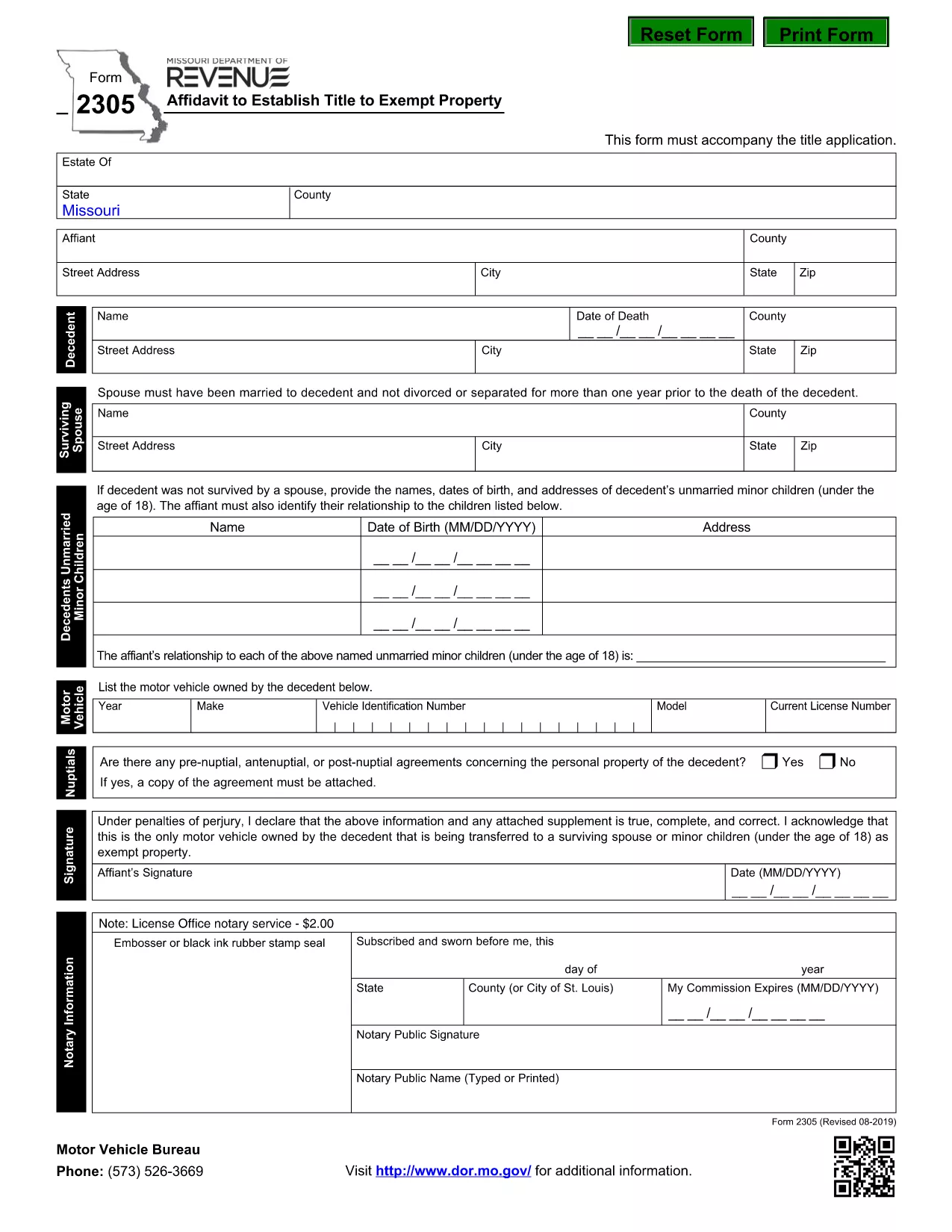
The Missouri Form 2305 – Affidavit to Establish Title to Exempt Property – is used when a deceased person’s estate needs to prove ownership of property that is exempt from certain taxes. This form must accompany the title application and include details such as the motor vehicle or other exempt items owned by the decedent.

What Is Form 2305 and When Is It Required?

Form 2305 is required by the Missouri Department of Revenue whenever you are applying for a title transfer of property that is exempt from the state's personal property tax. Typical scenarios include:

  • Vehicle owned by a deceased family member.
  • Equipment or machinery that qualifies for a tax exemption.
  • Any other personal property listed as exempt under Missouri law.

How to Complete Form 2305 Online with Formize

Instead of downloading the PDF and editing it manually, you can fill the form directly on our page:

  1. Click the "Fill out this form" button below.
  2. Wait a few seconds while the Formize PDF Filler app loads.
  3. Enter the required information in each fillable field.
  4. Review your entries, then click Save & Download to get a completed PDF.

All data stays secure, and you’ll have a printable, ready‑to‑submit document in minutes.

Common Mistakes to Avoid on Form 2305

  • Incorrect Decedent Information: Double‑check the name, Social Security number, and date of death.
  • Missing Vehicle Details: Provide the VIN, make, model, and year for every vehicle listed.
  • Signature Errors: The affidavit must be signed by the executor or personal representative; unsigned forms are rejected.
  • Leaving Blank Fields: If a field does not apply, write “N/A” rather than leaving it empty.

Download the Official Fillable PDF

For a hard‑copy version or offline use, you can download the official Missouri form directly from the Department of Revenue:

Download Form 2305 (PDF)

คำถามที่พบบ่อย
  • What is the purpose of Form 2305?

    Form 2305 is an affidavit used to establish legal title to property that is exempt from Missouri personal property tax, typically required during a title transfer after a death.

  • Do I need a notary for Form 2305?

    The Missouri Department of Revenue does not require notarization, but the form must be signed by the executor or personal representative of the estate.

  • Can I submit the form electronically?

    Yes. After completing the fillable PDF with Formize, you can print the signed copy and mail it with your title application. Some counties also accept scanned PDFs.

  • What if I make a mistake after submitting?

    Contact the Missouri Department of Revenue to request a corrected affidavit. You will need to submit a new Form 2305 with the accurate information.

  • Is there a filing fee for Form 2305?

    No separate fee is charged for the affidavit itself, but standard title transfer fees may apply.

  • How long does it take to process the affidavit?

    Processing time varies by county, but once the completed Form 2305 is received with the title application, it is usually reviewed within 5‑10 business days.

  • Can I use the same form for multiple exempt items?

    Yes. List each exempt vehicle or property on a separate line within the form’s schedule section.

  • Where can I get help if I have questions?

    Visit the Missouri Department of Revenue website or call their customer service line for assistance with Form 2305.

ทำอย่างไร

วิธีกรอก Form 2305 ฟรีทางออนไลน์ใน 4 ขั้นตอนง่ายๆ:

  1. 1
    Open the Fillable Form
    Click the "Fill out this form" button on the page. The Formize PDF Filler will open in your browser.
  2. 2
    Enter Required Information
    Complete each field with the decedent’s details, vehicle information, and any exempt property data. Use "N/A" for non‑applicable sections.
  3. 3
    Review and Sign
    Double‑check all entries for accuracy. Add the executor’s signature electronically if the form supports it, or print to sign later.
  4. 4
    Save and Download
    When finished, click "Save & Download" to obtain a completed PDF that you can print and submit to the Missouri Department of Revenue.
สร้างแอป PDF Filler
เกี่ยวกับ

แบบฟอร์มทะเบียนรถ

Form 2305 เป็นหนึ่งในแบบฟอร์มทะเบียนยานพาหนะที่เป็นเอกสารที่ใช้ในการจดทะเบียนยานยนต์กับหน่วยงานของรัฐที่เกี่ยวข้อง โดยทั่วไปคือกรมยานยนต์ (DMV) หรือหน่วยงานที่เทียบเท่า แบบฟอร์มเหล่านี้จำเป็นเมื่อบุคคลซื้อยานพาหนะใหม่หรือใช้แล้ว โอนกรรมสิทธิ์ยานพาหนะ หรือย้ายไปยังเขตอำนาจศาลใหม่พร้อมยานพาหนะ

แบบฟอร์มทะเบียนรถยนต์อาจแตกต่างกันไปตามเขตอำนาจศาล แต่โดยทั่วไปแล้วแบบฟอร์มดังกล่าวจำเป็นต้องมีข้อมูลต่อไปนี้:

ข้อมูลยานพาหนะ: รวมถึงรายละเอียดเกี่ยวกับยานพาหนะ เช่น ยี่ห้อ รุ่น ปี หมายเลขประจำตัวยานพาหนะ (VIN) และการอ่านมาตรวัดระยะทาง

ข้อมูลเจ้าของ: แบบฟอร์มนี้ต้องการข้อมูลเกี่ยวกับเจ้าของรถ รวมถึงชื่อ ที่อยู่ ข้อมูลติดต่อ และหมายเลขใบอนุญาตขับขี่

หลักฐานการเป็นเจ้าของ: อาจจำเป็นต้องมีหลักฐานการเป็นเจ้าของ เช่น ใบรับรองชื่อ ใบขาย หรือใบรับรองแหล่งกำเนิดสินค้าของผู้ผลิต (สำหรับรถยนต์ใหม่) ทั้งนี้ขึ้นอยู่กับสถานการณ์

ข้อมูลการประกันภัย: โดยทั่วไปจะต้องมีหลักฐานการประกันภัยรถยนต์ที่ถูกต้อง ซึ่งอาจรวมถึงการระบุหมายเลขกรมธรรม์ วันที่คุ้มครอง และรายละเอียดบริษัทประกันภัย

การชำระค่าธรรมเนียม: การจดทะเบียนยานพาหนะเกี่ยวข้องกับการชำระค่าธรรมเนียมต่างๆ เช่น ค่าธรรมเนียมการจดทะเบียน ภาษี และค่าใช้จ่ายอื่นๆ ที่เฉพาะเจาะจงสำหรับเขตอำนาจศาล

นอกเหนือจากข้อกำหนดพื้นฐานเหล่านี้แล้ว เขตอำนาจศาลบางแห่งอาจมีแบบฟอร์มหรือข้อกำหนดด้านเอกสารเพิ่มเติม ตัวอย่างเช่น ผลการทดสอบการปล่อยมลพิษ การตรวจสอบความปลอดภัย หรือหลักฐานการอยู่อาศัยอาจจำเป็นในบางพื้นที่

เมื่อกรอกแบบฟอร์มทะเบียนรถและส่งแล้ว หน่วยงานของรัฐจะออกใบรับรองการจดทะเบียน ป้ายทะเบียน และสติ๊กเกอร์ทะเบียน เอกสารเหล่านี้ระบุว่ารถยนต์ได้รับการจดทะเบียนถูกต้องตามกฎหมายและได้รับอนุญาตให้ใช้งานบนถนนสาธารณะ

สิ่งสำคัญคือต้องทราบว่าข้อกำหนดในการจดทะเบียนยานพาหนะอาจแตกต่างกันอย่างมากตามเขตอำนาจศาล ดังนั้นจึงขอแนะนำให้ปรึกษา DMV ในพื้นที่หรือหน่วยงานที่เทียบเท่าสำหรับแบบฟอร์มและขั้นตอนเฉพาะที่เกี่ยวข้องกับสถานที่ของคุณ

คุณสมบัติ

PDF ฟิลเลอร์

วิธีที่ง่ายที่สุดในการกรอกแบบฟอร์ม PDF ทางออนไลน์

  • กรอก Form 2305 อย่างรวดเร็ว
    กำลังมองหาวิธีเติม Form 2305 ทางออนไลน์อย่างรวดเร็วอยู่ใช่ไหม ด้วยตัวกรอกแบบฟอร์ม PDF ออนไลน์ฟรีของเรา คุณจะรู้วิธีแก้ไขและกรอกเอกสาร PDF นี้ในเวลาไม่ถึงนาที
  • โปรแกรมแก้ไข PDF ออนไลน์ที่ใช้งานง่าย
    เบื่อกับการพิมพ์ไฟล์ PDF เพื่อให้คุณสามารถแก้ไขได้ก่อนที่จะสแกนซ้ำและส่งกลับหรือไม่? แก้ไขเอกสาร PDF ออนไลน์ฟรี ใช้โปรแกรมแก้ไข PDF ออนไลน์ของเราเพื่อประหยัดเวลาและกระดาษ
  • เครื่องมือที่ยอดเยี่ยมสำหรับทุกแพลตฟอร์ม
    สงสัยวิธีเติม Form 2305 บน Mac หรืออาจใช้ตัวเติม PDF ฟรีได้อย่างไร เครื่องมือ PDF ออนไลน์ของเราทำงานได้บนทุกแพลตฟอร์ม
  • การจัดเก็บไฟล์ที่ปลอดภัย
    ไฟล์ "Form 2305" ที่เสร็จสมบูรณ์จะถูกจัดเก็บไว้ในฐานข้อมูลที่ปลอดภัยซึ่งจัดการโดย Amazon Cloud hosting คุณสามารถลบไฟล์ของคุณออกจากระบบของเราได้ตลอดเวลา ไม่ว่าในกรณีใด ไฟล์เหล่านี้จะถูกลบโดยอัตโนมัติหลังจากผ่านไป 24 ชั่วโมง
  • สนทนากับ Form 2305
    แชทกับ "Form 2305" บน Chatize ที่เป็นผู้ช่วยอ่าน PDF ฟรี ถามคำถามและรับคำตอบจาก "Form 2305" เพียงคลิกที่ปุ่ม แชทด้วยเอกสาร ด้านบน

ลบเซสชันการบรรจุ

ลบเซสชันการกรอกข้อมูลที่เลือกหรือไม่?ในกรณีนี้ความคืบหน้าในการกรอกแบบฟอร์มจะหายไป

ลบเซสชันการแก้ไข

ลบเซสชันการแก้ไขที่เลือกหรือไม่ ในกรณีนี้ ความคืบหน้าในการสร้างและแก้ไขแบบฟอร์มจะหายไป