
hamburger-menu icon
เลือกภาษา

Form 4715 – Motor Carrier Insurance Self‑Certification (Fillable PDF)

  1. ภาษา ภาษาอังกฤษ
  2. ประเทศ สหรัฐอเมริกา
  3. กิจกรรม ทะเบียนรถ
  4. สถานะ รัฐมิสซูรี
Form 4715 – Motor Carrier Insurance Self‑Certification (Fillable PDF)

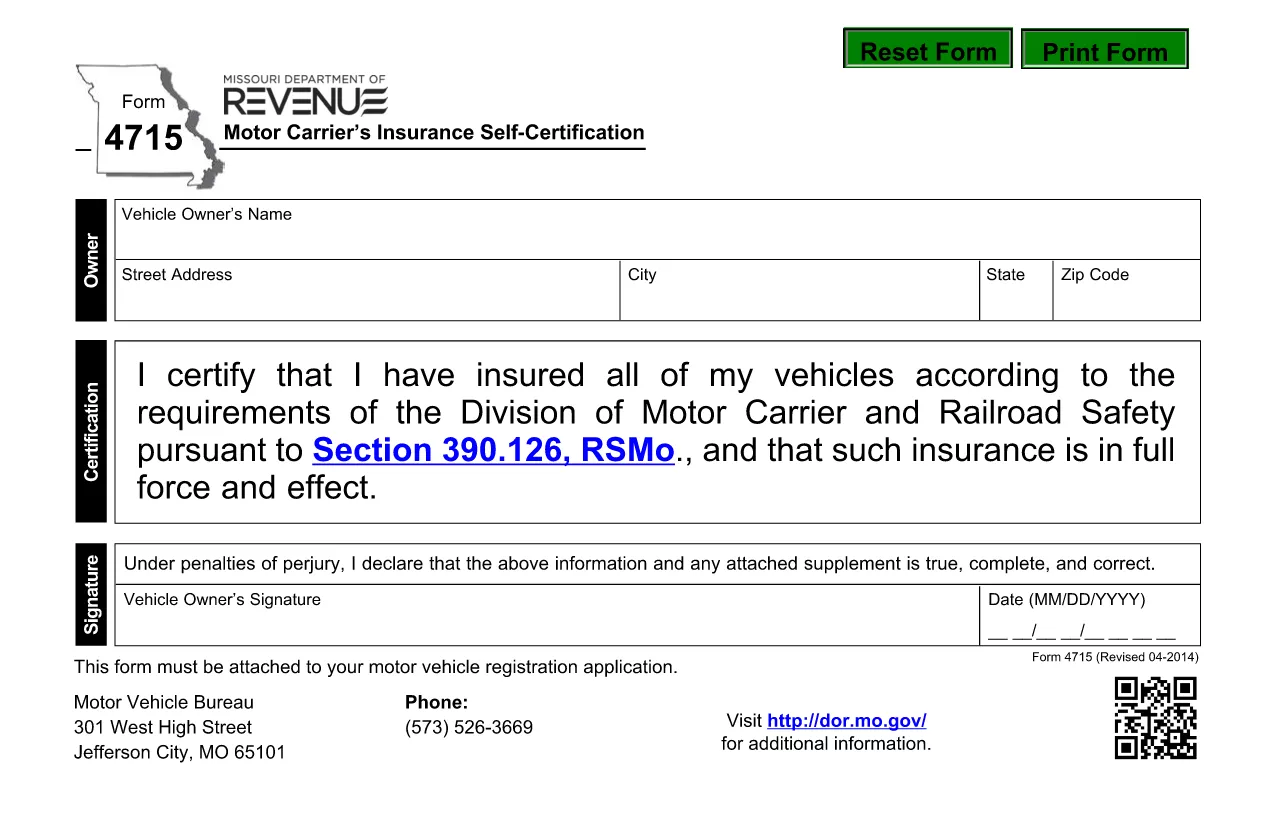
Form 4715 is the official Motor Carrier’s Insurance Self‑Certification required by the Missouri Division of Motor Carrier and Railroad Safety. It confirms that every vehicle in a motor carrier’s fleet is covered by the minimum insurance required under Missouri law (Section 390.126, RSMo.).

This fillable PDF lets you complete the certification instantly in your browser—no printing, scanning, or faxing needed. Simply click the “Fill out this form” button, enter the required information, and download the completed document for your records.

Key sections of the form include:

  • Carrier identification (name, address, MC number)
  • Vehicle details (VIN, make, model, year)
  • Insurance policy information (provider, policy number, coverage limits)
  • Signature and date

Using the Formize PDF Filler ensures all fields are validated in real time, reducing errors and speeding up the submission process.

คำถามที่พบบ่อย
  • Do I need Adobe Acrobat to fill out Form 4715?

    No. The Formize PDF Filler works in any modern browser and does not require a separate PDF editor.

  • Can I sign the form electronically?

    Yes. The filler includes an e‑signature field that complies with Missouri’s electronic record‑keeping rules.

  • What insurance coverage is required for each vehicle?

    Missouri law requires a minimum of $50,000 bodily injury per person, $100,000 per accident, and $25,000 property damage. Enter the exact limits from your policy.

  • How do I know the form is accepted after I submit it?

    After you email or upload the completed PDF, you will receive a confirmation receipt from the Division of Motor Carrier. Keep the saved copy for your records.

  • Is there a filing fee for Form 4715?

    No. Form 4715 is a certification only; any fees are associated with the underlying insurance policy, not the filing itself.

  • What if I make a mistake after saving the PDF?

    Open the saved PDF again in the Formize filler, correct the error, and re‑save. The filler preserves all previous entries for easy editing.

ทำอย่างไร

วิธีกรอก Form 4715 ฟรีทางออนไลน์ใน 4 ขั้นตอนง่ายๆ:

  1. 1
    Click the Fill‑out Button
    On this page, click the bright “Fill out this form” button. The Formize PDF Filler app will launch in a new tab.
  2. 2
    Wait for the Filler to Load
    The app loads the PDF and automatically detects all fillable fields. This usually takes only a few seconds.
  3. 3
    Enter Your Information
    Type the required data into each field. Real‑time validation will highlight missing or incorrectly formatted entries.
  4. 4
    Save or Submit
    When all sections are complete, click “Save PDF” to download the signed form to your computer or use the built‑in “Email” button to send it directly to the Missouri Division of Motor Carrier.
สร้างแอป PDF Filler
เกี่ยวกับ

แบบฟอร์มทะเบียนรถ

หากคุณเป็นเจ้าของหรือเช่ายานยนต์ รถพ่วงหรือเรือ คุณต้องปฏิบัติตามข้อผูกพันบางประการเพื่อให้ยานพาหนะของคุณจดทะเบียนถูกต้องตามกฎหมายและปลอดภัย

Form 4715 เป็นหนึ่งในแบบฟอร์มการจดทะเบียนรถยนต์ที่เป็นเอกสารที่ใช้ในการจดทะเบียนยานยนต์กับหน่วยงานของรัฐหรือจังหวัดที่เกี่ยวข้อง แบบฟอร์มเหล่านี้มักจำเป็นเมื่อบุคคลซื้อยานพาหนะใหม่หรือใช้แล้ว หรือเมื่อพวกเขาย้ายไปยังรัฐหรือจังหวัดใหม่ด้วยยานพาหนะ

ข้อกำหนดและแบบฟอร์มที่จำเป็นสำหรับการจดทะเบียนรถอาจแตกต่างกันไปตามสถานที่ แต่โดยทั่วไปแล้ว กระบวนการเกี่ยวข้องกับการให้ข้อมูลเกี่ยวกับรถ เจ้าของ และภาระผูกพันใดๆ ของรถ

เมื่อส่งแบบฟอร์มการจดทะเบียนและค่าธรรมเนียมแล้ว หน่วยงานของรัฐหรือหน่วยงานระดับจังหวัดจะออกใบรับรองการจดทะเบียนหรือป้ายทะเบียนให้กับเจ้าของรถ การจดทะเบียนนี้ทำให้รถสามารถใช้งานบนถนนสาธารณะและทางหลวงได้อย่างถูกกฎหมาย

คุณสมบัติ

PDF ฟิลเลอร์

วิธีที่ง่ายที่สุดในการกรอกแบบฟอร์ม PDF ทางออนไลน์

  • กรอก Form 4715 อย่างรวดเร็ว
    กำลังมองหาวิธีเติม Form 4715 ทางออนไลน์อย่างรวดเร็วอยู่ใช่ไหม ด้วยตัวกรอกแบบฟอร์ม PDF ออนไลน์ฟรีของเรา คุณจะรู้วิธีแก้ไขและกรอกเอกสาร PDF นี้ในเวลาไม่ถึงนาที
  • โปรแกรมแก้ไข PDF ออนไลน์ที่ใช้งานง่าย
    เบื่อกับการพิมพ์ไฟล์ PDF เพื่อให้คุณสามารถแก้ไขได้ก่อนที่จะสแกนซ้ำและส่งกลับหรือไม่? แก้ไขเอกสาร PDF ออนไลน์ฟรี ใช้โปรแกรมแก้ไข PDF ออนไลน์ของเราเพื่อประหยัดเวลาและกระดาษ
  • เครื่องมือที่ยอดเยี่ยมสำหรับทุกแพลตฟอร์ม
    สงสัยวิธีเติม Form 4715 บน Mac หรืออาจใช้ตัวเติม PDF ฟรีได้อย่างไร เครื่องมือ PDF ออนไลน์ของเราทำงานได้บนทุกแพลตฟอร์ม
  • การจัดเก็บไฟล์ที่ปลอดภัย
    ไฟล์ "Form 4715" ที่เสร็จสมบูรณ์จะถูกจัดเก็บไว้ในฐานข้อมูลที่ปลอดภัยซึ่งจัดการโดย Amazon Cloud hosting คุณสามารถลบไฟล์ของคุณออกจากระบบของเราได้ตลอดเวลา ไม่ว่าในกรณีใด ไฟล์เหล่านี้จะถูกลบโดยอัตโนมัติหลังจากผ่านไป 24 ชั่วโมง
  • สนทนากับ Form 4715
    แชทกับ "Form 4715" บน Chatize ที่เป็นผู้ช่วยอ่าน PDF ฟรี ถามคำถามและรับคำตอบจาก "Form 4715" เพียงคลิกที่ปุ่ม แชทด้วยเอกสาร ด้านบน

ลบเซสชันการบรรจุ

ลบเซสชันการกรอกข้อมูลที่เลือกหรือไม่?ในกรณีนี้ความคืบหน้าในการกรอกแบบฟอร์มจะหายไป

ลบเซสชันการแก้ไข

ลบเซสชันการแก้ไขที่เลือกหรือไม่ ในกรณีนี้ ความคืบหน้าในการสร้างและแก้ไขแบบฟอร์มจะหายไป