
hamburger-menu icon
เลือกภาษา

MV12 Application for Title of Vehicle – Fillable PDF Form

  1. ภาษา ภาษาอังกฤษ
  2. ประเทศ สหรัฐอเมริกา
  3. กิจกรรม ทะเบียนรถ
  4. สถานะ มอนทาน่า
MV12 Application for Title of Vehicle – Fillable PDF Form

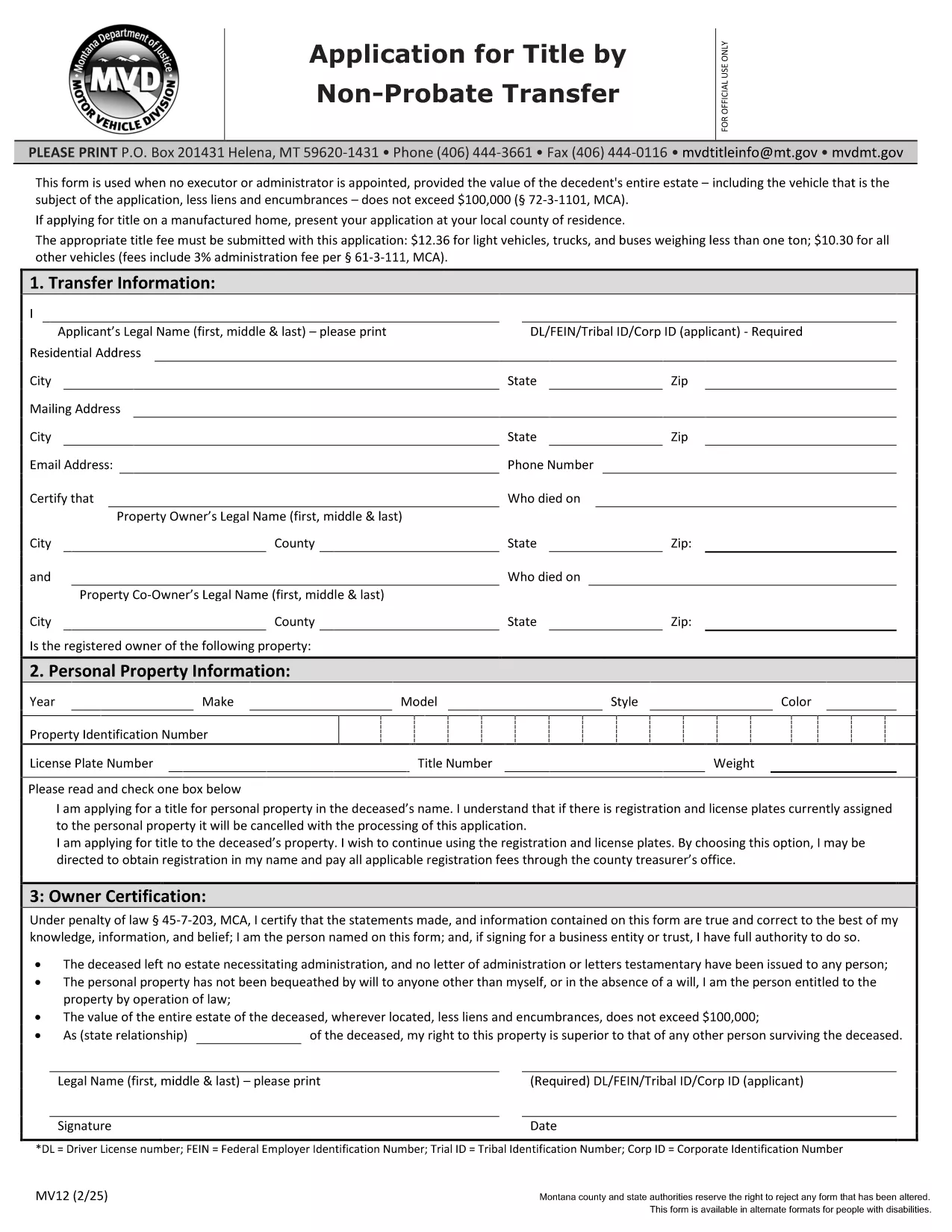
The MV12 is the official Montana application used to transfer a vehicle title when the owner has died or when a non‑probate transfer is required. This fillable PDF lets you complete the form quickly, securely, and without printing a single page.

Whether you are handling a right‑of‑survivorship transfer, a transfer by inheritance, or a simple change of ownership, the MV12 captures all required details—vehicle description, lien information, and the parties involved.

What Is the MV12 Form?

The MV12 is issued by the Montana Motor Vehicle Department (MVD). It is used when the estate’s total value is under $100,000 and no executor or administrator is appointed, or when the transfer is based on survivorship rights. The form replaces a paper‑only process with a digital, fillable version.

How to Fill Out the MV12 Online

Instead of downloading the PDF and opening a separate editor, simply click the "Fill out this form" button on this page. The Formize PDF Filler will load instantly, letting you type directly into each field, add signatures, and save your progress.

Common Mistakes to Avoid

  • Leaving the VIN or vehicle description blank.
  • Forgetting to attach a notarized signature when required.
  • Providing an outdated address for the owner or transferee.
  • Skipping the lien release section if a loan still exists on the vehicle.

Where to Submit the Completed Form

After you finish, download the completed PDF and mail or hand‑deliver it to your nearest Montana MVD office, or upload it through the MVD’s online portal if you have an account.

Eligibility & Required Documents

Before you start, gather these items:

  • Current vehicle title.
  • Proof of ownership (bill of sale, inheritance documents, or survivorship affidavit).
  • Notarized signatures where indicated.
  • Any lien release paperwork, if applicable.

Having these on hand will speed up processing and reduce the chance of a return.

คำถามที่พบบ่อย
  • Who can use the MV12 form?

    Anyone transferring a vehicle title in Montana when the estate value is under $100,000 and no executor is appointed, or when the transfer is based on right‑of‑survivorship.

  • Do I need a notary for the MV12?

    Yes, signatures on the owner’s declaration and any survivorship statements must be notarized.

  • Can I submit the MV12 electronically?

    You can upload the completed PDF through the Montana MVD’s online portal if you have an account; otherwise, mail or deliver the paper copy.

  • What happens if I make a mistake on the form?

    Minor errors can be corrected with a written amendment and a new signature. Major errors may require a new MV12 to be filed.

  • Is there a filing fee for the MV12?

    Yes, the MVD charges a standard title transfer fee. Check the latest fee schedule on the Montana MVD website.

  • How long does processing take?

    Processing typically takes 5‑10 business days after the MVD receives a complete and correct MV12.

  • Can I use the MV12 for a vehicle with an existing lien?

    Only if you include a lien release document signed by the lienholder. Otherwise, the title cannot be transferred.

  • What if the vehicle is a boat or snowmobile?

    The MV12 also covers motorboats, personal watercraft, and snowmobiles, as long as they are registered with the Montana MVD.

ทำอย่างไร

วิธีกรอก MV12 form ฟรีทางออนไลน์ใน 5 ขั้นตอนง่ายๆ:

  1. 1
    Open the Fillable Form
    Click the "Fill out this form" button on the page. The Formize PDF Filler loads instantly in your browser.
  2. 2
    Enter Your Information
    Type directly into each field—vehicle details, owner and transferee names, and lien information. Use the Tab key to move quickly between fields.
  3. 3
    Add Signatures
    Use the built‑in signature tool to draw or upload a scanned signature. Ensure notarized sections are signed by a qualified notary.
  4. 4
    Review & Save
    Click the "Review" button to check for missing fields. When everything looks correct, save the completed PDF to your computer.
  5. 5
    Submit to the MVD
    Mail, hand‑deliver, or upload the saved PDF to the Montana Motor Vehicle Department as instructed on the form.
สร้างแอป PDF Filler
เกี่ยวกับ

แบบฟอร์มทะเบียนรถ

หากคุณเป็นเจ้าของหรือเช่ายานยนต์ รถพ่วงหรือเรือ คุณต้องปฏิบัติตามข้อผูกพันบางประการเพื่อให้ยานพาหนะของคุณจดทะเบียนถูกต้องตามกฎหมายและปลอดภัย

MV12 form เป็นหนึ่งในแบบฟอร์มการจดทะเบียนรถยนต์ที่เป็นเอกสารที่ใช้ในการจดทะเบียนยานยนต์กับหน่วยงานของรัฐหรือจังหวัดที่เกี่ยวข้อง แบบฟอร์มเหล่านี้มักจำเป็นเมื่อบุคคลซื้อยานพาหนะใหม่หรือใช้แล้ว หรือเมื่อพวกเขาย้ายไปยังรัฐหรือจังหวัดใหม่ด้วยยานพาหนะ

ข้อกำหนดและแบบฟอร์มที่จำเป็นสำหรับการจดทะเบียนรถอาจแตกต่างกันไปตามสถานที่ แต่โดยทั่วไปแล้ว กระบวนการเกี่ยวข้องกับการให้ข้อมูลเกี่ยวกับรถ เจ้าของ และภาระผูกพันใดๆ ของรถ

เมื่อส่งแบบฟอร์มการจดทะเบียนและค่าธรรมเนียมแล้ว หน่วยงานของรัฐหรือหน่วยงานระดับจังหวัดจะออกใบรับรองการจดทะเบียนหรือป้ายทะเบียนให้กับเจ้าของรถ การจดทะเบียนนี้ทำให้รถสามารถใช้งานบนถนนสาธารณะและทางหลวงได้อย่างถูกกฎหมาย

คุณสมบัติ

PDF ฟิลเลอร์

วิธีที่ง่ายที่สุดในการกรอกแบบฟอร์ม PDF ทางออนไลน์

  • กรอก MV12 form อย่างรวดเร็ว
    กำลังมองหาวิธีเติม MV12 form ทางออนไลน์อย่างรวดเร็วอยู่ใช่ไหม ด้วยตัวกรอกแบบฟอร์ม PDF ออนไลน์ฟรีของเรา คุณจะรู้วิธีแก้ไขและกรอกเอกสาร PDF นี้ในเวลาไม่ถึงนาที
  • โปรแกรมแก้ไข PDF ออนไลน์ที่ใช้งานง่าย
    เบื่อกับการพิมพ์ไฟล์ PDF เพื่อให้คุณสามารถแก้ไขได้ก่อนที่จะสแกนซ้ำและส่งกลับหรือไม่? แก้ไขเอกสาร PDF ออนไลน์ฟรี ใช้โปรแกรมแก้ไข PDF ออนไลน์ของเราเพื่อประหยัดเวลาและกระดาษ
  • เครื่องมือที่ยอดเยี่ยมสำหรับทุกแพลตฟอร์ม
    สงสัยวิธีเติม MV12 form บน Mac หรืออาจใช้ตัวเติม PDF ฟรีได้อย่างไร เครื่องมือ PDF ออนไลน์ของเราทำงานได้บนทุกแพลตฟอร์ม
  • การจัดเก็บไฟล์ที่ปลอดภัย
    ไฟล์ "MV12 form" ที่เสร็จสมบูรณ์จะถูกจัดเก็บไว้ในฐานข้อมูลที่ปลอดภัยซึ่งจัดการโดย Amazon Cloud hosting คุณสามารถลบไฟล์ของคุณออกจากระบบของเราได้ตลอดเวลา ไม่ว่าในกรณีใด ไฟล์เหล่านี้จะถูกลบโดยอัตโนมัติหลังจากผ่านไป 24 ชั่วโมง
  • สนทนากับ MV12 form
    แชทกับ "MV12 form" บน Chatize ที่เป็นผู้ช่วยอ่าน PDF ฟรี ถามคำถามและรับคำตอบจาก "MV12 form" เพียงคลิกที่ปุ่ม แชทด้วยเอกสาร ด้านบน

ลบเซสชันการบรรจุ

ลบเซสชันการกรอกข้อมูลที่เลือกหรือไม่?ในกรณีนี้ความคืบหน้าในการกรอกแบบฟอร์มจะหายไป

ลบเซสชันการแก้ไข

ลบเซสชันการแก้ไขที่เลือกหรือไม่ ในกรณีนี้ ความคืบหน้าในการสร้างและแก้ไขแบบฟอร์มจะหายไป