
hamburger-menu icon
เลือกภาษา

MVR-181 Damage Disclosure Statement – Fillable PDF

  1. ภาษา ภาษาอังกฤษ
  2. ประเทศ สหรัฐอเมริกา
  3. กิจกรรม ทะเบียนรถ
  4. สถานะ นอร์ทแคโรไลนา
MVR-181 Damage Disclosure Statement – Fillable PDF

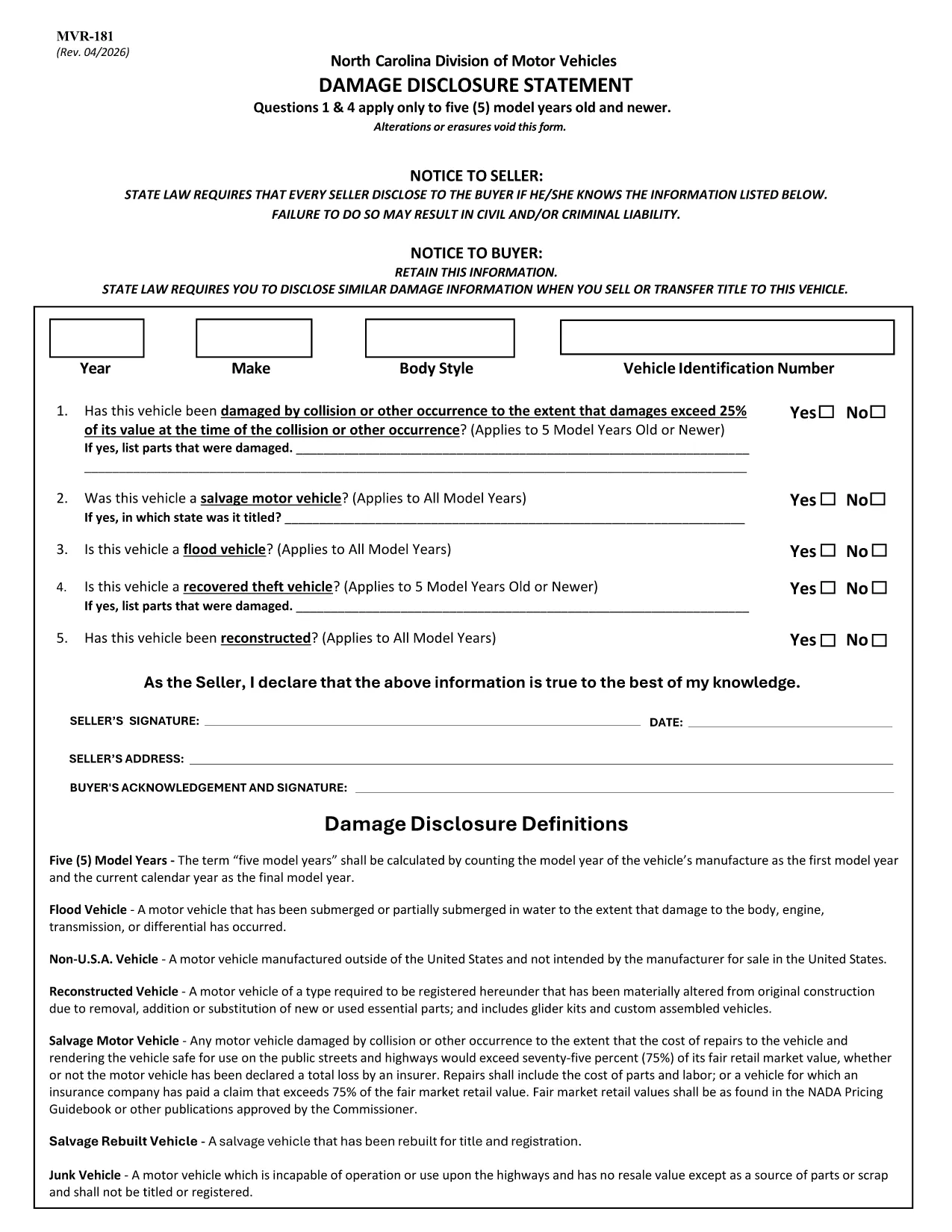
The MVR-181 Damage Disclosure Statement is a legally required form in North Carolina that sellers must complete to disclose any known damage, salvage status, or alterations to a motor vehicle before a sale. Providing accurate information protects both the seller and the buyer from future disputes.

What Is the MVR-181 Damage Disclosure Statement?

The form asks for details such as:

  • Vehicle identification (VIN, make, model, year)
  • Any prior collision or flood damage
  • Whether the vehicle has been declared a total loss or salvaged
  • Signatures of both seller and buyer confirming the information is true

Questions 1 & 4 only apply to vehicles that are five model years old or newer.

Why Choose a Fillable PDF for MVR-181?

Using a fillable PDF saves time, eliminates illegible handwriting, and ensures every required field is completed before submission. With Formize’s online editor you can:

  • Enter data directly on the form
  • Add a legally binding electronic signature
  • Validate the form instantly
  • Download or email the completed PDF in seconds

How to Complete the MVR-181 Online

Follow the simple steps below to fill out the form without leaving your browser.

Common Mistakes to Avoid

  • Leaving any required checkbox unchecked – the form will not validate.
  • Altering or erasing printed text – any changes void the statement.
  • Forgetting both signatures – an unsigned form is not enforceable.

Download the Official NC MVR-181 PDF

Click the button below to open the official North Carolina MVR‑181 PDF in Formize’s secure filler. No software download is required.

คำถามที่พบบ่อย
  • Who is required to complete the MVR-181?

    Any private seller or dealer transferring ownership of a motor vehicle in North Carolina must complete the Damage Disclosure Statement.

  • Is an electronic signature accepted on the MVR-181?

    Yes. North Carolina law recognizes ESIGN‑compliant electronic signatures as valid for the MVR‑181.

  • Can I use the same MVR-181 for multiple vehicles?

    No. Each vehicle requires its own completed form with the specific VIN and damage details.

  • What happens if I leave a required box unchecked?

    The form will not validate, and the transaction could be considered non‑compliant, exposing both parties to liability.

  • Do I need to submit the form to a government agency?

    The completed MVR‑181 is kept with the vehicle’s title paperwork. It is not filed with the DMV, but it must be presented at the time of sale.

  • Can I edit the form after I’ve signed it?

    Once an electronic signature is applied, the document is locked to preserve integrity. If changes are needed, create a new form.

  • Is the PDF provided by Formize the official version?

    Yes. The download link points to the official North Carolina Department of Transportation version of MVR‑181.

  • Do I need special software to fill out the PDF?

    No. Formize’s online filler works in any modern browser – no additional software is required.

ทำอย่างไร

วิธีกรอก MVR-181 ฟรีทางออนไลน์ใน 5 ขั้นตอนง่ายๆ:

  1. 1
    Open the Fillable Form
    Click the “Fill out this form” button on the page. The Formize PDF Filler app loads the MVR‑181 directly in your browser.
  2. 2
    Enter the Required Information
    Type into each fillable field – VIN, make, model, damage details, etc. The form highlights any missing required fields.
  3. 3
    Add Your Electronic Signature
    Use the built‑in e‑sign tool to sign as the seller and the buyer. The signature is legally binding and compliant with ESIGN.
  4. 4
    Review and Validate
    Click “Validate” to let Formize check for incomplete sections or unchecked boxes. Correct any issues before proceeding.
  5. 5
    Download or Email the Completed PDF
    When validation passes, choose “Download” to save a copy or “Email” to send the completed form directly to the other party.
สร้างแอป PDF Filler
เกี่ยวกับ

แบบฟอร์มทะเบียนรถ

MVR-181 เป็นหนึ่งในแบบฟอร์มทะเบียนยานพาหนะที่เป็นเอกสารที่ใช้ในการจดทะเบียนยานยนต์กับหน่วยงานของรัฐที่เกี่ยวข้อง โดยทั่วไปคือกรมยานยนต์ (DMV) หรือหน่วยงานที่เทียบเท่า แบบฟอร์มเหล่านี้จำเป็นเมื่อบุคคลซื้อยานพาหนะใหม่หรือใช้แล้ว โอนกรรมสิทธิ์ยานพาหนะ หรือย้ายไปยังเขตอำนาจศาลใหม่พร้อมยานพาหนะ

แบบฟอร์มทะเบียนรถยนต์อาจแตกต่างกันไปตามเขตอำนาจศาล แต่โดยทั่วไปแล้วแบบฟอร์มดังกล่าวจำเป็นต้องมีข้อมูลต่อไปนี้:

ข้อมูลยานพาหนะ: รวมถึงรายละเอียดเกี่ยวกับยานพาหนะ เช่น ยี่ห้อ รุ่น ปี หมายเลขประจำตัวยานพาหนะ (VIN) และการอ่านมาตรวัดระยะทาง

ข้อมูลเจ้าของ: แบบฟอร์มนี้ต้องการข้อมูลเกี่ยวกับเจ้าของรถ รวมถึงชื่อ ที่อยู่ ข้อมูลติดต่อ และหมายเลขใบอนุญาตขับขี่

หลักฐานการเป็นเจ้าของ: อาจจำเป็นต้องมีหลักฐานการเป็นเจ้าของ เช่น ใบรับรองชื่อ ใบขาย หรือใบรับรองแหล่งกำเนิดสินค้าของผู้ผลิต (สำหรับรถยนต์ใหม่) ทั้งนี้ขึ้นอยู่กับสถานการณ์

ข้อมูลการประกันภัย: โดยทั่วไปจะต้องมีหลักฐานการประกันภัยรถยนต์ที่ถูกต้อง ซึ่งอาจรวมถึงการระบุหมายเลขกรมธรรม์ วันที่คุ้มครอง และรายละเอียดบริษัทประกันภัย

การชำระค่าธรรมเนียม: การจดทะเบียนยานพาหนะเกี่ยวข้องกับการชำระค่าธรรมเนียมต่างๆ เช่น ค่าธรรมเนียมการจดทะเบียน ภาษี และค่าใช้จ่ายอื่นๆ ที่เฉพาะเจาะจงสำหรับเขตอำนาจศาล

นอกเหนือจากข้อกำหนดพื้นฐานเหล่านี้แล้ว เขตอำนาจศาลบางแห่งอาจมีแบบฟอร์มหรือข้อกำหนดด้านเอกสารเพิ่มเติม ตัวอย่างเช่น ผลการทดสอบการปล่อยมลพิษ การตรวจสอบความปลอดภัย หรือหลักฐานการอยู่อาศัยอาจจำเป็นในบางพื้นที่

เมื่อกรอกแบบฟอร์มทะเบียนรถและส่งแล้ว หน่วยงานของรัฐจะออกใบรับรองการจดทะเบียน ป้ายทะเบียน และสติ๊กเกอร์ทะเบียน เอกสารเหล่านี้ระบุว่ารถยนต์ได้รับการจดทะเบียนถูกต้องตามกฎหมายและได้รับอนุญาตให้ใช้งานบนถนนสาธารณะ

สิ่งสำคัญคือต้องทราบว่าข้อกำหนดในการจดทะเบียนยานพาหนะอาจแตกต่างกันอย่างมากตามเขตอำนาจศาล ดังนั้นจึงขอแนะนำให้ปรึกษา DMV ในพื้นที่หรือหน่วยงานที่เทียบเท่าสำหรับแบบฟอร์มและขั้นตอนเฉพาะที่เกี่ยวข้องกับสถานที่ของคุณ

คุณสมบัติ

PDF ฟิลเลอร์

วิธีที่ง่ายที่สุดในการกรอกแบบฟอร์ม PDF ทางออนไลน์

  • กรอก MVR-181 อย่างรวดเร็ว
    กำลังมองหาวิธีเติม MVR-181 ทางออนไลน์อย่างรวดเร็วอยู่ใช่ไหม ด้วยตัวกรอกแบบฟอร์ม PDF ออนไลน์ฟรีของเรา คุณจะรู้วิธีแก้ไขและกรอกเอกสาร PDF นี้ในเวลาไม่ถึงนาที
  • โปรแกรมแก้ไข PDF ออนไลน์ที่ใช้งานง่าย
    เบื่อกับการพิมพ์ไฟล์ PDF เพื่อให้คุณสามารถแก้ไขได้ก่อนที่จะสแกนซ้ำและส่งกลับหรือไม่? แก้ไขเอกสาร PDF ออนไลน์ฟรี ใช้โปรแกรมแก้ไข PDF ออนไลน์ของเราเพื่อประหยัดเวลาและกระดาษ
  • เครื่องมือที่ยอดเยี่ยมสำหรับทุกแพลตฟอร์ม
    สงสัยวิธีเติม MVR-181 บน Mac หรืออาจใช้ตัวเติม PDF ฟรีได้อย่างไร เครื่องมือ PDF ออนไลน์ของเราทำงานได้บนทุกแพลตฟอร์ม
  • การจัดเก็บไฟล์ที่ปลอดภัย
    ไฟล์ "MVR-181" ที่เสร็จสมบูรณ์จะถูกจัดเก็บไว้ในฐานข้อมูลที่ปลอดภัยซึ่งจัดการโดย Amazon Cloud hosting คุณสามารถลบไฟล์ของคุณออกจากระบบของเราได้ตลอดเวลา ไม่ว่าในกรณีใด ไฟล์เหล่านี้จะถูกลบโดยอัตโนมัติหลังจากผ่านไป 24 ชั่วโมง
  • สนทนากับ MVR-181
    แชทกับ "MVR-181" บน Chatize ที่เป็นผู้ช่วยอ่าน PDF ฟรี ถามคำถามและรับคำตอบจาก "MVR-181" เพียงคลิกที่ปุ่ม แชทด้วยเอกสาร ด้านบน

ลบเซสชันการบรรจุ

ลบเซสชันการกรอกข้อมูลที่เลือกหรือไม่?ในกรณีนี้ความคืบหน้าในการกรอกแบบฟอร์มจะหายไป

ลบเซสชันการแก้ไข

ลบเซสชันการแก้ไขที่เลือกหรือไม่ ในกรณีนี้ ความคืบหน้าในการสร้างและแก้ไขแบบฟอร์มจะหายไป