
hamburger-menu icon
เลือกภาษา

North Carolina MVR-63 Power of Attorney Fillable PDF

  1. ภาษา ภาษาอังกฤษ
  2. ประเทศ สหรัฐอเมริกา
  3. กิจกรรม ทะเบียนรถ
  4. สถานะ นอร์ทแคโรไลนา
North Carolina MVR-63 Power of Attorney Fillable PDF

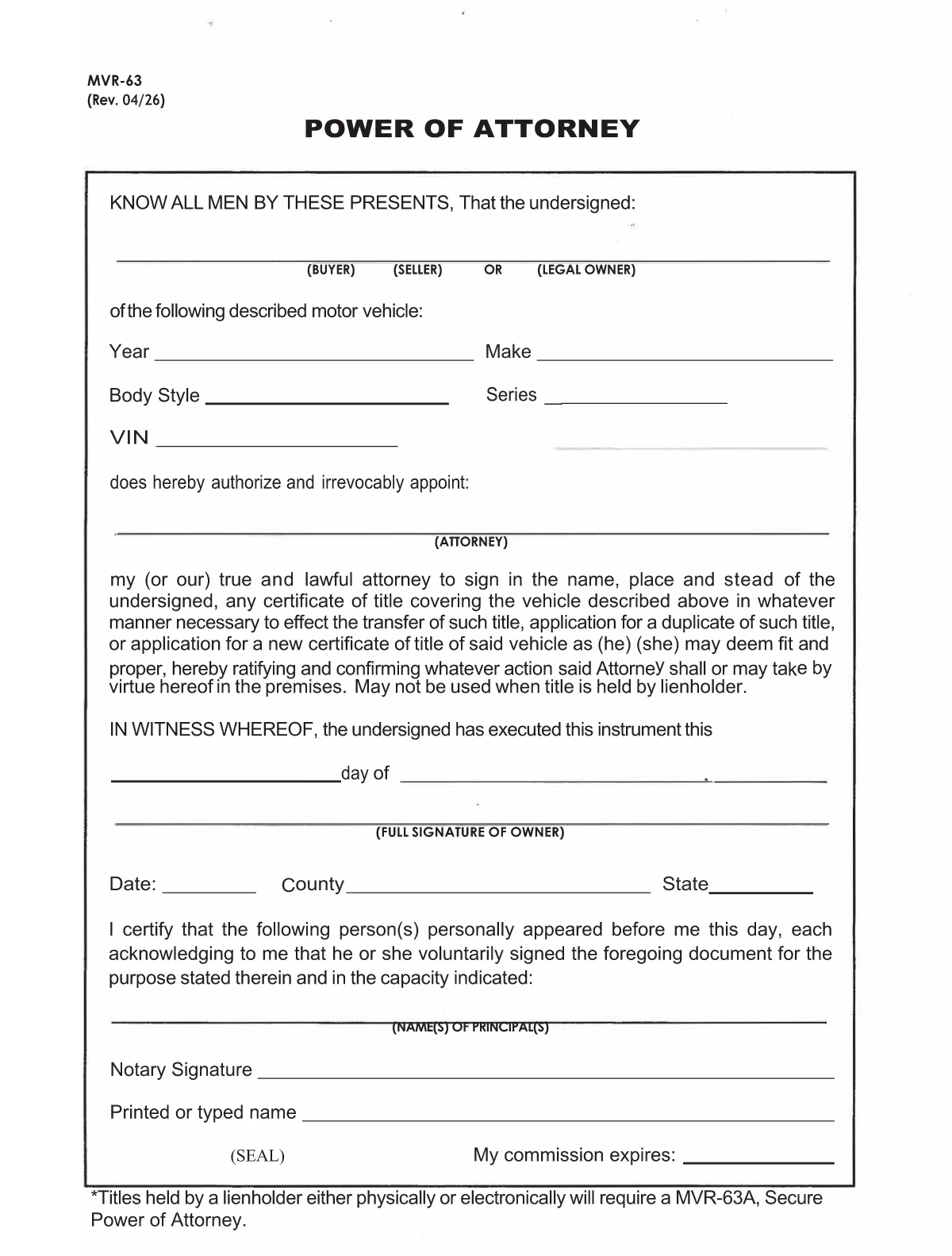
The MVR-63 is North Carolina’s Motor Vehicle Power of Attorney. It authorizes another person (the attorney‑in‑fact) to act on your behalf for vehicle‑related matters such as titling, registration, lien recording, or duplicate title requests. Using Formize’s fillable PDF, you can complete the form directly in your browser—no Adobe Acrobat required.

Our online PDF filler automatically preserves the exact layout of the official NCDOT document, ensuring the completed form is accepted by the Division of Motor Vehicles (DMV). Simply click the button below, fill in the required fields, and download the signed PDF ready for notarization.

Below you’ll find a quick overview of the form’s sections, step‑by‑step instructions, and tips to avoid common errors.

คำถามที่พบบ่อย
  • What is the purpose of the MVR-63 form?

    The MVR-63 grants a designated person the legal authority to handle motor‑vehicle transactions for the owner, such as titling, registration, lien recording, or obtaining duplicate titles.

  • Do I need a notary for the MVR-63?

    Yes. North Carolina law requires the MVR-63 to be notarized before the DMV will accept it.

  • Can I submit the MVR-63 electronically?

    The DMV still requires a notarized, printed copy. However, you can fill out the form online, print it, and then have it notarized.

  • Is there a fee to download the MVR-63 PDF?

    No. The official form is provided free of charge by the North Carolina Department of Transportation.

  • What information is required for the vehicle description?

    You must list the vehicle’s year, make, model, VIN (Vehicle Identification Number), and body type.

  • Can I give the attorney limited powers?

    Yes. The form includes checkboxes allowing you to specify which actions the attorney may perform (e.g., only title transfer or only registration).

  • How long is the MVR-63 valid?

    The form remains valid until the owner revokes it in writing or the DMV cancels it for any reason.

  • What if I make a mistake on the form?

    Cross out the error with a single line, initial it, and correct the information in the appropriate field before signing and notarizing.

ทำอย่างไร

วิธีกรอก MVR-63 ฟรีทางออนไลน์ใน 7 ขั้นตอนง่ายๆ:

  1. 1
    Open the Fillable Form
    Click the “Fill out this form” button on this page. The Formize PDF Filler app will open in a new tab.
  2. 2
    Wait for the Filler to Load
    The app loads the official MVR-63 PDF and makes every field editable. This usually takes a few seconds.
  3. 3
    Enter Owner Information
    Fill in the vehicle owner’s name, address, driver’s license number, and vehicle details (VIN, make, model, year).
  4. 4
    Add Attorney‑in‑Fact Details
    Provide the attorney’s full name, address, and relationship to the owner. Choose the specific powers you are granting.
  5. 5
    Sign and Date
    Type the owner’s signature in the signature field, add the date, and, if required, the county and state.
  6. 6
    Notarize the Form
    Print the completed PDF and have it notarized in person, or use an online notary service accepted by the NCDOT.
  7. 7
    Download or Submit
    After notarization, download the final PDF and submit it to your local DMV office or the designated agency.
สร้างแอป PDF Filler
เกี่ยวกับ

แบบฟอร์มทะเบียนรถ

หากคุณเป็นเจ้าของหรือเช่ายานยนต์ รถพ่วงหรือเรือ คุณต้องปฏิบัติตามข้อผูกพันบางประการเพื่อให้ยานพาหนะของคุณจดทะเบียนถูกต้องตามกฎหมายและปลอดภัย

MVR-63 เป็นหนึ่งในแบบฟอร์มการจดทะเบียนรถยนต์ที่เป็นเอกสารที่ใช้ในการจดทะเบียนยานยนต์กับหน่วยงานของรัฐหรือจังหวัดที่เกี่ยวข้อง แบบฟอร์มเหล่านี้มักจำเป็นเมื่อบุคคลซื้อยานพาหนะใหม่หรือใช้แล้ว หรือเมื่อพวกเขาย้ายไปยังรัฐหรือจังหวัดใหม่ด้วยยานพาหนะ

ข้อกำหนดและแบบฟอร์มที่จำเป็นสำหรับการจดทะเบียนรถอาจแตกต่างกันไปตามสถานที่ แต่โดยทั่วไปแล้ว กระบวนการเกี่ยวข้องกับการให้ข้อมูลเกี่ยวกับรถ เจ้าของ และภาระผูกพันใดๆ ของรถ

เมื่อส่งแบบฟอร์มการจดทะเบียนและค่าธรรมเนียมแล้ว หน่วยงานของรัฐหรือหน่วยงานระดับจังหวัดจะออกใบรับรองการจดทะเบียนหรือป้ายทะเบียนให้กับเจ้าของรถ การจดทะเบียนนี้ทำให้รถสามารถใช้งานบนถนนสาธารณะและทางหลวงได้อย่างถูกกฎหมาย

คุณสมบัติ

PDF ฟิลเลอร์

วิธีที่ง่ายที่สุดในการกรอกแบบฟอร์ม PDF ทางออนไลน์

  • กรอก MVR-63 อย่างรวดเร็ว
    กำลังมองหาวิธีเติม MVR-63 ทางออนไลน์อย่างรวดเร็วอยู่ใช่ไหม ด้วยตัวกรอกแบบฟอร์ม PDF ออนไลน์ฟรีของเรา คุณจะรู้วิธีแก้ไขและกรอกเอกสาร PDF นี้ในเวลาไม่ถึงนาที
  • โปรแกรมแก้ไข PDF ออนไลน์ที่ใช้งานง่าย
    เบื่อกับการพิมพ์ไฟล์ PDF เพื่อให้คุณสามารถแก้ไขได้ก่อนที่จะสแกนซ้ำและส่งกลับหรือไม่? แก้ไขเอกสาร PDF ออนไลน์ฟรี ใช้โปรแกรมแก้ไข PDF ออนไลน์ของเราเพื่อประหยัดเวลาและกระดาษ
  • เครื่องมือที่ยอดเยี่ยมสำหรับทุกแพลตฟอร์ม
    สงสัยวิธีเติม MVR-63 บน Mac หรืออาจใช้ตัวเติม PDF ฟรีได้อย่างไร เครื่องมือ PDF ออนไลน์ของเราทำงานได้บนทุกแพลตฟอร์ม
  • การจัดเก็บไฟล์ที่ปลอดภัย
    ไฟล์ "MVR-63" ที่เสร็จสมบูรณ์จะถูกจัดเก็บไว้ในฐานข้อมูลที่ปลอดภัยซึ่งจัดการโดย Amazon Cloud hosting คุณสามารถลบไฟล์ของคุณออกจากระบบของเราได้ตลอดเวลา ไม่ว่าในกรณีใด ไฟล์เหล่านี้จะถูกลบโดยอัตโนมัติหลังจากผ่านไป 24 ชั่วโมง
  • สนทนากับ MVR-63
    แชทกับ "MVR-63" บน Chatize ที่เป็นผู้ช่วยอ่าน PDF ฟรี ถามคำถามและรับคำตอบจาก "MVR-63" เพียงคลิกที่ปุ่ม แชทด้วยเอกสาร ด้านบน

ลบเซสชันการบรรจุ

ลบเซสชันการกรอกข้อมูลที่เลือกหรือไม่?ในกรณีนี้ความคืบหน้าในการกรอกแบบฟอร์มจะหายไป

ลบเซสชันการแก้ไข

ลบเซสชันการแก้ไขที่เลือกหรือไม่ ในกรณีนี้ ความคืบหน้าในการสร้างและแก้ไขแบบฟอร์มจะหายไป