
hamburger-menu icon
เลือกภาษา

Request Texas Motor Vehicle Information – Form VTR‑275

  1. ภาษา ภาษาอังกฤษ
  2. ประเทศ สหรัฐอเมริกา
  3. กิจกรรม ทะเบียนรถ
  4. สถานะ เท็กซัส
Request Texas Motor Vehicle Information – Form VTR‑275

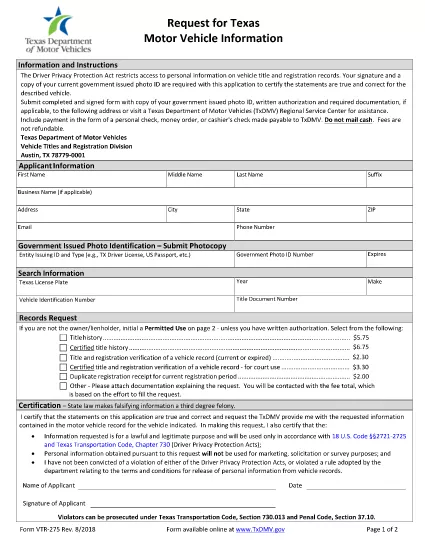
The Texas VTR‑275 (Request for Motor Vehicle Information) is the official form used to obtain vehicle records from the Texas Department of Motor Vehicles (TxDMV). Whether you need a title search, lien information, or ownership history, this fillable PDF lets you request the data quickly and securely.

What Is Form VTR‑275?

Form VTR‑275 is a state‑approved request that specifies the permitted uses of Texas motor‑vehicle information. It requires your signature (or printed initials) and a valid government‑issued photo ID. The form is accepted by the TxDMV, local county clerks, and authorized third‑party agencies.

How to Fill Out VTR‑275 with Formize

Instead of downloading the PDF and opening a separate editor, simply click the "Fill out this form" button on this page. The Formize PDF Filler app will load automatically, allowing you to complete every field online.

  • Step 1: Click the blue “Fill out this form” button.
  • Step 2: Wait a few seconds for the Formize PDF Filler to appear.
  • Step 3: Enter your personal details, vehicle information, and the specific reason for the request.
  • Step 4: Upload a scanned copy of your photo ID (if required).
  • Step 5: Review the completed form, then click “Submit” to download the finished PDF or send it directly to the TxDMV.

Common Mistakes to Avoid

Even a small error can delay processing. Keep these tips in mind:

  • Use the exact VIN or license‑plate number as it appears on the title.
  • Do not leave any required field blank; use “N/A” only when the form explicitly allows it.
  • Make sure your signature matches the name on your ID.
  • Attach a clear, legible copy of your photo ID; blurry images are rejected.

Where to Submit the Completed Form

After filling out VTR‑275, you have two options:

  • Mail: Send the signed form, copy of your ID, and any required authorization to:
    TxDMV – Vehicle Titles and Registration Division, Austin, TX 78779‑0001.
  • In‑Person: Visit any TxDMV Regional Service Center or participating county clerk office.

Electronic submission is not currently accepted, so a printed copy is required for mailing or in‑person delivery.

Frequently Asked Questions

Below are answers to the most common queries about Form VTR‑275.

คำถามที่พบบ่อย
  • Do I need a notary for Form VTR‑275?

    No. The form only requires your signature and a copy of a valid government‑issued photo ID. A notary is not required.

  • Can I submit the form electronically?

    The TxDMV currently accepts only paper copies. After filling the form online, print it and mail or deliver it in person.

  • What types of vehicle information can I request?

    You can request title history, lien status, registration details, and ownership records, provided the request falls under a permitted use.

  • How long does it take to receive the requested information?

    Processing typically takes 5‑10 business days after the TxDMV receives a complete and correctly signed form.

  • Is there a fee for using Form VTR‑275?

    Yes. A standard processing fee applies; check the TxDMV fee schedule for the most current amount.

  • Can I request information on a vehicle I don’t own?

    Only if you qualify under a permitted use (e.g., legal, insurance, or lien holder). The form requires you to specify the purpose.

  • What should I do if my ID copy is rejected?

    Resubmit a clearer, full‑face scan of a valid driver’s license, state ID, or passport. Ensure the image is not blurry and all edges are visible.

  • Is there a deadline for submitting the request?

    There is no statutory deadline, but the sooner you submit a complete form, the faster you’ll receive the records.

ทำอย่างไร

วิธีกรอก VTR-275 ฟรีทางออนไลน์ใน 5 ขั้นตอนง่ายๆ:

  1. 1
    Open the Fillable Form
    Click the "Fill out this form" button on the page. The Formize PDF Filler will open in a new window.
  2. 2
    Enter Required Information
    Complete each field: requestor details, vehicle VIN or plate, purpose of request, and sign electronically.
  3. 3
    Upload Supporting Documents
    Attach a clear scan or photo of your government‑issued ID and any required authorization letters.
  4. 4
    Review and Download
    Double‑check all entries, then click "Submit" to download the completed PDF ready for mailing or in‑person delivery.
  5. 5
    Send the Form
    Print the PDF, attach the ID copy, and mail it to the TxDMV address or bring it to a regional service center.
สร้างแอป PDF Filler
เกี่ยวกับ

แบบฟอร์มทะเบียนรถ

VTR-275 เป็นหนึ่งในแบบฟอร์มทะเบียนยานพาหนะที่เป็นเอกสารที่ใช้ในการจดทะเบียนยานยนต์กับหน่วยงานของรัฐที่เกี่ยวข้อง โดยทั่วไปคือกรมยานยนต์ (DMV) หรือหน่วยงานที่เทียบเท่า แบบฟอร์มเหล่านี้จำเป็นเมื่อบุคคลซื้อยานพาหนะใหม่หรือใช้แล้ว โอนกรรมสิทธิ์ยานพาหนะ หรือย้ายไปยังเขตอำนาจศาลใหม่พร้อมยานพาหนะ

แบบฟอร์มทะเบียนรถยนต์อาจแตกต่างกันไปตามเขตอำนาจศาล แต่โดยทั่วไปแล้วแบบฟอร์มดังกล่าวจำเป็นต้องมีข้อมูลต่อไปนี้:

ข้อมูลยานพาหนะ: รวมถึงรายละเอียดเกี่ยวกับยานพาหนะ เช่น ยี่ห้อ รุ่น ปี หมายเลขประจำตัวยานพาหนะ (VIN) และการอ่านมาตรวัดระยะทาง

ข้อมูลเจ้าของ: แบบฟอร์มนี้ต้องการข้อมูลเกี่ยวกับเจ้าของรถ รวมถึงชื่อ ที่อยู่ ข้อมูลติดต่อ และหมายเลขใบอนุญาตขับขี่

หลักฐานการเป็นเจ้าของ: อาจจำเป็นต้องมีหลักฐานการเป็นเจ้าของ เช่น ใบรับรองชื่อ ใบขาย หรือใบรับรองแหล่งกำเนิดสินค้าของผู้ผลิต (สำหรับรถยนต์ใหม่) ทั้งนี้ขึ้นอยู่กับสถานการณ์

ข้อมูลการประกันภัย: โดยทั่วไปจะต้องมีหลักฐานการประกันภัยรถยนต์ที่ถูกต้อง ซึ่งอาจรวมถึงการระบุหมายเลขกรมธรรม์ วันที่คุ้มครอง และรายละเอียดบริษัทประกันภัย

การชำระค่าธรรมเนียม: การจดทะเบียนยานพาหนะเกี่ยวข้องกับการชำระค่าธรรมเนียมต่างๆ เช่น ค่าธรรมเนียมการจดทะเบียน ภาษี และค่าใช้จ่ายอื่นๆ ที่เฉพาะเจาะจงสำหรับเขตอำนาจศาล

นอกเหนือจากข้อกำหนดพื้นฐานเหล่านี้แล้ว เขตอำนาจศาลบางแห่งอาจมีแบบฟอร์มหรือข้อกำหนดด้านเอกสารเพิ่มเติม ตัวอย่างเช่น ผลการทดสอบการปล่อยมลพิษ การตรวจสอบความปลอดภัย หรือหลักฐานการอยู่อาศัยอาจจำเป็นในบางพื้นที่

เมื่อกรอกแบบฟอร์มทะเบียนรถและส่งแล้ว หน่วยงานของรัฐจะออกใบรับรองการจดทะเบียน ป้ายทะเบียน และสติ๊กเกอร์ทะเบียน เอกสารเหล่านี้ระบุว่ารถยนต์ได้รับการจดทะเบียนถูกต้องตามกฎหมายและได้รับอนุญาตให้ใช้งานบนถนนสาธารณะ

สิ่งสำคัญคือต้องทราบว่าข้อกำหนดในการจดทะเบียนยานพาหนะอาจแตกต่างกันอย่างมากตามเขตอำนาจศาล ดังนั้นจึงขอแนะนำให้ปรึกษา DMV ในพื้นที่หรือหน่วยงานที่เทียบเท่าสำหรับแบบฟอร์มและขั้นตอนเฉพาะที่เกี่ยวข้องกับสถานที่ของคุณ

คุณสมบัติ

PDF ฟิลเลอร์

วิธีที่ง่ายที่สุดในการกรอกแบบฟอร์ม PDF ทางออนไลน์

  • กรอก VTR-275 อย่างรวดเร็ว
    กำลังมองหาวิธีเติม VTR-275 ทางออนไลน์อย่างรวดเร็วอยู่ใช่ไหม ด้วยตัวกรอกแบบฟอร์ม PDF ออนไลน์ฟรีของเรา คุณจะรู้วิธีแก้ไขและกรอกเอกสาร PDF นี้ในเวลาไม่ถึงนาที
  • โปรแกรมแก้ไข PDF ออนไลน์ที่ใช้งานง่าย
    เบื่อกับการพิมพ์ไฟล์ PDF เพื่อให้คุณสามารถแก้ไขได้ก่อนที่จะสแกนซ้ำและส่งกลับหรือไม่? แก้ไขเอกสาร PDF ออนไลน์ฟรี ใช้โปรแกรมแก้ไข PDF ออนไลน์ของเราเพื่อประหยัดเวลาและกระดาษ
  • เครื่องมือที่ยอดเยี่ยมสำหรับทุกแพลตฟอร์ม
    สงสัยวิธีเติม VTR-275 บน Mac หรืออาจใช้ตัวเติม PDF ฟรีได้อย่างไร เครื่องมือ PDF ออนไลน์ของเราทำงานได้บนทุกแพลตฟอร์ม
  • การจัดเก็บไฟล์ที่ปลอดภัย
    ไฟล์ "VTR-275" ที่เสร็จสมบูรณ์จะถูกจัดเก็บไว้ในฐานข้อมูลที่ปลอดภัยซึ่งจัดการโดย Amazon Cloud hosting คุณสามารถลบไฟล์ของคุณออกจากระบบของเราได้ตลอดเวลา ไม่ว่าในกรณีใด ไฟล์เหล่านี้จะถูกลบโดยอัตโนมัติหลังจากผ่านไป 24 ชั่วโมง
  • สนทนากับ VTR-275
    แชทกับ "VTR-275" บน Chatize ที่เป็นผู้ช่วยอ่าน PDF ฟรี ถามคำถามและรับคำตอบจาก "VTR-275" เพียงคลิกที่ปุ่ม แชทด้วยเอกสาร ด้านบน

ลบเซสชันการบรรจุ

ลบเซสชันการกรอกข้อมูลที่เลือกหรือไม่?ในกรณีนี้ความคืบหน้าในการกรอกแบบฟอร์มจะหายไป

ลบเซสชันการแก้ไข

ลบเซสชันการแก้ไขที่เลือกหรือไม่ ในกรณีนี้ ความคืบหน้าในการสร้างและแก้ไขแบบฟอร์มจะหายไป