
hamburger-menu icon
เลือกภาษา

VTR-62-EMS Fillable PDF – Texas EMS Exempt License Plate Application

  1. ภาษา ภาษาอังกฤษ
  2. ประเทศ สหรัฐอเมริกา
  3. กิจกรรม ทะเบียนรถ
  4. สถานะ เท็กซัส
VTR-62-EMS Fillable PDF – Texas EMS Exempt License Plate Application

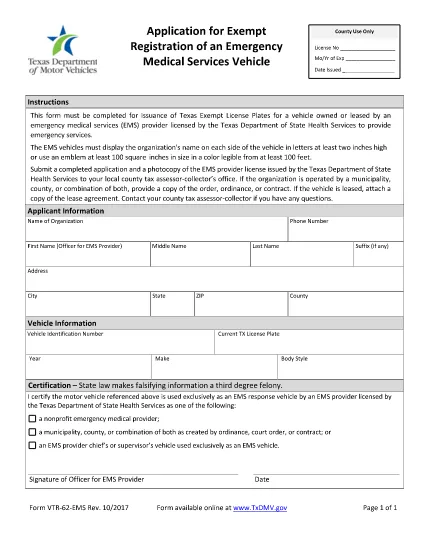
The VTR-62-EMS is the Texas Department of Motor Vehicles (TxDMV) application used by emergency medical services (EMS) providers to obtain exempt license plates for their emergency vehicles. This form must be completed, signed, and submitted to the TxDMV before the plates can be issued.

What Is the VTR-62-EMS Form?

The VTR-62-EMS form authorizes the issuance of special, exempt license plates that are reserved for EMS vehicles. The plates display the organization’s name or an approved emblem and are exempt from standard registration fees.

How to Complete the Form Online

Instead of downloading the PDF, simply click the "Fill out this form" button on this page. The Formize PDF Filler app will load the fillable version of the VTR-62-EMS, allowing you to:

  • Enter organization details, vehicle information, and contact data.
  • Upload a digital copy of the EMS emblem (optional).
  • Sign electronically with a mouse or touchscreen.
  • Save your progress and return later if needed.

Common Mistakes to Avoid

  • Incorrect vehicle identification number (VIN): Double‑check the VIN on the vehicle registration.
  • Missing signature: The form requires an authorized signature; an unsigned form will be rejected.
  • Improper emblem size: The emblem must be at least two inches high if used.
  • Wrong organization name spelling: The name appears on both sides of the plate and must be exact.

Where to Submit the Completed Form

After filling out and signing the form online, you can:

  • Download the completed PDF and mail it to the TxDMV address listed on the form.
  • Print the form and deliver it in person to any Texas Department of Motor Vehicles office.

Be sure to include any required supporting documents, such as proof of EMS licensing.

Download the Official PDF

If you prefer the original PDF, you can download it directly from the Texas DMV website:

Download VTR-62-EMS PDF

คำถามที่พบบ่อย
  • Who can use the VTR-62-EMS form?

    Any EMS provider licensed by the Texas Department of State Health Services that operates emergency vehicles may apply for exempt plates using this form.

  • Is there a fee for the exempt license plates?

    The plates are exempt from the standard registration fee, but you may still need to pay for the physical plate production, depending on the TxDMV policy.

  • Can I submit the form electronically?

    Yes. After completing the fillable PDF with Formize, you can download the signed document and email it to the TxDMV, or mail a printed copy.

  • What size must the EMS emblem be?

    The emblem must be at least two inches high and clearly visible on the plate.

  • How long does it take to receive the plates after submission?

    Processing typically takes 7‑10 business days once the TxDMV receives a complete and correctly signed application.

  • Do I need to renew the exempt plates?

    Exempt plates are valid for the same period as standard plates. Renewal notices will be sent by the TxDMV.

  • What if I make a mistake on the form?

    Correct any errors before signing. If you submit a form with mistakes, the TxDMV will return it, causing delays.

  • Can I use a different PDF editor to fill the form?

    You can, but the Formize fillable version is optimized for ease of use and ensures all required fields are completed.

ทำอย่างไร

วิธีกรอก VTR-62-EMS ฟรีทางออนไลน์ใน 5 ขั้นตอนง่ายๆ:

  1. 1
    Click the Fill Out Button
    Press the "Fill out this form" button on the page to launch the Formize PDF Filler.
  2. 2
    Wait for the Filler to Load
    The fillable version of VTR-62-EMS will appear in a secure window. This only takes a few seconds.
  3. 3
    Enter All Required Information
    Complete each field—organization name, vehicle VIN, driver details, etc.—exactly as shown on your registration documents.
  4. 4
    Add Your Signature
    Use your mouse, trackpad, or touchscreen to sign electronically. The signature is legally binding.
  5. 5
    Save, Download, or Print
    When finished, click "Save" to store a copy in your browser, "Download" to get a PDF file, or "Print" to submit a hard copy to the TxDMV.
สร้างแอป PDF Filler
เกี่ยวกับ

แบบฟอร์มทะเบียนรถ

VTR-62-EMS เป็นหนึ่งในแบบฟอร์มทะเบียนยานพาหนะที่เป็นเอกสารที่ใช้ในการจดทะเบียนยานยนต์กับหน่วยงานของรัฐที่เกี่ยวข้อง โดยทั่วไปคือกรมยานยนต์ (DMV) หรือหน่วยงานที่เทียบเท่า แบบฟอร์มเหล่านี้จำเป็นเมื่อบุคคลซื้อยานพาหนะใหม่หรือใช้แล้ว โอนกรรมสิทธิ์ยานพาหนะ หรือย้ายไปยังเขตอำนาจศาลใหม่พร้อมยานพาหนะ

แบบฟอร์มทะเบียนรถยนต์อาจแตกต่างกันไปตามเขตอำนาจศาล แต่โดยทั่วไปแล้วแบบฟอร์มดังกล่าวจำเป็นต้องมีข้อมูลต่อไปนี้:

ข้อมูลยานพาหนะ: รวมถึงรายละเอียดเกี่ยวกับยานพาหนะ เช่น ยี่ห้อ รุ่น ปี หมายเลขประจำตัวยานพาหนะ (VIN) และการอ่านมาตรวัดระยะทาง

ข้อมูลเจ้าของ: แบบฟอร์มนี้ต้องการข้อมูลเกี่ยวกับเจ้าของรถ รวมถึงชื่อ ที่อยู่ ข้อมูลติดต่อ และหมายเลขใบอนุญาตขับขี่

หลักฐานการเป็นเจ้าของ: อาจจำเป็นต้องมีหลักฐานการเป็นเจ้าของ เช่น ใบรับรองชื่อ ใบขาย หรือใบรับรองแหล่งกำเนิดสินค้าของผู้ผลิต (สำหรับรถยนต์ใหม่) ทั้งนี้ขึ้นอยู่กับสถานการณ์

ข้อมูลการประกันภัย: โดยทั่วไปจะต้องมีหลักฐานการประกันภัยรถยนต์ที่ถูกต้อง ซึ่งอาจรวมถึงการระบุหมายเลขกรมธรรม์ วันที่คุ้มครอง และรายละเอียดบริษัทประกันภัย

การชำระค่าธรรมเนียม: การจดทะเบียนยานพาหนะเกี่ยวข้องกับการชำระค่าธรรมเนียมต่างๆ เช่น ค่าธรรมเนียมการจดทะเบียน ภาษี และค่าใช้จ่ายอื่นๆ ที่เฉพาะเจาะจงสำหรับเขตอำนาจศาล

นอกเหนือจากข้อกำหนดพื้นฐานเหล่านี้แล้ว เขตอำนาจศาลบางแห่งอาจมีแบบฟอร์มหรือข้อกำหนดด้านเอกสารเพิ่มเติม ตัวอย่างเช่น ผลการทดสอบการปล่อยมลพิษ การตรวจสอบความปลอดภัย หรือหลักฐานการอยู่อาศัยอาจจำเป็นในบางพื้นที่

เมื่อกรอกแบบฟอร์มทะเบียนรถและส่งแล้ว หน่วยงานของรัฐจะออกใบรับรองการจดทะเบียน ป้ายทะเบียน และสติ๊กเกอร์ทะเบียน เอกสารเหล่านี้ระบุว่ารถยนต์ได้รับการจดทะเบียนถูกต้องตามกฎหมายและได้รับอนุญาตให้ใช้งานบนถนนสาธารณะ

สิ่งสำคัญคือต้องทราบว่าข้อกำหนดในการจดทะเบียนยานพาหนะอาจแตกต่างกันอย่างมากตามเขตอำนาจศาล ดังนั้นจึงขอแนะนำให้ปรึกษา DMV ในพื้นที่หรือหน่วยงานที่เทียบเท่าสำหรับแบบฟอร์มและขั้นตอนเฉพาะที่เกี่ยวข้องกับสถานที่ของคุณ

คุณสมบัติ

PDF ฟิลเลอร์

วิธีที่ง่ายที่สุดในการกรอกแบบฟอร์ม PDF ทางออนไลน์

  • กรอก VTR-62-EMS อย่างรวดเร็ว
    กำลังมองหาวิธีเติม VTR-62-EMS ทางออนไลน์อย่างรวดเร็วอยู่ใช่ไหม ด้วยตัวกรอกแบบฟอร์ม PDF ออนไลน์ฟรีของเรา คุณจะรู้วิธีแก้ไขและกรอกเอกสาร PDF นี้ในเวลาไม่ถึงนาที
  • โปรแกรมแก้ไข PDF ออนไลน์ที่ใช้งานง่าย
    เบื่อกับการพิมพ์ไฟล์ PDF เพื่อให้คุณสามารถแก้ไขได้ก่อนที่จะสแกนซ้ำและส่งกลับหรือไม่? แก้ไขเอกสาร PDF ออนไลน์ฟรี ใช้โปรแกรมแก้ไข PDF ออนไลน์ของเราเพื่อประหยัดเวลาและกระดาษ
  • เครื่องมือที่ยอดเยี่ยมสำหรับทุกแพลตฟอร์ม
    สงสัยวิธีเติม VTR-62-EMS บน Mac หรืออาจใช้ตัวเติม PDF ฟรีได้อย่างไร เครื่องมือ PDF ออนไลน์ของเราทำงานได้บนทุกแพลตฟอร์ม
  • การจัดเก็บไฟล์ที่ปลอดภัย
    ไฟล์ "VTR-62-EMS" ที่เสร็จสมบูรณ์จะถูกจัดเก็บไว้ในฐานข้อมูลที่ปลอดภัยซึ่งจัดการโดย Amazon Cloud hosting คุณสามารถลบไฟล์ของคุณออกจากระบบของเราได้ตลอดเวลา ไม่ว่าในกรณีใด ไฟล์เหล่านี้จะถูกลบโดยอัตโนมัติหลังจากผ่านไป 24 ชั่วโมง
  • สนทนากับ VTR-62-EMS
    แชทกับ "VTR-62-EMS" บน Chatize ที่เป็นผู้ช่วยอ่าน PDF ฟรี ถามคำถามและรับคำตอบจาก "VTR-62-EMS" เพียงคลิกที่ปุ่ม แชทด้วยเอกสาร ด้านบน

ลบเซสชันการบรรจุ

ลบเซสชันการกรอกข้อมูลที่เลือกหรือไม่?ในกรณีนี้ความคืบหน้าในการกรอกแบบฟอร์มจะหายไป

ลบเซสชันการแก้ไข

ลบเซสชันการแก้ไขที่เลือกหรือไม่ ในกรณีนี้ ความคืบหน้าในการสร้างและแก้ไขแบบฟอร์มจะหายไป