
Dil Seçin

ATF Form 5310.12 & 5310.16 Fillable PDF – Download & Complete Online

  1. Dil İngilizce
  2. Ülke Amerika Birleşik Devletleri
  3. Departman Alkol, Tütün, Ateşli Silahlar ve Patlayıcı Maddeler Bereau
  4. sektör ateşli silahlar
ATF Form 5310.12 & 5310.16 Fillable PDF – Download & Complete Online

Whether you are applying for a new Federal Firearms License (FFL) or need to add a responsible person to an existing license, the ATF’s Form 5310.12 and Form 5310.16 are essential. Formize provides a secure, fillable PDF that lets you complete both forms directly in your browser – no extra software required.

What Is ATF Form 5310.12?

Form 5310.12 is the official application used to request any type of FFL (Dealer, Manufacturer, Importer, etc.). It collects business information, background details, and the specific license class you are seeking.

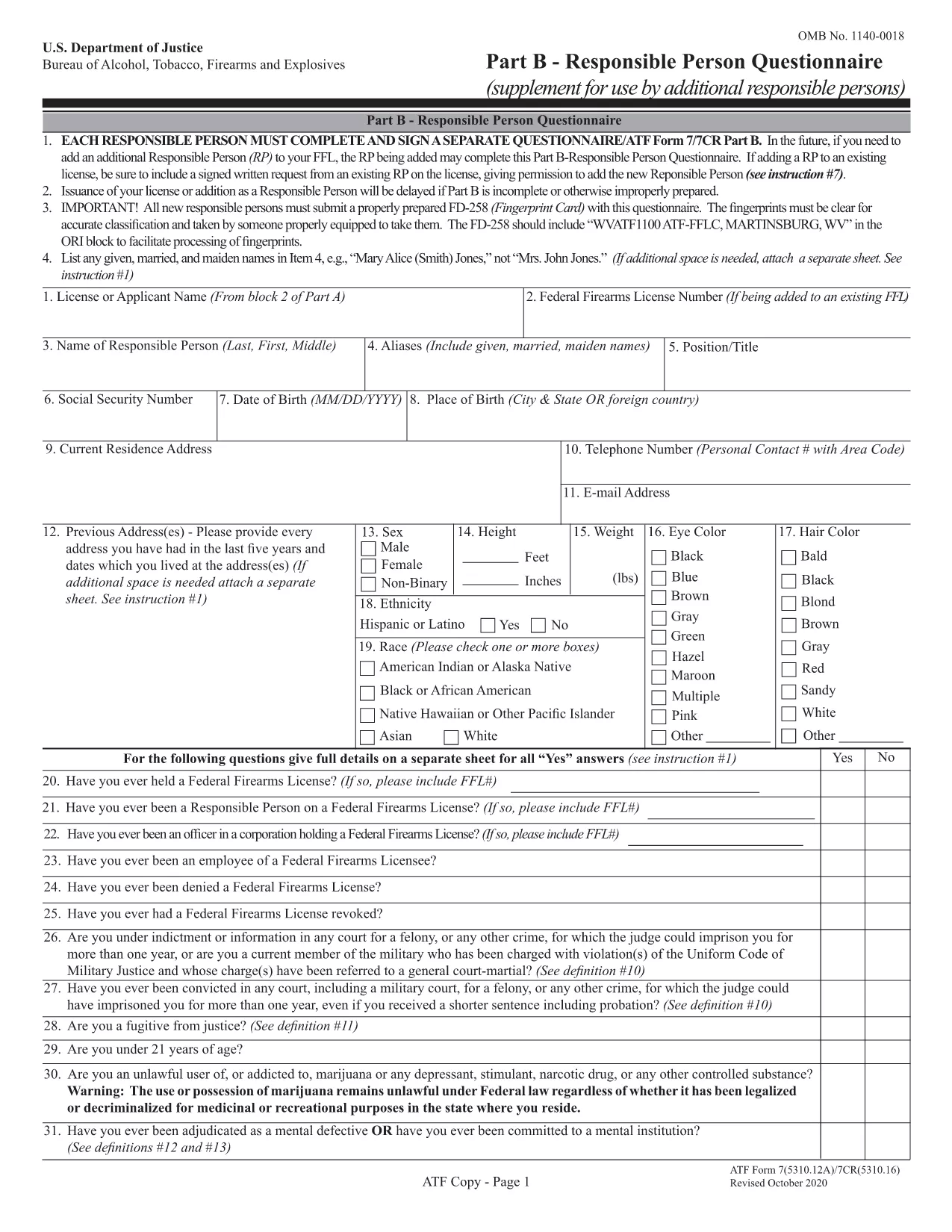
Understanding Form 5310.16 – Responsible Person Questionnaire

Form 5310.16 (also known as Part B) is a questionnaire that must be completed by every responsible person added to an FFL. It includes personal background questions, fingerprint instructions, and a photo requirement.

How to Fill Out the Forms Online with Formize

Follow the simple steps below to fill the PDF without leaving the page.

  • Click the "Fill out this form" button on the page.
  • Wait a few seconds while the Formize PDF Filler app loads.
  • Enter your information directly into the fillable fields.
  • Use the Save button to download a completed copy or Print it for mailing.
  • Mail the printed form to the ATF address shown on the form instructions.

Common Mistakes to Avoid

  • Leaving required fields blank – the filler highlights empty mandatory sections.
  • Using an outdated form version – our PDF is the latest revision (effective 2022).
  • Submitting the wrong mailing address – double‑check the address on the form’s last page.
  • Forgetting the fingerprint card for Form 5310.16 – attach it before mailing.

Where to Submit Your Completed Forms

After completing the forms, mail them to the ATF’s Federal Firearms Licensing Center (FFLC) at the address printed on the last page of each form. For expedited processing, consider using certified mail with tracking.

Need more help? Review the ATF’s official instructions linked on each form or consult a qualified firearms attorney.

SSS
  • Do I need to fill out both Form 5310.12 and 5310.16?

    Form 5310.12 is required for a new FFL. Form 5310.16 is only needed when adding or updating a responsible person on an existing FFL.

  • Can I submit the forms electronically?

    The ATF currently requires a hard‑copy submission for these forms. Use the online filler to complete them, then print and mail.

  • Is the PDF fillable on mobile devices?

    Yes. The Formize filler works on most modern smartphones and tablets, though a larger screen makes data entry easier.

  • What address should I use for mailing?

    The correct mailing address is printed on the last page of each form. For Form 5310.12, use the Federal Firearms Licensing Center address; for Form 5310.16, use the ATF address shown in the questionnaire instructions.

  • How long does it take the ATF to process my application?

    Processing times vary, but most FFL applications are reviewed within 60‑90 days after receipt.

  • Do I need a fingerprint card for Form 5310.16?

    Yes. Every responsible person must submit a fingerprint card (FD‑258) along with the completed questionnaire.

  • What if I make a mistake after mailing?

    Contact the ATF’s Federal Firearms Licensing Center immediately. They may allow a corrected form to be resubmitted before final approval.

NASıL

ATF Form 5310.12 formunu ücretsiz, çevrimiçi olarak 5 kolay adımda nasıl doldurabilirsiniz:

  1. 1
    Click the Fill Out Button
    Press the "Fill out this form" button on the page to launch the Formize PDF Filler.
  2. 2
    Wait for the Filler to Load
    A short loading screen appears while the secure fillable PDF is prepared.
  3. 3
    Enter Your Information
    Type directly into each highlighted field. Use the navigation tabs to jump between sections.
  4. 4
    Save or Print Your Completed Form
    When finished, click "Save" to download a copy or "Print" to produce a hard‑copy for mailing.
  5. 5
    Mail to the ATF
    Attach any required fingerprint cards or photos and mail the form to the address shown on the last page.
PDF Filler uygulamasını biçimlendirin
HAKKıNDA

Alkol, Tütün, Ateşli Silahlar ve Patlayıcılar (ATF) Formlarının Bereau'su

ATF Form 5310.12, ​​Amerika Birleşik Devletleri Adalet Bakanlığı bünyesinde federal bir kolluk kuvveti olan ATF tarafından kullanılan resmi formlardan biridir. ATF, alkol, tütün, ateşli silahlar ve patlayıcılarla ilgili federal yasa ve düzenlemelerin uygulanmasından sorumludur. Bu formlar, bu endüstrilerde yer alan işletmelerin ve bireylerin tescili, lisanslanması ve düzenlenmesi dahil olmak üzere çeşitli amaçlar için kullanılır. ATF formlarının bazı örnekleri:

ATF Formu 4473: Bu form, bir kişi federal lisanslı bir ateşli silah satıcısından ateşli silah satın aldığında geçmiş kontrolü işlemi için kullanılır. Alıcının kimliği, geçmişi ve ateşli silahlara sahip olma uygunluğu hakkında bilgi toplar.

ATF Form 1: Bu form ateşli silah yapımı ve tescili için başvuruda bulunmak için kullanılır. Genellikle kişisel kullanım için ateşli silah üretmek veya mevcut bir ateşli silahı farklı bir konfigürasyona dönüştürmek isteyen kişiler için kullanılır.

ATF Form 4: Bu form, ateşli silahın bir kişi veya kuruluştan diğerine devredilmesi ve tescili için kullanılır. Özel bir taraftan ateşli silah satın alma veya ateşli silahı bir vakfa veya şirkete devretme sürecinde yaygın olarak kullanılır.

ATF Form 6: Bu form, ateşli silahlar, mühimmat ve ATF tarafından düzenlenen diğer bazı öğelerin ithalatı için kullanılır. Bu tür ürünleri Amerika Birleşik Devletleri'ne ithal etmek isteyen bireyler veya işletmeler için gereklidir.

ATF Form 7: Bu form, federal ateşli silahlar lisansının (FFL) başvurusu ve yenilenmesi için kullanılır. Ateşli silahların üretimi, ticareti veya ithalatı ile uğraşan bireyler veya işletmeler için gereklidir.

ATF Form 5320.20: Bu form ateşli silahların taşınmasına ilişkin bildirim ve onay için kullanılır veya eyalet sınırları boyunca yıkıcı cihazlar.

ATF Formu 5400.13: Bu form aşağıdakilerin kaydı ve raporlanması için kullanılır: Patlayıcı madde ve cihazlar.

Bunlar alkol, tütün, ateşli silahlar ve patlayıcılarla ilgili federal yasaların düzenlenmesi ve uygulanmasıyla ilgili çeşitli amaçlarla kullanılan ATF formlarından sadece birkaç örnektir. Gereken spesifik formlar, yürütülen belirli faaliyet veya işleme ve geçerli düzenlemelere bağlıdır. Doğru ve güncel bilgiler için Alkol, Tütün, Ateşli Silahlar ve Patlayıcılar Bürosu'nun resmi web sitesine (www.atf.gov) başvurmak veya profesyonel rehberlik almak önemlidir. durumunuza uygun özel ATF formları ile ilgili.

ÖZELLIKLERI

PDF Doldurucu

PDF formlarını çevrimiçi doldurmanın en kolay yolu

  • ATF Form 5310.12'ü hızlıca doldurun
    ATF Form 5310.12 çevrimiçi olarak hızlı bir şekilde doldurmanın bir yolunu mu arıyorsunuz? Çevrimiçi ücretsiz PDF form doldurucumuzla, bu pdf belgesini nasıl düzenleyeceğinizi ve dolduracağınızı bir dakikadan kısa sürede öğreneceksiniz.
  • Kullanımı kolay çevrimiçi PDF düzenleyici
    PDF dosyalarını yeniden tarayıp geri göndermeden önce düzenleyebilmek için yazdırmaktan bıktınız mı? PDF belgelerini çevrimiçi olarak ücretsiz düzenleyin. Zamandan ve kağıttan tasarruf etmek için çevrimiçi pdf editörümüzü kullanın.
  • Harika araçlar, tüm platformlar
    Bir Mac'te ATF Form 5310.12'ü nasıl dolduracağınızı veya PDF doldurucuyu ücretsiz olarak nasıl kullanacağınızı mı merak ediyorsunuz? Çevrimiçi PDF araçlarımız tüm platformlarda çalışır.
  • Güvenli dosya depolama
    Tamamlanan "ATF Form 5310.12" dosyaları, Amazon Cloud barındırma tarafından yönetilen güvenli bir veritabanında depolanır. Dosyalarınızı istediğiniz zaman sistemimizden silebilirsiniz. Her durumda, bu dosyalar 24 saat sonra otomatik olarak silinir.
  • ATF Form 5310.12 ile sohbet et
    Ücretsiz bir PDF okuyucu asistanı olan Chatize'da "ATF Form 5310.12" ile sohbet edin. "ATF Form 5310.12" adlı kişiden sorular sorun ve yanıtlar alın. Yukarıdaki Belgeyle Sohbet Et düğmesini tıklamanız yeterlidir.

Doldurma oturumunu sil

Seçilen doldurma oturumunu silin mi? Bu durumda, formu doldurmadaki ilerlemeniz kaybolacaktır.

Düzenleme oturumunu sil

Seçilen düzenleme oturumu silinsin mi? Bu durumda formu oluşturma ve düzenleme konusundaki ilerlemeniz kaybolacaktır.