
Dil Seçin

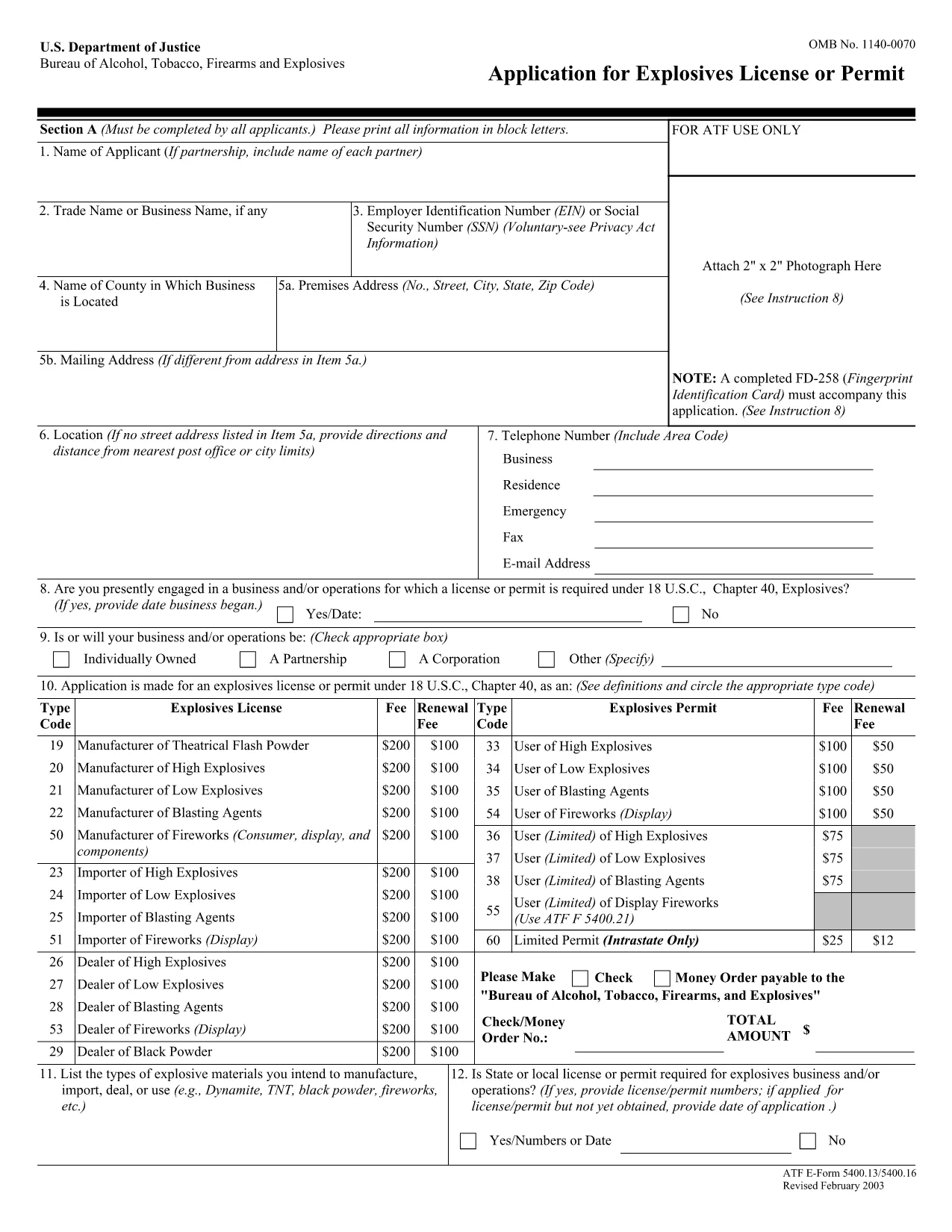
ATF Form 5400.13/5400.16 – Responsible Person Questionnaire

  1. Dil İngilizce
  2. Ülke Amerika Birleşik Devletleri
  3. Departman Alkol, Tütün, Ateşli Silahlar ve Patlayıcı Maddeler Bereau
  4. sektör patlayıcılar
ATF Form 5400.13/5400.16 – Responsible Person Questionnaire

The ATF Form 5400.13 (Responsible Person Questionnaire) and its companion Form 5400.16 are required for anyone applying for an explosives license or permit. These forms collect detailed information about each responsible person associated with the business, ensuring compliance with the Bureau of Alcohol, Tobacco, Firearms and Explosives (ATF) regulations.

What Is ATF Form 5400.13/5400.16?

Form 5400.13 gathers personal, business, and background data for each responsible person, while Form 5400.16 provides additional certification and signature fields. Together, they form the core of the ATF’s Responsible Person Questionnaire, a mandatory part of every explosives license or permit application.

How to Complete the Form Online with Formize

  • Step 1: Click the "Fill out this form" button on this page.
  • Step 2: Wait a few seconds while the Formize PDF Filler app loads the fillable PDF.
  • Step 3: Enter the requested information in each field. The interface saves your progress automatically.
  • Step 4: When all sections are complete, download the finished PDF or submit it directly to the ATF portal.

Common Mistakes & Tips for a Successful Submission

Don’t leave any required fields blank. The ATF will reject applications with missing data. Use the "Add another responsible person" button if you have more than one individual to report.

Use legal names only. Include maiden names, previous married names, and any aliases exactly as they appear on official documents.

Double‑check dates. Ensure birth dates, licensing dates, and expiration dates follow the MM/DD/YYYY format.

Where to Send the Completed Form

After you download the completed PDF, mail or fax it to the ATF National Services Center, Federal Explosives Licensing Center, P.O. Box 6200‑18, Portland, OR 97228‑6200. Refer to the ATF instructions for any additional submission requirements.

Need a printable version? Use the download link below to get the original PDF.

SSS
  • Who must complete ATF Form 5400.13/5400.16?

    Every individual who will act as a responsible person for an explosives business – owners, partners, officers, and key employees – must complete the questionnaire.

  • Can I submit a paper copy instead of the fillable PDF?

    Yes, a printed version is accepted, but using the fillable PDF reduces errors and speeds up processing.

  • What if I have more than three responsible persons?

    Use the "Add another responsible person" button in the online filler, or attach additional sheets if you print the form.

  • How long is the form valid after I submit it?

    The information is valid for the duration of the license or permit. Any changes (e.g., new responsible person) must be reported to the ATF promptly.

  • Do I need a digital signature?

    A typed name in the signature field is acceptable for the online version. For paper submissions, sign with a pen.

  • Is there a filing fee associated with this questionnaire?

    The questionnaire itself has no fee, but it is part of the overall explosives license application, which may have associated fees.

  • What should I do if I make a mistake after saving?

    Open the saved PDF in the Formize filler again, correct the error, and re‑download the updated file.

  • Where can I find the official ATF instructions?

    The ATF publishes detailed guidance on its website under the Explosives Licensing section; a link is included on the form’s cover page.

NASıL

ATF Form 5400.13 formunu ücretsiz, çevrimiçi olarak 4 kolay adımda nasıl doldurabilirsiniz:

  1. 1
    Click the Fill‑out Button
    Press the "Fill out this form" button on the page to launch the Formize PDF Filler.
  2. 2
    Wait for the Filler to Load
    A few seconds later the fillable PDF appears in the browser. No download or extra software is needed.
  3. 3
    Enter All Required Information
    Complete each field for every responsible person. The app auto‑saves as you type.
  4. 4
    Download or Submit
    When finished, click "Download PDF" to save a copy or follow ATF instructions to submit the form.
PDF Filler uygulamasını biçimlendirin
HAKKıNDA

Alkol, Tütün, Ateşli Silahlar ve Patlayıcılar (ATF) Formlarının Bereau'su

ATF Form 5400.13, ​​Amerika Birleşik Devletleri Adalet Bakanlığı bünyesinde federal bir kolluk kuvveti olan ATF tarafından kullanılan resmi formlardan biridir. ATF, alkol, tütün, ateşli silahlar ve patlayıcılarla ilgili federal yasa ve düzenlemelerin uygulanmasından sorumludur. Bu formlar, bu endüstrilerde yer alan işletmelerin ve bireylerin tescili, lisanslanması ve düzenlenmesi dahil olmak üzere çeşitli amaçlar için kullanılır. ATF formlarının bazı örnekleri:

ATF Formu 4473: Bu form, bir kişi federal lisanslı bir ateşli silah satıcısından ateşli silah satın aldığında geçmiş kontrolü işlemi için kullanılır. Alıcının kimliği, geçmişi ve ateşli silahlara sahip olma uygunluğu hakkında bilgi toplar.

ATF Form 1: Bu form ateşli silah yapımı ve tescili için başvuruda bulunmak için kullanılır. Genellikle kişisel kullanım için ateşli silah üretmek veya mevcut bir ateşli silahı farklı bir konfigürasyona dönüştürmek isteyen kişiler için kullanılır.

ATF Form 4: Bu form, ateşli silahın bir kişi veya kuruluştan diğerine devredilmesi ve tescili için kullanılır. Özel bir taraftan ateşli silah satın alma veya ateşli silahı bir vakfa veya şirkete devretme sürecinde yaygın olarak kullanılır.

ATF Form 6: Bu form, ateşli silahlar, mühimmat ve ATF tarafından düzenlenen diğer bazı öğelerin ithalatı için kullanılır. Bu tür ürünleri Amerika Birleşik Devletleri'ne ithal etmek isteyen bireyler veya işletmeler için gereklidir.

ATF Form 7: Bu form, federal ateşli silahlar lisansının (FFL) başvurusu ve yenilenmesi için kullanılır. Ateşli silahların üretimi, ticareti veya ithalatı ile uğraşan bireyler veya işletmeler için gereklidir.

ATF Form 5320.20: Bu form ateşli silahların taşınmasına ilişkin bildirim ve onay için kullanılır veya eyalet sınırları boyunca yıkıcı cihazlar.

ATF Formu 5400.13: Bu form aşağıdakilerin kaydı ve raporlanması için kullanılır: Patlayıcı madde ve cihazlar.

Bunlar alkol, tütün, ateşli silahlar ve patlayıcılarla ilgili federal yasaların düzenlenmesi ve uygulanmasıyla ilgili çeşitli amaçlarla kullanılan ATF formlarından sadece birkaç örnektir. Gereken spesifik formlar, yürütülen belirli faaliyet veya işleme ve geçerli düzenlemelere bağlıdır. Doğru ve güncel bilgiler için Alkol, Tütün, Ateşli Silahlar ve Patlayıcılar Bürosu'nun resmi web sitesine (www.atf.gov) başvurmak veya profesyonel rehberlik almak önemlidir. durumunuza uygun özel ATF formları ile ilgili.

ÖZELLIKLERI

PDF Doldurucu

PDF formlarını çevrimiçi doldurmanın en kolay yolu

  • ATF Form 5400.13'ü hızlıca doldurun
    ATF Form 5400.13 çevrimiçi olarak hızlı bir şekilde doldurmanın bir yolunu mu arıyorsunuz? Çevrimiçi ücretsiz PDF form doldurucumuzla, bu pdf belgesini nasıl düzenleyeceğinizi ve dolduracağınızı bir dakikadan kısa sürede öğreneceksiniz.
  • Kullanımı kolay çevrimiçi PDF düzenleyici
    PDF dosyalarını yeniden tarayıp geri göndermeden önce düzenleyebilmek için yazdırmaktan bıktınız mı? PDF belgelerini çevrimiçi olarak ücretsiz düzenleyin. Zamandan ve kağıttan tasarruf etmek için çevrimiçi pdf editörümüzü kullanın.
  • Harika araçlar, tüm platformlar
    Bir Mac'te ATF Form 5400.13'ü nasıl dolduracağınızı veya PDF doldurucuyu ücretsiz olarak nasıl kullanacağınızı mı merak ediyorsunuz? Çevrimiçi PDF araçlarımız tüm platformlarda çalışır.
  • Güvenli dosya depolama
    Tamamlanan "ATF Form 5400.13" dosyaları, Amazon Cloud barındırma tarafından yönetilen güvenli bir veritabanında depolanır. Dosyalarınızı istediğiniz zaman sistemimizden silebilirsiniz. Her durumda, bu dosyalar 24 saat sonra otomatik olarak silinir.
  • ATF Form 5400.13 ile sohbet et
    Ücretsiz bir PDF okuyucu asistanı olan Chatize'da "ATF Form 5400.13" ile sohbet edin. "ATF Form 5400.13" adlı kişiden sorular sorun ve yanıtlar alın. Yukarıdaki Belgeyle Sohbet Et düğmesini tıklamanız yeterlidir.

Doldurma oturumunu sil

Seçilen doldurma oturumunu silin mi? Bu durumda, formu doldurmadaki ilerlemeniz kaybolacaktır.

Düzenleme oturumunu sil

Seçilen düzenleme oturumu silinsin mi? Bu durumda formu oluşturma ve düzenleme konusundaki ilerlemeniz kaybolacaktır.