
Dil Seçin

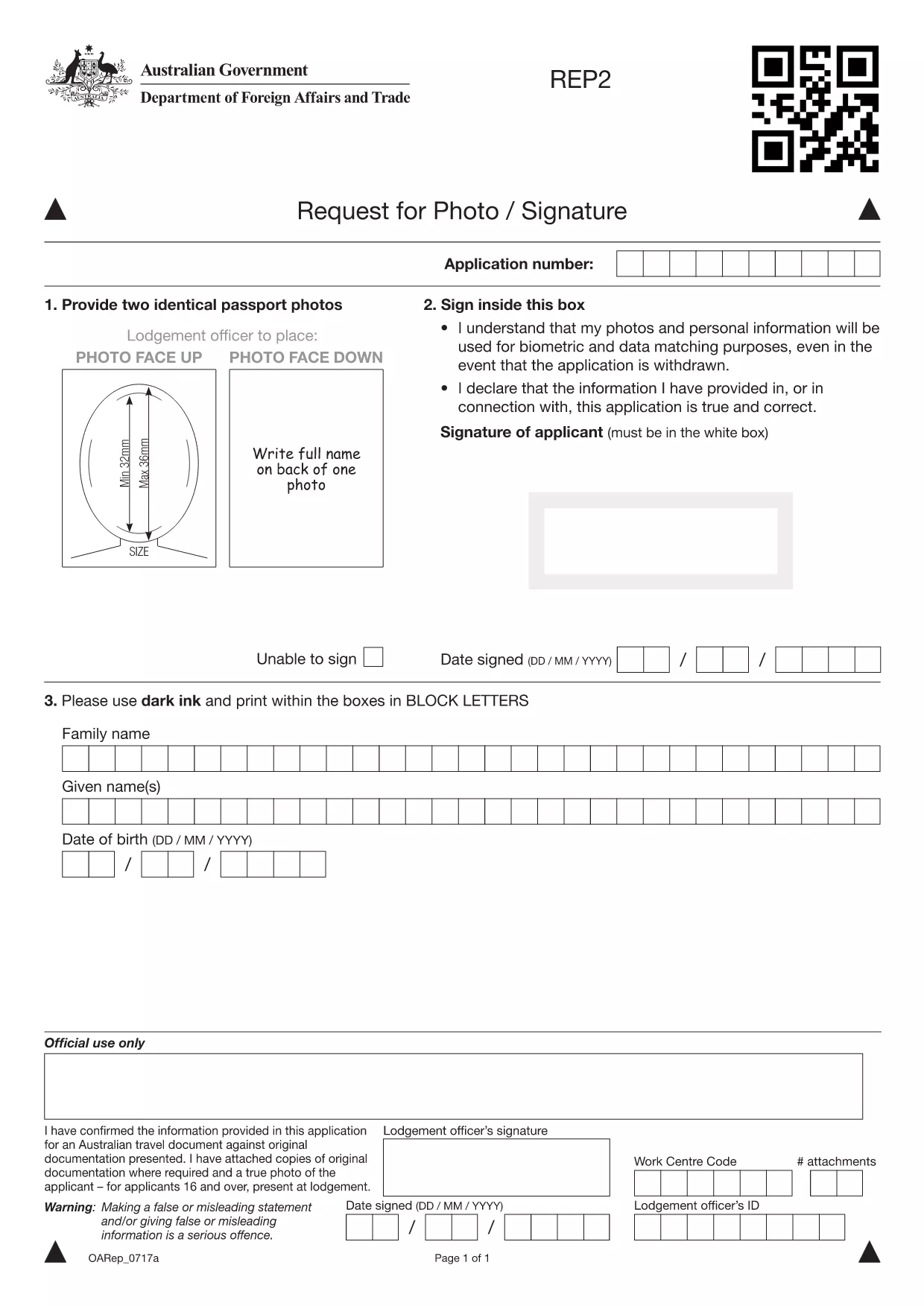
Australian Passport Photo & Signature Request Form (Fillable PDF)

  1. Dil İngilizce
  2. Ülke Avustralya
  3. Aktivite Passports
  4. Departman Australian Passport Office
Australian Passport Photo & Signature Request Form (Fillable PDF)

When applying for or renewing an Australian passport, the Department of Foreign Affairs and Trade requires a current passport‑size photo and, in some cases, a new signature. The Request for New Photo or Signature form is a government‑approved, fillable PDF that lets you submit this information quickly and securely.

This page lets you download the official PDF and fill it out directly in your browser using the Formize PDF Filler app – no extra software needed.

Why You Need This Form

  • It satisfies the photo and signature requirements for new or renewed passports.
  • Accepted by Australian passport offices both in Australia and overseas.
  • Provides a clear, auditable record for the Department of Foreign Affairs and Trade.

How to Complete the Form Online

  1. Click the Fill out this form button below.
  2. Wait a few seconds while the Formize PDF Filler app loads.
  3. Enter your personal details exactly as they appear on your current passport.
  4. Upload a compliant passport photo (45 mm × 35 mm, clear background).
  5. Provide a digital signature or type your name in the signature field.
  6. Review the completed form for errors, then click Submit to download the finished PDF.

Common Mistakes to Avoid

  • Using a photo that is too dark, blurry, or not the correct size.
  • Leaving any mandatory fields blank – the form will not process.
  • Entering a name that differs from the one on your existing passport.
  • Submitting the form without a digital signature when one is required.

Where to Submit Your Completed Form

After you download the filled PDF, attach it to your passport application through the official passport portal or send it to the nearest Australian embassy or consulate if you are applying from abroad.

Need help? Review the Australian Passport Office’s guidelines for photo specifications and signature requirements.

SSS
  • Do I need to print the form after filling it online?

    No. The Formize PDF Filler lets you download a fully completed PDF that can be attached electronically to your passport application.

  • What size and background should my passport photo be?

    The photo must be 45 mm × 35 mm, clear, with a plain white or off‑white background and no shadows on your face.

  • Can I use a scanned signature instead of a digital one?

    Yes. Upload a clear image of your signature, or use the typed signature option provided in the form.

  • Is this form accepted for applications made outside Australia?

    Yes. The form is valid for both domestic and overseas passport applications, as long as it is completed correctly.

  • How long does the Formize PDF Filler take to load?

    Typically under 5 seconds on a standard broadband connection. Faster on high‑speed connections.

  • What should I do if the form shows an error after I submit?

    Check that all mandatory fields are filled, the photo meets specifications, and the signature is clear. Correct any issues and resubmit.

  • Can I save my progress and finish the form later?

    Yes. Use the "Save" button in the Formize app to download a partially completed PDF, then reopen it later to finish.

NASıL

Australian passport form formunu ücretsiz, çevrimiçi olarak 5 kolay adımda nasıl doldurabilirsiniz:

  1. 1
    Open the Fillable Form
    Click the "Fill out this form" button on the page. The Formize PDF Filler app will open in a new tab.
  2. 2
    Load the Form
    Wait a few seconds while the PDF loads. No download or extra software is required.
  3. 3
    Enter Your Information
    Fill in all required fields, upload a compliant passport photo, and add your digital signature.
  4. 4
    Review and Submit
    Double‑check the entered data, then click "Submit" to generate a completed PDF you can download.
  5. 5
    Attach to Your Application
    Upload the finished PDF to your passport application portal or send it to the nearest Australian embassy.
PDF Filler uygulamasını biçimlendirin
HAKKıNDA

Australian passport form şablonu

Bir PDF belgesini görüntülemeye ve doldurmaya yönelik geleneksel özellikler grubuyla, bir web uygulamasının ve uyumlu mizanpajın avantajlarıyla birleştiğinde, Australian passport form kelimesini dakikalar içinde tamamlayabilirsiniz.

ÖZELLIKLERI

PDF Doldurucu

PDF formlarını çevrimiçi doldurmanın en kolay yolu

  • Australian passport form'ü hızlıca doldurun
    Australian passport form çevrimiçi olarak hızlı bir şekilde doldurmanın bir yolunu mu arıyorsunuz? Çevrimiçi ücretsiz PDF form doldurucumuzla, bu pdf belgesini nasıl düzenleyeceğinizi ve dolduracağınızı bir dakikadan kısa sürede öğreneceksiniz.
  • Kullanımı kolay çevrimiçi PDF düzenleyici
    PDF dosyalarını yeniden tarayıp geri göndermeden önce düzenleyebilmek için yazdırmaktan bıktınız mı? PDF belgelerini çevrimiçi olarak ücretsiz düzenleyin. Zamandan ve kağıttan tasarruf etmek için çevrimiçi pdf editörümüzü kullanın.
  • Harika araçlar, tüm platformlar
    Bir Mac'te Australian passport form'ü nasıl dolduracağınızı veya PDF doldurucuyu ücretsiz olarak nasıl kullanacağınızı mı merak ediyorsunuz? Çevrimiçi PDF araçlarımız tüm platformlarda çalışır.
  • Güvenli dosya depolama
    Tamamlanan "Australian passport form" dosyaları, Amazon Cloud barındırma tarafından yönetilen güvenli bir veritabanında depolanır. Dosyalarınızı istediğiniz zaman sistemimizden silebilirsiniz. Her durumda, bu dosyalar 24 saat sonra otomatik olarak silinir.
  • Australian passport form ile sohbet et
    Ücretsiz bir PDF okuyucu asistanı olan Chatize'da "Australian passport form" ile sohbet edin. "Australian passport form" adlı kişiden sorular sorun ve yanıtlar alın. Yukarıdaki Belgeyle Sohbet Et düğmesini tıklamanız yeterlidir.

Doldurma oturumunu sil

Seçilen doldurma oturumunu silin mi? Bu durumda, formu doldurmadaki ilerlemeniz kaybolacaktır.

Düzenleme oturumunu sil

Seçilen düzenleme oturumu silinsin mi? Bu durumda formu oluşturma ve düzenleme konusundaki ilerlemeniz kaybolacaktır.