
Dil Seçin

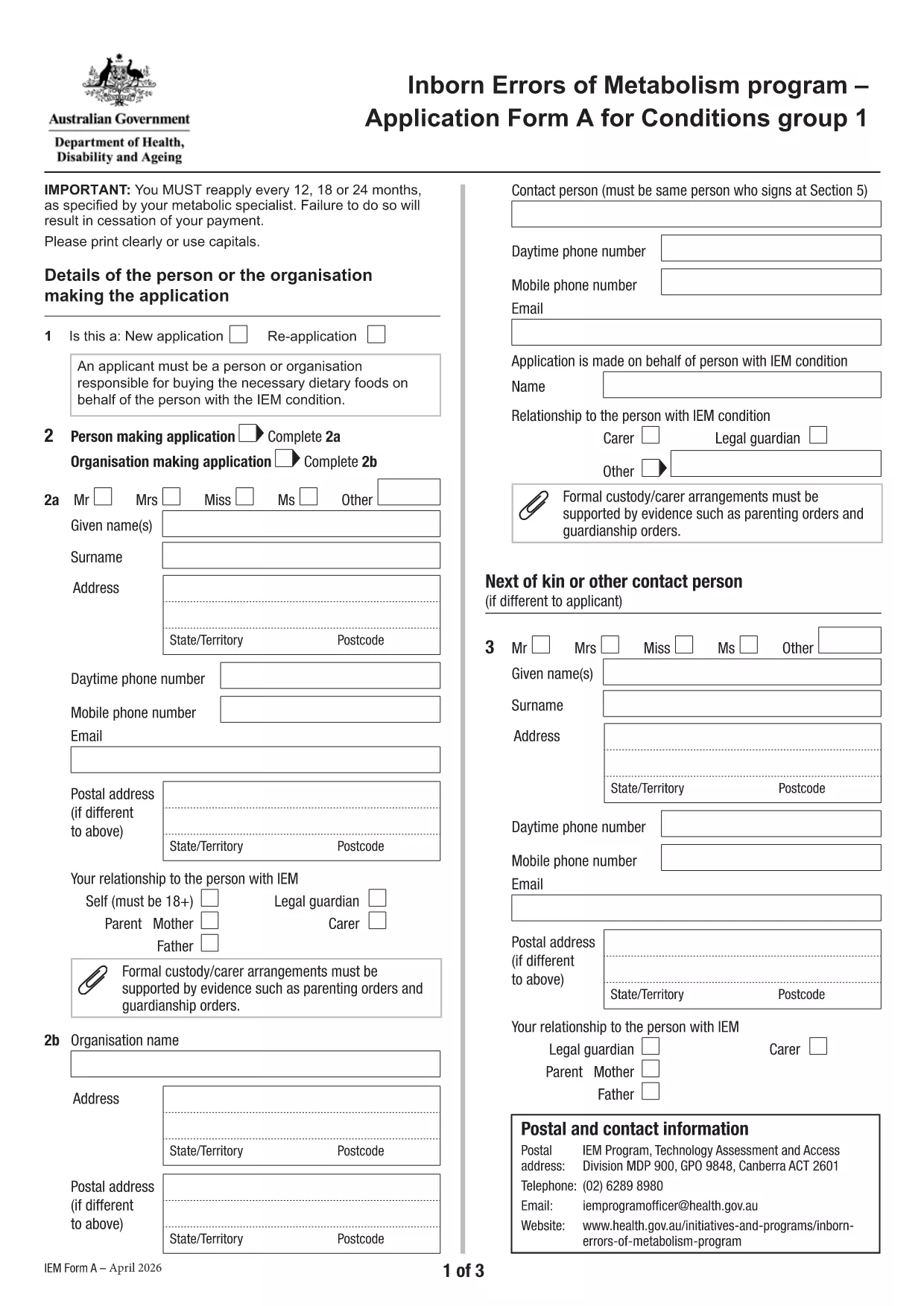
Application Form A – Inborn Errors of Metabolism

  1. Dil İngilizce
  2. Ülke Avustralya
  3. Aktivite Health Assistance
  4. Departman Sağlık ve Aile Refahı Bakanlığı
Application Form A – Inborn Errors of Metabolism

Application Form A is the official Australian Government form used to apply for financial assistance for individuals diagnosed with certain Inborn Errors of Metabolism, specifically dihydropteridine reductase (DHPR) deficiency, hyperphenylalaninemia, and phenylketonuria (PKU). The form must be completed and resubmitted every 12 months to maintain eligibility.

What is Application Form A?

This PDF form collects personal details, medical diagnosis, treatment information, and financial data required by the Department of Health’s Inborn Errors of Metabolism program. It is a fillable PDF, meaning you can type directly into the fields without printing.

Who needs to complete this form?

  • Individuals diagnosed with DHPR deficiency, hyperphenylalaninemia, or PKU.
  • Parents or legal guardians applying on behalf of a minor.
  • Anyone who has previously received assistance under the program and needs to renew their claim.

How to fill out Application Form A online

Instead of downloading the PDF and opening it in a separate editor, simply click the "Fill out this form" button on this page. The Formize PDF Filler app will load automatically, allowing you to complete the form directly in your browser.

Common mistakes to avoid

  • Leaving required fields blank – the form will not submit.
  • Providing outdated medical reports – attach the most recent diagnosis documents.
  • Using an unsupported browser – Chrome is recommended for best performance.
  • Submitting the form before the 12‑month renewal period – ensure you are within the eligibility window.

Where to submit the completed form

After you finish filling out the form, click the Submit button within the Formize interface. Your application will be securely transmitted to the Department of Health’s processing team. You will receive a confirmation email with a reference number for future inquiries.

Need more help? Review the FAQs below or contact your local health service for assistance.

SSS
  • What conditions are covered by Application Form A?

    The form is only for DHPR deficiency, hyperphenylalaninemia, and phenylketonuria (PKU). Other metabolic conditions must use Application Form B.

  • How often must I re‑apply?

    You must reassess and submit a new Application Form A every 12 months to continue receiving assistance.

  • Can I fill out the form on a mobile device?

    Yes, the Formize PDF Filler works on most smartphones and tablets, though a larger screen (tablet or desktop) is recommended for easier navigation.

  • What if I make a mistake after submitting?

    Contact the Department of Health’s Inborn Errors of Metabolism program using the reference number from your confirmation email. They can guide you on how to correct the error.

  • Do I need to print the form after filling it online?

    No. The form is submitted electronically via Formize. Printing is only necessary if you want a hard copy for your records.

  • Which browsers are supported?

    Chrome is the recommended browser for optimal performance. Firefox, Edge, and Safari also work but may have limited functionality.

  • Is my personal and medical information secure?

    Yes. Formize uses SSL encryption, and the Department of Health follows strict privacy guidelines to protect your data.

  • Can I save my progress and finish later?

    The Formize platform allows you to save a draft. Click the "Save Draft" button before exiting and return using the same link.

NASıL

Application Form A formunu ücretsiz, çevrimiçi olarak 5 kolay adımda nasıl doldurabilirsiniz:

  1. 1
    Open the fillable form
    Click the "Fill out this form" button on the page. The Formize PDF Filler will open in a new tab.
  2. 2
    Enter your information
    Type directly into each field. Use the tab key to move quickly between sections.
  3. 3
    Attach supporting documents
    Upload recent medical reports and proof of identity using the attachment icons beside each required field.
  4. 4
    Review and submit
    Check all entries for accuracy, then click the "Submit" button. You will receive a confirmation email with a reference number.
  5. 5
    Save a copy
    After submission, download a PDF copy of the completed form for your records.
PDF Filler uygulamasını biçimlendirin
HAKKıNDA

Application Form A şablonu

Bir PDF belgesini görüntülemeye ve doldurmaya yönelik geleneksel özellikler grubuyla, bir web uygulamasının ve uyumlu mizanpajın avantajlarıyla birleştiğinde, Application Form A kelimesini dakikalar içinde tamamlayabilirsiniz.

ÖZELLIKLERI

PDF Doldurucu

PDF formlarını çevrimiçi doldurmanın en kolay yolu

  • Application Form A'ü hızlıca doldurun
    Application Form A çevrimiçi olarak hızlı bir şekilde doldurmanın bir yolunu mu arıyorsunuz? Çevrimiçi ücretsiz PDF form doldurucumuzla, bu pdf belgesini nasıl düzenleyeceğinizi ve dolduracağınızı bir dakikadan kısa sürede öğreneceksiniz.
  • Kullanımı kolay çevrimiçi PDF düzenleyici
    PDF dosyalarını yeniden tarayıp geri göndermeden önce düzenleyebilmek için yazdırmaktan bıktınız mı? PDF belgelerini çevrimiçi olarak ücretsiz düzenleyin. Zamandan ve kağıttan tasarruf etmek için çevrimiçi pdf editörümüzü kullanın.
  • Harika araçlar, tüm platformlar
    Bir Mac'te Application Form A'ü nasıl dolduracağınızı veya PDF doldurucuyu ücretsiz olarak nasıl kullanacağınızı mı merak ediyorsunuz? Çevrimiçi PDF araçlarımız tüm platformlarda çalışır.
  • Güvenli dosya depolama
    Tamamlanan "Application Form A" dosyaları, Amazon Cloud barındırma tarafından yönetilen güvenli bir veritabanında depolanır. Dosyalarınızı istediğiniz zaman sistemimizden silebilirsiniz. Her durumda, bu dosyalar 24 saat sonra otomatik olarak silinir.
  • Application Form A ile sohbet et
    Ücretsiz bir PDF okuyucu asistanı olan Chatize'da "Application Form A" ile sohbet edin. "Application Form A" adlı kişiden sorular sorun ve yanıtlar alın. Yukarıdaki Belgeyle Sohbet Et düğmesini tıklamanız yeterlidir.

Doldurma oturumunu sil

Seçilen doldurma oturumunu silin mi? Bu durumda, formu doldurmadaki ilerlemeniz kaybolacaktır.

Düzenleme oturumunu sil

Seçilen düzenleme oturumu silinsin mi? Bu durumda formu oluşturma ve düzenleme konusundaki ilerlemeniz kaybolacaktır.