
Dil Seçin

APS Application Form – Fillable PDF

  1. Dil İngilizce
  2. Ülke Avustralya
  3. Aktivite Employment
  4. Departman Infrastructure
APS Application Form – Fillable PDF

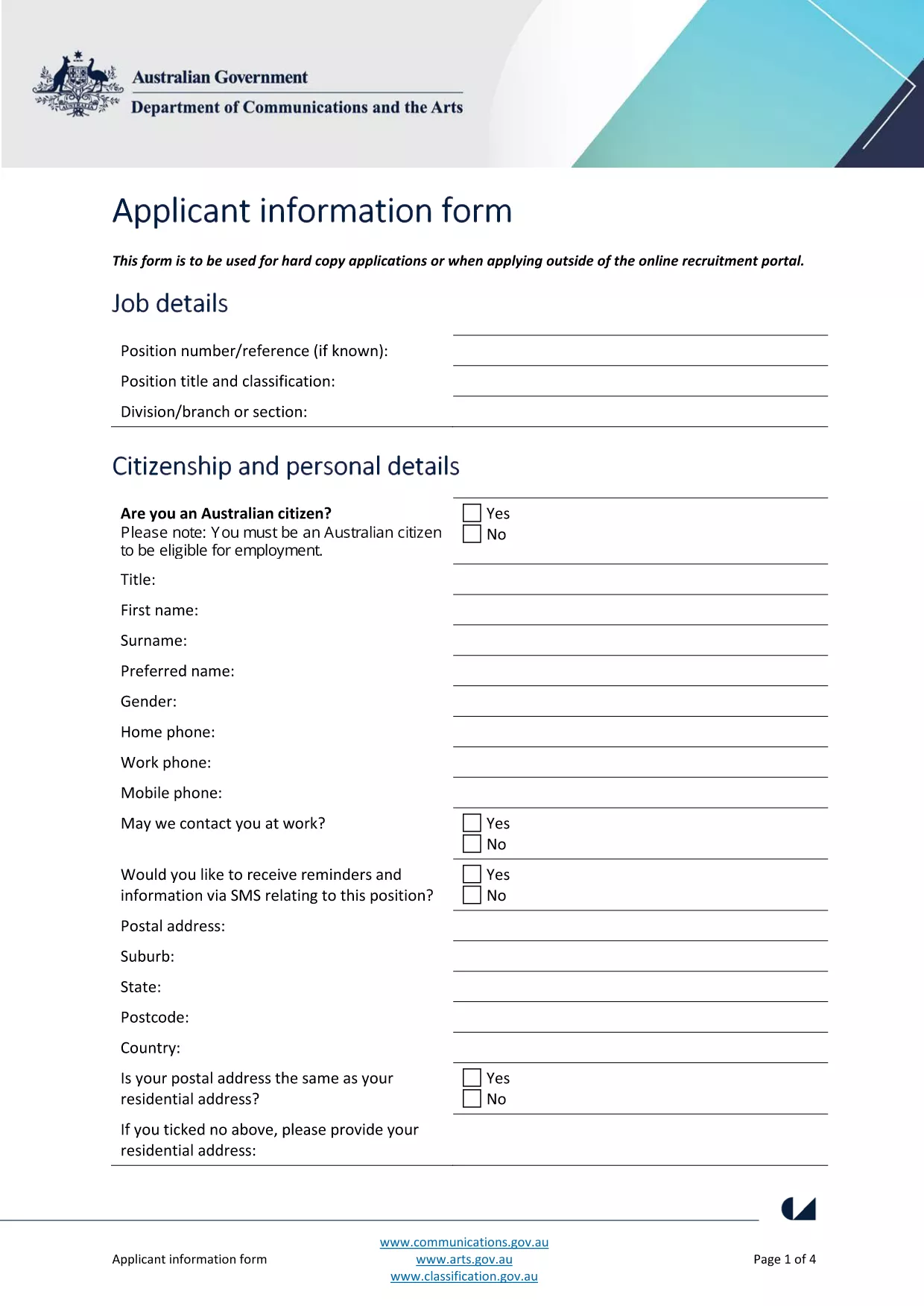
The Australian Public Service (APS) uses a standard Application Form for most entry‑level and graduate roles. This fillable PDF lets you enter your personal details, work experience, and qualifications directly on the page, then submit the completed file to the hiring agency.

What Is the APS Application Form?

The form is a government‑issued document that collects the information required to assess your suitability for APS positions. It includes sections for:

  • Personal details (name, contact, residency)
  • Education and qualifications
  • Employment history and achievements
  • Skills, competencies and security declarations

How to Complete the Form with Formize

Instead of downloading the PDF and opening a separate editor, simply click the "Fill out this form" button on this page. The Formize PDF Filler app loads in your browser, letting you:

  1. Enter data in each field with keyboard or drop‑down menus.
  2. Save a copy to your computer at any time.
  3. Validate required fields before submitting.

When you’re done, click **Submit** to download the completed PDF or email it directly to the recruiting agency.

Common Mistakes & Tips for a Perfect Submission

  • Missing required fields: The Formize filler highlights empty mandatory sections in red.
  • Incorrect date formats: Use DD/MM/YYYY as shown in the example fields.
  • Spelling errors: Run the built‑in spell‑check before saving.
  • Oversized files: Keep attachments (e.g., resumes) under 2 MB to avoid upload errors.

Where to Send Your Completed Application

After saving the filled PDF, follow the specific job posting instructions. Most APS vacancies request the file as an attachment in the online recruitment portal, or via a designated government email address.

Need more guidance? Review the official applicant information guide for detailed eligibility criteria.

SSS
  • Do I need Adobe Acrobat to fill the APS form?

    No. Formize’s online PDF filler works in any modern browser, so you don’t need Acrobat or any extra software.

  • Can I edit the form after I’ve saved it?

    Yes. Open the saved PDF again with Formize, make changes, and re‑save. All data remains editable.

  • Is my personal data safe when I use Formize?

    Formize processes the PDF locally in your browser; no data is stored on external servers, ensuring privacy and security.

  • What if the PDF won’t load?

    Refresh the page and click the "Fill out this form" button again. If the problem persists, clear your browser cache or try a different browser.

  • Can I print a hard‑copy after filling the form?

    Absolutely. After saving, open the PDF in any viewer and print it like any standard document.

  • Do I need to sign the PDF digitally?

    The APS form accepts a scanned signature or a typed name in the signature field. Upload a scanned signature if required.

NASıL

APS application form formunu ücretsiz, çevrimiçi olarak 4 kolay adımda nasıl doldurabilirsiniz:

  1. 1
    Open the Fillable Form
    Click the "Fill out this form" button on the page. The Formize PDF Filler loads instantly in your browser.
  2. 2
    Enter Your Information
    Type directly into each highlighted field. Use drop‑down menus for dates, states, and yes/no answers.
  3. 3
    Validate and Save
    The filler checks required fields automatically. When all sections are green, click "Save" to download the completed PDF.
  4. 4
    Submit Your Application
    Attach the saved PDF to the APS vacancy posting or email it to the address listed in the job advert.
PDF Filler uygulamasını biçimlendirin
HAKKıNDA

APS application form şablonu

Bir PDF belgesini görüntülemeye ve doldurmaya yönelik geleneksel özellikler grubuyla, bir web uygulamasının ve uyumlu mizanpajın avantajlarıyla birleştiğinde, APS application form kelimesini dakikalar içinde tamamlayabilirsiniz.

ÖZELLIKLERI

PDF Doldurucu

PDF formlarını çevrimiçi doldurmanın en kolay yolu

  • APS application form'ü hızlıca doldurun
    APS application form çevrimiçi olarak hızlı bir şekilde doldurmanın bir yolunu mu arıyorsunuz? Çevrimiçi ücretsiz PDF form doldurucumuzla, bu pdf belgesini nasıl düzenleyeceğinizi ve dolduracağınızı bir dakikadan kısa sürede öğreneceksiniz.
  • Kullanımı kolay çevrimiçi PDF düzenleyici
    PDF dosyalarını yeniden tarayıp geri göndermeden önce düzenleyebilmek için yazdırmaktan bıktınız mı? PDF belgelerini çevrimiçi olarak ücretsiz düzenleyin. Zamandan ve kağıttan tasarruf etmek için çevrimiçi pdf editörümüzü kullanın.
  • Harika araçlar, tüm platformlar
    Bir Mac'te APS application form'ü nasıl dolduracağınızı veya PDF doldurucuyu ücretsiz olarak nasıl kullanacağınızı mı merak ediyorsunuz? Çevrimiçi PDF araçlarımız tüm platformlarda çalışır.
  • Güvenli dosya depolama
    Tamamlanan "APS application form" dosyaları, Amazon Cloud barındırma tarafından yönetilen güvenli bir veritabanında depolanır. Dosyalarınızı istediğiniz zaman sistemimizden silebilirsiniz. Her durumda, bu dosyalar 24 saat sonra otomatik olarak silinir.
  • APS application form ile sohbet et
    Ücretsiz bir PDF okuyucu asistanı olan Chatize'da "APS application form" ile sohbet edin. "APS application form" adlı kişiden sorular sorun ve yanıtlar alın. Yukarıdaki Belgeyle Sohbet Et düğmesini tıklamanız yeterlidir.

Doldurma oturumunu sil

Seçilen doldurma oturumunu silin mi? Bu durumda, formu doldurmadaki ilerlemeniz kaybolacaktır.

Düzenleme oturumunu sil

Seçilen düzenleme oturumu silinsin mi? Bu durumda formu oluşturma ve düzenleme konusundaki ilerlemeniz kaybolacaktır.