
Dil Seçin

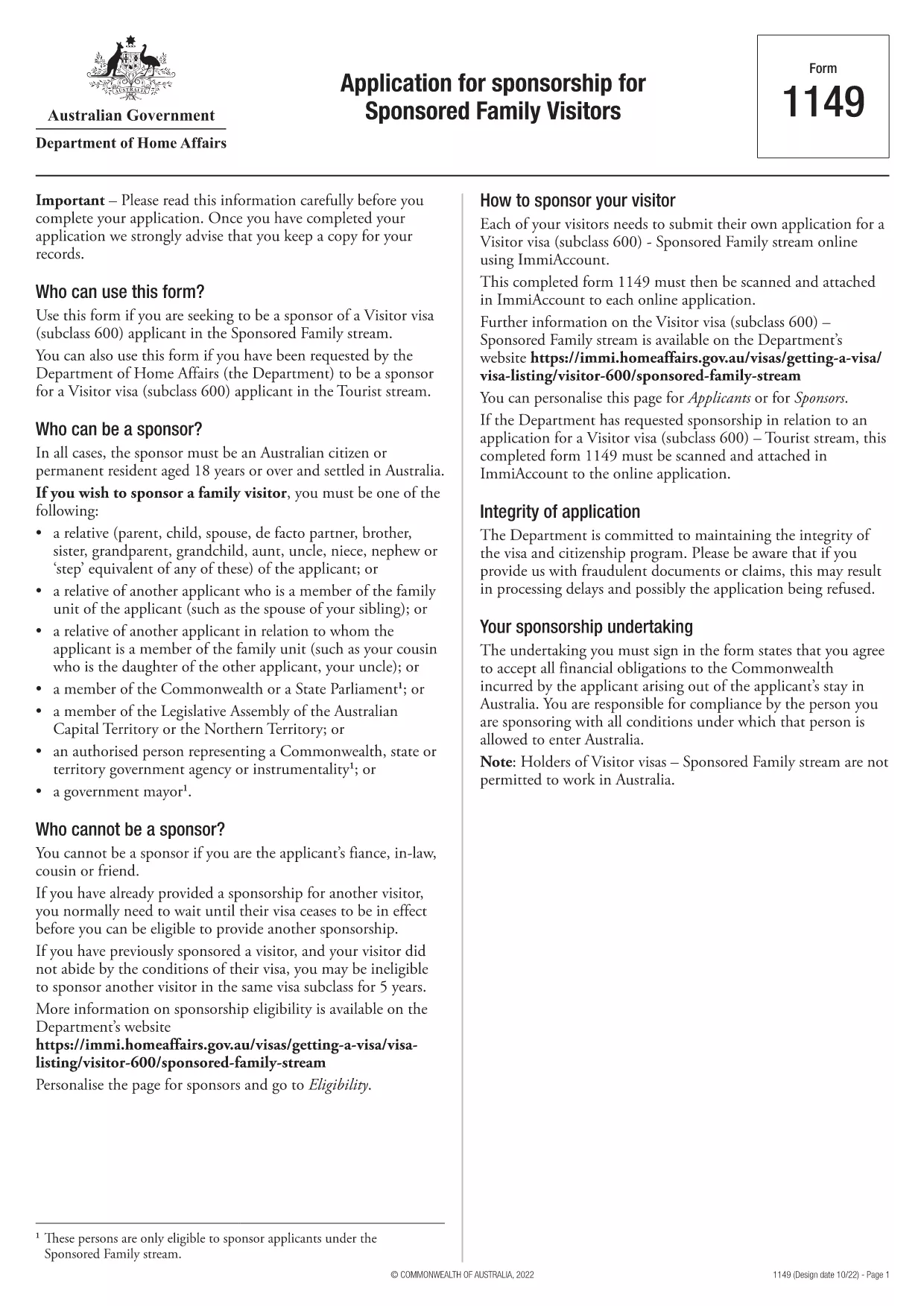
Form 1149 – Application for Sponsorship of a Family Visitor (Visitor Visa 600)

  1. Ülke Avustralya
  2. Dil İngilizce
  3. Aktivite Katıl veya aileni getir
Form 1149 – Application for Sponsorship of a Family Visitor (Visitor Visa 600)

Form 1149 is the official Application for Sponsorship for Sponsored Family Visitors used by Australian citizens or permanent residents who wish to sponsor a relative, a member of the Commonwealth, or a state parliamentarian for a Visitor visa (subclass 600). The form outlines the sponsor’s obligations, eligibility criteria, and any security bond requirements.

Traditionally the form is a static PDF that must be printed, handwritten, and mailed. With Formize you can complete the same form entirely online – just click Fill out this form and let our secure PDF filler do the work.

What Is Form 1149?

Form 1149 collects detailed information about the sponsor (name, address, citizenship status), the invited visitor (relationship, passport details, travel dates), and the financial support the sponsor will provide. It also asks about any previous sponsorships and the sponsor’s ability to meet the visa conditions.

Who Needs to Complete This Form?

  • Australian citizens or permanent residents sponsoring a family member for a Visitor visa (subclass 600).
  • Members of the Commonwealth or state parliament who are inviting a guest for official duties.
  • Anyone required to provide a security bond for the visitor’s stay.

How to Fill Form 1149 Online with Formize

Follow these simple steps to complete the form without printing:

  1. Click the Fill out this form button on this page.
  2. Wait a few seconds while the Formize PDF Filler loads the fillable version of Form 1149.
  3. Enter all required details in the highlighted fields. The filler validates dates, passport numbers, and numeric entries in real‑time.
  4. Review the summary page, correct any highlighted errors, and click Submit to download the completed PDF.
  5. Print the signed PDF (if a physical signature is required) and attach it to your visa application package.

Common Mistakes to Avoid

  • Incorrect passport numbers: Double‑check each digit; a single typo can delay processing.
  • Missing sponsor’s financial details: Provide clear evidence of income or savings to satisfy the bond requirement.
  • Leaving optional fields blank: If a field asks for “previous sponsorships”, answer “None” rather than leaving it empty.
  • Using an outdated version: Always use the latest PDF – the link on this page points to the current 2024 version.

Where to Submit the Completed Form

After filling and printing the form, include it with the Visitor visa (subclass 600) application packet and submit to the Department of Home Affairs either online via ImmiAccount or by post to the address indicated in the visa instructions.

Using Formize’s online filler saves time, reduces errors, and ensures you are working with the most up‑to‑date version of Form 1149.

SSS
  • Who can act as a sponsor on Form 1149?

    Only Australian citizens or permanent residents may sponsor a family visitor for a subclass 600 visa. Commonwealth or state parliament members may also sponsor for official visits.

  • Do I need to provide a security bond?

    A bond is required if the sponsor cannot demonstrate sufficient financial capacity. The amount is determined by the Department of Home Affairs based on the visitor’s length of stay and circumstances.

  • Can I submit the form electronically?

    Yes. Fill the form online with Formize, download the completed PDF, and attach it to your ImmiAccount submission. Some cases may still require a printed, signed copy.

  • How long is Form 1149 valid?

    The form does not have an expiry date, but you should use the latest version available on the Department of Home Affairs website.

  • What common errors cause delays?

    Incorrect passport numbers, missing financial information, and leaving optional fields blank are the most frequent reasons for processing delays.

  • Is there a fee to use Formize’s PDF filler?

    Formize offers a free basic filler for most government forms, including Form 1149. Premium features are optional and not required for this form.

  • Do I need to sign the PDF digitally?

    A digital signature is accepted for most online submissions. If you submit a paper application, print the PDF and sign it with a pen.

NASıL

Form 1149 formunu ücretsiz, çevrimiçi olarak 5 kolay adımda nasıl doldurabilirsiniz:

  1. 1
    Open the Fillable Form
    Click the "Fill out this form" button on this page. The Formize PDF Filler will open in a new tab.
  2. 2
    Enter Your Details
    Fill each highlighted field with accurate information. The tool validates entries in real time.
  3. 3
    Review and Correct Errors
    Check the summary page for any highlighted errors, correct them, and confirm the data.
  4. 4
    Download the Completed PDF
    Click "Submit" to download the fully completed PDF. Print and sign if a physical signature is required.
  5. 5
    Attach to Your Visa Application
    Include the signed PDF with your Visitor visa (subclass 600) application and submit to the Department of Home Affairs.
PDF Filler uygulamasını biçimlendirin
HAKKıNDA

Aile Formlarına Katılın veya Getirin

Form 1149, ​​bireylerin aile üyelerinin farklı bir ülkeye göç etmesini veya yeniden bir araya gelmesini desteklemek ve kolaylaştırmak için kullandıkları başvuru formlarından biridir. Bu formlar genellikle, halihazırda belirli bir ülkede ikamet eden bireylerin birinci dereceden aile üyelerini kendilerine katılmaları için getirmelerine olanak tanıyan aile temelli göç programları veya politikalarıyla ilişkilendirilir. Spesifik formlar ülkeye ve göçmenlik sistemine bağlı olarak değişebilir, ancak burada bazı yaygın örnekler verilmiştir:

Aile Sponsorluğu Başvuru Formu: Aile bireylerine göçmenlik konusunda sponsor olmak isteyen bireylerin kullandığı ana formdur. Sponsor (ülkede halihazırda ikamet eden kişi) ve sponsor olunan aile üyeleri hakkında, aralarındaki ilişkiler, kişisel ayrıntılar ve destekleyici belgeler de dahil olmak üzere bilgi toplar.

Bağımlı Vize Başvuru Formu: Bazı göçmenlik sistemlerinde, halihazırda bir ülkede ikamet eden kişiler, eşleri, çocukları veya ebeveynleri gibi birinci dereceden aile üyelerini de getirmek üzere bağımlı vize başvurusunda bulunabilirler. Bağımlı vize başvuru formu sponsor, bakmakla yükümlü olunan aile üyeleri, bunların ilişkileri ve destekleyici belgeler hakkında bilgi toplar.

Destek Beyanı: Bazı ülkelerde sponsorların, sponsor olunan aile üyelerine yönelik mali sorumluluklarını teyit eden yasal bir belge olan bir destek beyanı sunmaları gerekebilir. Bu belge genellikle sponsorun geliri, varlıkları ve aile üyelerini maddi olarak destekleme yeteneği hakkında ayrıntıları içerir.

Tıbbi Muayene Formları: Göçmenlik için sponsor olunan aile üyelerinin, varış ülkesinin sağlık gereksinimlerini karşıladıklarından emin olmak için tıbbi muayeneden geçmeleri gerekebilir. Tıbbi muayene formları gerekli sağlık bilgilerini ve test sonuçlarını toplar.

İlişki Belgeleme Formları: Sponsor ile sponsor olunan aile bireyleri arasındaki aile ilişkisini kanıtlamak için çeşitli belgeler istenebilir. Bunlar arasında doğum belgeleri, evlilik belgeleri, evlat edinme belgeleri veya aile ilişkisine ilişkin diğer destekleyici kanıtlar bulunabilir.

Belirli formların ve gerekliliklerin ülkeye ve göçmenlik yasalarına ve politikalarına bağlı olarak önemli ölçüde değişebileceğini unutmamak önemlidir. Aile üyelerine sponsorluk yapmak veya belirli bir ülkeye getirmek için gerekli formlar ve süreçlerle ilgili doğru ve güncel bilgi edinmek için göçmenlik dairesinin resmi web sitesine başvurmanız veya hukuki tavsiye almanız önerilir.

ÖZELLIKLERI

PDF Doldurucu

PDF formlarını çevrimiçi doldurmanın en kolay yolu

  • Form 1149'ü hızlıca doldurun
    Form 1149 çevrimiçi olarak hızlı bir şekilde doldurmanın bir yolunu mu arıyorsunuz? Çevrimiçi ücretsiz PDF form doldurucumuzla, bu pdf belgesini nasıl düzenleyeceğinizi ve dolduracağınızı bir dakikadan kısa sürede öğreneceksiniz.
  • Kullanımı kolay çevrimiçi PDF düzenleyici
    PDF dosyalarını yeniden tarayıp geri göndermeden önce düzenleyebilmek için yazdırmaktan bıktınız mı? PDF belgelerini çevrimiçi olarak ücretsiz düzenleyin. Zamandan ve kağıttan tasarruf etmek için çevrimiçi pdf editörümüzü kullanın.
  • Harika araçlar, tüm platformlar
    Bir Mac'te Form 1149'ü nasıl dolduracağınızı veya PDF doldurucuyu ücretsiz olarak nasıl kullanacağınızı mı merak ediyorsunuz? Çevrimiçi PDF araçlarımız tüm platformlarda çalışır.
  • Güvenli dosya depolama
    Tamamlanan "Form 1149" dosyaları, Amazon Cloud barındırma tarafından yönetilen güvenli bir veritabanında depolanır. Dosyalarınızı istediğiniz zaman sistemimizden silebilirsiniz. Her durumda, bu dosyalar 24 saat sonra otomatik olarak silinir.
  • Form 1149 ile sohbet et
    Ücretsiz bir PDF okuyucu asistanı olan Chatize'da "Form 1149" ile sohbet edin. "Form 1149" adlı kişiden sorular sorun ve yanıtlar alın. Yukarıdaki Belgeyle Sohbet Et düğmesini tıklamanız yeterlidir.

Doldurma oturumunu sil

Seçilen doldurma oturumunu silin mi? Bu durumda, formu doldurmadaki ilerlemeniz kaybolacaktır.

Düzenleme oturumunu sil

Seçilen düzenleme oturumu silinsin mi? Bu durumda formu oluşturma ve düzenleme konusundaki ilerlemeniz kaybolacaktır.