
Dil Seçin

RTB‑45 Notice of Rent Increase – Fillable PDF

  1. Dil İngilizce
  2. Ülke Kanada
  3. Aktivite kiracılık
  4. Belirtmek, bildirmek Britanya Kolumbiyası
RTB‑45 Notice of Rent Increase – Fillable PDF

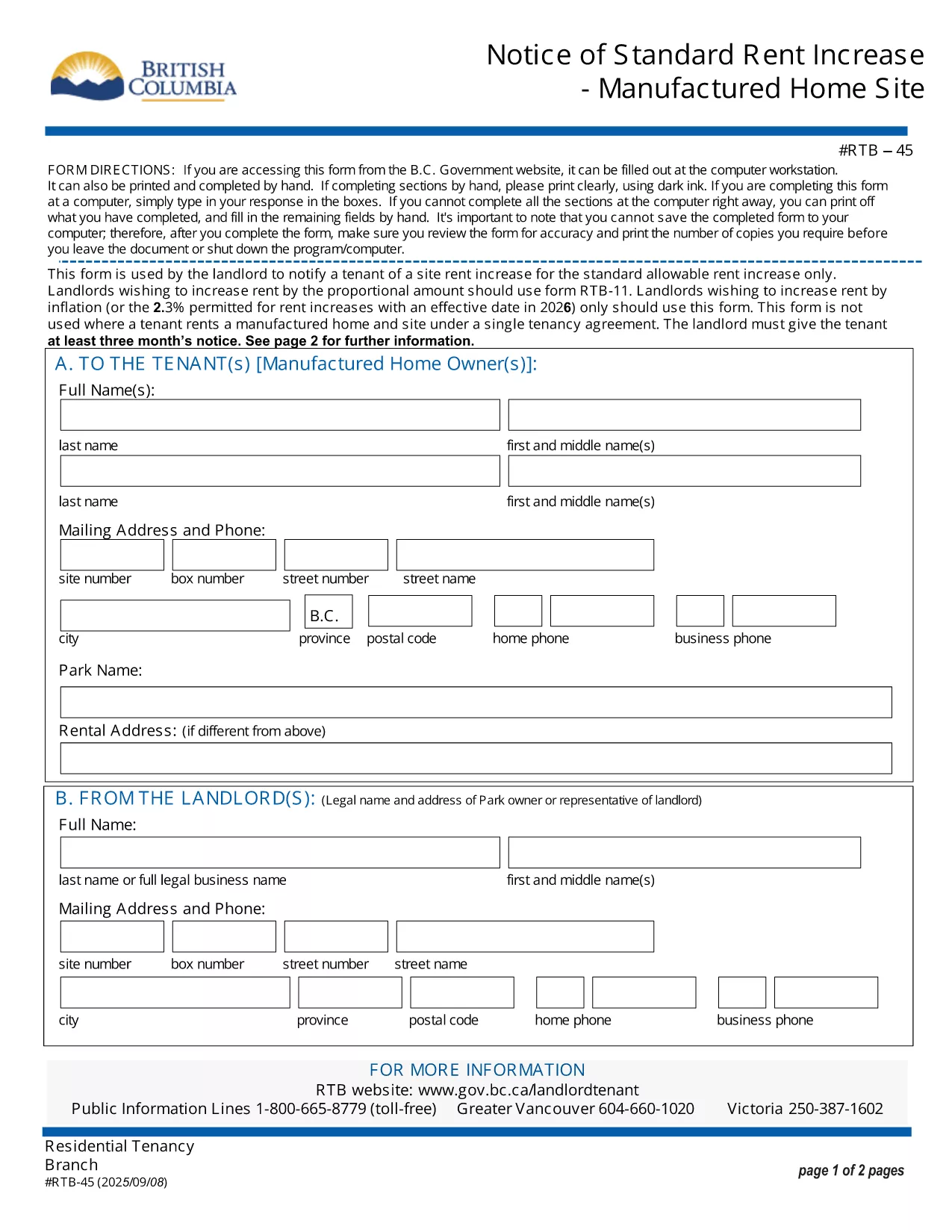
The RTB‑45 is the official notice used in British Columbia to inform tenants of a rent increase for manufactured home sites. Landlords must provide this form at least three months before the increase takes effect, as required by the Residential Tenancy Act.

Our fillable PDF version lets you complete the notice directly in your browser—no printing, scanning, or faxing needed. Simply click the button below, fill the required fields, and download a legally‑compliant PDF ready to serve.

What Is the RTB‑45 Form?

The RTB‑45 details the new rent amount, the date the increase starts, and the reason for the change. It must be signed by the landlord (or authorized agent) and delivered to the tenant in writing.

How to Complete the RTB‑45 Online

Using Formize’s PDF Filler, the process is quick and secure:

  • Click the "Fill out this form" button.
  • Wait for the Formize PDF Filler app to load.
  • Enter the landlord’s contact information, tenant’s name, current rent, new rent, and effective date.
  • Review the populated fields for accuracy.
  • Save or download the completed PDF and serve it to the tenant.

Common Mistakes to Avoid

  • Incorrect notice period: BC law requires at least three months’ written notice.
  • Missing signatures: The form is not valid without the landlord’s signature.
  • Wrong effective date: The increase cannot take effect before the tenancy has been in place for 12 months.

Download & Save Your Completed Form

After filling out the RTB‑45, you can download the PDF for your records or email it directly to the tenant. The fillable version retains all formatting, ensuring the document remains compliant with BC tenancy regulations.

SSS
  • Who must use the RTB‑45 form?

    Landlords of manufactured home sites in British Columbia must use RTB‑45 to give tenants written notice of a rent increase.

  • How many days notice is required?

    BC law requires at least three months (90 days) written notice before the rent increase takes effect.

  • Can I submit the RTB‑45 electronically?

    Yes. The fillable PDF can be completed online and emailed to the tenant, as long as the tenant receives a legible, signed copy.

  • Do I need a lawyer to fill out the form?

    No. The form is straightforward; just follow the on‑screen prompts. If you have complex questions, consult a tenancy specialist.

  • What happens if I miss the notice period?

    If the three‑month notice isn’t given, the rent increase is invalid and you must re‑issue a new RTB‑45 with proper notice.

  • Is the fillable PDF compatible with all browsers?

    The Formize PDF Filler works with modern browsers (Chrome, Edge, Firefox, Safari). For best results, use the latest version.

NASıL

RTB-45 formunu ücretsiz, çevrimiçi olarak 5 kolay adımda nasıl doldurabilirsiniz:

  1. 1
    Click the Fill Out Button
    Press the "Fill out this form" button on the page to launch the Formize PDF Filler.
  2. 2
    Wait for the Filler to Load
    The app loads in a few seconds; a loading indicator will appear.
  3. 3
    Enter Required Information
    Complete each field: landlord details, tenant name, current rent, new rent, and effective date.
  4. 4
    Review and Validate
    Double‑check all entries for accuracy and ensure the signature field is filled.
  5. 5
    Save or Download
    Click "Save" to store the form in your account or "Download" to get a printable PDF.
PDF Filler uygulamasını biçimlendirin
HAKKıNDA

Ev sahipleri ve/veya kiracılar için kira sözleşmeleriyle ilgili dava önerme formları.

RTB-45, ​​çoğu özel ev sahibi ve konut derneği tarafından kullanılan konut kira sözleşmesi türüdür.

Ev sahibi veya kiracının yönetmeliklerde belirtilen belirli kurallara uyması gereken bir dizi konu vardır. Bazı durumlarda, kira sözleşmesinin diğer tarafını etkileyebilecek bir eylemi öneren, 'öngörülen form' adı verilen bir formu doldurmaları gerekebilir.

Formlar, öngörülen formlar olarak adlandırılır, çünkü bu formlardaki ifadeler, formu dolduran kişinin ve formun kendisine sunulduğu kişinin ne önerildiğini ve buna karşılık olarak ne yapabileceğini anlayabilmesi için dikkatli bir şekilde kaleme alınmıştır. Doğru formun sunulmaması, önerilen eylemi geçersiz kılabilir.

Bir form bunu yapabileceğinizi belirtmedikçe, bu formlardaki ifadeleri değiştiremezsiniz. İfadeyi değiştirirseniz, form geçersiz olabilir. Formda belirtilen bildirim sürelerine de uymanız gerekir.

ÖZELLIKLERI

PDF Doldurucu

PDF formlarını çevrimiçi doldurmanın en kolay yolu

  • RTB-45'ü hızlıca doldurun
    RTB-45 çevrimiçi olarak hızlı bir şekilde doldurmanın bir yolunu mu arıyorsunuz? Çevrimiçi ücretsiz PDF form doldurucumuzla, bu pdf belgesini nasıl düzenleyeceğinizi ve dolduracağınızı bir dakikadan kısa sürede öğreneceksiniz.
  • Kullanımı kolay çevrimiçi PDF düzenleyici
    PDF dosyalarını yeniden tarayıp geri göndermeden önce düzenleyebilmek için yazdırmaktan bıktınız mı? PDF belgelerini çevrimiçi olarak ücretsiz düzenleyin. Zamandan ve kağıttan tasarruf etmek için çevrimiçi pdf editörümüzü kullanın.
  • Harika araçlar, tüm platformlar
    Bir Mac'te RTB-45'ü nasıl dolduracağınızı veya PDF doldurucuyu ücretsiz olarak nasıl kullanacağınızı mı merak ediyorsunuz? Çevrimiçi PDF araçlarımız tüm platformlarda çalışır.
  • Güvenli dosya depolama
    Tamamlanan "RTB-45" dosyaları, Amazon Cloud barındırma tarafından yönetilen güvenli bir veritabanında depolanır. Dosyalarınızı istediğiniz zaman sistemimizden silebilirsiniz. Her durumda, bu dosyalar 24 saat sonra otomatik olarak silinir.
  • RTB-45 ile sohbet et
    Ücretsiz bir PDF okuyucu asistanı olan Chatize'da "RTB-45" ile sohbet edin. "RTB-45" adlı kişiden sorular sorun ve yanıtlar alın. Yukarıdaki Belgeyle Sohbet Et düğmesini tıklamanız yeterlidir.

Doldurma oturumunu sil

Seçilen doldurma oturumunu silin mi? Bu durumda, formu doldurmadaki ilerlemeniz kaybolacaktır.

Düzenleme oturumunu sil

Seçilen düzenleme oturumu silinsin mi? Bu durumda formu oluşturma ve düzenleme konusundaki ilerlemeniz kaybolacaktır.