
Dil Seçin

Fillable Form 10AC – Order for Provisional Registration

  1. Dil İngilizce
  2. Ülke Hindistan
  3. Aktivite vergiler
Bu formu doldurun
Fillable Form 10AC – Order for Provisional Registration

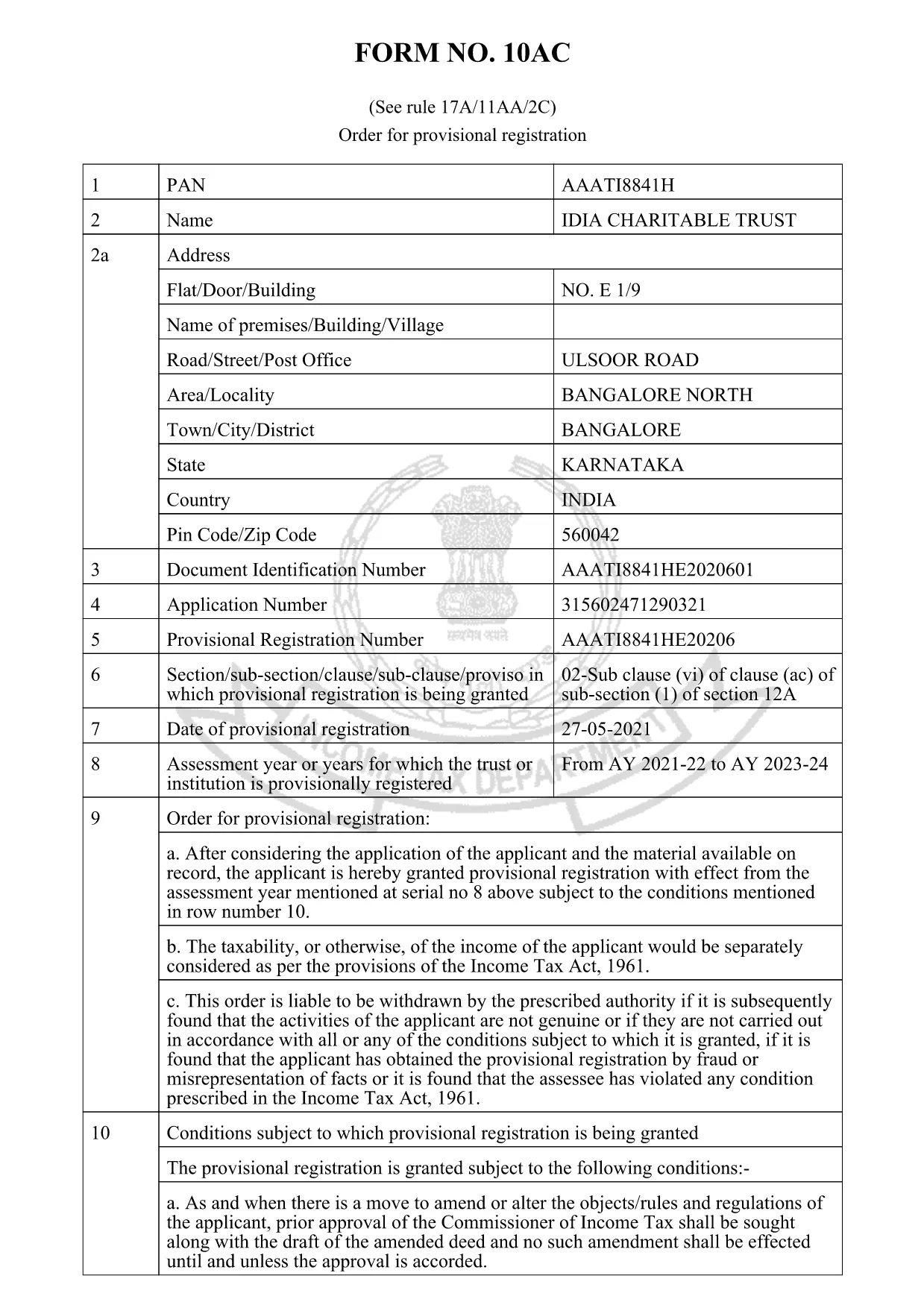
Form 10AC is the official “Order for Provisional Registration” used under Rule 17A/11AA/2C of the Income Tax Act, 1961. Trusts, charitable institutions, and religious societies file this form to obtain a temporary registration that allows them to operate while the final approval is processed.

What is Form 10AC?

The form records the applicant’s details, the purpose of the trust, and the provisional registration period. It also specifies conditions for asset disposal, dissolution, and compliance with Sections 13(3) and 115TD‑115TF of the Act.

Key Sections of Form 10AC

  • Applicant Information: Name, address, PAN, and registration number of the trust.
  • Objects of the Trust: Detailed description of charitable or religious activities.
  • Provisional Period: Start and end dates of the temporary registration.
  • Asset & Surplus Clauses: How surplus assets are to be transferred if the trust is dissolved.
  • Declaration: Signature of the authorized signatory and the jurisdiction officer.

How to Fill Form 10AC Online with Formize

Instead of downloading the PDF and opening a separate editor, simply click the “Fill out this form” button on this page. The Formize PDF Filler app will load automatically, letting you type directly into the fields, add dates, and sign electronically.

Common Mistakes to Avoid

  • Leaving any mandatory field blank – the system will highlight missing entries.
  • Using an incorrect PAN or registration number – verify numbers before submitting.
  • Not attaching the required supporting documents – upload them in the “Attachments” section.
  • Mistyping dates – the filler enforces the DD/MM/YYYY format.

Download & Save Your Completed Form

After completing the form, click Save to download a filled PDF copy. Keep a backup for your records and submit the original to the Income Tax Department as instructed.

Need a printable version? The link below provides the official PDF that powers the online filler.

SSS
  • What is the purpose of Form 10AC?

    Form 10AC grants a provisional registration to trusts and charitable institutions, allowing them to operate while the final registration is being processed.

  • Can I fill Form 10AC on a mobile device?

    Yes. The Formize PDF Filler works on all modern browsers, including mobile Safari and Chrome.

  • Do I need a digital signature to submit the form?

    A digital signature is optional for the online filler, but the printed copy must be signed by an authorized signatory before submission.

  • How long is the provisional registration valid?

    The provisional period is usually six months from the date of issuance, but it can be extended by the jurisdiction officer.

  • What happens to surplus assets if the trust is dissolved?

    Surplus assets must be transferred to another organization with similar objectives, as stipulated in Section 13(3) of the Income Tax Act.

  • Is there a fee to download Form 10AC?

    No. The PDF is free to download and fill online using the Formize platform.

  • Can I edit the form after I have saved it?

    Yes. Open the saved PDF again with Formize’s filler to make any needed corrections before final submission.

NASıL

form 10ac formunu ücretsiz, çevrimiçi olarak 5 kolay adımda nasıl doldurabilirsiniz:

  1. 1
    Open the Fillable Form
    Click the “Fill out this form” button on the page. The Formize PDF Filler loads instantly in your browser.
  2. 2
    Enter Your Details
    Type directly into each highlighted field – name, PAN, address, and trust objects. The filler validates entries in real time.
  3. 3
    Attach Supporting Documents
    Use the “Attachments” section to upload required certificates, PAN copies, and any other supporting paperwork.
  4. 4
    Review & Sign
    Check every field for accuracy, then add your electronic signature in the declaration box.
  5. 5
    Save or Submit
    Click “Save” to download the completed PDF for your records, or follow the on‑screen instructions to submit it to the Income Tax Department.
PDF Filler uygulamasını biçimlendirin
HAKKıNDA

Gelir Vergisi Departmanı Formları

form 10ac, ​​Hindistan Gelir Vergisi Departmanı tarafından gelir vergilerini yönetmek ve toplamak için kullanılan resmi formlardan biridir. Bu formlar vergi mükellefleri tarafından gelirlerini, kesintilerini ve vergi yükümlülüklerini vergi makamlarına bildirmek için kullanılır.

Hindistan'da yaygın olarak kullanılan bazı Gelir Vergisi Departmanı formları şunlardır:

ITR-1 (Sahaj): Bu form şu kişiler tarafından kullanılır: maaş, bir ev mülkü ve faiz, emekli maaşı veya aile emekliliği gibi diğer kaynaklardan geliri olan kişiler. Toplam geliri Rs'ye kadar olan kişiler için geçerlidir. 50 lakh.

ITR-2: Bu form bireyler ve Hindular tarafından kullanılır İş veya meslek dışındaki kaynaklardan gelir elde eden Bölünmemiş Aileler (HUF'ler). Toplam geliri Rs'yi aşan kişiler için geçerlidir. 50 lakh veya yabancı varlık/gelir sahibi olmak.

ITR-3: Bu form bireyler ve HUF'ler tarafından kullanılır iş veya meslekten gelir sahibi olmak. Ortaklık firmasından gelir elde eden kişiler ve meslek icra eden profesyoneller için geçerlidir.

ITR-4 (Sugam): Bu form şu kişiler tarafından kullanılır: Gelir Vergisi Kanunu'nun 44AD, 44ADA veya 44AE bölümleri kapsamında varsayımsal vergilendirme planını tercih eden bireyler, HUF'ler ve firmalar (LLP hariç).

Form 16: Bu form işverenler tarafından çalışanlara sağlanır ve ayrıntıları içerir maaş, kaynakta kesilen vergi (TDS) ve diğer ilgili bilgiler. Çalışanların gelir vergisi beyannamelerini doğru bir şekilde doldurmalarına yardımcı olur.

Form 26AS: Bu bir form değil, yıllık konsolide vergi beyanıdır Bu, vergi mükellefi tarafından ödenen TDS, geçici vergi ve öz değerlendirme vergisi gibi vergiyle ilgili bilgilerin bir özetini sağlar. Vergi mükelleflerinin gelir vergisi beyannamelerini doldururken vergi yükümlülüklerini çapraz olarak doğrulamalarına yardımcı olur.

Bunlar Hindistan'daki Gelir Vergisi Departmanı formlarının sadece birkaç örneğidir. Özel formlar ve gereklilikler, gelirin niteliğine, vergi mükellefi kategorisine ve Hindistan'da geçerli olan vergi kanunlarına göre değişiklik gösterebilir. Hindistan Gelir Vergisi Dairesi'nin resmi web sitesine (www.incometaxindia.gov.in) başvurmak veya vergilerle ilgili doğru ve güncel bilgiler edinmek için profesyonel tavsiye almak önemlidir. Hindistan'daki vergi durumunuzla ilgili özel gelir vergisi formları.

ÖZELLIKLERI

PDF Doldurucu

PDF formlarını çevrimiçi doldurmanın en kolay yolu

  • form 10ac'ü hızlıca doldurun
    form 10ac çevrimiçi olarak hızlı bir şekilde doldurmanın bir yolunu mu arıyorsunuz? Çevrimiçi ücretsiz PDF form doldurucumuzla, bu pdf belgesini nasıl düzenleyeceğinizi ve dolduracağınızı bir dakikadan kısa sürede öğreneceksiniz.
  • Kullanımı kolay çevrimiçi PDF düzenleyici
    PDF dosyalarını yeniden tarayıp geri göndermeden önce düzenleyebilmek için yazdırmaktan bıktınız mı? PDF belgelerini çevrimiçi olarak ücretsiz düzenleyin. Zamandan ve kağıttan tasarruf etmek için çevrimiçi pdf editörümüzü kullanın.
  • Harika araçlar, tüm platformlar
    Bir Mac'te form 10ac'ü nasıl dolduracağınızı veya PDF doldurucuyu ücretsiz olarak nasıl kullanacağınızı mı merak ediyorsunuz? Çevrimiçi PDF araçlarımız tüm platformlarda çalışır.
  • Güvenli dosya depolama
    Tamamlanan "form 10ac" dosyaları, Amazon Cloud barındırma tarafından yönetilen güvenli bir veritabanında depolanır. Dosyalarınızı istediğiniz zaman sistemimizden silebilirsiniz. Her durumda, bu dosyalar 24 saat sonra otomatik olarak silinir.
  • form 10ac ile sohbet et
    Ücretsiz bir PDF okuyucu asistanı olan Chatize'da "form 10ac" ile sohbet edin. "form 10ac" adlı kişiden sorular sorun ve yanıtlar alın. Yukarıdaki Belgeyle Sohbet Et düğmesini tıklamanız yeterlidir.

Doldurma oturumunu sil

Seçilen doldurma oturumunu silin mi? Bu durumda, formu doldurmadaki ilerlemeniz kaybolacaktır.

Düzenleme oturumunu sil

Seçilen düzenleme oturumu silinsin mi? Bu durumda formu oluşturma ve düzenleme konusundaki ilerlemeniz kaybolacaktır.