
Dil Seçin

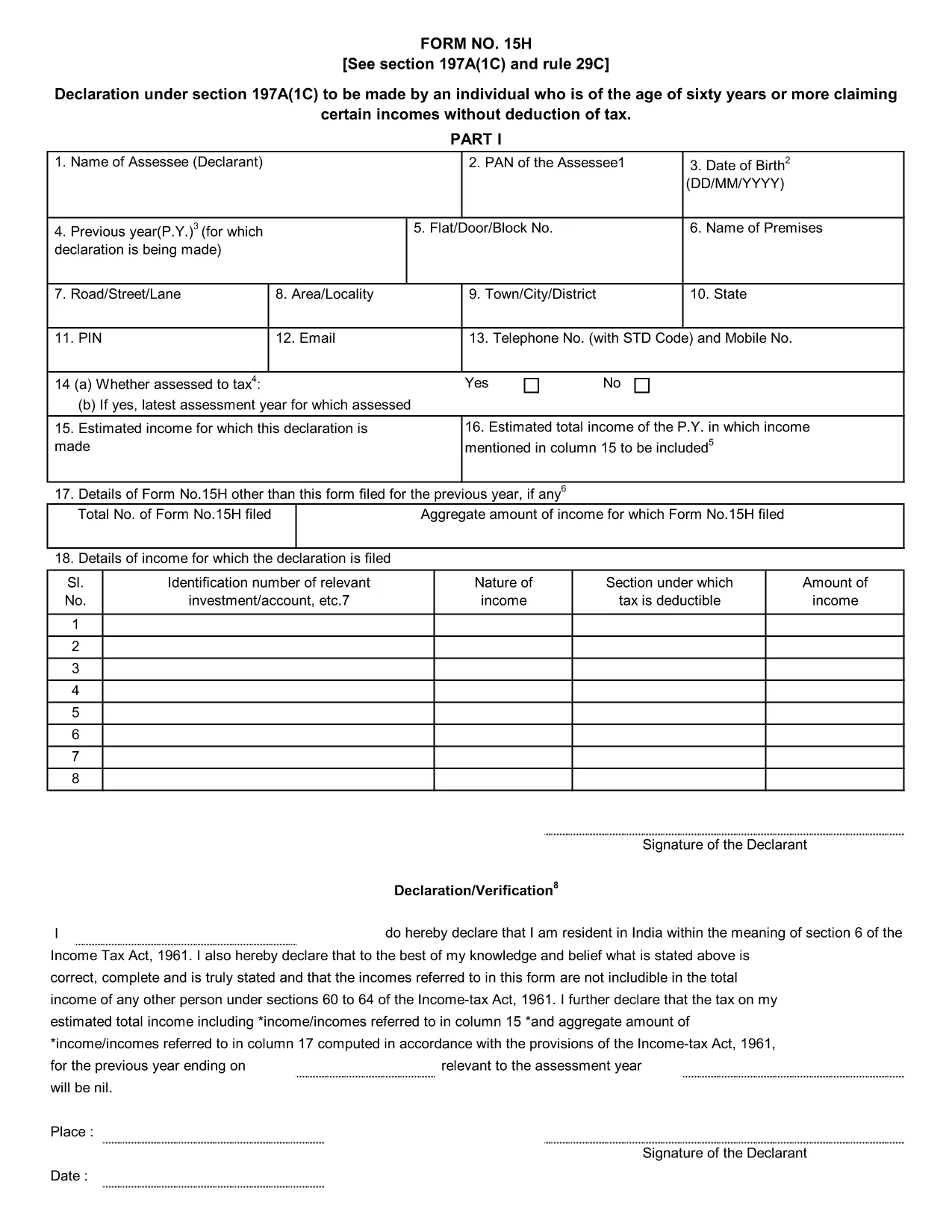
Form 15H – Senior Citizens’ Interest Income Declaration (Fillable PDF)

  1. Dil İngilizce
  2. Ülke Hindistan
  3. Aktivite vergiler
Form 15H – Senior Citizens’ Interest Income Declaration (Fillable PDF)

Form 15H is a declaration under sub‑section (1C) of section 197A of the Income‑Tax Act, 1961. It allows senior citizens (aged 60 years or more) to request that tax be **not deducted at source (TDS)** on interest earned from bank or post‑office deposits, provided they meet certain income thresholds.

Who Can Use Form 15H?

  • Resident individuals aged 60 years or above.
  • Those whose total taxable income does not exceed the limits set by the Act (₹3 lakhs for ages 60‑79, ₹5 lakhs for 80 years and above).
  • Taxpayers who receive interest income from banks, post offices, or cooperative societies.

Eligibility & Income Limits

The Income‑Tax Department defines two income caps:

  • Age 60‑79: Taxable income ≤ ₹300,000 per financial year.
  • Age 80 and above: Taxable income ≤ ₹500,000 per financial year.

If your interest earnings are below ₹50,000 in a year, you are not required to submit Form 15H – the bank will not deduct TDS automatically.

How to Fill Form 15H Online

Instead of downloading the PDF and editing it locally, simply click the "Fill out this form" button on this page. The Formize PDF Filler app will load in your browser, allowing you to complete the declaration in a few easy steps:

  1. Enter your name, PAN, and address as they appear on your PAN card.
  2. Provide your bank account details where the interest is credited.
  3. Declare the total interest earned and confirm it is within the eligible limit.
  4. Sign electronically (or print, sign, and scan if you prefer a hard copy).
  5. Submit the form to your bank or download it for manual submission.

Common Mistakes to Avoid

  • Entering an incorrect PAN – the bank will reject the form.
  • Mis‑calculating total taxable income; always include salary, rent, and other earnings.
  • Submitting the form after the interest has already been taxed – it must be given **before** the bank deducts TDS.
  • Leaving the "Signature" field blank; an electronic signature is acceptable in most banks.

Download & Save the Fillable PDF

If you prefer a local copy, you can download the official fillable PDF below. The file retains the original layout and can be opened with any modern PDF reader.

Download Form 15H – Fillable PDF

Using Formize’s online filler saves time, reduces errors, and lets you submit the declaration instantly to your bank.

SSS
  • What is the purpose of Form 15H?

    Form 15H allows senior citizens (60 years or older) to request that TDS be **not deducted** on interest income when their total taxable income is below the specified thresholds.

  • Can I use Form 15H if I am below 60 years?

    No. Individuals under 60 should use Form 15G, which serves the same purpose for younger taxpayers.

  • Do I need to submit Form 15H every financial year?

    Yes. The declaration is valid only for the financial year in which it is submitted. A new Form 15H must be provided each year you wish to claim the exemption.

  • What if my interest income exceeds ₹50,000?

    If interest exceeds ₹50,000, the bank will automatically deduct TDS unless you submit a valid Form 15H before the interest is credited.

  • Is an electronic signature accepted?

    Most banks accept an electronic signature entered via the Formize PDF Filler. If your bank requires a handwritten signature, print, sign, and scan the completed form.

  • Can I submit Form 15H online to the Income‑Tax Department?

    Form 15H is submitted to the **bank or post‑office** where the interest is credited, not directly to the Income‑Tax Department.

  • What happens if I submit an incorrect PAN?

    The bank will reject the form and may still deduct TDS. Ensure the PAN matches the one on your PAN card.

  • Do I need to attach any supporting documents?

    Generally no. The form itself is sufficient, but keep your interest statements handy in case the bank requests verification.

NASıL

Form 15H formunu ücretsiz, çevrimiçi olarak 5 kolay adımda nasıl doldurabilirsiniz:

  1. 1
    Click the Fill‑out Button
    Press the "Fill out this form" button on the page. The Formize PDF Filler loads instantly in your browser.
  2. 2
    Enter Your Details
    Provide your name, PAN, address, bank account number, and total interest earned as prompted.
  3. 3
    Verify Income Limits
    The filler will automatically check that your total taxable income is within the ₹3 Lakh or ₹5 Lakh limits based on age.
  4. 4
    Add Your Signature
    Use the electronic signature tool or upload a scanned signature image.
  5. 5
    Submit or Download
    Send the completed form directly to your bank via their portal, or download the PDF for manual submission.
PDF Filler uygulamasını biçimlendirin
HAKKıNDA

Gelir Vergisi Departmanı Formları

Form 15H, ​​Hindistan Gelir Vergisi Departmanı tarafından gelir vergilerini yönetmek ve toplamak için kullanılan resmi formlardan biridir. Bu formlar vergi mükellefleri tarafından gelirlerini, kesintilerini ve vergi yükümlülüklerini vergi makamlarına bildirmek için kullanılır.

Hindistan'da yaygın olarak kullanılan bazı Gelir Vergisi Departmanı formları şunlardır:

ITR-1 (Sahaj): Bu form şu kişiler tarafından kullanılır: maaş, bir ev mülkü ve faiz, emekli maaşı veya aile emekliliği gibi diğer kaynaklardan geliri olan kişiler. Toplam geliri Rs'ye kadar olan kişiler için geçerlidir. 50 lakh.

ITR-2: Bu form bireyler ve Hindular tarafından kullanılır İş veya meslek dışındaki kaynaklardan gelir elde eden Bölünmemiş Aileler (HUF'ler). Toplam geliri Rs'yi aşan kişiler için geçerlidir. 50 lakh veya yabancı varlık/gelir sahibi olmak.

ITR-3: Bu form bireyler ve HUF'ler tarafından kullanılır iş veya meslekten gelir sahibi olmak. Ortaklık firmasından gelir elde eden kişiler ve meslek icra eden profesyoneller için geçerlidir.

ITR-4 (Sugam): Bu form şu kişiler tarafından kullanılır: Gelir Vergisi Kanunu'nun 44AD, 44ADA veya 44AE bölümleri kapsamında varsayımsal vergilendirme planını tercih eden bireyler, HUF'ler ve firmalar (LLP hariç).

Form 16: Bu form işverenler tarafından çalışanlara sağlanır ve ayrıntıları içerir maaş, kaynakta kesilen vergi (TDS) ve diğer ilgili bilgiler. Çalışanların gelir vergisi beyannamelerini doğru bir şekilde doldurmalarına yardımcı olur.

Form 26AS: Bu bir form değil, yıllık konsolide vergi beyanıdır Bu, vergi mükellefi tarafından ödenen TDS, geçici vergi ve öz değerlendirme vergisi gibi vergiyle ilgili bilgilerin bir özetini sağlar. Vergi mükelleflerinin gelir vergisi beyannamelerini doldururken vergi yükümlülüklerini çapraz olarak doğrulamalarına yardımcı olur.

Bunlar Hindistan'daki Gelir Vergisi Departmanı formlarının sadece birkaç örneğidir. Özel formlar ve gereklilikler, gelirin niteliğine, vergi mükellefi kategorisine ve Hindistan'da geçerli olan vergi kanunlarına göre değişiklik gösterebilir. Hindistan Gelir Vergisi Dairesi'nin resmi web sitesine (www.incometaxindia.gov.in) başvurmak veya vergilerle ilgili doğru ve güncel bilgiler edinmek için profesyonel tavsiye almak önemlidir. Hindistan'daki vergi durumunuzla ilgili özel gelir vergisi formları.

ÖZELLIKLERI

PDF Doldurucu

PDF formlarını çevrimiçi doldurmanın en kolay yolu

  • Form 15H'ü hızlıca doldurun
    Form 15H çevrimiçi olarak hızlı bir şekilde doldurmanın bir yolunu mu arıyorsunuz? Çevrimiçi ücretsiz PDF form doldurucumuzla, bu pdf belgesini nasıl düzenleyeceğinizi ve dolduracağınızı bir dakikadan kısa sürede öğreneceksiniz.
  • Kullanımı kolay çevrimiçi PDF düzenleyici
    PDF dosyalarını yeniden tarayıp geri göndermeden önce düzenleyebilmek için yazdırmaktan bıktınız mı? PDF belgelerini çevrimiçi olarak ücretsiz düzenleyin. Zamandan ve kağıttan tasarruf etmek için çevrimiçi pdf editörümüzü kullanın.
  • Harika araçlar, tüm platformlar
    Bir Mac'te Form 15H'ü nasıl dolduracağınızı veya PDF doldurucuyu ücretsiz olarak nasıl kullanacağınızı mı merak ediyorsunuz? Çevrimiçi PDF araçlarımız tüm platformlarda çalışır.
  • Güvenli dosya depolama
    Tamamlanan "Form 15H" dosyaları, Amazon Cloud barındırma tarafından yönetilen güvenli bir veritabanında depolanır. Dosyalarınızı istediğiniz zaman sistemimizden silebilirsiniz. Her durumda, bu dosyalar 24 saat sonra otomatik olarak silinir.
  • Form 15H ile sohbet et
    Ücretsiz bir PDF okuyucu asistanı olan Chatize'da "Form 15H" ile sohbet edin. "Form 15H" adlı kişiden sorular sorun ve yanıtlar alın. Yukarıdaki Belgeyle Sohbet Et düğmesini tıklamanız yeterlidir.

Doldurma oturumunu sil

Seçilen doldurma oturumunu silin mi? Bu durumda, formu doldurmadaki ilerlemeniz kaybolacaktır.

Düzenleme oturumunu sil

Seçilen düzenleme oturumu silinsin mi? Bu durumda formu oluşturma ve düzenleme konusundaki ilerlemeniz kaybolacaktır.