
Dil Seçin

Form 1120‑S Schedule K‑3 Fillable PDF

  1. Ülke Amerika Birleşik Devletleri
  2. Dil İngilizce
  3. Aktivite vergiler
  4. Departman İç Gelir Servisi
Form 1120‑S Schedule K‑3 Fillable PDF

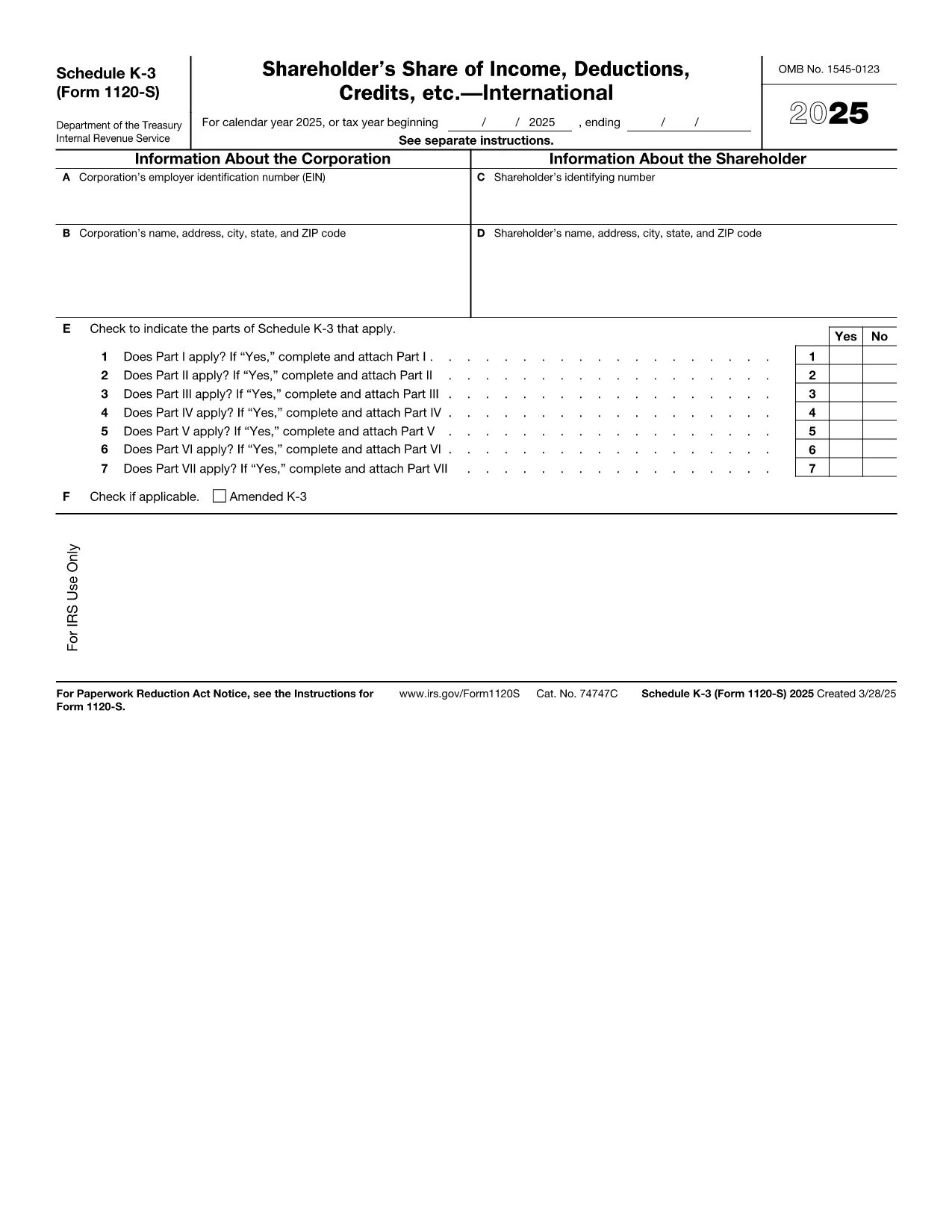
Schedule K‑3 (Form 1120‑S) is the IRS’s dedicated worksheet for reporting a corporation’s international tax items that flow through to each shareholder’s Schedule K‑1. If your S corporation has foreign income, taxes paid, or other cross‑border activities, you must complete this form.

What Is Schedule K‑3 and Who Needs It?

Schedule K‑3 expands on Schedule K‑2 to capture detailed foreign tax credit limitations, foreign source income, and other international items. All S corporations that report foreign activities on their Form 1120‑S must file Schedule K‑3, and shareholders use the information to claim foreign tax credits on their personal returns.

How to Complete Schedule K‑3 Online

Instead of printing, editing, and rescanning, you can fill the official IRS PDF directly in your browser with Formize’s PDF Filler. The process is simple:

  1. Click the "Fill out this form" button on this page.
  2. Wait a few seconds while the Formize PDF Filler app loads the fillable version of Schedule K‑3.
  3. Enter the required numbers in each field – the form automatically validates dates and numeric formats.
  4. Review every line for accuracy; the filler highlights missing or inconsistent entries.
  5. When you’re satisfied, click Save to download a completed PDF or Export to Cloud for secure storage.

Common Mistakes to Avoid on Schedule K‑3

  • Leaving foreign tax credit limitation fields blank – the IRS treats blanks as zero, which can under‑report credits.
  • Mismatching the currency conversion rate – use the rate applicable to the tax year, not a rounded estimate.
  • Omitting Schedule K‑2 reference numbers – Schedule K‑3 must reference the corresponding Schedule K‑2 lines.
  • Incorrect shareholder identification – ensure the name and SSN/EIN match the Schedule K‑1.

Download the Official IRS Fillable PDF

The PDF linked below is the exact version published by the Internal Revenue Service. It is fully fillable and compatible with Formize’s online editor.

Download Schedule K‑3 (Form 1120‑S) – IRS PDF

FAQs About Form 1120‑S Schedule K‑3

Below are the most common questions taxpayers ask about this schedule. Click each question to view the answer.

Talimatlar

SSS
  • Do I need Schedule K‑3 if my S corporation has no foreign activity?

    No. Schedule K‑3 is required only when the corporation reports foreign income, taxes, or other international items on Schedule K‑2.

  • Can I use the same PDF for multiple tax years?

    Each tax year has its own version of Schedule K‑3. Use the PDF that matches the year you are filing (e.g., 2025 version for 2025 returns).

  • Is the Formize PDF Filler free to use?

    Yes, filling out the Schedule K‑3 online with Formize’s basic filler is free. Advanced features such as cloud storage may require a paid plan.

  • How do I report foreign tax credits on my personal return?

    The amounts from Schedule K‑3 flow to the shareholder’s Schedule K‑1. Use those figures on Form 1116 (or the appropriate line on Form 1040) to claim the credit.

  • What if I make a mistake after saving the PDF?

    Open the saved PDF again in Formize’s filler, correct the fields, and re‑save. The fillable PDF preserves all form fields for easy editing.

  • Where can I get help if I’m unsure about any line?

    The IRS instructions for Form 1120‑S and Schedule K‑3 provide detailed guidance. You can also consult a tax professional familiar with international S‑corp reporting.

NASıL

Form 1120-S Schedule K-3 formunu ücretsiz, çevrimiçi olarak 5 kolay adımda nasıl doldurabilirsiniz:

  1. 1
    Click the Fill Out Button
    Press the "Fill out this form" button on the page to launch the Formize PDF Filler.
  2. 2
    Wait for the Filler to Load
    A few seconds later the fillable Schedule K‑3 PDF appears in your browser.
  3. 3
    Enter Required Information
    Type the numbers and text into each highlighted field. The filler checks formats automatically.
  4. 4
    Review for Accuracy
    Use the built‑in validation to spot any missing or inconsistent entries before finalizing.
  5. 5
    Save or Export the Completed Form
    Click "Save" to download the finished PDF or choose "Export to Cloud" for secure storage.
PDF Filler uygulamasını biçimlendirin
HAKKıNDA

Vergi formları

Form 1120-S Schedule K-3, ​​geliri, kesintileri ve vergi yükümlülüğünü ilgili vergi dairesine bildirmek için kullanılan belgeler olan Vergi formlarından biridir. Bu formlar vergi beyanı sürecinin önemli bir parçasıdır ve bireylerin ve işletmelerin vergi kanunlarına uymasını ve vergi yükümlülüklerini doğru bir şekilde hesaplamasını sağlamak için kullanılır.

Gereken spesifik vergi formları, bireyin başvuru durumu, gelir kaynakları ve ülkenin vergi kanunları gibi faktörlere bağlı olarak değişiklik gösterebilir. Ancak, bazı yaygın vergi formu türleri şunlardır:

Bireysel Gelir Vergisi Formları: Amerika Birleşik Devletleri'nde 1040 serisi gibi bu formlar kullanılmaktadır bireyler tarafından gelirlerini raporlamak, kesintileri ve alacakları talep etmek ve vergi yükümlülüklerini hesaplamak için kullanılır.

İşletme Vergi Formları: Şahıs şirketleri, ortaklıklar, şirketler ve serbest meslek sahibi kişiler de dahil olmak üzere işletmelerin, gelirlerini, giderlerini ve borçlu oldukları vergileri bildirmek için çeşitli formlar doldurmaları gerekebilir. Örnekler arasında Çizelge C (İşletmeden Kar veya Zarar) ve Form 1120 (ABD Kurumlar Gelir Vergisi Beyannamesi) yer alır.

İstihdam Vergisi Formları: İşverenlerin çalışan ücretlerini bildirmesi ve bordro vergilerini kesip ödemesi gerekir. Bu amaçla W-2 (Ücret ve Vergi Beyanı) ve 941 (İşverenin Üç Aylık Federal Vergi Beyannamesi) gibi formlar kullanılır.

Yatırım ve Emeklilik Hesabı Formları: Bu formlar, yatırım gelirleri, sermaye kazançları ve zararları ile emeklilik hesaplarından yapılan katkı ve dağıtımların raporlanması için kullanılır. Örnekler arasında Form 1099-DIV (Temettüler ve Dağıtımlar) ve Form 5498 (IRA Katkı Bilgileri).

Emlak ve Hediye Vergisi Formları: Bir kişi vefat ettiğinde veya önemli hediyeler verdiğinde, Form 706 gibi özel formlar a> (Amerika Birleşik Devletleri Emlak (ve Nesil Atlama Transferi) Vergi Beyannamesi) ve Form 709 (Amerika Birleşik Devletleri Hediyesi (ve Nesil- Transferi Atlama) Vergi İadesi), geçerli emlak veya intikal vergilerini raporlamak ve hesaplamak için kullanılır.

Vergi yasalarının ve formlarının zaman içinde değişebileceğini unutmamak önemlidir; bu nedenle bireyler ve işletmeler, mevcut gerekliliklere uygunluğu sağlamak için ilgili vergi dairesine danışmalı veya profesyonel vergi danışmanlığı almalıdır.

ÖZELLIKLERI

PDF Doldurucu

PDF formlarını çevrimiçi doldurmanın en kolay yolu

  • Form 1120-S Schedule K-3'ü hızlıca doldurun
    Form 1120-S Schedule K-3 çevrimiçi olarak hızlı bir şekilde doldurmanın bir yolunu mu arıyorsunuz? Çevrimiçi ücretsiz PDF form doldurucumuzla, bu pdf belgesini nasıl düzenleyeceğinizi ve dolduracağınızı bir dakikadan kısa sürede öğreneceksiniz.
  • Kullanımı kolay çevrimiçi PDF düzenleyici
    PDF dosyalarını yeniden tarayıp geri göndermeden önce düzenleyebilmek için yazdırmaktan bıktınız mı? PDF belgelerini çevrimiçi olarak ücretsiz düzenleyin. Zamandan ve kağıttan tasarruf etmek için çevrimiçi pdf editörümüzü kullanın.
  • Harika araçlar, tüm platformlar
    Bir Mac'te Form 1120-S Schedule K-3'ü nasıl dolduracağınızı veya PDF doldurucuyu ücretsiz olarak nasıl kullanacağınızı mı merak ediyorsunuz? Çevrimiçi PDF araçlarımız tüm platformlarda çalışır.
  • Güvenli dosya depolama
    Tamamlanan "Form 1120-S Schedule K-3" dosyaları, Amazon Cloud barındırma tarafından yönetilen güvenli bir veritabanında depolanır. Dosyalarınızı istediğiniz zaman sistemimizden silebilirsiniz. Her durumda, bu dosyalar 24 saat sonra otomatik olarak silinir.
  • Form 1120-S Schedule K-3 ile sohbet et
    Ücretsiz bir PDF okuyucu asistanı olan Chatize'da "Form 1120-S Schedule K-3" ile sohbet edin. "Form 1120-S Schedule K-3" adlı kişiden sorular sorun ve yanıtlar alın. Yukarıdaki Belgeyle Sohbet Et düğmesini tıklamanız yeterlidir.

Doldurma oturumunu sil

Seçilen doldurma oturumunu silin mi? Bu durumda, formu doldurmadaki ilerlemeniz kaybolacaktır.

Düzenleme oturumunu sil

Seçilen düzenleme oturumu silinsin mi? Bu durumda formu oluşturma ve düzenleme konusundaki ilerlemeniz kaybolacaktır.