
Dil Seçin

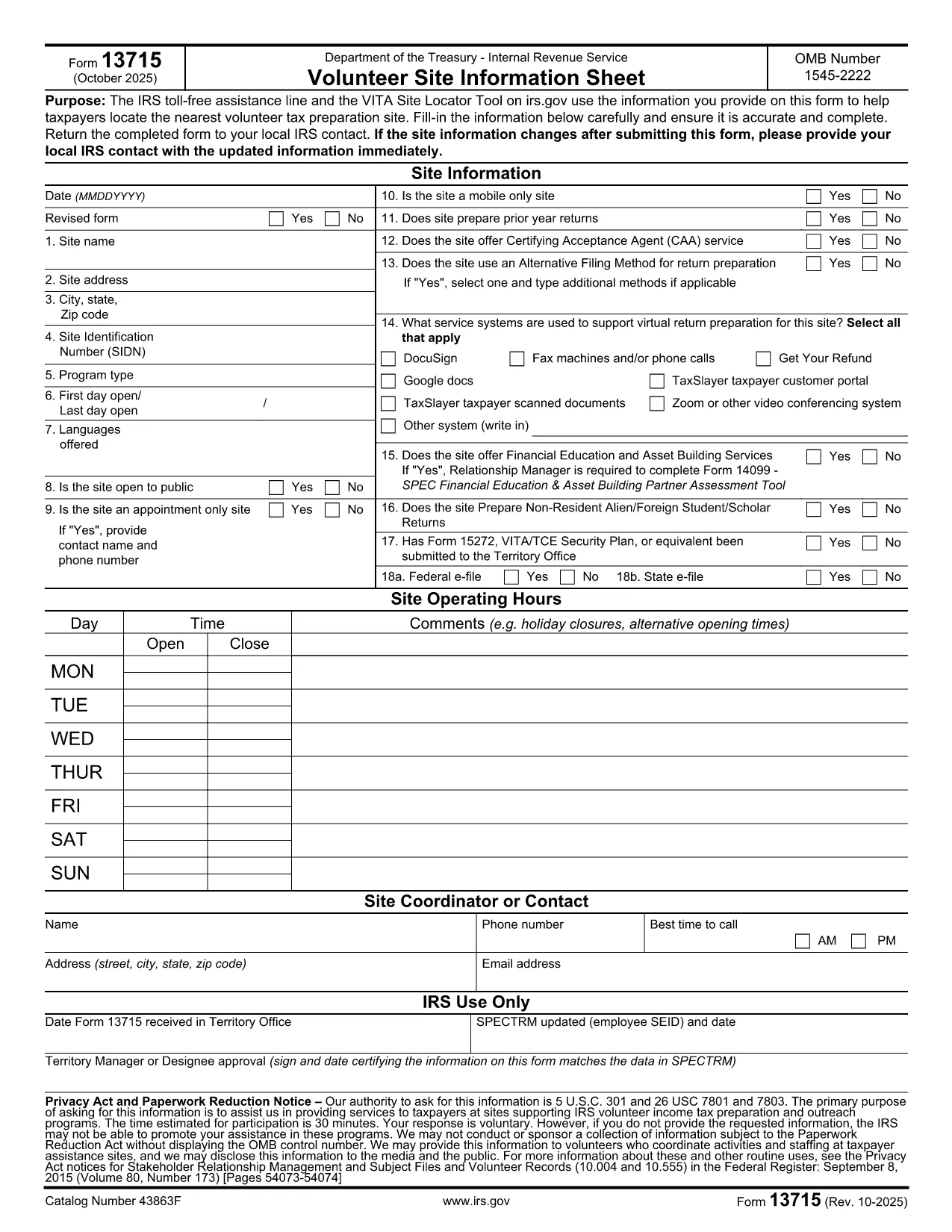
Form 13715 – Volunteer Site Information Sheet (Fillable PDF)

  1. Ülke Amerika Birleşik Devletleri
  2. Dil İngilizce
  3. Aktivite vergiler
  4. Departman İç Gelir Servisi
Form 13715 – Volunteer Site Information Sheet (Fillable PDF)

The IRS Form 13715, also known as the Volunteer Site Information Sheet, is required for any organization that wants to be listed in the VITA (Volunteer Income Tax Assistance) Site Locator tool. This form collects essential contact and service details so taxpayers can easily find the nearest volunteer tax‑preparation site.

What Is Form 13715 and Who Needs It?

Form 13715 is issued by the Internal Revenue Service (IRS) and must be completed by:

  • Non‑profit organizations that host VITA or TCE (Tax Counseling for the Elderly) sites.
  • Community centers, libraries, churches, or any entity that provides free tax‑preparation services.

The information you provide helps the IRS toll‑free assistance line and the online site locator match taxpayers with the closest volunteer site.

How to Complete the Form Using Formize

Instead of downloading the PDF and opening it in a separate editor, simply click the "Fill out this form" button on this page. The Formize PDF Filler app will load instantly, allowing you to:

  1. Enter all required details directly in your browser.
  2. Save your progress automatically.
  3. Download a completed, IRS‑ready PDF with one click.

Common Mistakes & Tips

  • Missing phone number or email: The IRS requires at least one reliable contact method.
  • Incorrect zip code: Double‑check the ZIP to ensure the site appears in the correct geographic search.
  • Out‑of‑date service hours: Update hours each year to avoid confusion for taxpayers.

Review each field carefully before saving the final PDF.

Where to Submit the Completed Form

After you finish, print the filled‑in PDF and mail it to your local IRS VITA coordinator (address is provided on the form). Some regions also accept a scanned copy via email—check the instructions on the last page of the form.

FAQs About Form 13715

Below are quick answers to the most common questions (full FAQ list is also available further down the page).

SSS
  • Do I need to print the form after filling it online?

    Yes. The IRS requires a hard‑copy signature on Form 13715 before it can be processed. Print the completed PDF, sign, and mail it.

  • Can I save a draft and finish later?

    Absolutely. Formize automatically saves your progress in the browser’s local storage. Return to the page later and continue where you left off.

  • Is there a fee to use Formize’s PDF filler?

    No. The fillable PDF tool is completely free for all IRS forms, including Form 13715.

  • What if I enter the wrong ZIP code?

    The site will not appear in the VITA locator for the intended area, and taxpayers may be directed elsewhere. Double‑check the ZIP before downloading.

  • How often should I update Form 13715?

    Update the form annually or whenever your contact information, service hours, or locations change.

  • Can I submit the form electronically?

    The IRS still requires a signed hard copy, but many regional VITA coordinators accept a scanned copy via email after the original is mailed.

  • Where can I find help if I have questions?

    Contact the IRS VITA hotline at 1‑800‑222‑2222 or reach out to your local IRS volunteer coordinator for assistance.

  • Is Form 13715 the same as Form 13614?

    No. Form 13715 collects site information for VITA locations, while Form 13614 is the IRS Individual Taxpayer Interview and used by volunteers to prepare returns.

NASıL

Form 13715 formunu ücretsiz, çevrimiçi olarak 5 kolay adımda nasıl doldurabilirsiniz:

  1. 1
    Click the Fill‑out Button
    Press the "Fill out this form" button on this page. The Formize PDF Filler loads directly in your browser—no download required.
  2. 2
    Enter Your Information
    Complete each field: organization name, contact details, service hours, and any special instructions. The form auto‑saves as you type.
  3. 3
    Review & Validate
    Use the built‑in validation to check for missing or incorrectly formatted entries. Correct any highlighted errors.
  4. 4
    Download the Completed PDF
    When all fields are filled, click the "Download PDF" button. You’ll receive an IRS‑ready, fillable PDF ready for printing or electronic submission.
  5. 5
    Submit to Your Local IRS Coordinator
    Print the PDF and mail it to the address listed on the last page, or follow any region‑specific email instructions.
PDF Filler uygulamasını biçimlendirin
HAKKıNDA

Vergi formları

Form 13715, ​​vergilerle ilgili bilgileri ilgili vergi dairesine bildirmek için kullanılan belgeler olan Vergi formlarından biridir. Vergi mükellefinin koşullarına ve konumuna bağlı olarak değişebilen federal, eyalet ve yerel vergi formları dahil olmak üzere çeşitli vergi formları vardır.

ÖZELLIKLERI

PDF Doldurucu

PDF formlarını çevrimiçi doldurmanın en kolay yolu

  • Form 13715'ü hızlıca doldurun
    Form 13715 çevrimiçi olarak hızlı bir şekilde doldurmanın bir yolunu mu arıyorsunuz? Çevrimiçi ücretsiz PDF form doldurucumuzla, bu pdf belgesini nasıl düzenleyeceğinizi ve dolduracağınızı bir dakikadan kısa sürede öğreneceksiniz.
  • Kullanımı kolay çevrimiçi PDF düzenleyici
    PDF dosyalarını yeniden tarayıp geri göndermeden önce düzenleyebilmek için yazdırmaktan bıktınız mı? PDF belgelerini çevrimiçi olarak ücretsiz düzenleyin. Zamandan ve kağıttan tasarruf etmek için çevrimiçi pdf editörümüzü kullanın.
  • Harika araçlar, tüm platformlar
    Bir Mac'te Form 13715'ü nasıl dolduracağınızı veya PDF doldurucuyu ücretsiz olarak nasıl kullanacağınızı mı merak ediyorsunuz? Çevrimiçi PDF araçlarımız tüm platformlarda çalışır.
  • Güvenli dosya depolama
    Tamamlanan "Form 13715" dosyaları, Amazon Cloud barındırma tarafından yönetilen güvenli bir veritabanında depolanır. Dosyalarınızı istediğiniz zaman sistemimizden silebilirsiniz. Her durumda, bu dosyalar 24 saat sonra otomatik olarak silinir.
  • Form 13715 ile sohbet et
    Ücretsiz bir PDF okuyucu asistanı olan Chatize'da "Form 13715" ile sohbet edin. "Form 13715" adlı kişiden sorular sorun ve yanıtlar alın. Yukarıdaki Belgeyle Sohbet Et düğmesini tıklamanız yeterlidir.

Doldurma oturumunu sil

Seçilen doldurma oturumunu silin mi? Bu durumda, formu doldurmadaki ilerlemeniz kaybolacaktır.

Düzenleme oturumunu sil

Seçilen düzenleme oturumu silinsin mi? Bu durumda formu oluşturma ve düzenleme konusundaki ilerlemeniz kaybolacaktır.