
Dil Seçin

Form 4461-C Fillable PDF – Download & Complete Online

  1. Ülke Amerika Birleşik Devletleri
  2. Dil İngilizce
  3. Aktivite vergiler
  4. Departman İç Gelir Servisi
Form 4461-C Fillable PDF – Download & Complete Online

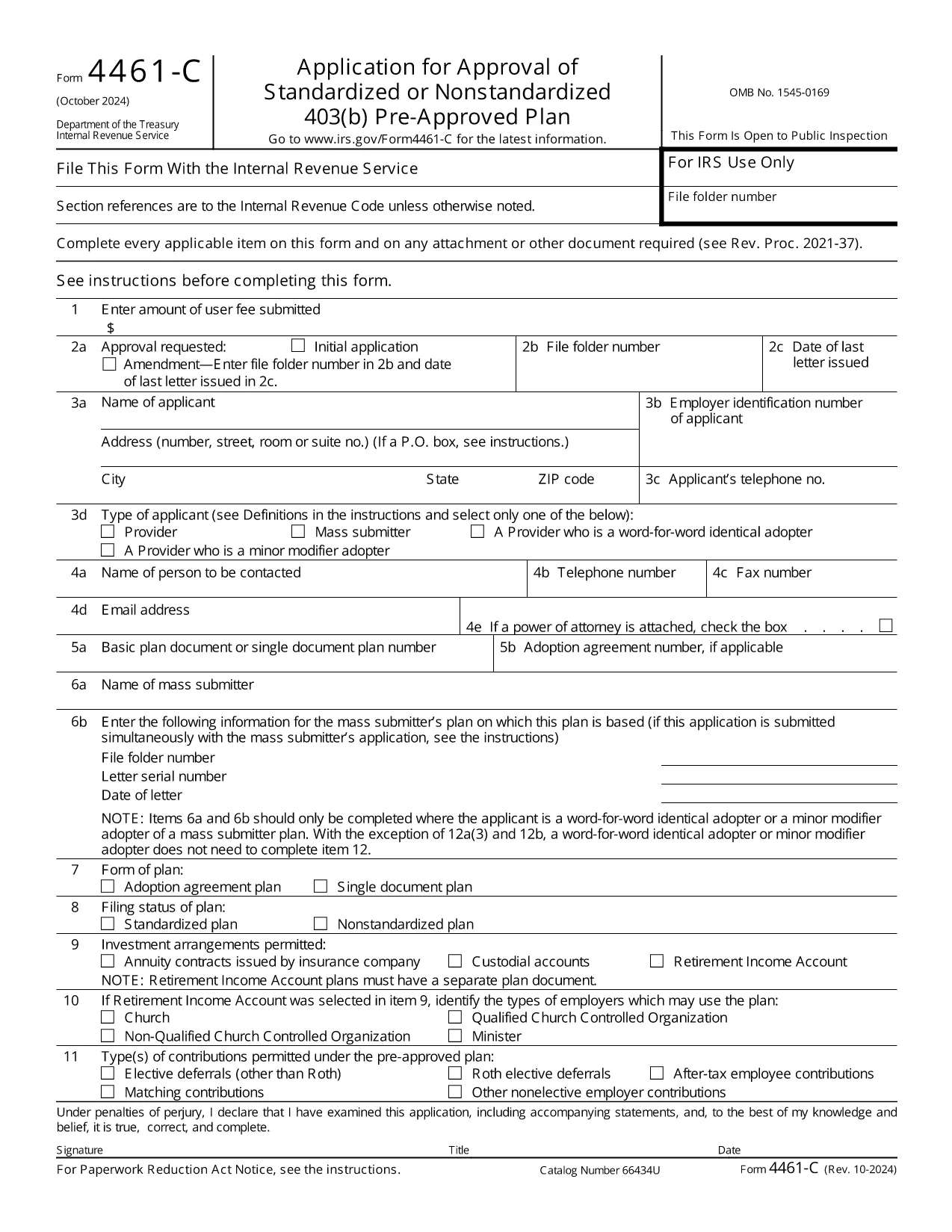
The IRS Form 4461‑C is the official application used by providers or mass submitters of a 403(b) pre‑approved plan. It must be filed for each separate adoption agreement or for each single‑document plan where no adoption agreement is used. Our fillable PDF lets you complete the form quickly, accurately, and securely.

What Is Form 4461‑C?

Form 4461‑C is part of the IRS’s pre‑approval process for employee benefit plans under section 401(a) of the Internal Revenue Code. It captures essential plan details, adoption agreements, and supporting documentation required for IRS approval.

How to Fill Out Form 4461‑C Online

Instead of downloading the PDF and opening a separate editor, simply click the "Fill out this form" button on this page. The Formize PDF Filler will load in your browser, allowing you to:

  1. Enter information directly into each field.
  2. Save your progress automatically.
  3. Validate entries with built‑in checks.
  4. Download the completed, IRS‑ready PDF or submit it electronically.

Common Mistakes to Avoid

  • Leaving required fields blank: The filler highlights missing data before you can save.
  • Mismatched plan numbers: Double‑check the plan identification numbers on line 12(a).
  • Incorrect signatures: Use the electronic signature option or print and sign where required.
  • Submitting outdated versions: This page always provides the latest revision (Rev. 10‑2024).

Submission & Acceptance Guidelines

After completing the form, you can either:

  • Download the PDF and mail it to the IRS address listed in the instructions.
  • Upload the PDF through the IRS e‑file portal if you have an authorized transmitter.

Keep a copy for your records and track the submission status using the IRS’s online tools.

FAQs About Form 4461‑C

For quick answers, scroll down to the FAQ section below.

SSS
  • Who must file Form 4461‑C?

    Any provider or mass submitter of a 403(b) pre‑approved plan must file Form 4461‑C for each separate adoption agreement or single‑document plan.

  • Can I file Form 4461‑C electronically?

    Yes. After completing the fillable PDF, you can upload it through the IRS e‑file portal if you have an authorized transmitter.

  • How many copies of Form 4461‑C are required?

    Submit one copy of Form 4461‑C for each adoption agreement or each single‑document plan, plus any supporting documents listed on line 12(a).

  • What is the latest revision of Form 4461‑C?

    The current version is Rev. 10‑2024, which is the PDF linked on this page.

  • Do I need a signature on the PDF?

    Yes. The form requires the plan sponsor’s signature. You can use the electronic signature feature in Formize or print, sign, and scan the completed form.

  • Where do I send the completed form?

    Mail the completed form to the address specified in the IRS instructions, or submit it electronically via the IRS e‑file system.

NASıL

Form 4461-C formunu ücretsiz, çevrimiçi olarak 4 kolay adımda nasıl doldurabilirsiniz:

  1. 1
    Open the Fillable Form
    Click the "Fill out this form" button on the page. The Formize PDF Filler loads instantly in your browser.
  2. 2
    Enter Your Information
    Complete each field. Required fields are highlighted. Use the auto‑save feature to protect your data.
  3. 3
    Review & Sign
    Check all entries for accuracy, add electronic signatures where allowed, and correct any validation warnings.
  4. 4
    Download or Submit
    When finished, download the completed PDF for mailing or upload it to the IRS e‑file system.
PDF Filler uygulamasını biçimlendirin
HAKKıNDA

Vergi formları

Form 4461-C, ​​vergilerle ilgili bilgileri ilgili vergi dairesine bildirmek için kullanılan belgeler olan Vergi formlarından biridir. Vergi mükellefinin koşullarına ve konumuna bağlı olarak değişebilen federal, eyalet ve yerel vergi formları dahil olmak üzere çeşitli vergi formları vardır.

ÖZELLIKLERI

PDF Doldurucu

PDF formlarını çevrimiçi doldurmanın en kolay yolu

  • Form 4461-C'ü hızlıca doldurun
    Form 4461-C çevrimiçi olarak hızlı bir şekilde doldurmanın bir yolunu mu arıyorsunuz? Çevrimiçi ücretsiz PDF form doldurucumuzla, bu pdf belgesini nasıl düzenleyeceğinizi ve dolduracağınızı bir dakikadan kısa sürede öğreneceksiniz.
  • Kullanımı kolay çevrimiçi PDF düzenleyici
    PDF dosyalarını yeniden tarayıp geri göndermeden önce düzenleyebilmek için yazdırmaktan bıktınız mı? PDF belgelerini çevrimiçi olarak ücretsiz düzenleyin. Zamandan ve kağıttan tasarruf etmek için çevrimiçi pdf editörümüzü kullanın.
  • Harika araçlar, tüm platformlar
    Bir Mac'te Form 4461-C'ü nasıl dolduracağınızı veya PDF doldurucuyu ücretsiz olarak nasıl kullanacağınızı mı merak ediyorsunuz? Çevrimiçi PDF araçlarımız tüm platformlarda çalışır.
  • Güvenli dosya depolama
    Tamamlanan "Form 4461-C" dosyaları, Amazon Cloud barındırma tarafından yönetilen güvenli bir veritabanında depolanır. Dosyalarınızı istediğiniz zaman sistemimizden silebilirsiniz. Her durumda, bu dosyalar 24 saat sonra otomatik olarak silinir.
  • Form 4461-C ile sohbet et
    Ücretsiz bir PDF okuyucu asistanı olan Chatize'da "Form 4461-C" ile sohbet edin. "Form 4461-C" adlı kişiden sorular sorun ve yanıtlar alın. Yukarıdaki Belgeyle Sohbet Et düğmesini tıklamanız yeterlidir.

Doldurma oturumunu sil

Seçilen doldurma oturumunu silin mi? Bu durumda, formu doldurmadaki ilerlemeniz kaybolacaktır.

Düzenleme oturumunu sil

Seçilen düzenleme oturumu silinsin mi? Bu durumda formu oluşturma ve düzenleme konusundaki ilerlemeniz kaybolacaktır.