
Dil Seçin

Fillable IRS Form 4684 – Casualties and Thefts

  1. Ülke Amerika Birleşik Devletleri
  2. Dil İngilizce
  3. Aktivite vergiler
  4. Departman İç Gelir Servisi
Fillable IRS Form 4684 – Casualties and Thefts

What Is Form 4684?

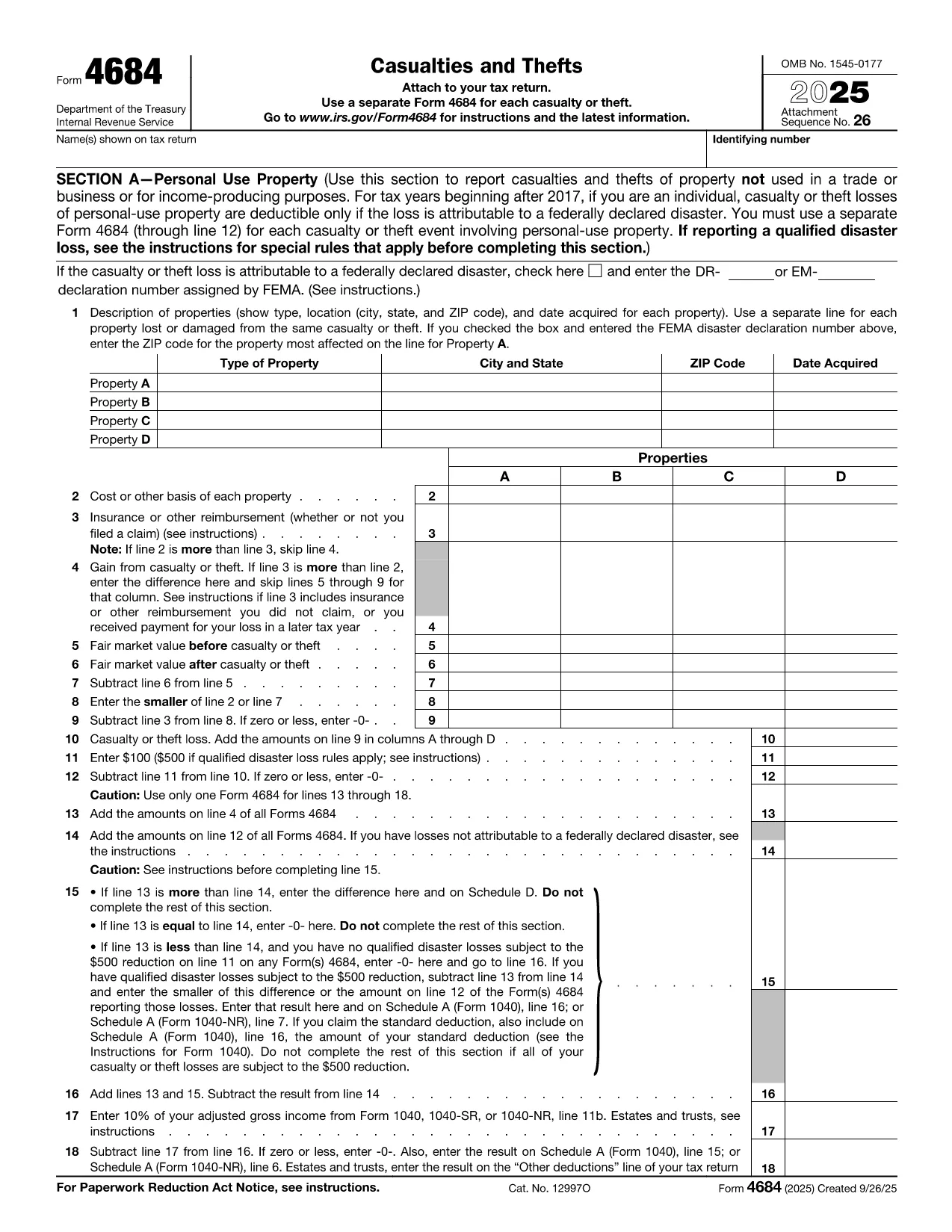
IRS Form 4684, Casualties and Thefts, is used to report losses from property damage, natural disasters, or theft. The form allows individuals and businesses to claim a deductible loss on their federal tax return.

How to Complete Form 4684 Online

With Formize’s built‑in PDF filler you can fill out Form 4684 directly in your browser—no download, print, or manual entry required.

  1. Click the "Fill out this form" button on this page.
  2. Wait a few seconds while the Formize PDF Filler app loads the fillable version of Form 4684.
  3. Enter your personal information, loss details, and insurance reimbursements exactly as the instructions describe.
  4. Review the calculated deductible loss that appears automatically.
  5. Save the completed PDF or download it to attach to your tax return.

Common Mistakes to Avoid

  • Skipping the disaster declaration check: For personal‑use property, a loss is only deductible if it results from a federally declared disaster.
  • Incorrect basis calculation: Use the original cost or adjusted basis, not the current market value.
  • Omitting insurance reimbursements: All insurance or other reimbursements must be reported on Line 3.
  • Failing to attach supporting documents: Receipts, police reports, and insurance statements should accompany the form.

Download the Fillable PDF

If you prefer the traditional method, you can download the official fillable PDF from the IRS. The file is fully compatible with Formize’s online editor.

Download IRS Form 4684 (PDF)

FAQs About Form 4684

Below are the most common questions taxpayers have about Form 4684.

Talimatlar

SSS
  • When is Form 4684 required?

    You must file Form 4684 to claim a casualty or theft loss on your federal tax return. Personal‑use losses are only deductible for federally declared disasters.

  • Can I use Form 4684 for business property?

    Yes. Section B of the form is dedicated to business and income‑producing property losses.

  • Do I need to attach supporting documents?

    Yes. Attach receipts, police reports, insurance statements, and any other documentation that verifies the loss.

  • What if my loss exceeds my insurance reimbursement?

    Enter the difference on Line 4 (Gain from casualty or theft) or continue to the loss calculation sections to determine the deductible amount.

  • Is the online fillable version the same as the PDF from the IRS?

    The fillable version uses the exact IRS layout and fields, so the information you enter matches the official PDF perfectly.

  • How long do I have to file Form 4684?

    Form 4684 is filed with your annual tax return, typically due by April 15. Extensions apply if you file for an extension on your return.

  • Can I edit a completed Form 4684 later?

    Yes. With Formize you can reopen the saved PDF, make corrections, and re‑download the updated version before filing.

NASıL

IRS Form 4684 formunu ücretsiz, çevrimiçi olarak 5 kolay adımda nasıl doldurabilirsiniz:

  1. 1
    Open the Fillable Form
    Click the "Fill out this form" button on the page. The Formize PDF Filler will load the fillable version of Form 4684 in your browser.
  2. 2
    Enter Your Information
    Fill in your name, SSN, and loss details exactly as the IRS instructions require. The online fields guide you line‑by‑line.
  3. 3
    Add Insurance & Reimbursements
    Record any insurance payouts or other reimbursements on Line 3. The calculator will automatically adjust the deductible loss.
  4. 4
    Review & Save
    Check the automatically calculated loss for accuracy, then click "Save" to download the completed PDF or store it in your Formize account.
  5. 5
    Attach to Your Tax Return
    Include the saved PDF with your Form 1040 when you file, either electronically or by mail.
PDF Filler uygulamasını biçimlendirin
HAKKıNDA

Vergi formları

IRS Form 4684, ​​vergilerle ilgili bilgileri ilgili vergi dairesine bildirmek için kullanılan belgeler olan Vergi formlarından biridir. Vergi mükellefinin koşullarına ve konumuna bağlı olarak değişebilen federal, eyalet ve yerel vergi formları dahil olmak üzere çeşitli vergi formları vardır.

ÖZELLIKLERI

PDF Doldurucu

PDF formlarını çevrimiçi doldurmanın en kolay yolu

  • IRS Form 4684'ü hızlıca doldurun
    IRS Form 4684 çevrimiçi olarak hızlı bir şekilde doldurmanın bir yolunu mu arıyorsunuz? Çevrimiçi ücretsiz PDF form doldurucumuzla, bu pdf belgesini nasıl düzenleyeceğinizi ve dolduracağınızı bir dakikadan kısa sürede öğreneceksiniz.
  • Kullanımı kolay çevrimiçi PDF düzenleyici
    PDF dosyalarını yeniden tarayıp geri göndermeden önce düzenleyebilmek için yazdırmaktan bıktınız mı? PDF belgelerini çevrimiçi olarak ücretsiz düzenleyin. Zamandan ve kağıttan tasarruf etmek için çevrimiçi pdf editörümüzü kullanın.
  • Harika araçlar, tüm platformlar
    Bir Mac'te IRS Form 4684'ü nasıl dolduracağınızı veya PDF doldurucuyu ücretsiz olarak nasıl kullanacağınızı mı merak ediyorsunuz? Çevrimiçi PDF araçlarımız tüm platformlarda çalışır.
  • Güvenli dosya depolama
    Tamamlanan "IRS Form 4684" dosyaları, Amazon Cloud barındırma tarafından yönetilen güvenli bir veritabanında depolanır. Dosyalarınızı istediğiniz zaman sistemimizden silebilirsiniz. Her durumda, bu dosyalar 24 saat sonra otomatik olarak silinir.
  • IRS Form 4684 ile sohbet et
    Ücretsiz bir PDF okuyucu asistanı olan Chatize'da "IRS Form 4684" ile sohbet edin. "IRS Form 4684" adlı kişiden sorular sorun ve yanıtlar alın. Yukarıdaki Belgeyle Sohbet Et düğmesini tıklamanız yeterlidir.

Doldurma oturumunu sil

Seçilen doldurma oturumunu silin mi? Bu durumda, formu doldurmadaki ilerlemeniz kaybolacaktır.

Düzenleme oturumunu sil

Seçilen düzenleme oturumu silinsin mi? Bu durumda formu oluşturma ve düzenleme konusundaki ilerlemeniz kaybolacaktır.