
Dil Seçin

Form 5500‑EZ – Fillable PDF for Single‑Participant Retirement Plans

  1. Ülke Amerika Birleşik Devletleri
  2. Dil İngilizce
  3. Aktivite vergiler
  4. Departman İç Gelir Servisi
Form 5500‑EZ – Fillable PDF for Single‑Participant Retirement Plans

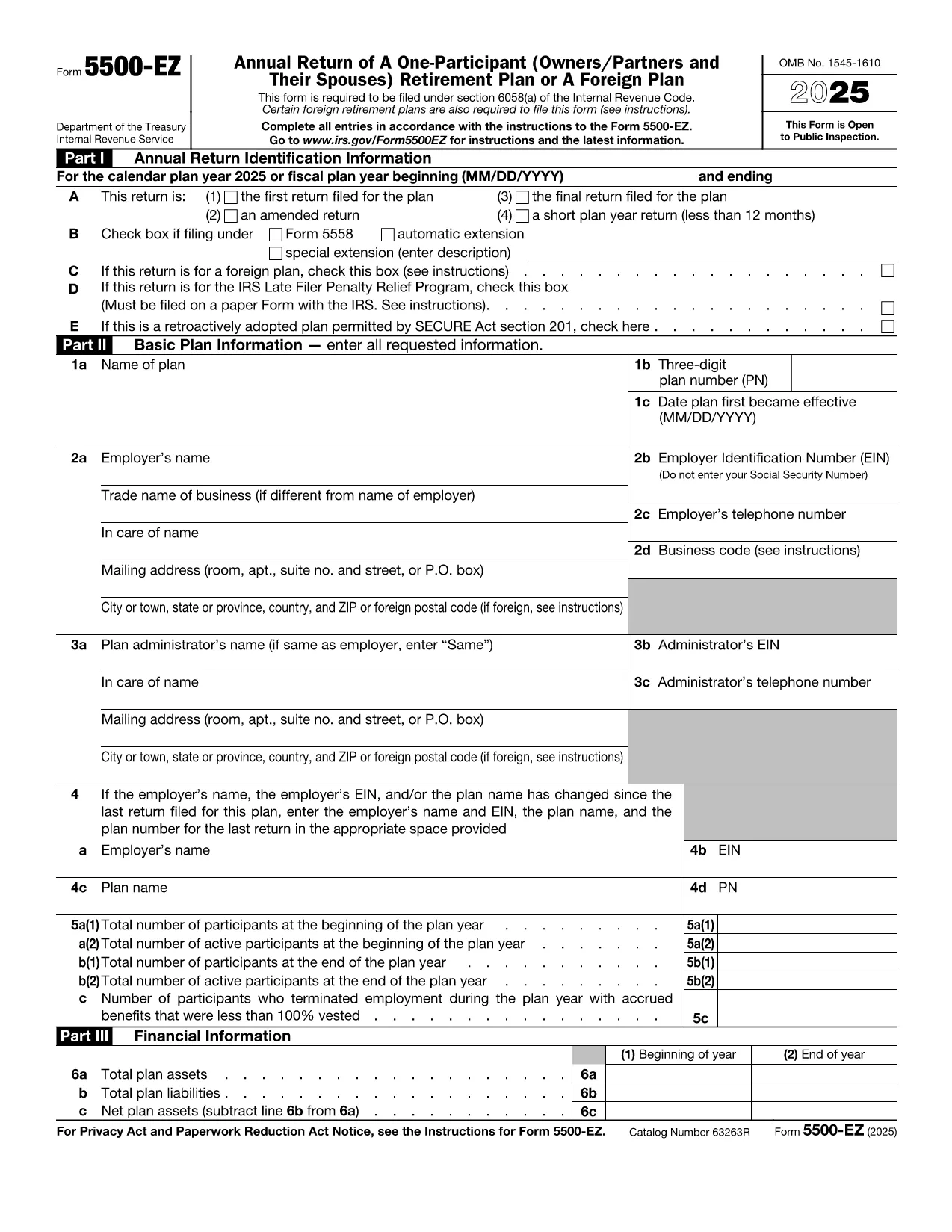
Form 5500‑EZ is the streamlined annual reporting form used by the Internal Revenue Service (IRS) for small retirement plans that have only one participant or are foreign plans. It replaces the longer Form 5500 series and includes basic plan information, number of participants, contributions, benefits, and other required details.

What Is Form 5500‑EZ?

This form is required for:

  • One‑participant pension plans (e.g., solo 401(k) or SIMPLE IRA)
  • Foreign retirement plans that meet the IRS definition of a small plan
  • Plans that do not need to file Schedule MB or Schedule SB

Filing Form 5500‑EZ on time helps you avoid penalties and keeps your retirement plan in good standing.

How to Fill Out the Form Online with Formize

Instead of downloading the PDF and editing it manually, you can complete the form directly on our site:

  1. Click the "Fill out this form" button below.
  2. The Formize PDF Filler app loads the official fillable PDF.
  3. Enter the required information in each field – the form validates data as you type.
  4. When you’re done, add your electronic signature, then save or download the completed PDF.

All changes are saved automatically, so you never lose your work.

Common Mistakes & Tips for a Smooth Filing

  • Incorrect plan year: Verify the plan year on the first page; a mismatch triggers an IRS notice.
  • Missing participant count: Even a single‑participant plan must list the exact number of participants.
  • Wrong contribution totals: Double‑check employer and employee contributions – they must equal the amounts reported on Schedule A.
  • Signature errors: Use the built‑in electronic signature tool; hand‑written signatures on a printed PDF are not accepted for e‑filings.

Download the Official IRS PDF

If you prefer the original IRS version, you can download it directly from the link below. The file is the same one used by Formize, ensuring full compatibility with the online filler.

Download Form 5500‑EZ (PDF)

Talimatlar

  • Form 5500-EZ Talimatlar - Form 5500-EZ için talimatlar, A One-Participant (Owners/Partners ve onların Spouses) Emekli Planı veya Yabancı Plan
SSS
  • Who must file Form 5500‑EZ?

    Any one‑participant retirement plan or foreign plan that meets the IRS definition of a small plan must file Form 5500‑EZ annually.

  • Can I file Form 5500‑EZ electronically?

    Yes. Use the IRS e‑file system or a compliant online filler like Formize, then submit the completed PDF through the FIRE system.

  • What is the filing deadline?

    The form is due by the last day of the seventh month after the plan year ends (typically July 31 for calendar‑year plans).

  • Do I need Schedule MB or Schedule SB?

    No. Form 5500‑EZ does not require Schedule MB (Money‑Based) or Schedule SB (Service‑Based).

  • What if I make a mistake after filing?

    You can file an amended Form 5500‑EZ using the same fillable PDF. Mark the form as "Amended" and include an explanation of the changes.

  • Is there a fee to use Formize's filler?

    Formize offers a free basic fillable version for Form 5500‑EZ. Advanced features may require a subscription, but the core filing process is free.

  • Can I print the completed form for a paper filing?

    Yes. After completing the form online, download the PDF and print it. Sign the printed copy if you are filing by paper.

NASıL

Form 5500 EZ formunu ücretsiz, çevrimiçi olarak 4 kolay adımda nasıl doldurabilirsiniz:

  1. 1
    Open the Fillable Form
    Click the "Fill out this form" button on the page. The Formize PDF Filler will load the official Form 5500‑EZ.
  2. 2
    Enter Your Information
    Complete each field. The filler validates entries in real time, helping you avoid common errors.
  3. 3
    Add Your Electronic Signature
    Use the built‑in signature tool to sign the form securely.
  4. 4
    Save or Download
    When all sections are complete, click "Save" to store the file in your account or "Download" to get the finished PDF.
PDF Filler uygulamasını biçimlendirin
HAKKıNDA

Federal vergi formları

Form 5500 EZ, Amerika Birleşik Devletleri'nde federal gelir vergilerini Ulusal Gelir İdaresi'ne (IRS) bildirmek ve dosyalamak için kullanılan belgeler olan Federal vergi formlarından biridir. Bu formlar bireyler, işletmeler ve kuruluşlar tarafından gelirlerini, kesintilerini ve federal vergi yükümlülüklerini hesaplamak için gerekli diğer bilgileri bildirmek için kullanılır.

En yaygın kullanılan federal vergi formu, bireysel vergi mükellefleri tarafından kişisel gelir vergilerini bildirmek için kullanılan Form 1040'dır. Yaygın olarak kullanılan diğer formlar arasında ortaklıklar için Form 1065, Form 1120 ve vergiden muaf kuruluşlar için Form 990.

Federal vergi formları genellikle vergi mükelleflerinin ücretler, maaşlar ve bahşişler gibi çeşitli gelir kaynaklarının yanı sıra yatırımlardan, kiralık mülklerden ve diğer kaynaklardan elde edilen gelirleri bildirmelerini gerektirir. Formlar aynı zamanda vergi mükelleflerinin hayır amaçlı katkılar, ipotek faizi ve sağlık harcamaları gibi çeşitli harcamalar için kesinti ve kredi talep etmelerine de olanak tanıyor.

Federal vergi formlarının doğru ve zamanında doldurulması önemlidir; aksi takdirde IRS'den cezalar ve faiz kesintileri gelebilir.

ÖZELLIKLERI

PDF Doldurucu

PDF formlarını çevrimiçi doldurmanın en kolay yolu

  • Form 5500 EZ'ü hızlıca doldurun
    Form 5500 EZ çevrimiçi olarak hızlı bir şekilde doldurmanın bir yolunu mu arıyorsunuz? Çevrimiçi ücretsiz PDF form doldurucumuzla, bu pdf belgesini nasıl düzenleyeceğinizi ve dolduracağınızı bir dakikadan kısa sürede öğreneceksiniz.
  • Kullanımı kolay çevrimiçi PDF düzenleyici
    PDF dosyalarını yeniden tarayıp geri göndermeden önce düzenleyebilmek için yazdırmaktan bıktınız mı? PDF belgelerini çevrimiçi olarak ücretsiz düzenleyin. Zamandan ve kağıttan tasarruf etmek için çevrimiçi pdf editörümüzü kullanın.
  • Harika araçlar, tüm platformlar
    Bir Mac'te Form 5500 EZ'ü nasıl dolduracağınızı veya PDF doldurucuyu ücretsiz olarak nasıl kullanacağınızı mı merak ediyorsunuz? Çevrimiçi PDF araçlarımız tüm platformlarda çalışır.
  • Güvenli dosya depolama
    Tamamlanan "Form 5500 EZ" dosyaları, Amazon Cloud barındırma tarafından yönetilen güvenli bir veritabanında depolanır. Dosyalarınızı istediğiniz zaman sistemimizden silebilirsiniz. Her durumda, bu dosyalar 24 saat sonra otomatik olarak silinir.
  • Form 5500 EZ ile sohbet et
    Ücretsiz bir PDF okuyucu asistanı olan Chatize'da "Form 5500 EZ" ile sohbet edin. "Form 5500 EZ" adlı kişiden sorular sorun ve yanıtlar alın. Yukarıdaki Belgeyle Sohbet Et düğmesini tıklamanız yeterlidir.

Doldurma oturumunu sil

Seçilen doldurma oturumunu silin mi? Bu durumda, formu doldurmadaki ilerlemeniz kaybolacaktır.

Düzenleme oturumunu sil

Seçilen düzenleme oturumu silinsin mi? Bu durumda formu oluşturma ve düzenleme konusundaki ilerlemeniz kaybolacaktır.