

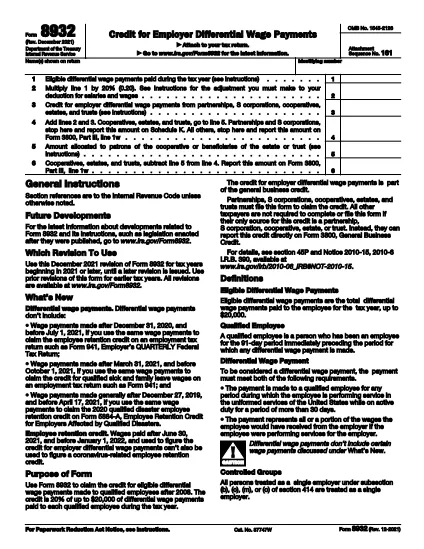

İç Gelir Hizmeti (IRS) Formları
IRS Form 8932, ABD'de geliri bildirmek, kesintileri ve alacakları talep etmek, vergi yükümlülüğünü hesaplamak ve vergiyle ilgili diğer yükümlülükleri yerine getirmek için kullanılan resmi vergi formlarından biridir. IRS, Amerika Birleşik Devletleri'ndeki iç gelir yasalarının idaresinden ve uygulanmasından sorumlu federal kurumdur.
İşte İç Gelir Hizmeti formlarının bazı örnekleri:
Form 1040: Bu, çoğu vergi mükellefi tarafından kullanılan birincil bireysel gelir vergisi beyannamesi formudur. Çeşitli gelir türlerini raporlamak, kesinti ve alacakları talep etmek, vergi borcunu hesaplamak ve vergi mükellefinin ek vergi borcu olup olmadığını veya iade hakkına sahip olup olmadığını belirlemek için kullanılır.
Form 1099: Form 1099'un farklı varyasyonları vardır, örneğin 1099-MISC, 1099-INT, 1099-DIV vb. Bu formlar, bireylerin veya işletmelerin istihdam dışında serbest meslek gibi çeşitli kaynaklardan elde ettiği gelirleri bildirmek için kullanılır. gelir, faiz geliri, temettü geliri ve kira geliridir.
W-2 Formu: Bu form, işverenler tarafından çalışanlara ödenen ücretleri ve vergileri bildirmek için kullanılır maaşlarından kesinti yapılıyor. Çalışanlar bireysel vergi beyannamelerini tamamlamak için W-2 Formu'ndaki bilgileri kullanır.
Form 941: İşverenler bu formu, çalışanları için federal gelir vergisi stopajı, Sosyal Güvenlik vergisi ve Medicare vergisi dahil olmak üzere istihdam vergilerini bildirmek için kullanır.
Form 1065: Bu form, ortaklıklar tarafından gelirlerini, kesintilerini ve vergi yükümlülüklerini bildirmek için kullanılır. Ortaklıkların kendisi gelir vergisi ödemez; bunun yerine ortaklar, ortaklık gelirinden paylarını bireysel vergi beyannamelerinde bildirirler.
Form 1120: C şirketlerinin gelirlerini bildirmek için kullandıkları kurumlar vergisi beyannamesi formudur, kesintiler ve vergi sorumluluğu.
Form 990: Bu form, kâr amacı gütmeyen kuruluşlar ve hayır kurumları gibi vergiden muaf kuruluşlar tarafından aşağıdaki amaçlarla kullanılır: mali bilgilerini, faaliyetlerini ve vergi kanunlarına uyumlarını rapor ederler.
Form 8862: Bu form, daha önce Kazanılmış Gelir Vergisi Kredisini (EITC) talep eden vergi mükellefleri tarafından kullanılır. ancak izin verilmemişti ve şimdi tekrar hak talebinde bulunmak istiyorum.
Bunlar vergiyle ilgili çeşitli yükümlülükleri yerine getirmek için mevcut olan çok sayıda IRS formundan sadece birkaç örnektir. Bir kişi veya işletme için gereken özel formlar, onların benzersiz koşullarına, gelir kaynaklarına ve kesintilerine bağlıdır. Belirli IRS'ye ilişkin doğru ve güncel bilgi edinmek için Milli Gelirler Dairesi'nin resmi web sitesine (www.irs.gov) başvurmanız veya profesyonel vergi danışmanlığı almanız önerilir. Vergi durumunuzla ilgili formlar.