
Dil Seçin

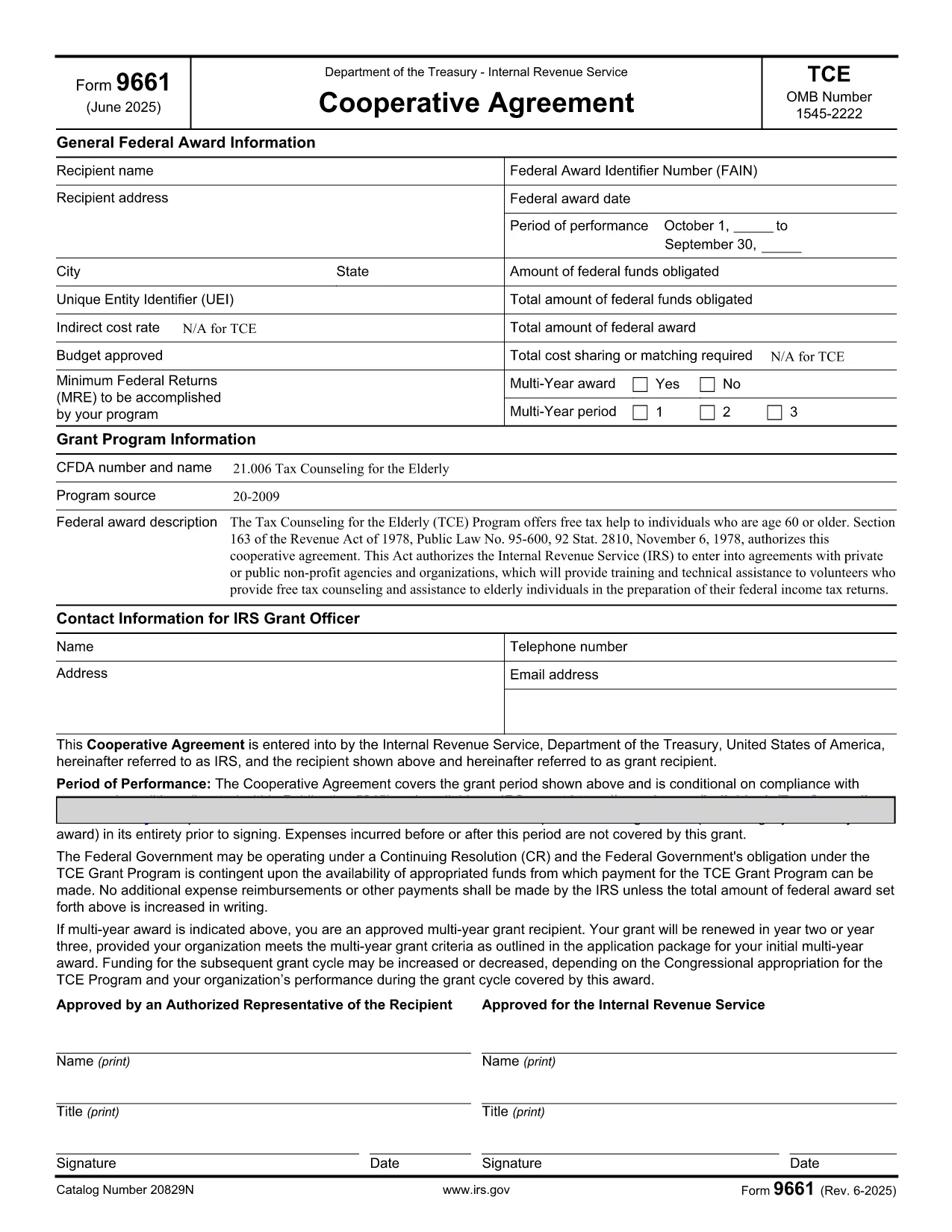
Form 9661 – Fillable PDF for Tax Counseling for the Elderly (TCE)

  1. Ülke Amerika Birleşik Devletleri
  2. Dil İngilizce
  3. Aktivite vergiler
  4. Departman İç Gelir Servisi
Form 9661 – Fillable PDF for Tax Counseling for the Elderly (TCE)

Form 9661, the Application for Tax Counseling for the Elderly (TCE) Program, is an IRS form that allows eligible seniors (age 60 or older) to receive free tax assistance. The form can now be completed directly in your browser using our secure, fillable PDF powered by Formize.

By using the online fillable version, you avoid printing, scanning, or installing special PDF editors. Simply click the button on this page, let the Formize PDF Filler load, and start entering your information.

Key benefits of the fillable PDF:

  • Auto‑save as you type – no data loss.
  • Built‑in validation to reduce errors.
  • Instant download of the completed form in PDF format.

Below you’ll find detailed instructions, common pitfalls, and answers to the most frequent questions about Form 9661.

SSS
  • Who is eligible to use Form 9661?

    Individuals who are 60 years of age or older and wish to receive free tax counseling through the TCE program.

  • Do I need a PDF editor to fill out Form 9661?

    No. Our online fillable PDF works in any modern browser—no additional software is required.

  • Can I save my progress and return later?

    Yes. Use the "Save" button in the Formize Filler to download a partially completed PDF, then reopen it later to continue.

  • Where do I submit the completed Form 9661?

    Submit the signed form to the TCE provider that will assist you with your taxes. Many providers accept electronic PDFs.

  • What common mistakes should I avoid?

    Make sure to enter your Social Security Number exactly as it appears on your SSN card, sign the form, and double‑check dates for accuracy.

  • Is Form 9661 free to download?

    Yes. The IRS provides this form at no cost, and our fillable version is also free to use.

  • Can I use Form 9661 for non‑U.S. residents?

    Form 9661 is intended for U.S. taxpayers who meet the age requirement. Non‑U.S. residents should consult their local tax authority.

NASıL

Form 9661 formunu ücretsiz, çevrimiçi olarak 5 kolay adımda nasıl doldurabilirsiniz:

  1. 1
    Open the Fillable Form
    Click the "Fill out this form" button on this page. The Formize PDF Filler app will launch in a new window.
  2. 2
    Wait for the Loader
    Allow a few seconds for the fillable PDF to load. All fields will become editable automatically.
  3. 3
    Enter Your Information
    Complete each section of Form 9661. Required fields are marked with an asterisk and validated in real time.
  4. 4
    Review and Correct
    Use the built‑in review tool to check for missing or incorrect entries before finalizing.
  5. 5
    Download or Print
    When you’re satisfied, click "Download" to save the completed PDF or "Print" to submit a hard copy to your TCE provider.
PDF Filler uygulamasını biçimlendirin
HAKKıNDA

Vergi formları

Form 9661, ​​vergilerle ilgili bilgileri ilgili vergi dairesine bildirmek için kullanılan belgeler olan Vergi formlarından biridir. Vergi mükellefinin koşullarına ve konumuna bağlı olarak değişebilen federal, eyalet ve yerel vergi formları dahil olmak üzere çeşitli vergi formları vardır.

ÖZELLIKLERI

PDF Doldurucu

PDF formlarını çevrimiçi doldurmanın en kolay yolu

  • Form 9661'ü hızlıca doldurun
    Form 9661 çevrimiçi olarak hızlı bir şekilde doldurmanın bir yolunu mu arıyorsunuz? Çevrimiçi ücretsiz PDF form doldurucumuzla, bu pdf belgesini nasıl düzenleyeceğinizi ve dolduracağınızı bir dakikadan kısa sürede öğreneceksiniz.
  • Kullanımı kolay çevrimiçi PDF düzenleyici
    PDF dosyalarını yeniden tarayıp geri göndermeden önce düzenleyebilmek için yazdırmaktan bıktınız mı? PDF belgelerini çevrimiçi olarak ücretsiz düzenleyin. Zamandan ve kağıttan tasarruf etmek için çevrimiçi pdf editörümüzü kullanın.
  • Harika araçlar, tüm platformlar
    Bir Mac'te Form 9661'ü nasıl dolduracağınızı veya PDF doldurucuyu ücretsiz olarak nasıl kullanacağınızı mı merak ediyorsunuz? Çevrimiçi PDF araçlarımız tüm platformlarda çalışır.
  • Güvenli dosya depolama
    Tamamlanan "Form 9661" dosyaları, Amazon Cloud barındırma tarafından yönetilen güvenli bir veritabanında depolanır. Dosyalarınızı istediğiniz zaman sistemimizden silebilirsiniz. Her durumda, bu dosyalar 24 saat sonra otomatik olarak silinir.
  • Form 9661 ile sohbet et
    Ücretsiz bir PDF okuyucu asistanı olan Chatize'da "Form 9661" ile sohbet edin. "Form 9661" adlı kişiden sorular sorun ve yanıtlar alın. Yukarıdaki Belgeyle Sohbet Et düğmesini tıklamanız yeterlidir.

Doldurma oturumunu sil

Seçilen doldurma oturumunu silin mi? Bu durumda, formu doldurmadaki ilerlemeniz kaybolacaktır.

Düzenleme oturumunu sil

Seçilen düzenleme oturumu silinsin mi? Bu durumda formu oluşturma ve düzenleme konusundaki ilerlemeniz kaybolacaktır.