
Dil Seçin

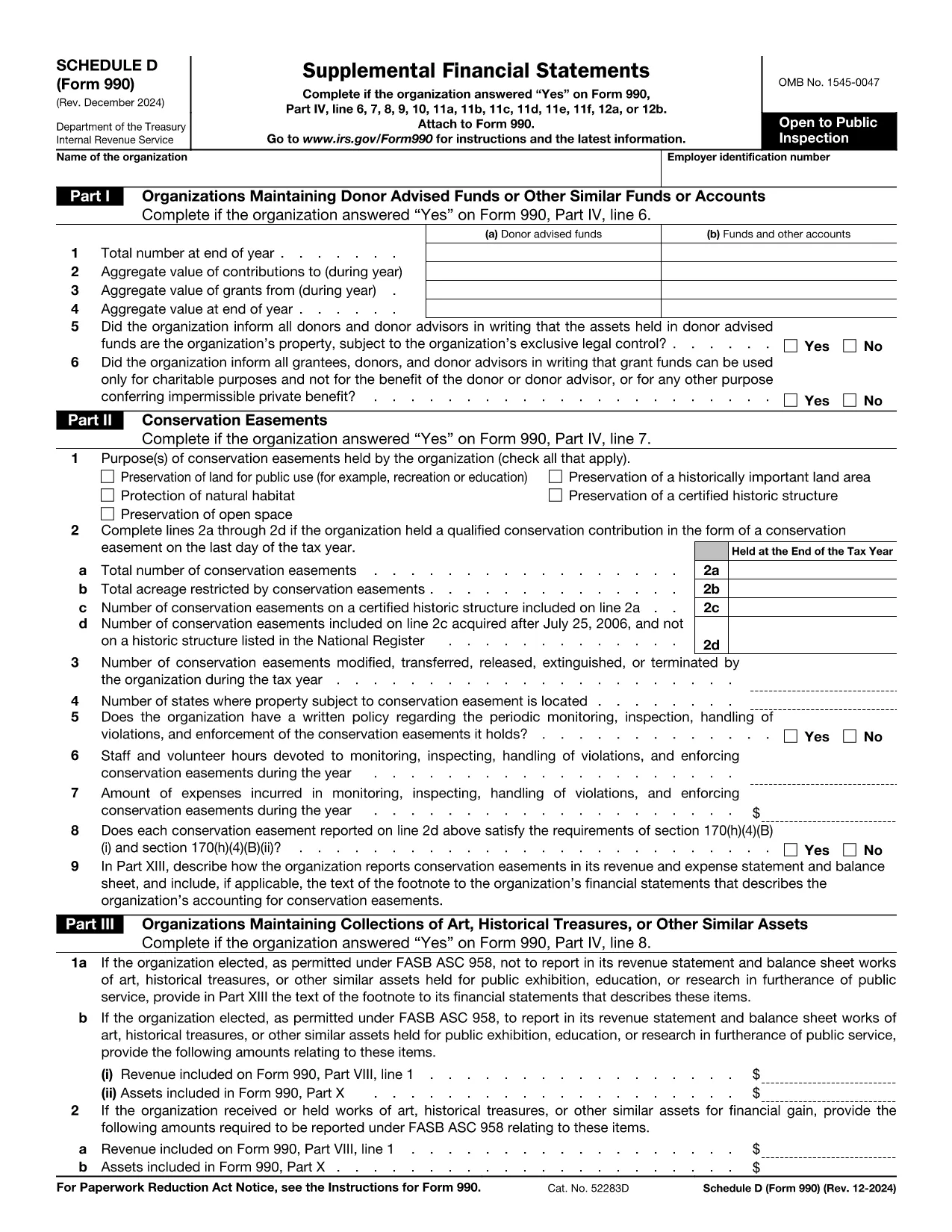
IRS Form 990 Schedule D – Fillable PDF

  1. Ülke Amerika Birleşik Devletleri
  2. Dil İngilizce
  3. Aktivite vergiler
  4. Departman İç Gelir Servisi
IRS Form 990 Schedule D – Fillable PDF

Schedule D is the supplemental attachment to the IRS Form 990 that tax‑exempt organizations use to disclose detailed information about donor‑advised funds, conservation easements, art collections, and other special assets. Getting the correct, up‑to‑date fillable PDF and completing it accurately is essential for compliance.

What Is Schedule D (Form 990)?

Schedule D (Form 990) provides the Internal Revenue Service with supplemental financial statements. It covers:

  • Donor‑advised funds and similar accounts
  • Conservation easements
  • Collections of art, historical treasures, or other valuable assets
  • Endowment, escrow, and custodial arrangements

How to Fill Schedule D Directly on Formize

Instead of downloading the PDF and opening a separate editor, simply click the "Fill out this form" button on this page. The Formize PDF Filler app will load in your browser, letting you complete every field online.

Common Mistakes to Avoid

  • Skipping Part I questions – the IRS cross‑checks these answers with the main Form 990.
  • Incorrect EIN formatting – use nine digits without dashes.
  • Leaving supplemental narrative sections blank when the schedule asks for explanations.
  • Not signing the form – the digital signature is required before submission.

Download the Official Fillable PDF

If you prefer to work offline, you can download the official Schedule D PDF directly from the IRS:

Download Form 990 Schedule D (PDF)

Frequently Asked Questions

Below are the most common questions nonprofit professionals ask about Schedule D.

Talimatlar

SSS
  • Do I need Schedule D if I file Form 990‑EZ?

    No. Schedule D is only required when filing the full Form 990. Organizations filing Form 990‑EZ or Form 990‑N do not attach Schedule D.

  • What types of assets must be reported on Schedule D?

    Donor‑advised funds, conservation easements, art or historical collections, endowment funds, and any escrow or custodial arrangements must be disclosed.

  • Can I edit the PDF after I download it?

    Yes, but the easiest method is to use the Formize online filler, which saves changes automatically and provides a secure digital signature.

  • How long do I have to keep a copy of Schedule D?

    Nonprofit organizations must retain a copy of all filed schedules for at least three years from the filing date.

  • What are the penalties for not filing Schedule D when required?

    Failure to file can result in monetary penalties and may jeopardize the organization’s tax‑exempt status.

  • Is there a fee to use the Formize PDF Filler?

    Formize provides free access to fill out Schedule D online; no hidden fees are charged for the basic filling and download features.

  • Where should I mail the completed Schedule D?

    Schedule D is filed together with the main Form 990 at the address listed in the Form 990 instructions for your filing type.

NASıL

Form 990 Schedule D formunu ücretsiz, çevrimiçi olarak 5 kolay adımda nasıl doldurabilirsiniz:

  1. 1
    Click the Fill‑out Button
    Press the bright “Fill out this form” button on this page to launch the Formize PDF Filler.
  2. 2
    Wait for the Filler to Load
    The web‑based filler loads in seconds. No download or installation is required.
  3. 3
    Enter All Required Information
    Complete each section—organization name, EIN, and all Part I‑XIII questions—using the on‑screen fields.
  4. 4
    Review and Add a Digital Signature
    Use the built‑in signature tool to sign the form electronically. Review for accuracy before saving.
  5. 5
    Save, Download, or Submit
    When you’re done, click “Save” to store a copy, “Download” to get the completed PDF, or follow your organization’s submission process.
PDF Filler uygulamasını biçimlendirin
HAKKıNDA

Vergi formları

Form 990 Schedule D is one of Tax forms that are documents used to report information about an individual's or business's income, deductions, and tax liability to the relevant tax authority. Bu formlar vergi kanunlarına uymak ve vergi yükümlülüklerini yerine getirmek için gereklidir. Vergi formları ülkeye ve yürürlükteki spesifik vergi gerekliliklerine bağlı olarak değişiklik gösterir. Here are some common types of tax forms:

Bireysel Vergi Formları: Bu formlar, bireysel vergi mükellefleri tarafından kişisel gelirlerini bildirmek ve kesinti, kredi ve muafiyet talebinde bulunmak için kullanılır. Örnekler arasında Amerika Birleşik Devletleri'ndeki 1040 formu veya Birleşik Krallık'taki Öz Değerlendirme Vergi Beyannamesi formu yer almaktadır.

İşletme Vergisi Formları: İşletme vergisi formları şirketler, ortaklıklar veya serbest meslek sahibi kişiler tarafından ticari gelirlerini, giderlerini ve vergiyle ilgili diğer bilgileri bildirmek için kullanılır. Örnekler arasında Amerika Birleşik Devletleri'ndeki Çizelge C formu (İşletmeden Kar veya Zarar) veya Birleşik Krallık'taki CT600 formu (Şirket Vergi Beyannamesi) yer alır.

Bordro Vergi Formları: Bu formlar, işverenler tarafından çalışanlarının maaş çeklerinden kesilen ücret, maaş ve vergileri bildirmek için kullanılır. Örnekler arasında Amerika Birleşik Devletleri'ndeki W-2 formu veya Birleşik Krallık'taki P60 formu bulunmaktadır.

Satış Vergisi Formları: Satış vergisi formları, işletmeler tarafından vergiye tabi mal veya hizmetlerden tahsil edilen satış vergisini raporlamak ve göndermek için kullanılır. Belirli satış vergisi formları yargı bölgesine göre değişir.

Katma Değer Vergisi (KDV) Formları: KDV formları, katma değer vergisi uygulayan ülkelerde, satışlarda tahsil edilen KDV'yi raporlamak ve göndermek ve satın alımlar için KDV kredisi talep etmek için kullanılır. Örnekler arasında birçok ülkede kullanılan KDV iade formları yer almaktadır.

Tahmini Vergi Formları: Tahmini vergi formları, serbest meslek geliri veya yatırım geliri gibi stopaja tabi olmayan gelirlere ilişkin tahmini vergileri raporlamak ve ödemek için kullanılır.

Bunlar mevcut olabilecek çok sayıda vergi formunun sadece birkaç örneğidir. Gereken spesifik formlar, ülkenizdeki veya yargı bölgesindeki vergi kanunlarına ve düzenlemelerine bağlıdır. Hangi formların durumunuza uygun olduğunu belirlemek için vergi dairesinin yönergelerine başvurmanız veya profesyonel tavsiye almanız önemlidir.

ÖZELLIKLERI

PDF Doldurucu

PDF formlarını çevrimiçi doldurmanın en kolay yolu

  • Form 990 Schedule D'ü hızlıca doldurun
    Form 990 Schedule D çevrimiçi olarak hızlı bir şekilde doldurmanın bir yolunu mu arıyorsunuz? Çevrimiçi ücretsiz PDF form doldurucumuzla, bu pdf belgesini nasıl düzenleyeceğinizi ve dolduracağınızı bir dakikadan kısa sürede öğreneceksiniz.
  • Kullanımı kolay çevrimiçi PDF düzenleyici
    PDF dosyalarını yeniden tarayıp geri göndermeden önce düzenleyebilmek için yazdırmaktan bıktınız mı? PDF belgelerini çevrimiçi olarak ücretsiz düzenleyin. Zamandan ve kağıttan tasarruf etmek için çevrimiçi pdf editörümüzü kullanın.
  • Harika araçlar, tüm platformlar
    Bir Mac'te Form 990 Schedule D'ü nasıl dolduracağınızı veya PDF doldurucuyu ücretsiz olarak nasıl kullanacağınızı mı merak ediyorsunuz? Çevrimiçi PDF araçlarımız tüm platformlarda çalışır.
  • Güvenli dosya depolama
    Tamamlanan "Form 990 Schedule D" dosyaları, Amazon Cloud barındırma tarafından yönetilen güvenli bir veritabanında depolanır. Dosyalarınızı istediğiniz zaman sistemimizden silebilirsiniz. Her durumda, bu dosyalar 24 saat sonra otomatik olarak silinir.
  • Form 990 Schedule D ile sohbet et
    Ücretsiz bir PDF okuyucu asistanı olan Chatize'da "Form 990 Schedule D" ile sohbet edin. "Form 990 Schedule D" adlı kişiden sorular sorun ve yanıtlar alın. Yukarıdaki Belgeyle Sohbet Et düğmesini tıklamanız yeterlidir.

Doldurma oturumunu sil

Seçilen doldurma oturumunu silin mi? Bu durumda, formu doldurmadaki ilerlemeniz kaybolacaktır.

Düzenleme oturumunu sil

Seçilen düzenleme oturumu silinsin mi? Bu durumda formu oluşturma ve düzenleme konusundaki ilerlemeniz kaybolacaktır.