
Dil Seçin

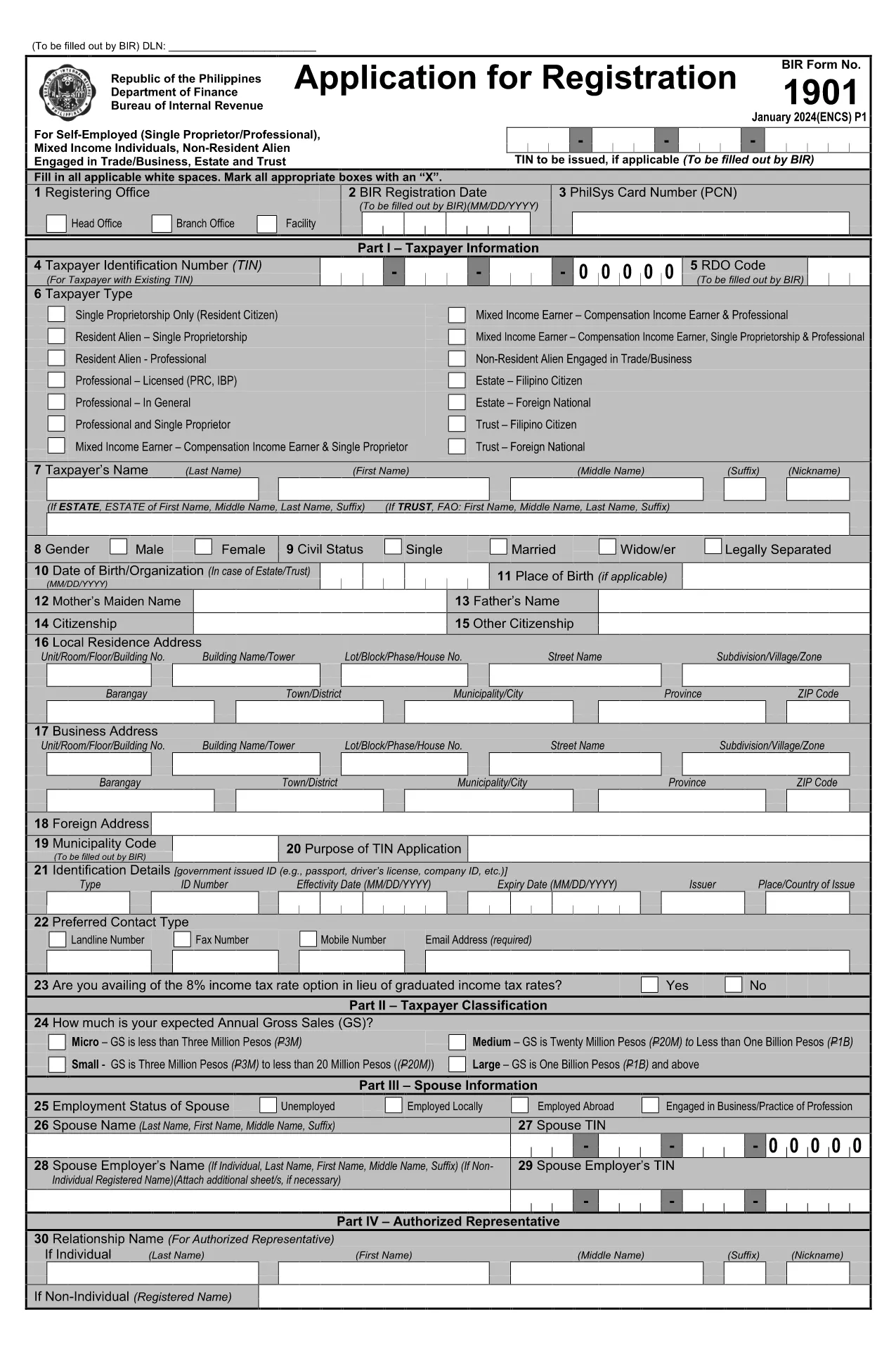
BIR Form 1901 – Fillable PDF Application Form

  1. Dil İngilizce
  2. Ülke Philippines
  3. Departman Bureau of Internal Revenue
  4. Aktivite vergiler
BIR Form 1901 – Fillable PDF Application Form

The BIR Form 1901 is the official application used in the Philippines to register a new business with the Bureau of Internal Revenue (BIR). This fillable PDF lets you enter all required information digitally, eliminating the need for paper copies and manual calculations.

What Is BIR Form 1901?

Form 1901, also known as the "Payment Order Form for New Business Registrant," captures essential details such as the Taxpayer Identification Number (TIN), branch code, RDO code, and the tax year. It is required for every new business entity before it can legally operate and issue official receipts.

How to Fill Out the BIR Form 1901 Online

Instead of downloading the file and opening it in a separate PDF editor, simply click the "Fill out this form" button on this page. The Formize PDF Filler app will load directly in your browser:

  1. Click Fill out this form and wait a few seconds for the Formize PDF Filler to appear.
  2. Enter your information in each highlighted field. The filler automatically validates TIN format and numeric fields.
  3. Use the Save button to download a completed copy to your device, or click Print to produce a hard‑copy for submission.

Common Mistakes to Avoid

  • Incorrect TIN or branch code: Double‑check numbers against your BIR Certificate of Registration.
  • Leaving mandatory fields blank: The Formize filler highlights missing entries before you can save.
  • Mismatched tax year: Ensure the year matches the fiscal year of your business start‑up.

Where to Submit the Completed Form

After filling out and saving the PDF, submit the original form to the BIR office that issued your RDO (Revenue District Office) code. You may also attach the electronic copy to your online BIR registration portal if you have one.

Download & Start Filling Instantly

Ready to begin? Click the button below and let Formize do the heavy lifting. No software download, no hassle—just a secure, browser‑based PDF filler.

SSS
  • Who needs to file BIR Form 1901?

    All newly registered businesses, partnerships, and corporations in the Philippines must submit Form 1901 before they can issue official receipts.

  • Can I edit the form after I save it?

    Yes. Open the saved PDF in any PDF editor or re‑load the form through Formize to make changes before final submission.

  • Is there a fee to download or fill the form?

    No. The PDF download and the Formize filler are completely free.

  • What is the difference between the branch code and RDO code?

    The branch code identifies your specific BIR office location, while the RDO (Revenue District Office) code designates the larger district that oversees several branches.

  • Where do I submit the completed Form 1901?

    Submit the original printed form to the BIR office that issued your RDO code. An electronic copy can be uploaded to the BIR online portal if available.

  • What common errors cause rejection?

    Incorrect TIN, missing mandatory fields, and mismatched tax year are the top reasons for rejection. Use the Formize validator to avoid them.

  • Do I need a digital signature?

    A handwritten signature is required on the printed copy. For electronic submissions, a qualified digital signature accepted by BIR can be used.

  • How long does it take for the BIR to process the form?

    Processing time varies by office, but most RDOs complete verification within 3‑5 business days after receipt.

  • Can I use this form for an existing business?

    No. Existing businesses should use the appropriate renewal or amendment forms. Form 1901 is strictly for new registrations.

  • Is the PDF compatible with mobile devices?

    Yes. The Formize filler works on smartphones and tablets, allowing you to complete the form on the go.

NASıL

BIR Form 1901 formunu ücretsiz, çevrimiçi olarak 3 kolay adımda nasıl doldurabilirsiniz:

  1. 1
    Click the Fill‑out Button
    Press the "Fill out this form" button on the page. The Formize PDF Filler will open in a new browser window.
  2. 2
    Enter Your Information
    Complete each highlighted field. The filler validates numbers and dates automatically.
  3. 3
    Save or Print
    When all fields are filled, click "Save" to download the completed PDF or "Print" to get a hard copy for BIR submission.
PDF Filler uygulamasını biçimlendirin
HAKKıNDA

Vergi formları

BIR Form 1901 is one of Tax forms that are documents used to report information about an individual's or business's income, deductions, and tax liability to the relevant tax authority. Bu formlar vergi kanunlarına uymak ve vergi yükümlülüklerini yerine getirmek için gereklidir. Vergi formları ülkeye ve yürürlükteki spesifik vergi gerekliliklerine bağlı olarak değişiklik gösterir. Here are some common types of tax forms:

Bireysel Vergi Formları: Bu formlar, bireysel vergi mükellefleri tarafından kişisel gelirlerini bildirmek ve kesinti, kredi ve muafiyet talebinde bulunmak için kullanılır. Örnekler arasında Amerika Birleşik Devletleri'ndeki 1040 formu veya Birleşik Krallık'taki Öz Değerlendirme Vergi Beyannamesi formu yer almaktadır.

İşletme Vergisi Formları: İşletme vergisi formları şirketler, ortaklıklar veya serbest meslek sahibi kişiler tarafından ticari gelirlerini, giderlerini ve vergiyle ilgili diğer bilgileri bildirmek için kullanılır. Örnekler arasında Amerika Birleşik Devletleri'ndeki Çizelge C formu (İşletmeden Kar veya Zarar) veya Birleşik Krallık'taki CT600 formu (Şirket Vergi Beyannamesi) yer alır.

Bordro Vergi Formları: Bu formlar, işverenler tarafından çalışanlarının maaş çeklerinden kesilen ücret, maaş ve vergileri bildirmek için kullanılır. Örnekler arasında Amerika Birleşik Devletleri'ndeki W-2 formu veya Birleşik Krallık'taki P60 formu bulunmaktadır.

Satış Vergisi Formları: Satış vergisi formları, işletmeler tarafından vergiye tabi mal veya hizmetlerden tahsil edilen satış vergisini raporlamak ve göndermek için kullanılır. Belirli satış vergisi formları yargı bölgesine göre değişir.

Katma Değer Vergisi (KDV) Formları: KDV formları, katma değer vergisi uygulayan ülkelerde, satışlarda tahsil edilen KDV'yi raporlamak ve göndermek ve satın alımlar için KDV kredisi talep etmek için kullanılır. Örnekler arasında birçok ülkede kullanılan KDV iade formları yer almaktadır.

Tahmini Vergi Formları: Tahmini vergi formları, serbest meslek geliri veya yatırım geliri gibi stopaja tabi olmayan gelirlere ilişkin tahmini vergileri raporlamak ve ödemek için kullanılır.

Bunlar mevcut olabilecek çok sayıda vergi formunun sadece birkaç örneğidir. Gereken spesifik formlar, ülkenizdeki veya yargı bölgesindeki vergi kanunlarına ve düzenlemelerine bağlıdır. Hangi formların durumunuza uygun olduğunu belirlemek için vergi dairesinin yönergelerine başvurmanız veya profesyonel tavsiye almanız önemlidir.

ÖZELLIKLERI

PDF Doldurucu

PDF formlarını çevrimiçi doldurmanın en kolay yolu

  • BIR Form 1901'ü hızlıca doldurun
    BIR Form 1901 çevrimiçi olarak hızlı bir şekilde doldurmanın bir yolunu mu arıyorsunuz? Çevrimiçi ücretsiz PDF form doldurucumuzla, bu pdf belgesini nasıl düzenleyeceğinizi ve dolduracağınızı bir dakikadan kısa sürede öğreneceksiniz.
  • Kullanımı kolay çevrimiçi PDF düzenleyici
    PDF dosyalarını yeniden tarayıp geri göndermeden önce düzenleyebilmek için yazdırmaktan bıktınız mı? PDF belgelerini çevrimiçi olarak ücretsiz düzenleyin. Zamandan ve kağıttan tasarruf etmek için çevrimiçi pdf editörümüzü kullanın.
  • Harika araçlar, tüm platformlar
    Bir Mac'te BIR Form 1901'ü nasıl dolduracağınızı veya PDF doldurucuyu ücretsiz olarak nasıl kullanacağınızı mı merak ediyorsunuz? Çevrimiçi PDF araçlarımız tüm platformlarda çalışır.
  • Güvenli dosya depolama
    Tamamlanan "BIR Form 1901" dosyaları, Amazon Cloud barındırma tarafından yönetilen güvenli bir veritabanında depolanır. Dosyalarınızı istediğiniz zaman sistemimizden silebilirsiniz. Her durumda, bu dosyalar 24 saat sonra otomatik olarak silinir.
  • BIR Form 1901 ile sohbet et
    Ücretsiz bir PDF okuyucu asistanı olan Chatize'da "BIR Form 1901" ile sohbet edin. "BIR Form 1901" adlı kişiden sorular sorun ve yanıtlar alın. Yukarıdaki Belgeyle Sohbet Et düğmesini tıklamanız yeterlidir.

Doldurma oturumunu sil

Seçilen doldurma oturumunu silin mi? Bu durumda, formu doldurmadaki ilerlemeniz kaybolacaktır.

Düzenleme oturumunu sil

Seçilen düzenleme oturumu silinsin mi? Bu durumda formu oluşturma ve düzenleme konusundaki ilerlemeniz kaybolacaktır.