
Dil Seçin

2025 CSE Application Form – Fillable Online

  1. Dil İngilizce
  2. Ülke Philippines
  3. Departman Department of Budget and Management
  4. Aktivite Procurement
Bu formu doldurun
2025 CSE Application Form – Fillable Online

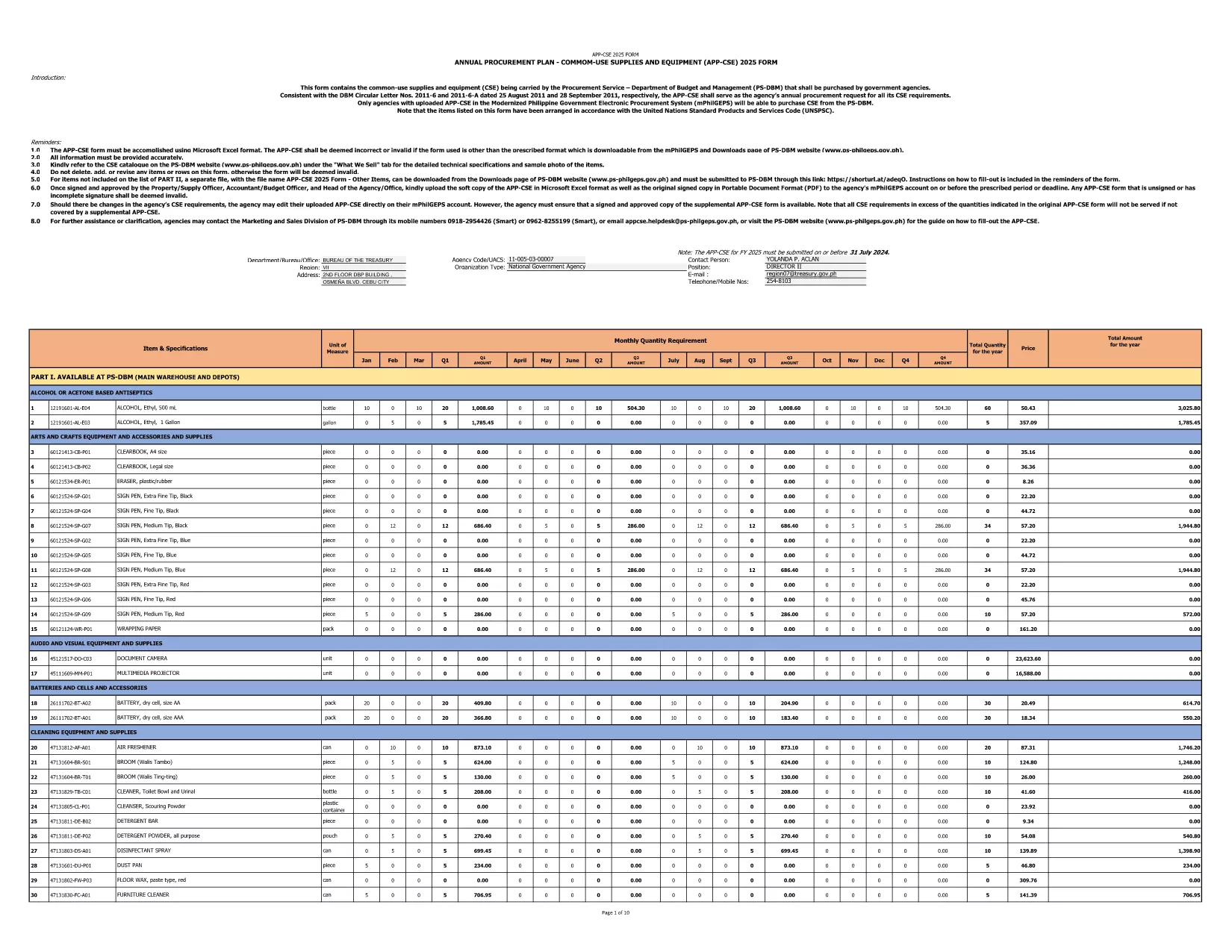
The 2025 CSE (Common‑Use Supplies and Equipment) Application Form is the official document used by Philippine government agencies to request procurement of shared supplies and equipment. This fillable PDF is hosted by the Department of Budget and Management and follows the latest DBM Circular Letters.

What Is the CSE Application Form?

The CSE form consolidates all common‑use items that agencies plan to purchase for the fiscal year. It ensures transparency, avoids duplication, and streamlines the procurement process across the public sector.

How to Complete the Form Online

Instead of downloading the PDF and opening a separate editor, simply click the "Fill out this form" button on this page. The Formize PDF Filler app will load in your browser, letting you enter data directly into the fields.

Common Mistakes to Avoid

  • Leaving required fields blank – the form will flag them before submission.
  • Using the wrong fiscal year – this version is for FY 2025 only.
  • Entering non‑numeric values in budget columns.
  • Forgetting to attach supporting documents where indicated.

Download the Official PDF

If you prefer to keep a local copy, you can download the original PDF from the government site. The file is the same one used by Formize.

Why Use Formize PDF Filler?

Formize provides a secure, browser‑based environment that:

  • Preserves the original formatting of the government form.
  • Auto‑saves your progress, preventing data loss.
  • Allows you to submit the completed form directly to your agency’s procurement portal.

Start filling the 2025 CSE Application Form now and accelerate your agency’s procurement workflow.

SSS
  • Is this form only for FY 2025?

    Yes. The downloaded PDF is specifically labeled APP‑CSE FY 2025 and follows the 2025 procurement guidelines.

  • Do I need a PDF editor to fill the form?

    No. The Formize PDF Filler works in any modern browser—no extra software is required.

  • Can I save my progress and return later?

    Absolutely. The filler auto‑saves your entries, and you can download a draft PDF at any time.

  • What if I make a mistake after submitting?

    You can download the completed PDF, correct it using Formize, and re‑submit. Always keep a backup copy.

  • Is the form secure?

    Formize uses SSL encryption, and the PDF remains on your device unless you choose to upload it to a secure agency portal.

  • Where can I find guidance on each field?

    Each field includes a tooltip with brief instructions. For detailed guidance, refer to DBM Circular Letter Nos. 2011‑6 and 2011‑6‑A.

  • Can I print the completed form?

    Yes. After filling out the form, click "Print" to generate a printer‑ready version.

NASıL

CSE application form formunu ücretsiz, çevrimiçi olarak 4 kolay adımda nasıl doldurabilirsiniz:

  1. 1
    Open the Fillable Form
    Click the "Fill out this form" button on the page. The Formize PDF Filler loads instantly in your browser.
  2. 2
    Enter Required Information
    Complete each highlighted field—agency name, item description, quantity, budget, and supporting details.
  3. 3
    Validate and Save
    Use the built‑in validation to check for missing or incorrect entries, then click "Save" to store a copy on your device.
  4. 4
    Submit or Export
    When finished, either submit the form directly to your procurement portal or export it as a completed PDF for offline filing.
PDF Filler uygulamasını biçimlendirin
HAKKıNDA

CSE application form şablonu

Bir PDF belgesini görüntülemeye ve doldurmaya yönelik geleneksel özellikler grubuyla, bir web uygulamasının ve uyumlu mizanpajın avantajlarıyla birleştiğinde, CSE application form kelimesini dakikalar içinde tamamlayabilirsiniz.

ÖZELLIKLERI

PDF Doldurucu

PDF formlarını çevrimiçi doldurmanın en kolay yolu

  • CSE application form'ü hızlıca doldurun
    CSE application form çevrimiçi olarak hızlı bir şekilde doldurmanın bir yolunu mu arıyorsunuz? Çevrimiçi ücretsiz PDF form doldurucumuzla, bu pdf belgesini nasıl düzenleyeceğinizi ve dolduracağınızı bir dakikadan kısa sürede öğreneceksiniz.
  • Kullanımı kolay çevrimiçi PDF düzenleyici
    PDF dosyalarını yeniden tarayıp geri göndermeden önce düzenleyebilmek için yazdırmaktan bıktınız mı? PDF belgelerini çevrimiçi olarak ücretsiz düzenleyin. Zamandan ve kağıttan tasarruf etmek için çevrimiçi pdf editörümüzü kullanın.
  • Harika araçlar, tüm platformlar
    Bir Mac'te CSE application form'ü nasıl dolduracağınızı veya PDF doldurucuyu ücretsiz olarak nasıl kullanacağınızı mı merak ediyorsunuz? Çevrimiçi PDF araçlarımız tüm platformlarda çalışır.
  • Güvenli dosya depolama
    Tamamlanan "CSE application form" dosyaları, Amazon Cloud barındırma tarafından yönetilen güvenli bir veritabanında depolanır. Dosyalarınızı istediğiniz zaman sistemimizden silebilirsiniz. Her durumda, bu dosyalar 24 saat sonra otomatik olarak silinir.
  • CSE application form ile sohbet et
    Ücretsiz bir PDF okuyucu asistanı olan Chatize'da "CSE application form" ile sohbet edin. "CSE application form" adlı kişiden sorular sorun ve yanıtlar alın. Yukarıdaki Belgeyle Sohbet Et düğmesini tıklamanız yeterlidir.

Doldurma oturumunu sil

Seçilen doldurma oturumunu silin mi? Bu durumda, formu doldurmadaki ilerlemeniz kaybolacaktır.

Düzenleme oturumunu sil

Seçilen düzenleme oturumu silinsin mi? Bu durumda formu oluşturma ve düzenleme konusundaki ilerlemeniz kaybolacaktır.