
Dil Seçin

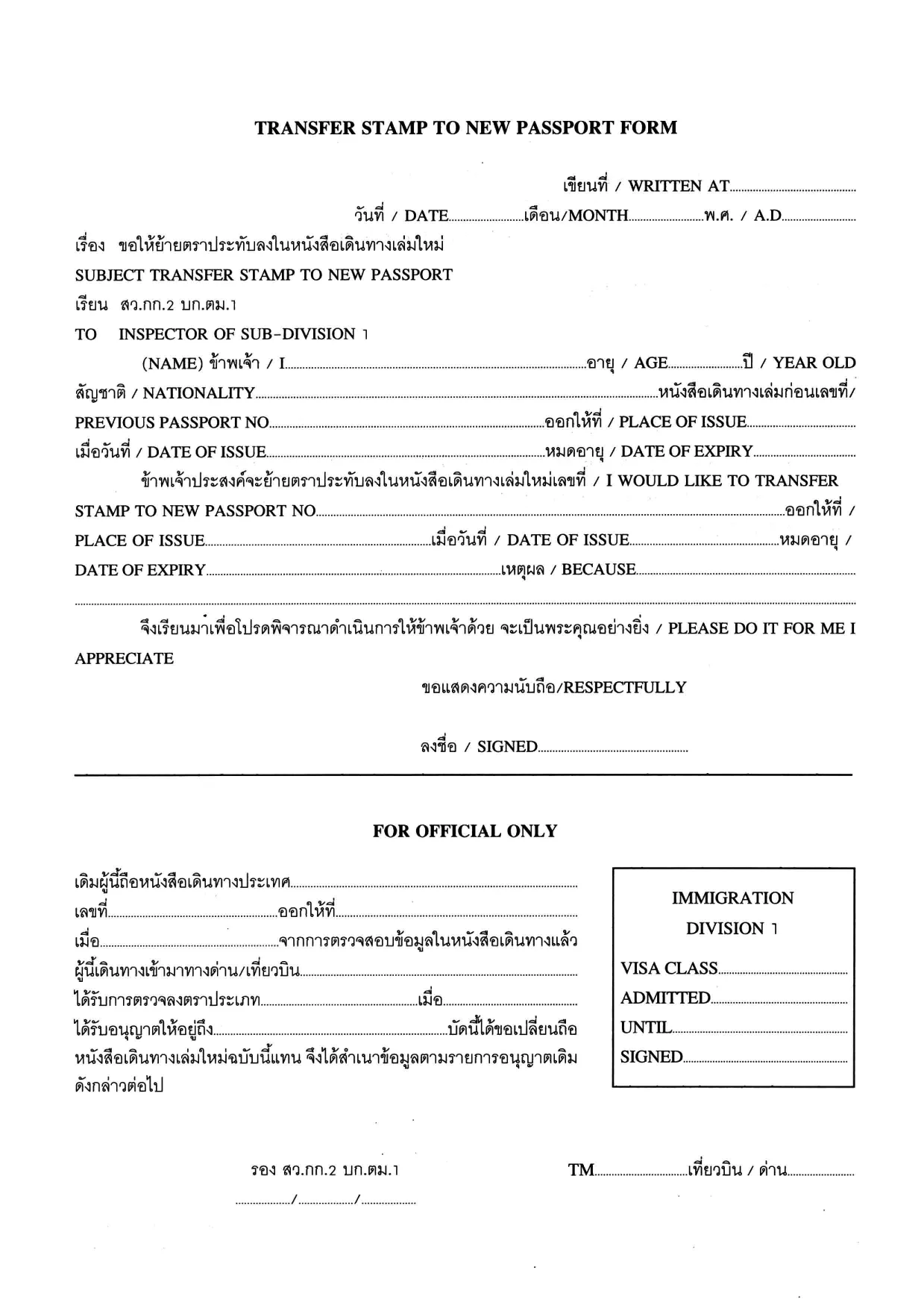
Transfer Stamp to New Passport Form (Fillable PDF)

  1. Dil İngilizce Tayland
  2. Ülke Tayland
  3. Aktivite vizeler
Transfer Stamp to New Passport Form (Fillable PDF)

When you receive a new passport, you must transfer any valid visa or entry stamp from your old passport to the new one. The Transfer Stamp to New Passport Form is the official document used by many embassies and consulates to record this transfer.

Our fillable PDF lets you complete the form quickly, without printing, scanning, or hand‑writing. Simply click the button below, let the Formize PDF Filler load, and start typing. The form saves your progress automatically, so you can return later if needed.

Why You Need This Form

Without a transferred stamp, your existing visa may be considered invalid, which can lead to denied entry, delays at the border, or the need to re‑apply for a new visa. The transfer form ensures that immigration authorities recognize the continuity of your visa status.

How to Fill the Transfer Stamp Form Online

Follow the step‑by‑step guide in the How To section below. The online Formize filler mirrors the original PDF layout, so you’ll know exactly where each piece of information belongs.

Required Documents and Common Mistakes

  • Old passport – copy of the page with the original stamp.
  • New passport – copy of the biographic page.
  • Embassy or consular letter (if required).

Common errors include misspelling names, entering an incorrect passport number, or forgetting to sign the form. Double‑check each field before saving.

Download & Start Filling Instantly

Click the button below to open the fillable PDF in the Formize PDF Filler app. No additional software is needed – everything runs securely in your browser.

Fill out this form

SSS
  • Who must use the Transfer Stamp to New Passport Form?

    Anyone who has a valid visa or entry stamp in an old passport that is being replaced with a new passport must complete this form to keep the visa active.

  • Can I fill out the form on a mobile device?

    Yes. The Formize PDF Filler works on all modern browsers, including smartphones and tablets.

  • Do I need to print the form after filling it online?

    Most embassies accept a digitally signed PDF, but check the specific instructions of the consulate you are dealing with.

  • What documents should I attach with the completed form?

    Attach a clear copy of the page containing the original stamp from the old passport, a copy of the biographic page of the new passport, and any embassy letter if required.

  • Is the information I enter secure?

    Formize runs over HTTPS, encrypting all data between your browser and our servers. The PDF is stored only on your device unless you choose to upload it.

  • Can I edit the form after I have downloaded it?

    Yes, you can reopen the saved PDF in Formize to make additional changes before final submission.

  • What should I do if I make a mistake?

    Simply correct the field in the filler and re‑save. If you have already submitted the form, contact the embassy for guidance on re‑issuing the document.

  • Is there a fee for using the Transfer Stamp form?

    The form itself is free to download. Any processing or visa transfer fees are set by the embassy or consulate.

NASıL

transfer stamp new passport formunu ücretsiz, çevrimiçi olarak 5 kolay adımda nasıl doldurabilirsiniz:

  1. 1
    Click the Fill‑out Button
    Press the “Fill out this form” button on the page. The Formize PDF Filler will open in a new browser tab.
  2. 2
    Wait for the Formizer to Load
    The fillable PDF loads automatically. A loading indicator shows when the app is ready.
  3. 3
    Enter Your Information
    Type directly into each field – name, passport numbers, visa details, and dates. Use the tab key to move quickly between fields.
  4. 4
    Save Your Progress
    The filler saves your entries in real time. You can close the tab and return later without losing data.
  5. 5
    Download or Submit
    When finished, click “Download PDF” to save the completed form, or follow your embassy’s instructions to submit it electronically.
PDF Filler uygulamasını biçimlendirin
HAKKıNDA

Vize Formları

transfer stamp new passport, ​​yabancı bir ülkeye giriş için vize başvurusunda kullanılan belgeler olan Vize formlarından biridir. Vize, yabancı uyruklu bir kişinin belirli bir süre için yabancı bir ülkeye girmesine, orada kalmasına ve bazen çalışmasına izin veren bir belgedir. Vize almanın kesin biçimleri ve gereklilikleri ülkeye ve vize türüne göre değişir.

Vize formları tipik olarak isim, doğum tarihi ve pasaport bilgileri gibi kişisel bilgilerin yanı sıra seyahatin amacı ve uzunluğu, amaçlanan varış yeri ve başvuranın daha önce vize reddi veya bir ülkeden sınır dışı edilip edilmediği hakkında bilgiler gerektirir. Formlar ayrıca pasaport, fotoğraf ve mali destek kanıtı gibi destekleyici belgeler gerektirebilir.

Amerika Birleşik Devletleri'nde en yaygın vize formları DS-160 ve DS-260 formlarıdır. DS-160 formu göçmen olmayan bir vizeye başvurmak için kullanılırken, DS-260 formu göçmen vizesine başvurmak için kullanılır. Bu formlar, başvuranın kişisel ve seyahat geçmişi hakkında ayrıntılı bilgilerin yanı sıra pasaport, seyahat programı ve mali kayıtlar gibi destekleyici belgeler gerektirir.

Diğer ülkelerin farklı vize formları ve gereksinimleri olabilir, ancak temel süreç genellikle bir vize başvurusunun tamamlanmasını, destekleyici belgelerin sağlanmasını ve bir ABD büyükelçiliği veya konsolosluğunda bir konsolosluk görevlisi ile görüşmeye katılmayı içerir. Vize başvuru sürecinin karmaşık ve zaman alıcı olabileceğini unutmamak önemlidir ve vize almak isteyen kişilerin, gerekli tüm formların ve gereksinimlerin karşılandığından emin olmak için bir göçmenlik avukatına veya başka bir kalifiye profesyonele danışmaları önerilir.

ÖZELLIKLERI

PDF Doldurucu

PDF formlarını çevrimiçi doldurmanın en kolay yolu

  • transfer stamp new passport'ü hızlıca doldurun
    transfer stamp new passport çevrimiçi olarak hızlı bir şekilde doldurmanın bir yolunu mu arıyorsunuz? Çevrimiçi ücretsiz PDF form doldurucumuzla, bu pdf belgesini nasıl düzenleyeceğinizi ve dolduracağınızı bir dakikadan kısa sürede öğreneceksiniz.
  • Kullanımı kolay çevrimiçi PDF düzenleyici
    PDF dosyalarını yeniden tarayıp geri göndermeden önce düzenleyebilmek için yazdırmaktan bıktınız mı? PDF belgelerini çevrimiçi olarak ücretsiz düzenleyin. Zamandan ve kağıttan tasarruf etmek için çevrimiçi pdf editörümüzü kullanın.
  • Harika araçlar, tüm platformlar
    Bir Mac'te transfer stamp new passport'ü nasıl dolduracağınızı veya PDF doldurucuyu ücretsiz olarak nasıl kullanacağınızı mı merak ediyorsunuz? Çevrimiçi PDF araçlarımız tüm platformlarda çalışır.
  • Güvenli dosya depolama
    Tamamlanan "transfer stamp new passport" dosyaları, Amazon Cloud barındırma tarafından yönetilen güvenli bir veritabanında depolanır. Dosyalarınızı istediğiniz zaman sistemimizden silebilirsiniz. Her durumda, bu dosyalar 24 saat sonra otomatik olarak silinir.
  • transfer stamp new passport ile sohbet et
    Ücretsiz bir PDF okuyucu asistanı olan Chatize'da "transfer stamp new passport" ile sohbet edin. "transfer stamp new passport" adlı kişiden sorular sorun ve yanıtlar alın. Yukarıdaki Belgeyle Sohbet Et düğmesini tıklamanız yeterlidir.

Doldurma oturumunu sil

Seçilen doldurma oturumunu silin mi? Bu durumda, formu doldurmadaki ilerlemeniz kaybolacaktır.

Düzenleme oturumunu sil

Seçilen düzenleme oturumu silinsin mi? Bu durumda formu oluşturma ve düzenleme konusundaki ilerlemeniz kaybolacaktır.