Dil Seçin

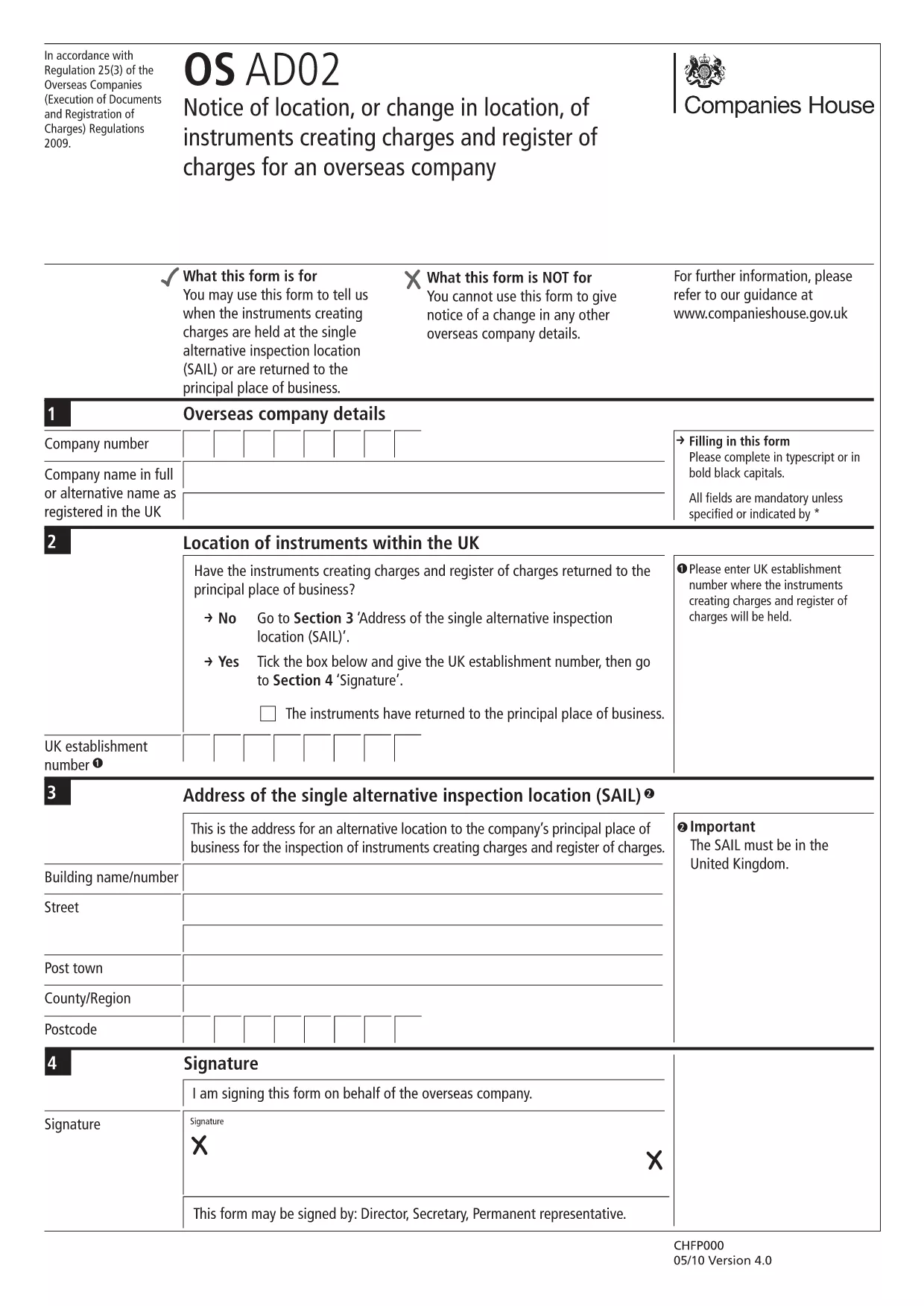
EN-AD.02 – Notice of Location or Change of Location Form (Fillable PDF)

  1. Dil İngilizce
  2. Ülke United Kingdom
  3. Aktivite Legal filings
  4. Departman Companies House
EN-AD.02 – Notice of Location or Change of Location Form (Fillable PDF)

The EN-AD.02 (also referenced as OS AD02) is the official notice used to record the location, or any change in location, of instruments that create charges on the UK Register of Charges for overseas companies. Completing this form correctly ensures your charge is properly registered and publicly searchable.

Formize makes the EN-AD.02 form 100 % fillable online – no PDF editor required. Simply click the button below, let the Formize PDF Filler load, and start typing. All data is saved automatically, and you can download a completed copy or submit it directly to Companies House.

What Is EN-AD.02?

EN-AD.02 is a statutory document required by Companies House when an overseas company creates a charge over assets in the United Kingdom. The form captures details such as:

  • Company name and registration number
  • Type of instrument creating the charge
  • Exact location of the charge (or any change to that location)
  • Date of registration

How to Complete the EN-AD.02 Form Online

Follow the simple steps in the How‑To section below. The Formize PDF Filler loads the official PDF, turns every field into an interactive input, and validates dates and numeric entries for you.

Common Mistakes to Avoid

  • Leaving required fields blank: The form will not submit if mandatory sections are empty.
  • Mismatching dates: Ensure the “Date of Change” is later than the original registration date.
  • Incorrect charge description: Use the exact wording from the instrument to avoid rejection.

Where to Submit the Completed Form

After you finish, you can either:

  1. Download the signed PDF and upload it through the Companies House WebFiling service.
  2. Send the PDF by post to the Companies House office handling overseas charges.

Both methods require the form to be signed by an authorized representative of the overseas company.

SSS
  • What is the purpose of the EN-AD.02 form?

    It notifies Companies House of the location, or any change in location, of instruments that create charges on the UK Register of Charges for overseas companies.

  • Can I edit the EN-AD.02 PDF without Formize?

    Technically you could use a PDF editor, but Formize provides a secure, fillable version that validates data and prevents common errors.

  • Is an electronic signature accepted on EN-AD.02?

    Yes, Companies House accepts qualified electronic signatures. Upload the signed PDF through WebFiling or attach a scanned handwritten signature.

  • How long does it take for the completed form to be processed?

    Once submitted, Companies House usually updates the Register of Charges within 5‑7 business days.

  • Do I need to submit supporting documents with EN-AD.02?

    Only if the charge instrument references additional agreements. Include any annexes mentioned in the instrument to avoid delays.

  • What if I make a mistake after submitting?

    You can file a corrected EN-AD.02 using the same process, clearly marking it as an amendment and referencing the original filing reference number.

NASıL

EN-AD.02 formunu ücretsiz, çevrimiçi olarak 5 kolay adımda nasıl doldurabilirsiniz:

  1. 1
    Click the “Fill out this form” button
    Locate the bright button on this page and click it. The Formize PDF Filler will open in a new tab.
  2. 2
    Wait for the Formize PDF Filler to load
    The app loads the official EN-AD.02 PDF and automatically converts every field into an editable box.
  3. 3
    Enter the required information
    Type directly into each field. The filler validates dates, numbers, and required entries in real time.
  4. 4
    Review and sign
    Double‑check all entries, add an electronic signature if your organization uses one, and click “Save”.
  5. 5
    Download or submit
    Choose to download the completed PDF for your records or follow the on‑screen instructions to submit it to Companies House.
PDF Filler uygulamasını biçimlendirin
HAKKıNDA

EN-AD.02 şablonu

Bir PDF belgesini görüntülemeye ve doldurmaya yönelik geleneksel özellikler grubuyla, bir web uygulamasının ve uyumlu mizanpajın avantajlarıyla birleştiğinde, EN-AD.02 kelimesini dakikalar içinde tamamlayabilirsiniz.

ÖZELLIKLERI

PDF Doldurucu

PDF formlarını çevrimiçi doldurmanın en kolay yolu

  • EN-AD.02'ü hızlıca doldurun
    EN-AD.02 çevrimiçi olarak hızlı bir şekilde doldurmanın bir yolunu mu arıyorsunuz? Çevrimiçi ücretsiz PDF form doldurucumuzla, bu pdf belgesini nasıl düzenleyeceğinizi ve dolduracağınızı bir dakikadan kısa sürede öğreneceksiniz.
  • Kullanımı kolay çevrimiçi PDF düzenleyici
    PDF dosyalarını yeniden tarayıp geri göndermeden önce düzenleyebilmek için yazdırmaktan bıktınız mı? PDF belgelerini çevrimiçi olarak ücretsiz düzenleyin. Zamandan ve kağıttan tasarruf etmek için çevrimiçi pdf editörümüzü kullanın.
  • Harika araçlar, tüm platformlar
    Bir Mac'te EN-AD.02'ü nasıl dolduracağınızı veya PDF doldurucuyu ücretsiz olarak nasıl kullanacağınızı mı merak ediyorsunuz? Çevrimiçi PDF araçlarımız tüm platformlarda çalışır.
  • Güvenli dosya depolama
    Tamamlanan "EN-AD.02" dosyaları, Amazon Cloud barındırma tarafından yönetilen güvenli bir veritabanında depolanır. Dosyalarınızı istediğiniz zaman sistemimizden silebilirsiniz. Her durumda, bu dosyalar 24 saat sonra otomatik olarak silinir.
  • EN-AD.02 ile sohbet et
    Ücretsiz bir PDF okuyucu asistanı olan Chatize'da "EN-AD.02" ile sohbet edin. "EN-AD.02" adlı kişiden sorular sorun ve yanıtlar alın. Yukarıdaki Belgeyle Sohbet Et düğmesini tıklamanız yeterlidir.

Doldurma oturumunu sil

Seçilen doldurma oturumunu silin mi? Bu durumda, formu doldurmadaki ilerlemeniz kaybolacaktır.

Düzenleme oturumunu sil

Seçilen düzenleme oturumu silinsin mi? Bu durumda formu oluşturma ve düzenleme konusundaki ilerlemeniz kaybolacaktır.