Dil Seçin

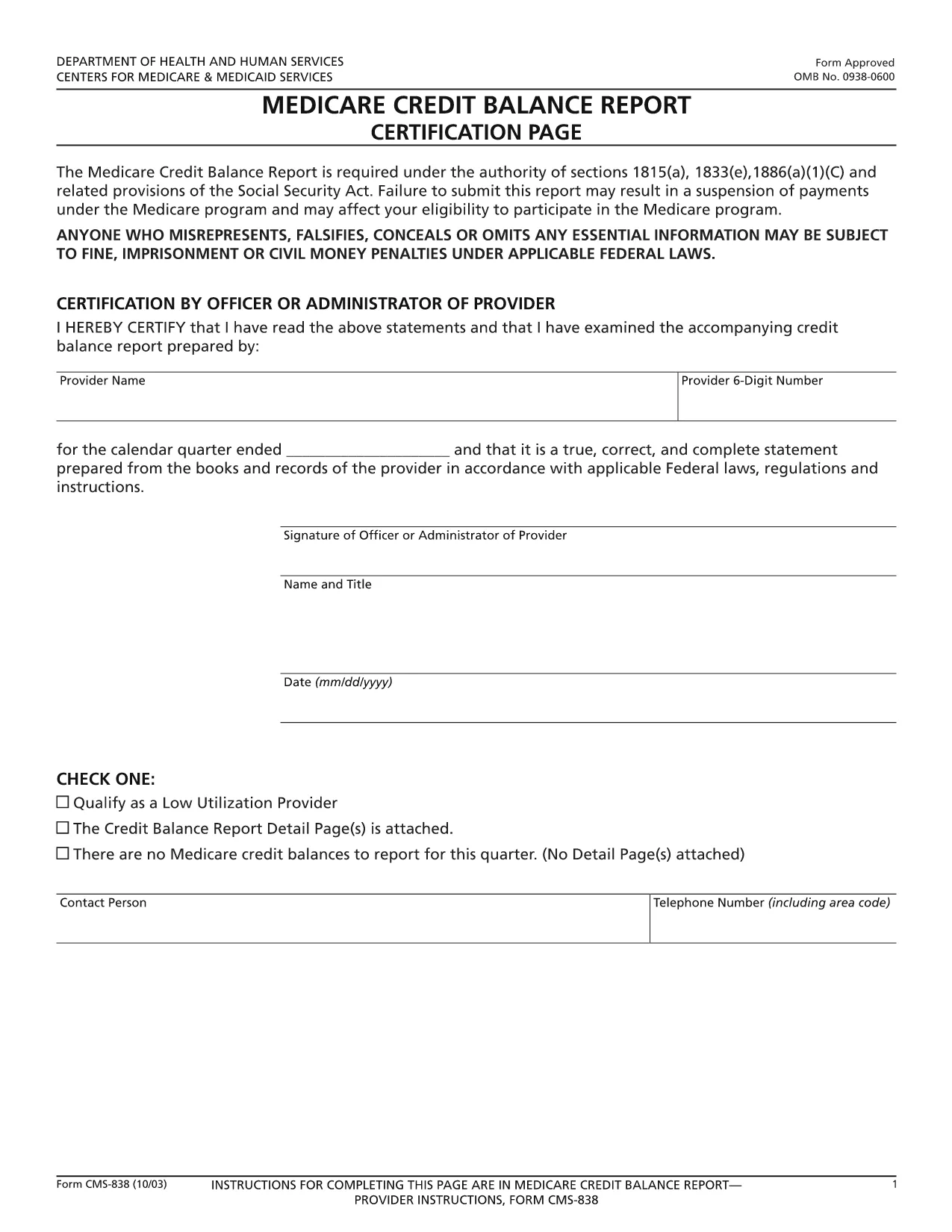
CMS‑838 Medicare Credit Balance Report – Fillable PDF

  1. Dil İngilizce
  2. Ülke Amerika Birleşik Devletleri
  3. Departman Centers for Medicare & Medicaid Services
  4. Aktivite Medicare
CMS‑838 Medicare Credit Balance Report – Fillable PDF

The CMS‑838 Medicare Credit Balance Report is the official form used by providers and suppliers to report excess or improper Medicare payments. Completing this form accurately helps you avoid penalties and ensures timely reimbursement.

What Is the CMS‑838 Form?

Form CMS‑838 captures detailed information about credit balances, over‑payments, and any adjustments that need to be reported back to the Centers for Medicare & Medicaid Services (CMS). It is a required filing for anyone who has received a Medicare credit balance during the reporting period.

Who Must File the CMS‑838?

  • Hospitals, clinics, and independent practice sites that have received Medicare credit balances.
  • Durable medical equipment (DME) suppliers and home health agencies.
  • Any Medicare‑eligible entity that identifies an over‑payment and must report it to CMS.

How to Complete the Fillable CMS‑838 Online

Instead of downloading the PDF and editing it in a separate program, simply click the “Fill out this form” button on this page. The Formize PDF Filler app will load the fillable version directly in your browser.

  1. Click Fill out this form and wait for the Formize editor to appear.
  2. Enter the required data in each field – the form validates entries in real time.
  3. Save your progress at any time; the app stores a secure copy in your browser.
  4. When finished, click Submit to download the completed PDF, then upload it to the CMS portal as instructed.

Common Mistakes to Avoid

  • Leaving mandatory fields blank: The Formize filler highlights missing required fields before you can submit.
  • Mismatched dates: Ensure the reporting period matches the dates on your credit balance statements.
  • Incorrect provider identifiers: Double‑check your NPI and TIN numbers.
  • Failing to attach supporting documentation: Upload any audit reports or reconciliation sheets as separate files when you submit to CMS.

Download the Fillable PDF

Ready to start? Click the button below to open the fillable CMS‑838 form instantly. No software download required – just a modern web browser.

SSS
  • What is the purpose of the CMS‑838 form?

    The CMS‑838 reports any Medicare credit balances, over‑payments, or adjustments that a provider must return to CMS. It helps maintain compliance and prevents future penalties.

  • Can I edit the CMS‑838 after I download it?

    Yes, but using the Formize fillable version is recommended. It prevents formatting errors and ensures all required fields are completed before you submit.

  • Do I need a digital signature on the CMS‑838?

    CMS accepts a typed signature in the fillable PDF. After completing the form, you can add a digital signature within the Formize app or print, sign, and scan the document.

  • How often must the CMS‑838 be filed?

    The form is required each time a credit balance is identified. Most providers file it quarterly, but frequency depends on your organization’s payment cycle.

  • What supporting documents should I attach?

    Include reconciliation statements, audit reports, and any correspondence with Medicare that explains the credit balance. Attach them as separate PDFs when you submit to the CMS portal.

  • Is there a fee to use the Formize PDF filler?

    No. Formize offers the fillable CMS‑838 at no cost. You only need an internet connection and a modern web browser.

NASıL

CMS-838 formunu ücretsiz, çevrimiçi olarak 4 kolay adımda nasıl doldurabilirsiniz:

  1. 1
    Open the Fillable Form
    Click the “Fill out this form” button on the page. The Formize PDF Filler app loads the CMS‑838 directly in your browser.
  2. 2
    Enter Required Information
    Complete each highlighted field. Real‑time validation ensures numbers, dates, and identifiers are entered correctly.
  3. 3
    Save and Review
    Use the “Save” option to store a draft. Review all entries, paying special attention to mandatory sections.
  4. 4
    Download and Submit
    When the form is complete, click “Download PDF” to save a copy, then upload it to the CMS portal as instructed in your provider handbook.
PDF Filler uygulamasını biçimlendirin
HAKKıNDA

CMS-838 şablonu

Bir PDF belgesini görüntülemeye ve doldurmaya yönelik geleneksel özellikler grubuyla, bir web uygulamasının ve uyumlu mizanpajın avantajlarıyla birleştiğinde, CMS-838 kelimesini dakikalar içinde tamamlayabilirsiniz.

ÖZELLIKLERI

PDF Doldurucu

PDF formlarını çevrimiçi doldurmanın en kolay yolu

  • CMS-838'ü hızlıca doldurun
    CMS-838 çevrimiçi olarak hızlı bir şekilde doldurmanın bir yolunu mu arıyorsunuz? Çevrimiçi ücretsiz PDF form doldurucumuzla, bu pdf belgesini nasıl düzenleyeceğinizi ve dolduracağınızı bir dakikadan kısa sürede öğreneceksiniz.
  • Kullanımı kolay çevrimiçi PDF düzenleyici
    PDF dosyalarını yeniden tarayıp geri göndermeden önce düzenleyebilmek için yazdırmaktan bıktınız mı? PDF belgelerini çevrimiçi olarak ücretsiz düzenleyin. Zamandan ve kağıttan tasarruf etmek için çevrimiçi pdf editörümüzü kullanın.
  • Harika araçlar, tüm platformlar
    Bir Mac'te CMS-838'ü nasıl dolduracağınızı veya PDF doldurucuyu ücretsiz olarak nasıl kullanacağınızı mı merak ediyorsunuz? Çevrimiçi PDF araçlarımız tüm platformlarda çalışır.
  • Güvenli dosya depolama
    Tamamlanan "CMS-838" dosyaları, Amazon Cloud barındırma tarafından yönetilen güvenli bir veritabanında depolanır. Dosyalarınızı istediğiniz zaman sistemimizden silebilirsiniz. Her durumda, bu dosyalar 24 saat sonra otomatik olarak silinir.
  • CMS-838 ile sohbet et
    Ücretsiz bir PDF okuyucu asistanı olan Chatize'da "CMS-838" ile sohbet edin. "CMS-838" adlı kişiden sorular sorun ve yanıtlar alın. Yukarıdaki Belgeyle Sohbet Et düğmesini tıklamanız yeterlidir.

Doldurma oturumunu sil

Seçilen doldurma oturumunu silin mi? Bu durumda, formu doldurmadaki ilerlemeniz kaybolacaktır.

Düzenleme oturumunu sil

Seçilen düzenleme oturumu silinsin mi? Bu durumda formu oluşturma ve düzenleme konusundaki ilerlemeniz kaybolacaktır.