
Dil Seçin

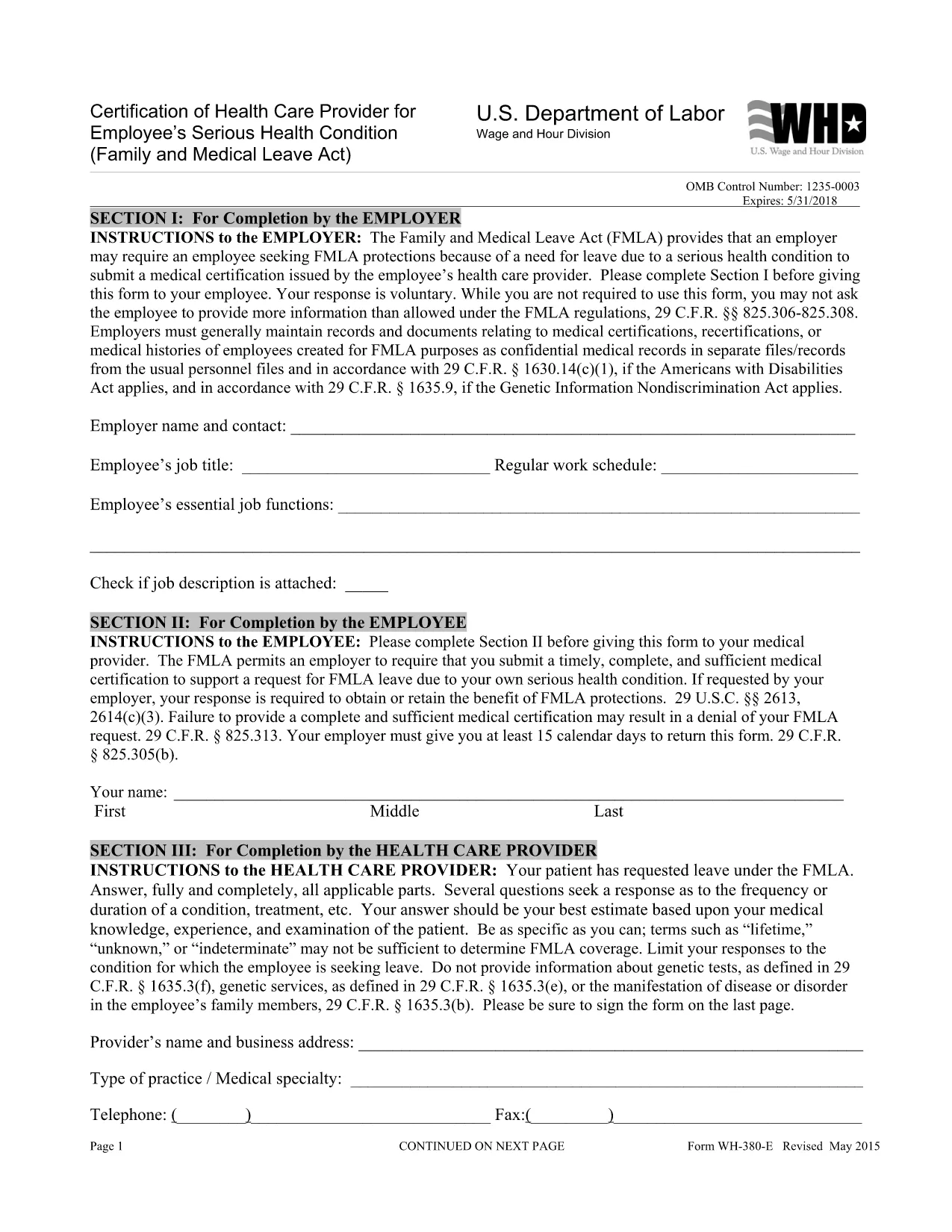
WH‑380‑E Fillable PDF – Family & Medical Leave Act Medical Certification

  1. Dil İngilizce
  2. Ülke Amerika Birleşik Devletleri
  3. Departman Çalışma Bakanlığı
  4. Ajans Ücret ve Saat Bölümü
WH‑380‑E Fillable PDF – Family & Medical Leave Act Medical Certification

The WH‑380‑E is the official certification of a health care provider required under the Family and Medical Leave Act (FMLA). Employers use this form to verify an employee’s serious health condition, a newborn or newly‑adopted child, or a need for caretaker leave.

What Is the WH‑380‑E Form?

This government‑issued PDF collects detailed medical information, including diagnosis, treatment dates, and the provider’s certification that the condition qualifies for FMLA leave. It is used by federal, state, and private employers across the United States.

How to Complete the WH‑380‑E Online

Instead of downloading and editing the PDF in a separate editor, simply click the “Fill out this form” button on this page. The Formize PDF Filler app will load the fillable version instantly. Follow these steps:

  • Step 1: Click the “Fill out this form” button.
  • Step 2: The Formize filler loads – the document becomes interactive.
  • Step 3: Enter the employee’s information, health‑care provider details, and medical certification data.
  • Step 4: Review for completeness and accuracy.
  • Step 5: Click “Save & Download” to obtain a completed PDF you can print or email to HR.

Common Mistakes to Avoid

  • Leaving any required field blank – every asterisk (*) field must be completed.
  • Providing a diagnosis when the form states it is optional (unless your employer requests it).
  • Using illegible handwriting – the online filler ensures clear, typed text.
  • Submitting the form without the provider’s signature and date.

Where to Submit the Certified Form

After saving the completed WH‑380‑E, send it to your employer’s Human Resources or Benefits department according to your company’s leave‑request policy. Federal employees may also submit it to the agency’s HR office.

Download the Fillable WH‑380‑E PDF

If you prefer to keep a copy of the original document, you can download the official WH‑380‑E PDF from the West Virginia Legislature site. Our online filler uses the same version, guaranteeing compliance.

SSS
  • What is the purpose of the WH‑380‑E form?

    The WH‑380‑E certifies that an employee’s serious health condition (or a family member’s condition) meets the eligibility criteria for FMLA leave.

  • Can I fill out WH‑380‑E on a mobile device?

    Yes. The Formize PDF Filler works on smartphones and tablets, allowing you to complete the form on any modern browser.

  • Do I need to include a diagnosis on the form?

    A diagnosis is optional unless your employer specifically requests it. The form’s instructions note that the provider may omit the diagnosis while still meeting FMLA requirements.

  • How many copies of the completed WH‑380‑E do I need?

    Typically one completed, signed copy is submitted to HR. Keep a personal copy for your records.

  • Is the WH‑380‑E required for all FMLA leave types?

    The form is required for serious health conditions of the employee or an immediate family member. Separate certification forms exist for newborn or adopted child care.

  • What if I make a mistake after submitting the form?

    Contact your HR department immediately. You can submit a corrected WH‑380‑E with a note explaining the changes.

  • Is the WH‑380‑E a federal or state form?

    It is a federal form issued under the Family and Medical Leave Act, but many states adopt the same version for their own leave programs.

  • Do I need a notary for the WH‑380‑E?

    No. The health‑care provider’s signature and date satisfy the certification requirements.

NASıL

WH-380-E formunu ücretsiz, çevrimiçi olarak 5 kolay adımda nasıl doldurabilirsiniz:

  1. 1
    Open the Fillable Form
    Click the “Fill out this form” button on the page. The Formize PDF Filler loads the WH‑380‑E as an interactive document.
  2. 2
    Enter Required Information
    Type the employee’s name, dates of care, and the health‑care provider’s details into the highlighted fields.
  3. 3
    Complete the Medical Certification
    Provide the diagnosis (if required), treatment plan, and any functional limitations. Ensure the provider signs and dates the form.
  4. 4
    Review and Save
    Double‑check all entries for accuracy, then click “Save & Download” to get a completed PDF you can print or email.
  5. 5
    Submit to HR
    Send the saved PDF to your employer’s HR or Benefits department following your organization’s leave‑submission guidelines.
PDF Filler uygulamasını biçimlendirin
HAKKıNDA

Çalışma Bakanlığı (DOL) Formları

WH-380-E, ​​Amerika Birleşik Devletleri Çalışma Bakanlığı ve onun çeşitli kurumları tarafından bilgi toplamak, programları yönetmek ve çalışmayla ilgili yasa ve düzenlemeleri uygulamak için kullanılan resmi formlardan biridir. Çalışma Bakanlığı, Amerika Birleşik Devletleri'nde çalışanların refahını teşvik etmek ve korumaktan, adil istihdam uygulamalarını sağlamaktan ve çalışma ve istihdamın çeşitli yönlerini denetlemekten sorumlu federal bir yürütme departmanıdır.

İşte Çalışma Bakanlığı formlarının bazı örnekleri:

İstihdama Uygunluk Doğrulaması (Form I-9): ABD Vatandaşlık ve Göçmenlik Hizmetleri (USCIS) tarafından yönetilen Form I-9, genellikle Çalışma Bakanlığı ile ilişkilidir. İşverenler tarafından Amerika Birleşik Devletleri'nde istihdam edilmek üzere işe alınan kişilerin kimliğini ve istihdama uygunluğunu doğrulamak için kullanılır.

Aile ve Sağlık İzin Yasası (FMLA) Formları: DOL'un Ücret ve Saat Bölümü FMLA'yı yönetir ve Sağlık Hizmetleri Sertifikasyonu da dahil olmak üzere bu federal yasanın hükümlerini uygulamak ve bunlara uymak için çeşitli formlar kullanılır. Sağlayıcı formu ve FMLA Uygunluk Bildirimi ile Haklar ve Sorumluluklar formu.

Mesleki Güvenlik ve Sağlık İdaresi (OSHA) Formları: DOL'un bir bölümü olan OSHA, belirli işverenlerin OSHA Form 300, OSHA Form 300A ve OSHA gibi formları kullanarak işyerindeki yaralanma ve hastalıklara ilişkin kayıt tutmasını zorunlu kılar. Form 301.

İşsizlik Sigortası Formları: DOL'un İstihdam ve Eğitim İdaresi, İşsizlik Sigortası (UI) programını denetler ve UI yardım taleplerini yönetmek ve işleme koymak için eyalet işgücü kurumları tarafından çeşitli formlar kullanılır.

Ücret ve Saat Uyumluluk Formları: DOL'un Ücret ve Saat Bölümü, Adil Çalışma Standartları Yasası (FLSA) ve Aile ve Sağlık İzin Yasası (FMLA) dahil olmak üzere çeşitli iş yasalarını uygular. İşverenlerin bu yasalara uygunluğu sürdürmek için çalışılan saatlerin kayıtları, ücret oranları ve diğer ilgili bilgiler gibi belirli formları kullanması gerekebilir.

Bu örnekler Çalışma Bakanlığı formlarının bazı ortak kategorilerini temsil etmektedir, ancak DOL ve çeşitli kurumlarının çalışma ve istihdamla ilgili sorumluluklarını yerine getirmek için kullandıkları başka birçok form da vardır. Gereken spesifik formlar, ilgili programa, düzenlemeye veya yaptırım eylemine bağlı olarak değişebilir. Doğru ve güncel bilgilere ulaşmak için ABD Çalışma Bakanlığı'nın resmi web sitesini (www.dol.gov) ziyaret etmeniz veya ilgili DOL kurumlarına veya hukuk uzmanlarına danışmanız önerilir. İşgücüyle ilgili ihtiyaçlarınız veya uyumluluk gereksinimlerinizle ilgili belirli DOL formlarına ilişkin tarih bilgileri.

ÖZELLIKLERI

PDF Doldurucu

PDF formlarını çevrimiçi doldurmanın en kolay yolu

  • WH-380-E'ü hızlıca doldurun
    WH-380-E çevrimiçi olarak hızlı bir şekilde doldurmanın bir yolunu mu arıyorsunuz? Çevrimiçi ücretsiz PDF form doldurucumuzla, bu pdf belgesini nasıl düzenleyeceğinizi ve dolduracağınızı bir dakikadan kısa sürede öğreneceksiniz.
  • Kullanımı kolay çevrimiçi PDF düzenleyici
    PDF dosyalarını yeniden tarayıp geri göndermeden önce düzenleyebilmek için yazdırmaktan bıktınız mı? PDF belgelerini çevrimiçi olarak ücretsiz düzenleyin. Zamandan ve kağıttan tasarruf etmek için çevrimiçi pdf editörümüzü kullanın.
  • Harika araçlar, tüm platformlar
    Bir Mac'te WH-380-E'ü nasıl dolduracağınızı veya PDF doldurucuyu ücretsiz olarak nasıl kullanacağınızı mı merak ediyorsunuz? Çevrimiçi PDF araçlarımız tüm platformlarda çalışır.
  • Güvenli dosya depolama
    Tamamlanan "WH-380-E" dosyaları, Amazon Cloud barındırma tarafından yönetilen güvenli bir veritabanında depolanır. Dosyalarınızı istediğiniz zaman sistemimizden silebilirsiniz. Her durumda, bu dosyalar 24 saat sonra otomatik olarak silinir.
  • WH-380-E ile sohbet et
    Ücretsiz bir PDF okuyucu asistanı olan Chatize'da "WH-380-E" ile sohbet edin. "WH-380-E" adlı kişiden sorular sorun ve yanıtlar alın. Yukarıdaki Belgeyle Sohbet Et düğmesini tıklamanız yeterlidir.

Doldurma oturumunu sil

Seçilen doldurma oturumunu silin mi? Bu durumda, formu doldurmadaki ilerlemeniz kaybolacaktır.

Düzenleme oturumunu sil

Seçilen düzenleme oturumu silinsin mi? Bu durumda formu oluşturma ve düzenleme konusundaki ilerlemeniz kaybolacaktır.