
Dil Seçin

Virginia DSD 7 Form – Fillable PDF for Vehicle Registration

  1. Dil İngilizce
  2. Ülke Amerika Birleşik Devletleri
  3. Aktivite Araç Kaydı
  4. Departman Department of Motor Vehicles
Virginia DSD 7 Form – Fillable PDF for Vehicle Registration

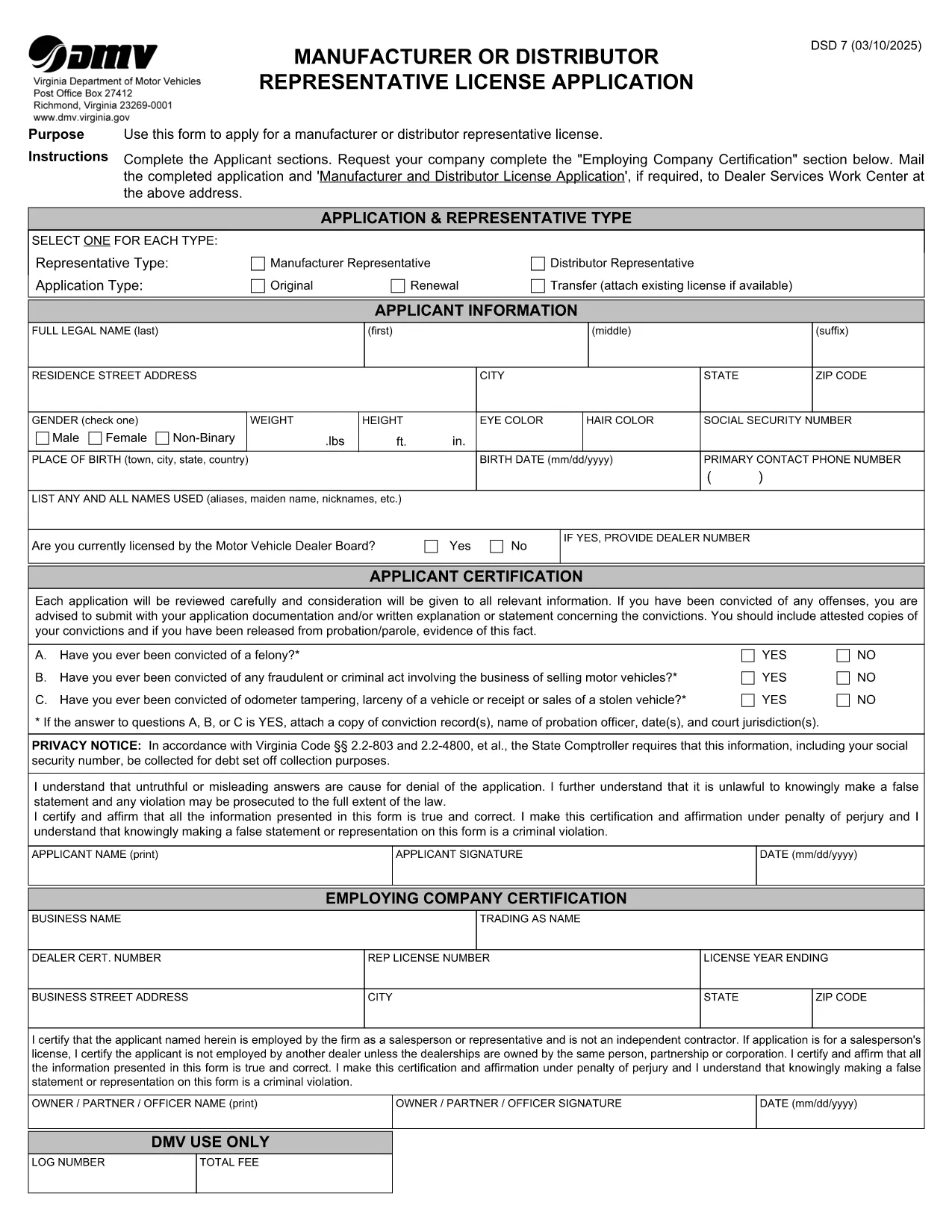
The DSD 7 form is the official Virginia Department of Motor Vehicles (DMV) document used for certain vehicle registration and title transactions. Whether you need to update ownership, correct a title error, or provide supporting information, the DSD 7 must be completed accurately.

What is the DSD 7 Form?

The DSD 7 is a fillable PDF released by the Virginia DMV. It collects details such as the vehicle identification number (VIN), owner information, and the reason for the request. The form is required for:

  • Title corrections
  • Ownership transfers that are not covered by a standard bill of sale
  • Special exemptions or clarifications requested by the DMV

How to Fill Out the DSD 7 Online

Instead of downloading the PDF and opening it in a separate editor, simply click the "Fill out this form" button below. Our Formize PDF Filler app will load the document directly in your browser, letting you type, check boxes, and sign without any software installation.

Common Mistakes to Avoid

  • Leaving required fields blank: The DMV will reject any submission missing mandatory information.
  • Incorrect VIN format: Double‑check the 17‑character VIN for typos.
  • Using the wrong signature style: Use a clear, legible electronic signature that matches your legal signature.
  • Submitting outdated documents: Attach only current supporting paperwork.

Where to Submit the Completed Form

After you finish filling the DSD 7, you can:

  • Print and mail it to the address listed on the form.
  • Upload the completed PDF through the Virginia DMV's online portal (if applicable).

Always keep a copy for your records.

SSS
  • What does DSD stand for?

    DSD stands for "Department of State Division" and is a designation used by the Virginia DMV for certain specialized forms.

  • Can I submit the DSD 7 electronically?

    Yes. After completing the form with Formize, you can upload the PDF through the Virginia DMV's online portal where electronic submissions are accepted.

  • Do I need a notary for the DSD 7?

    A notary is not required for the DSD 7 unless the specific transaction you are performing explicitly calls for notarization.

  • How long does it take the DMV to process the DSD 7?

    Processing times vary, but most standard requests are handled within 7‑10 business days after receipt.

  • What should I do if I make a mistake after submitting?

    Contact the Virginia DMV immediately. In many cases you will need to submit a corrected DSD 7 with a note explaining the error.

  • Is there a fee for filing the DSD 7?

    Yes, the DMV charges a processing fee. Check the form instructions or the DMV website for the current amount.

  • Can I save my progress and return later?

    The Formize PDF Filler allows you to download a partially completed PDF, which you can reopen later to finish.

NASıL

DSD 7 form formunu ücretsiz, çevrimiçi olarak 5 kolay adımda nasıl doldurabilirsiniz:

  1. 1
    Click the Fill Out Button
    Press the "Fill out this form" button on the page to launch the Formize PDF Filler.
  2. 2
    Wait for the Filler to Load
    The browser will open the fillable DSD 7 PDF. A loading spinner indicates the app is preparing the document.
  3. 3
    Complete Each Section
    Enter your information, select checkboxes, and add your electronic signature exactly as required.
  4. 4
    Review and Submit
    Double‑check all entries, then click the "Submit" button to download the completed PDF or print it for mailing.
  5. 5
    Save a Copy
    Store the final PDF on your computer or cloud storage for future reference.
PDF Filler uygulamasını biçimlendirin
HAKKıNDA

Araç Tescil Formları

DSD 7 form, bir motorlu taşıtın ilgili devlet kurumuna, genellikle Motorlu Taşıtlar Dairesi'ne (DMV) veya eşdeğer bir kuruma tescil ettirilmesi için kullanılan belgeler olan Araç kayıt formlarından biridir. Bu formlar, bir kişi yeni veya kullanılmış bir araç satın aldığında, aracın mülkiyetini devrettiğinde veya bir araçla yeni bir yargı bölgesine taşındığında gereklidir.

Belirli araç kayıt formları yargı yetkisine göre değişiklik gösterebilir ancak genellikle aşağıdaki bilgileri gerektirir:

Araç Bilgileri: Bu, marka, model, yıl, araç şasi numarası (VIN) ve kilometre sayacı okuması gibi araçla ilgili ayrıntıları içerir.

Sahip Bilgileri: Form, aracın sahibi hakkında, adı, adresi, iletişim bilgileri ve ehliyet numarası dahil olmak üzere bilgiler gerektirecektir.

Mülkiyet Kanıtı: Koşullara bağlı olarak tapu belgesi, satış faturası veya üreticinin menşe belgesi (yeni araçlar için) gibi mülkiyet kanıtı gerekli olabilir.

Sigorta Bilgileri: Genellikle geçerli araç sigortası teminatının kanıtı gereklidir. Bu, sigorta poliçe numarasının, teminat tarihlerinin ve sigorta şirketi ayrıntılarının sağlanmasını içerebilir.

Ücretlerin Ödenmesi: Araç tescili, tescil ücretleri, vergiler ve muhtemelen yargı bölgesine özgü diğer masraflar gibi çeşitli ücretlerin ödenmesini içerir.

Bu temel gerekliliklere ek olarak, bazı yargı bölgelerinde ek formlar veya belge gereklilikleri olabilir. Örneğin, belirli bölgelerde emisyon testi sonuçları, güvenlik denetimleri veya ikamet belgesi gerekli olabilir.

Araç tescil formları tamamlanıp gönderildikten sonra, resmi makam bir tescil belgesi, araç plakaları ve tescil çıkartmaları düzenleyecektir. Bu belgeler, aracın yasal olarak kayıtlı olduğunu ve kamuya açık yollarda çalıştırılmaya yetkili olduğunu gösterir.

Araç tescil gerekliliklerinin yargı yetkisine göre önemli ölçüde değişebileceğini unutmamak önemlidir. Bu nedenle, bulunduğunuz yere uygun özel formlar ve prosedürler için yerel DMV'ye veya eşdeğer kuruma danışmanız önerilir.

ÖZELLIKLERI

PDF Doldurucu

PDF formlarını çevrimiçi doldurmanın en kolay yolu

  • DSD 7 form'ü hızlıca doldurun
    DSD 7 form çevrimiçi olarak hızlı bir şekilde doldurmanın bir yolunu mu arıyorsunuz? Çevrimiçi ücretsiz PDF form doldurucumuzla, bu pdf belgesini nasıl düzenleyeceğinizi ve dolduracağınızı bir dakikadan kısa sürede öğreneceksiniz.
  • Kullanımı kolay çevrimiçi PDF düzenleyici
    PDF dosyalarını yeniden tarayıp geri göndermeden önce düzenleyebilmek için yazdırmaktan bıktınız mı? PDF belgelerini çevrimiçi olarak ücretsiz düzenleyin. Zamandan ve kağıttan tasarruf etmek için çevrimiçi pdf editörümüzü kullanın.
  • Harika araçlar, tüm platformlar
    Bir Mac'te DSD 7 form'ü nasıl dolduracağınızı veya PDF doldurucuyu ücretsiz olarak nasıl kullanacağınızı mı merak ediyorsunuz? Çevrimiçi PDF araçlarımız tüm platformlarda çalışır.
  • Güvenli dosya depolama
    Tamamlanan "DSD 7 form" dosyaları, Amazon Cloud barındırma tarafından yönetilen güvenli bir veritabanında depolanır. Dosyalarınızı istediğiniz zaman sistemimizden silebilirsiniz. Her durumda, bu dosyalar 24 saat sonra otomatik olarak silinir.
  • DSD 7 form ile sohbet et
    Ücretsiz bir PDF okuyucu asistanı olan Chatize'da "DSD 7 form" ile sohbet edin. "DSD 7 form" adlı kişiden sorular sorun ve yanıtlar alın. Yukarıdaki Belgeyle Sohbet Et düğmesini tıklamanız yeterlidir.

Doldurma oturumunu sil

Seçilen doldurma oturumunu silin mi? Bu durumda, formu doldurmadaki ilerlemeniz kaybolacaktır.

Düzenleme oturumunu sil

Seçilen düzenleme oturumu silinsin mi? Bu durumda formu oluşturma ve düzenleme konusundaki ilerlemeniz kaybolacaktır.