
Dil Seçin

California DMV DL 939 – 10‑Year History Record Check Form

  1. Dil İngilizce
  2. Ülke Amerika Birleşik Devletleri
  3. Aktivite Ehliyet
  4. Belirtmek, bildirmek Kaliforniya
California DMV DL 939 – 10‑Year History Record Check Form

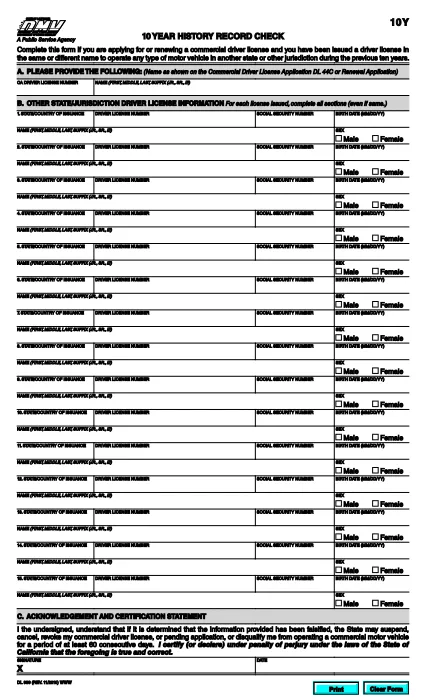
The DL 939 is the California Department of Motor Vehicles (DMV) 10‑Year History Record Check form. It is required when you are applying for or renewing a commercial driver’s license (CDL) and need to disclose any driver’s licenses you have held in the past ten years, even if they were issued in a different name or state.

What Is the DL 939 Form?

Form DL 939 collects detailed information about your driving history, including:

  • All driver’s licenses issued in the last ten years
  • Names, dates of issue, and issuing jurisdictions
  • Any suspensions, revocations, or restrictions

Providing accurate data helps the DMV verify your eligibility for a CDL and prevents delays in processing your application.

How to Complete the DL 939 Online with Formize

Instead of downloading, printing, and scanning the PDF, you can fill it out instantly on our site:

  1. Click the “Fill out this form” button below the PDF preview.
  2. Wait a few seconds while the Formize PDF Filler app loads.
  3. Enter the requested information into each fillable field. The interface mirrors the original DMV layout, so you’ll know exactly where to type.
  4. Review your entries for accuracy (see the “Common Mistakes” section).
  5. When you’re satisfied, click Save & Download to get a completed PDF ready for upload or printing.

Common Mistakes to Avoid

  • Leaving fields blank: Every license you held in the past ten years must be listed, even if it was cancelled.
  • Mismatching dates: Use the exact issue and expiration dates shown on your original licenses.
  • Incorrect name spelling: Include name variations (e.g., maiden name) exactly as they appear on the original documents.
  • Skipping the “Signature” field: The form is not valid without a signature or electronic acknowledgment.

Where to Submit the Completed Form

After you download the filled PDF, attach it to your CDL application packet and submit it to your nearest California DMV office or upload it through the DMV’s online portal, if available.

Need help? Review the FAQ section below or contact your local DMV office for clarification.

SSS
  • Who needs to fill out DL 939?

    Anyone applying for or renewing a commercial driver’s license in California who has held any driver’s license in the past ten years, even in another state or under a different name.

  • Can I submit the form electronically?

    Yes. After completing the form with Formize, you can upload the saved PDF directly to the California DMV’s online portal or email it if your local office accepts electronic submissions.

  • What happens if I leave a previous license out?

    Omitting a license can delay your CDL processing, cause a denial, or lead to penalties for providing incomplete information.

  • Is there a fee to use Formize’s PDF filler?

    No. Formize provides a free, secure filler for all California DMV forms, including DL 939.

  • Do I need a digital signature?

    If you fill the form online, you can add an electronic signature using the filler’s built‑in signature tool. The DMV accepts this as long as it’s clearly marked.

  • How long is the DL 939 valid?

    The completed DL 939 is valid for the duration of the specific CDL application or renewal it accompanies. It does not have an independent expiration date.

NASıL

DL 939 formunu ücretsiz, çevrimiçi olarak 5 kolay adımda nasıl doldurabilirsiniz:

  1. 1
    Open the Form
    Click the “Fill out this form” button on the page. The Formize PDF Filler will open in a new window.
  2. 2
    Load the PDF Filler
    Wait a few seconds while the filler loads the DL 939 template. All fields become editable.
  3. 3
    Enter Your Information
    Type the required data into each field, matching the original DMV records exactly.
  4. 4
    Review & Save
    Check every entry for accuracy, then click “Save & Download” to get a completed PDF.
  5. 5
    Submit the Form
    Attach the saved PDF to your CDL application or upload it through the California DMV online portal.
PDF Filler uygulamasını biçimlendirin
HAKKıNDA

Ehliyet Başvuru Formları

DL 939, ehliyet başvurusunda bulunmak veya ehliyetle ilgili çeşitli hizmetleri talep etmek için kullanılan belgeler olan sürücü belgesi formlarından biridir. Bu formlar genellikle Amerika Birleşik Devletleri'ndeki Motorlu Araçlar Departmanı (DMV) gibi belirli bir yargı bölgesinde sürücü ehliyeti vermekten sorumlu departman veya kurum tarafından sağlanır.

Yaygın sürücü belgesi formları şunları içerir:

Ehliyet Başvurusu: Bu form, yeni bir ehliyet başvurusunda bulunmak veya mevcut bir ehliyeti yenilemek için kullanılır. Genellikle ad, adres, doğum tarihi ve Sosyal Güvenlik numarası gibi kişisel bilgileri gerektirir.

Kimlik Belgeleri: Bazı yargı bölgelerinde, başvuru sahibinin kimliğini ve ikametgahını doğrulamak için özel kimlik belgeleri istenir. Bunlar doğum belgesi, pasaport veya sosyal güvenlik kartı gibi formları içerebilir.

Görme Muayenesi: Çoğu sürücü ehliyeti başvurusu, yetkili bir tıp uzmanının veya göz bakımı uzmanının, başvuru sahibinin araç kullanmak için minimum görme gereksinimlerini karşıladığını onayladığı bir görme muayenesi formu gerektirir.

Sürücü Eğitim Formları: Bazı durumlarda kişilerin, sürücü eğitimi tamamlama sertifikası veya eğitmen tarafından imzalanmış bir form gibi bir sürücü eğitimi kursunu tamamladıklarına dair kanıt sunmaları gerekebilir.

Tıbbi Değerlendirme: Bazı tıbbi durumlar, bir sağlık uzmanı tarafından ek formların doldurulmasını gerektirebilir. Bu formlar, başvuru sahibinin fiziksel ve zihinsel olarak araç kullanmaya uygunluğunu doğrular.

Adres Değişikliği Formu: Ehliyet sahibinin yeni bir adrese taşınması durumunda, ehliyet bilgilerini güncellemek için adres değişikliği formu doldurması gerekebilir.

Sürücü belgesi formları yerel DMV ofisinden alınabilir veya web sitesinden indirilebilir. Sorunsuz bir başvuru veya hizmet süreci sağlamak için gerekli formları destekleyici belgelerle birlikte dikkatlice doldurup göndermeniz önemlidir.

ÖZELLIKLERI

PDF Doldurucu

PDF formlarını çevrimiçi doldurmanın en kolay yolu

  • DL 939'ü hızlıca doldurun
    DL 939 çevrimiçi olarak hızlı bir şekilde doldurmanın bir yolunu mu arıyorsunuz? Çevrimiçi ücretsiz PDF form doldurucumuzla, bu pdf belgesini nasıl düzenleyeceğinizi ve dolduracağınızı bir dakikadan kısa sürede öğreneceksiniz.
  • Kullanımı kolay çevrimiçi PDF düzenleyici
    PDF dosyalarını yeniden tarayıp geri göndermeden önce düzenleyebilmek için yazdırmaktan bıktınız mı? PDF belgelerini çevrimiçi olarak ücretsiz düzenleyin. Zamandan ve kağıttan tasarruf etmek için çevrimiçi pdf editörümüzü kullanın.
  • Harika araçlar, tüm platformlar
    Bir Mac'te DL 939'ü nasıl dolduracağınızı veya PDF doldurucuyu ücretsiz olarak nasıl kullanacağınızı mı merak ediyorsunuz? Çevrimiçi PDF araçlarımız tüm platformlarda çalışır.
  • Güvenli dosya depolama
    Tamamlanan "DL 939" dosyaları, Amazon Cloud barındırma tarafından yönetilen güvenli bir veritabanında depolanır. Dosyalarınızı istediğiniz zaman sistemimizden silebilirsiniz. Her durumda, bu dosyalar 24 saat sonra otomatik olarak silinir.
  • DL 939 ile sohbet et
    Ücretsiz bir PDF okuyucu asistanı olan Chatize'da "DL 939" ile sohbet edin. "DL 939" adlı kişiden sorular sorun ve yanıtlar alın. Yukarıdaki Belgeyle Sohbet Et düğmesini tıklamanız yeterlidir.

Doldurma oturumunu sil

Seçilen doldurma oturumunu silin mi? Bu durumda, formu doldurmadaki ilerlemeniz kaybolacaktır.

Düzenleme oturumunu sil

Seçilen düzenleme oturumu silinsin mi? Bu durumda formu oluşturma ve düzenleme konusundaki ilerlemeniz kaybolacaktır.