
Dil Seçin

Missouri Form 4201 – Assignment of Securities (Fillable PDF)

  1. Dil İngilizce
  2. Ülke Amerika Birleşik Devletleri
  3. Aktivite Ehliyet
  4. Belirtmek, bildirmek Missouri
Missouri Form 4201 – Assignment of Securities (Fillable PDF)

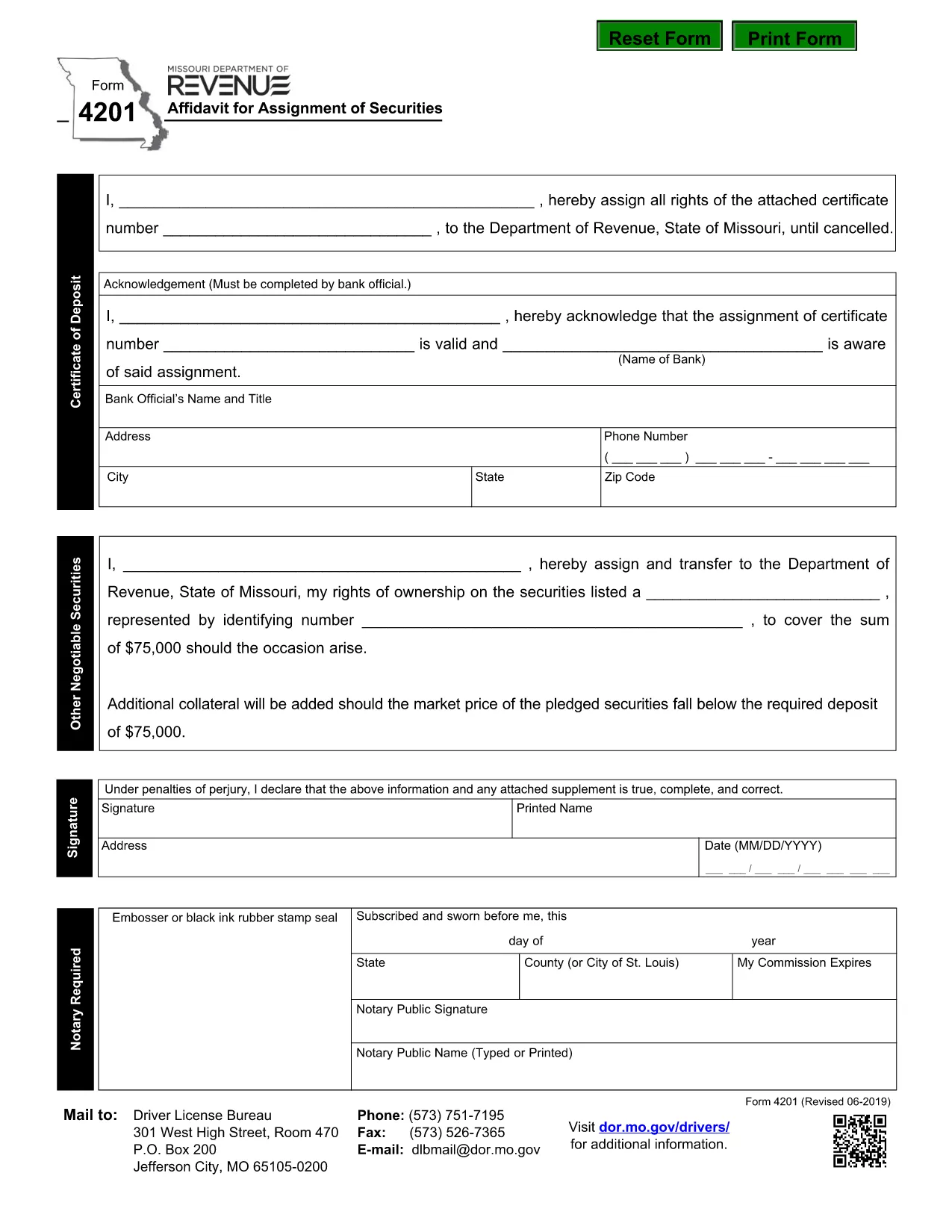
Form 4201 is the Missouri Department of Revenue’s official Affidavit for Assignment of Securities. This fillable PDF lets you complete the form online, save a copy, and submit it without printing.

What Is Form 4201?

Form 4201 records the transfer of securities (such as stocks, bonds, or other financial instruments) from one party to another for tax purposes. The Missouri Department of Revenue uses it to verify the assignment and ensure proper reporting.

Who Needs to File Form 4201?

  • Individuals or entities assigning securities that are subject to Missouri tax.
  • Trustees, executors, or legal representatives handling a transfer.
  • Businesses that need to document a securities assignment on their state tax return.

How to Complete the Fillable PDF

Instead of downloading the PDF and opening a separate editor, simply click the "Fill out this form" button on this page. The Formize PDF Filler app will load directly in your browser.

  1. Click Fill out this form.
  2. Wait a few seconds for the Formize PDF Filler to appear.
  3. Enter the required information in each highlighted field.
  4. Use the built‑in validation to check for missing or incorrect entries.
  5. When finished, click Download Completed PDF or Submit as instructed.

Common Mistakes & Tips

  • Missing signatures: The form requires a signature from the assignor; the filler lets you type a digital signature.
  • Incorrect dates: Use the format MM/DD/YYYY.
  • Wrong security description: Provide the full legal name and identification number.
  • Double‑check the “Assignment Amount” field for accuracy before saving.

Where to Submit the Completed Form

After saving the completed PDF, mail or fax it to the Missouri Department of Revenue address shown on the form, or upload it through the department’s online portal if you have an account.

Need help? Review the instructions on the form itself or contact the Missouri Department of Revenue directly.

SSS
  • What is the purpose of Missouri Form 4201?

    Form 4201 documents the assignment of securities for tax reporting. It ensures the Missouri Department of Revenue records the transfer correctly.

  • Who is required to file Form 4201?

    Anyone assigning securities that are subject to Missouri tax—individuals, trusts, executors, or businesses—must file this form.

  • Can I file Form 4201 electronically?

    Yes. Use the Formize fillable PDF to complete the form online, then download and upload it through the Missouri Department of Revenue’s electronic portal.

  • Is a handwritten signature still needed?

    A digital signature entered in the fillable PDF is accepted. If you print the form, you must sign it manually.

  • What happens if I make a mistake on the form?

    Correct the error in the Formize filler before downloading. If you submit a printed copy with errors, you may need to file an amended form.

  • Where do I send the completed Form 4201?

    Mail or fax the completed PDF to the address listed on the form, or upload it via the Missouri Department of Revenue’s online portal.

NASıL

Form 4201 formunu ücretsiz, çevrimiçi olarak 5 kolay adımda nasıl doldurabilirsiniz:

  1. 1
    Open the Fillable Form
    Click the "Fill out this form" button on the page. The Formize PDF Filler will open in a new browser window.
  2. 2
    Load the Form
    Wait a few seconds while the fillable PDF loads. All fields will be highlighted for easy entry.
  3. 3
    Enter Your Information
    Type the required data into each field. Use the built‑in validation to correct any errors.
  4. 4
    Review & Save
    Check the completed form for accuracy, then click "Download Completed PDF" to save a copy or "Submit" to send it directly.
  5. 5
    Submit or Print
    Print and mail the form, fax it, or upload it through the Missouri Department of Revenue portal as instructed.
PDF Filler uygulamasını biçimlendirin
HAKKıNDA

Ehliyet Başvuru Formları

Form 4201, bireylerin kamuya açık yollarda motorlu araç kullanmalarına izin veren, devlet tarafından verilen resmi bir belge olan sürücü belgesi alma veya yenileme sürecinde kullanılan belgeler olan Sürücü belgesi formlarından biridir. Bu formlar yargı yetkisine bağlı olarak değişiklik gösterebilir ancak genel olarak aşağıdakileri içerir:

Başvuru Formu: Bu form, ehliyet başvurusunda bulunmak için kullanılır ve genellikle ad, adres, doğum tarihi ve Sosyal Güvenlik numarası gibi kişisel bilgileri ister.

Kimlik Belgeleri: Başvuru formuyla birlikte bireylerden genellikle kimliklerini, ikametlerini ve ülkedeki yasal varlıklarını kanıtlayacak belirli kimlik belgeleri sağlamaları istenir. Bunlar geçerli bir pasaport, doğum belgesi, Sosyal Güvenlik kartı veya devlet tarafından verilmiş başka bir kimlik belgesini içerebilir.

İkamet Kanıtı: Birçok yargı bölgesi, başvuru sahiplerinin adreslerini doğrulamak için elektrik faturası, kira sözleşmesi veya banka ekstresi gibi ikamet kanıtlarını sağlamalarını şart koşar.

Tıbbi Muayene Formu: Bazı yargı bölgelerinde, başvuru sahibinin güvenli sürüş için gerekli fiziksel ve zihinsel gereksinimleri karşıladığından emin olmak amacıyla tıbbi muayene yapılması gerekebilir. Bu formu genellikle bir tıp uzmanı doldurur.

Sürücü Eğitimi Tamamlama Formu: İlk kez sürücü olacaklar için bir sürücü eğitim programının tamamlanması gerekli olabilir. Sürücü ehliyetine başvurmak için genellikle başarıyla tamamlandığını gösteren bir form veya sertifika gereklidir.

Görme Testi Formu: Ehliyet başvuru sürecinde yaygın olarak bir görme testi yapılır. Bir göz uzmanı veya yetkili personel, başvuru sahibinin görme keskinliğini değerlendirecek ve gerekli formu dolduracaktır.

Bu formlar genellikle yerel Motorlu Araçlar Departmanında (DMV) veya sürücü ehliyetinden sorumlu eşdeğer devlet kurumunda mevcuttur. Farklılık gösterebileceğinden, yargı alanınız için geçerli olan özel gereklilikleri ve formları kontrol etmeniz önemlidir.

ÖZELLIKLERI

PDF Doldurucu

PDF formlarını çevrimiçi doldurmanın en kolay yolu

  • Form 4201'ü hızlıca doldurun
    Form 4201 çevrimiçi olarak hızlı bir şekilde doldurmanın bir yolunu mu arıyorsunuz? Çevrimiçi ücretsiz PDF form doldurucumuzla, bu pdf belgesini nasıl düzenleyeceğinizi ve dolduracağınızı bir dakikadan kısa sürede öğreneceksiniz.
  • Kullanımı kolay çevrimiçi PDF düzenleyici
    PDF dosyalarını yeniden tarayıp geri göndermeden önce düzenleyebilmek için yazdırmaktan bıktınız mı? PDF belgelerini çevrimiçi olarak ücretsiz düzenleyin. Zamandan ve kağıttan tasarruf etmek için çevrimiçi pdf editörümüzü kullanın.
  • Harika araçlar, tüm platformlar
    Bir Mac'te Form 4201'ü nasıl dolduracağınızı veya PDF doldurucuyu ücretsiz olarak nasıl kullanacağınızı mı merak ediyorsunuz? Çevrimiçi PDF araçlarımız tüm platformlarda çalışır.
  • Güvenli dosya depolama
    Tamamlanan "Form 4201" dosyaları, Amazon Cloud barındırma tarafından yönetilen güvenli bir veritabanında depolanır. Dosyalarınızı istediğiniz zaman sistemimizden silebilirsiniz. Her durumda, bu dosyalar 24 saat sonra otomatik olarak silinir.
  • Form 4201 ile sohbet et
    Ücretsiz bir PDF okuyucu asistanı olan Chatize'da "Form 4201" ile sohbet edin. "Form 4201" adlı kişiden sorular sorun ve yanıtlar alın. Yukarıdaki Belgeyle Sohbet Et düğmesini tıklamanız yeterlidir.

Doldurma oturumunu sil

Seçilen doldurma oturumunu silin mi? Bu durumda, formu doldurmadaki ilerlemeniz kaybolacaktır.

Düzenleme oturumunu sil

Seçilen düzenleme oturumu silinsin mi? Bu durumda formu oluşturma ve düzenleme konusundaki ilerlemeniz kaybolacaktır.