
Dil Seçin

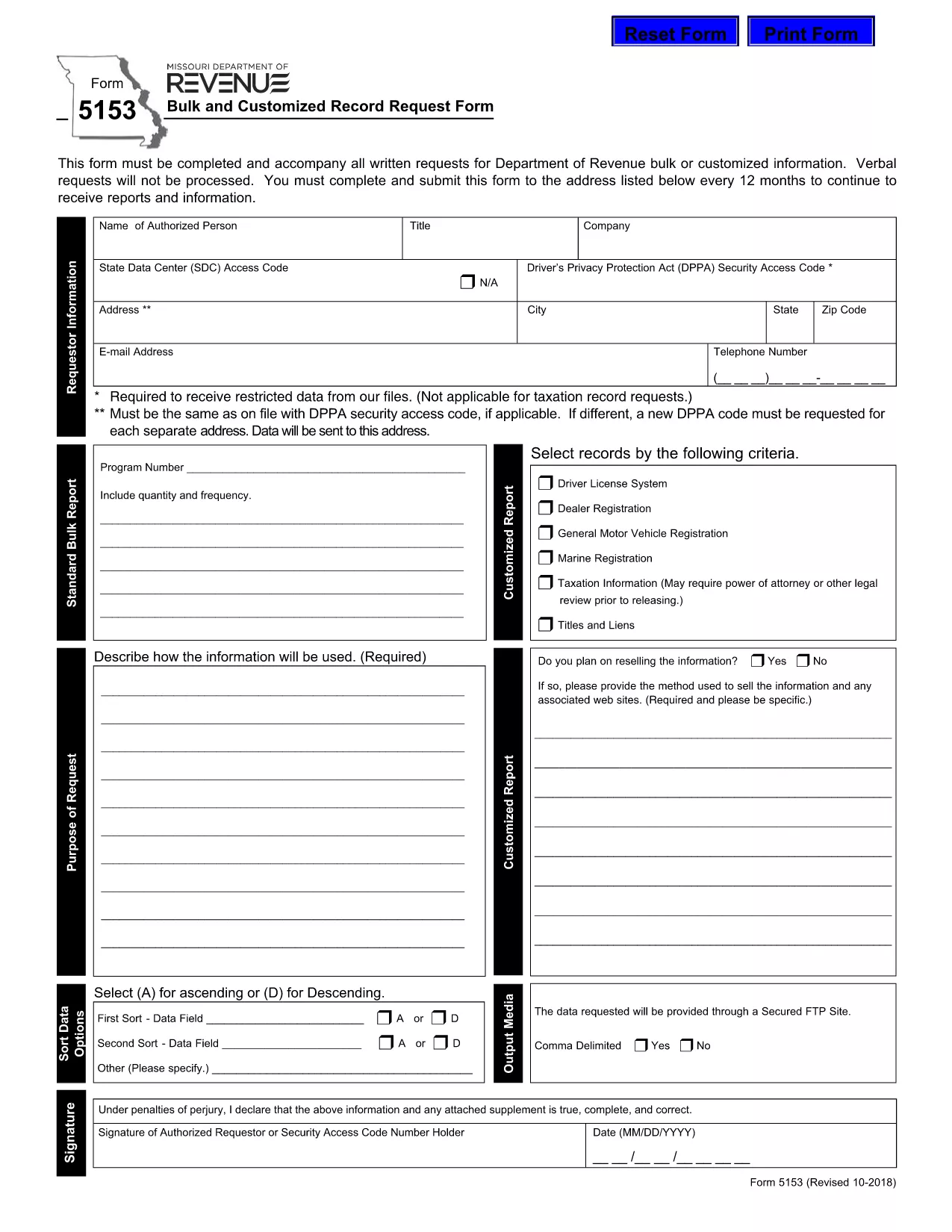
Form 5153 – Bulk and Customized Record Request

  1. Dil İngilizce
  2. Ülke Amerika Birleşik Devletleri
  3. Aktivite Ehliyet
  4. Belirtmek, bildirmek Missouri
Form 5153 – Bulk and Customized Record Request

The Missouri Department of Revenue requires Form 5153 for any bulk or customized request for tax records. This form must accompany every written request; verbal requests are not processed.

What is Form 5153?

Form 5153, titled Bulk and Customized Record Request Form, authorizes the Department of Revenue to release large sets of tax data or specific customized information to the requester. It is used by businesses, researchers, and legal representatives who need extensive revenue data.

How to Fill Form 5153 Online

Instead of downloading and editing the PDF manually, simply click the “Fill out this form” button on this page. The Formize PDF Filler app will load the fillable version of Form 5153 directly in your browser.

  • Step 1: Click the blue “Fill out this form” button.
  • Step 2: Wait a few seconds while the Formize PDF Filler loads.
  • Step 3: Complete each field. The filler validates dates, numbers, and required entries in real time.
  • Step 4: When finished, click Save & Download to store a copy on your computer.
  • Step 5: Print the saved PDF, sign where required, and mail it to the address listed on the form.

Common Mistakes to Avoid

Even with an online filler, errors can cause delays. Keep these tips in mind:

  • Do not leave required fields blank – the filler will highlight them.
  • Use the exact legal name of the requesting entity.
  • Provide a complete, current mailing address.
  • Double‑check the date format (MM/DD/YYYY).
  • Ensure the signature line is signed after printing – electronic signatures are not accepted for this form.

Submission Guidelines

After printing and signing, mail the completed Form 5153 to the address shown on the last page of the PDF. Include any supporting documentation required for your specific request. Keep a copy of the signed form for your records.

Download the Fillable PDF

If you prefer the traditional method, you can download the original fillable PDF directly from the Missouri Department of Revenue:

Download Form 5153 (PDF)

SSS
  • What is the purpose of Form 5153?

    Form 5153 is used to request bulk or customized tax records from the Missouri Department of Revenue.

  • Can I submit Form 5153 electronically?

    No. After completing the form online, you must print, sign, and mail it to the Department of Revenue.

  • How often can I submit Form 5153?

    You may submit the form once every 12 months for the same type of request.

  • Is there a fee for filing Form 5153?

    The form itself is free, but the Department may charge fees for processing large data requests.

  • What should I do if I make a mistake on the form?

    Print a new copy, correct the error, and submit the revised form. Do not send a corrected version of a previously mailed form.

  • Where do I mail the completed Form 5153?

    The mailing address is printed on the last page of the PDF. Verify the address on the form before sending.

  • Can I request records for multiple entities on one Form 5153?

    Each entity requires its own separate Form 5153 to ensure proper processing.

NASıL

Form 5153 formunu ücretsiz, çevrimiçi olarak 4 kolay adımda nasıl doldurabilirsiniz:

  1. 1
    Open the Fillable Form
    Click the blue “Fill out this form” button on the page. The Formize PDF Filler loads the fillable version of Form 5153 directly in your browser.
  2. 2
    Complete the Fields
    Enter all required information. The filler validates entries in real time, highlighting any missing or incorrect data.
  3. 3
    Save and Download
    When all fields are completed, click “Save & Download” to store a copy on your computer.
  4. 4
    Print, Sign, and Mail
    Print the saved PDF, sign the required signature line, and mail the form to the address listed on the last page.
PDF Filler uygulamasını biçimlendirin
HAKKıNDA

Ehliyet Başvuru Formları

Form 5153, bireylerin kamuya açık yollarda motorlu araç kullanmalarına izin veren, devlet tarafından verilen resmi bir belge olan sürücü belgesi alma veya yenileme sürecinde kullanılan belgeler olan Sürücü belgesi formlarından biridir. Bu formlar yargı yetkisine bağlı olarak değişiklik gösterebilir ancak genel olarak aşağıdakileri içerir:

Başvuru Formu: Bu form, ehliyet başvurusunda bulunmak için kullanılır ve genellikle ad, adres, doğum tarihi ve Sosyal Güvenlik numarası gibi kişisel bilgileri ister.

Kimlik Belgeleri: Başvuru formuyla birlikte bireylerden genellikle kimliklerini, ikametlerini ve ülkedeki yasal varlıklarını kanıtlayacak belirli kimlik belgeleri sağlamaları istenir. Bunlar geçerli bir pasaport, doğum belgesi, Sosyal Güvenlik kartı veya devlet tarafından verilmiş başka bir kimlik belgesini içerebilir.

İkamet Kanıtı: Birçok yargı bölgesi, başvuru sahiplerinin adreslerini doğrulamak için elektrik faturası, kira sözleşmesi veya banka ekstresi gibi ikamet kanıtlarını sağlamalarını şart koşar.

Tıbbi Muayene Formu: Bazı yargı bölgelerinde, başvuru sahibinin güvenli sürüş için gerekli fiziksel ve zihinsel gereksinimleri karşıladığından emin olmak amacıyla tıbbi muayene yapılması gerekebilir. Bu formu genellikle bir tıp uzmanı doldurur.

Sürücü Eğitimi Tamamlama Formu: İlk kez sürücü olacaklar için bir sürücü eğitim programının tamamlanması gerekli olabilir. Sürücü ehliyetine başvurmak için genellikle başarıyla tamamlandığını gösteren bir form veya sertifika gereklidir.

Görme Testi Formu: Ehliyet başvuru sürecinde yaygın olarak bir görme testi yapılır. Bir göz uzmanı veya yetkili personel, başvuru sahibinin görme keskinliğini değerlendirecek ve gerekli formu dolduracaktır.

Bu formlar genellikle yerel Motorlu Araçlar Departmanında (DMV) veya sürücü ehliyetinden sorumlu eşdeğer devlet kurumunda mevcuttur. Farklılık gösterebileceğinden, yargı alanınız için geçerli olan özel gereklilikleri ve formları kontrol etmeniz önemlidir.

ÖZELLIKLERI

PDF Doldurucu

PDF formlarını çevrimiçi doldurmanın en kolay yolu

  • Form 5153'ü hızlıca doldurun
    Form 5153 çevrimiçi olarak hızlı bir şekilde doldurmanın bir yolunu mu arıyorsunuz? Çevrimiçi ücretsiz PDF form doldurucumuzla, bu pdf belgesini nasıl düzenleyeceğinizi ve dolduracağınızı bir dakikadan kısa sürede öğreneceksiniz.
  • Kullanımı kolay çevrimiçi PDF düzenleyici
    PDF dosyalarını yeniden tarayıp geri göndermeden önce düzenleyebilmek için yazdırmaktan bıktınız mı? PDF belgelerini çevrimiçi olarak ücretsiz düzenleyin. Zamandan ve kağıttan tasarruf etmek için çevrimiçi pdf editörümüzü kullanın.
  • Harika araçlar, tüm platformlar
    Bir Mac'te Form 5153'ü nasıl dolduracağınızı veya PDF doldurucuyu ücretsiz olarak nasıl kullanacağınızı mı merak ediyorsunuz? Çevrimiçi PDF araçlarımız tüm platformlarda çalışır.
  • Güvenli dosya depolama
    Tamamlanan "Form 5153" dosyaları, Amazon Cloud barındırma tarafından yönetilen güvenli bir veritabanında depolanır. Dosyalarınızı istediğiniz zaman sistemimizden silebilirsiniz. Her durumda, bu dosyalar 24 saat sonra otomatik olarak silinir.
  • Form 5153 ile sohbet et
    Ücretsiz bir PDF okuyucu asistanı olan Chatize'da "Form 5153" ile sohbet edin. "Form 5153" adlı kişiden sorular sorun ve yanıtlar alın. Yukarıdaki Belgeyle Sohbet Et düğmesini tıklamanız yeterlidir.

Doldurma oturumunu sil

Seçilen doldurma oturumunu silin mi? Bu durumda, formu doldurmadaki ilerlemeniz kaybolacaktır.

Düzenleme oturumunu sil

Seçilen düzenleme oturumu silinsin mi? Bu durumda formu oluşturma ve düzenleme konusundaki ilerlemeniz kaybolacaktır.