
Dil Seçin

Form 5285 – Skills Test Failure (Behind‑the‑Wheel) Fillable PDF

  1. Dil İngilizce
  2. Ülke Amerika Birleşik Devletleri
  3. Aktivite Ehliyet
  4. Belirtmek, bildirmek Missouri
Form 5285 – Skills Test Failure (Behind‑the‑Wheel) Fillable PDF

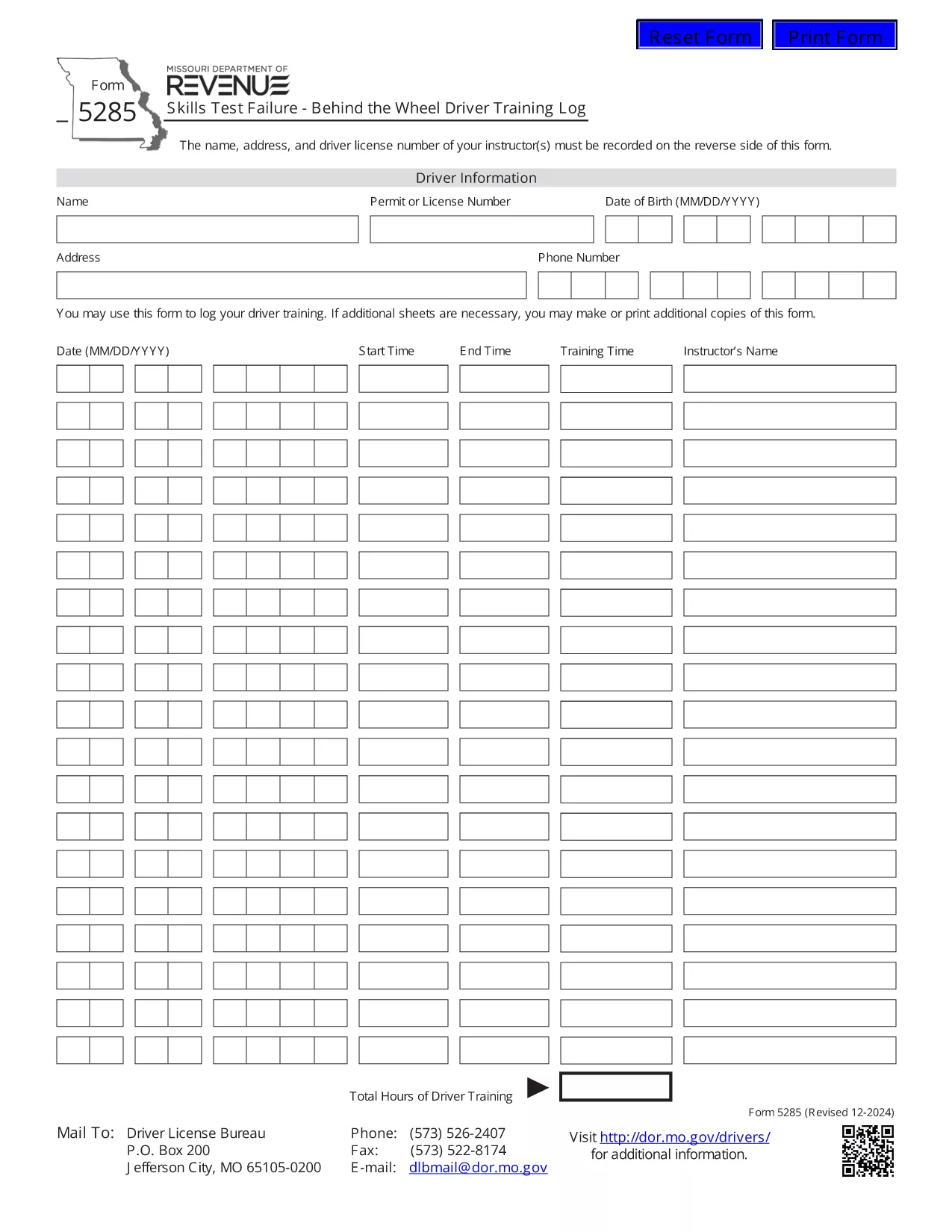
Form 5285 is the official Missouri Skills Test Failure – Behind the Wheel Driver Training Log. Instructors use this form to record a driver’s failure during a behind‑the‑wheel skills test, including instructor details, driver information, and the specific skills that were not met.

What Is Form 5285?

This form is required by the Missouri Department of Revenue – Driver Licensing Division. It captures:

  • Instructor name, address, and license number
  • Driver’s personal details
  • Date and location of the test
  • Specific skills that were failed
  • Signature of the instructor

How to Fill Out Form 5285 Online

Instead of printing, printing, and scanning, you can complete the form directly in your browser using Formize’s fillable PDF technology:

  1. Click the "Fill out this form" button on this page.
  2. Wait a few seconds while the Formize PDF Filler app loads the PDF.
  3. Enter the required information in each field. The form is fully interactive – just type or select from drop‑down menus.
  4. When you’re done, click Save to store a copy in your browser or download a completed PDF.
  5. Print the completed document if a hard copy is needed for submission.

Common Mistakes to Avoid

  • Leaving required fields blank: The PDF will highlight missing information before you can save.
  • Incorrect instructor license number: Double‑check the number on the instructor’s license.
  • Using the wrong date format: Missouri requires MM/DD/YYYY.
  • Submitting an unsigned form: The instructor’s signature is mandatory.

Where to Submit the Completed Form

After you have saved the filled form, submit it to the nearest Missouri Department of Revenue driver licensing office or mail it to the address listed on the form’s instructions. Some offices also accept electronic submissions via email – call your local office to confirm.

Download the Official PDF

If you prefer the original PDF for offline use, you can download it directly from the Missouri Department of Revenue:

Download Form 5285 (PDF)

SSS
  • What is the purpose of Form 5285?

    Form 5285 records a driver’s failure on a behind‑the‑wheel skills test. It provides the Missouri Department of Revenue with details needed to issue a retest or take corrective action.

  • Can I fill out Form 5285 on a mobile device?

    Yes. The Formize fillable PDF works on smartphones and tablets. Just tap the "Fill out this form" button and complete the fields using your device’s keyboard.

  • Do I need to print the form after filling it online?

    Only if your local licensing office requires a hard copy. Many offices now accept a saved PDF sent by email or uploaded through their portal.

  • Is there a fee to use the Formize PDF Filler?

    No. Formize provides free, secure filling of Missouri state forms, including Form 5285.

  • What should I do if I make a mistake after saving?

    Open the saved PDF again with the Formize filler, edit the incorrect fields, and re‑save. The filler preserves all previously entered data.

  • Where can I find the official instructions for Form 5285?

    The official instructions are included on the last page of the PDF you download from the Missouri Department of Revenue website.

NASıL

Form 5285 formunu ücretsiz, çevrimiçi olarak 4 kolay adımda nasıl doldurabilirsiniz:

  1. 1
    Open the Fillable Form
    Click the "Fill out this form" button on the page. The Formize PDF Filler loads the Form 5285 directly in your browser.
  2. 2
    Enter the Required Information
    Type the instructor’s name, address, license number, driver details, test date, and failed skill items into the highlighted fields.
  3. 3
    Review and Save
    Use the built‑in validation to ensure all required fields are completed, then click "Save" to store a copy or download the completed PDF.
  4. 4
    Print or Submit Electronically
    Print the saved PDF for a hard‑copy submission, or follow your local office’s instructions for electronic delivery.
PDF Filler uygulamasını biçimlendirin
HAKKıNDA

Ehliyet Başvuru Formları

Çoğu ülkede, yola çıkmadan önce ehliyet almak zorunludur. Ehliyet almak, araba kullanmak isteyen herkes için önemli bir kilometre taşıdır.

Form 5285, ​​ehliyet başvurusu yapmak isteyen kişilerden bilgi toplamak için kullanılan belgeler olan Ehliyet Başvuru formlarından biridir. Genellikle başvuranın adı, doğum tarihi, kimlik numarası, iletişim bilgileri ile sürücü belgesi geçmişi ve deneyimi için alanlar içerir.

ÖZELLIKLERI

PDF Doldurucu

PDF formlarını çevrimiçi doldurmanın en kolay yolu

  • Form 5285'ü hızlıca doldurun
    Form 5285 çevrimiçi olarak hızlı bir şekilde doldurmanın bir yolunu mu arıyorsunuz? Çevrimiçi ücretsiz PDF form doldurucumuzla, bu pdf belgesini nasıl düzenleyeceğinizi ve dolduracağınızı bir dakikadan kısa sürede öğreneceksiniz.
  • Kullanımı kolay çevrimiçi PDF düzenleyici
    PDF dosyalarını yeniden tarayıp geri göndermeden önce düzenleyebilmek için yazdırmaktan bıktınız mı? PDF belgelerini çevrimiçi olarak ücretsiz düzenleyin. Zamandan ve kağıttan tasarruf etmek için çevrimiçi pdf editörümüzü kullanın.
  • Harika araçlar, tüm platformlar
    Bir Mac'te Form 5285'ü nasıl dolduracağınızı veya PDF doldurucuyu ücretsiz olarak nasıl kullanacağınızı mı merak ediyorsunuz? Çevrimiçi PDF araçlarımız tüm platformlarda çalışır.
  • Güvenli dosya depolama
    Tamamlanan "Form 5285" dosyaları, Amazon Cloud barındırma tarafından yönetilen güvenli bir veritabanında depolanır. Dosyalarınızı istediğiniz zaman sistemimizden silebilirsiniz. Her durumda, bu dosyalar 24 saat sonra otomatik olarak silinir.
  • Form 5285 ile sohbet et
    Ücretsiz bir PDF okuyucu asistanı olan Chatize'da "Form 5285" ile sohbet edin. "Form 5285" adlı kişiden sorular sorun ve yanıtlar alın. Yukarıdaki Belgeyle Sohbet Et düğmesini tıklamanız yeterlidir.

Doldurma oturumunu sil

Seçilen doldurma oturumunu silin mi? Bu durumda, formu doldurmadaki ilerlemeniz kaybolacaktır.

Düzenleme oturumunu sil

Seçilen düzenleme oturumu silinsin mi? Bu durumda formu oluşturma ve düzenleme konusundaki ilerlemeniz kaybolacaktır.