
Dil Seçin

Nevada DMV Form 301 – Certification of Attendance (Fillable PDF)

  1. Dil İngilizce
  2. Ülke Amerika Birleşik Devletleri
  3. Aktivite Ehliyet
  4. Belirtmek, bildirmek nevada
Nevada DMV Form 301 – Certification of Attendance (Fillable PDF)

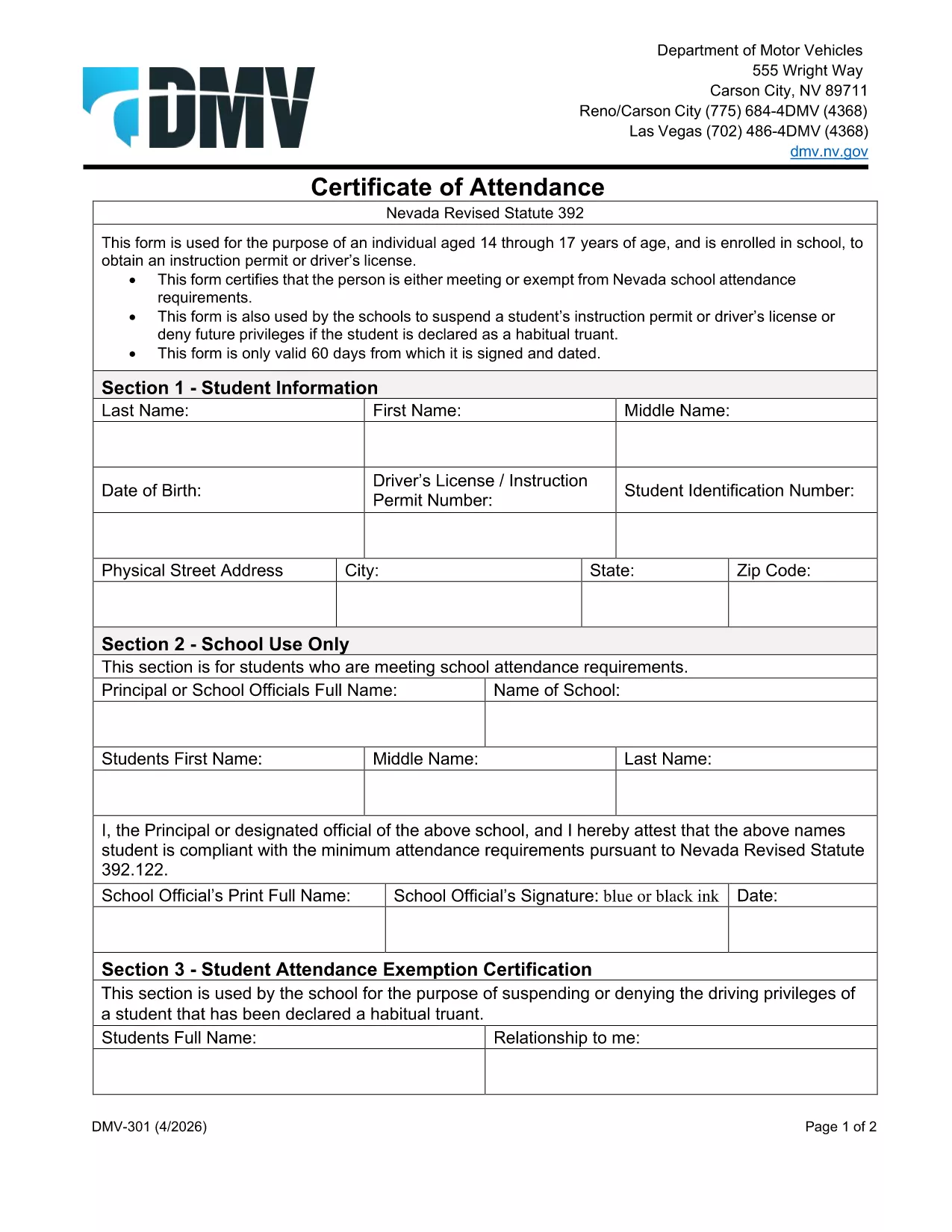
The Nevada Department of Motor Vehicles (DMV) requires Form 301 – Certification of Attendance for teens ages 14‑18 who are enrolled in school and are applying for an instruction permit or driver’s license. This form verifies that the student meets the state’s school attendance requirements or is exempt.

What Is DMV Form 301?

Form 301 is a short, one‑page certificate completed by the student, a parent/guardian, and the school. It is used to:

  • Confirm regular school attendance
  • Document any legal exemption
  • Allow the DMV to issue an instruction permit or driver’s license

How to Complete the Certification of Attendance

Follow the simple steps below. The form is fully fillable online, so you don’t need any PDF editor.

  1. Click the "Fill out this form" button on this page.
  2. Wait a few seconds while the Formize PDF Filler app loads the fillable DMV 301 PDF.
  3. Enter the student’s printed name, date of birth, and school information in the designated fields.
  4. Have the parent/guardian sign the required section electronically.
  5. If you are a school administrator, complete the "School Use Only" part and add the school seal.
  6. When all fields are completed, click Save to download a completed copy, or click Print to bring a hard copy to the DMV.

Common Mistakes to Avoid

To ensure your form is accepted, avoid these frequent errors:

  • Leaving any required field blank – the filler will highlight missing data.
  • Using an illegible signature – the electronic signature must be clear.
  • Submitting an outdated school name or address – verify the information with your school office.
  • Forgetting to date the form – the DMV requires a current date.

Where to Submit the Form

After you’ve filled and signed Form 301, bring the printed copy (or a secured digital version on a tablet) to any Nevada DMV office together with the required identification documents. The form is accepted at all DMV locations across Nevada.

Download the Fillable PDF Instantly

Ready to start? Click the button above, let Formize load the fillable PDF, and complete the Certification of Attendance in minutes.

SSS
  • Who needs to complete DMV Form 301?

    Any Nevada resident between 14 and 18 years old who is enrolled in school and is applying for an instruction permit or driver’s license must submit a completed Form 301.

  • Can I fill out Form 301 on a mobile device?

    Yes. The Formize PDF Filler works on smartphones, tablets, and computers, allowing you to complete the form on any device.

  • Do I need a physical signature?

    The DMV accepts an electronic signature entered through the fillable PDF. Print the form with the signature if you prefer a hard copy.

  • What if my school does not have a seal?

    If the school lacks an official seal, have the school administrator write the school name and date in the "School Use Only" section and sign it.

  • How long is the Certification of Attendance valid?

    The form is valid for the specific permit or license application it accompanies. If the application is delayed, a new form may be required.

  • Where can I submit the completed Form 301?

    Bring the completed form to any Nevada DMV office, or submit it as part of your online permit application if the DMV offers that option.

  • Is there a fee to download the PDF?

    No. The PDF is provided free of charge; you only pay the standard DMV fees for the permit or license.

NASıL

DMV 301 formunu ücretsiz, çevrimiçi olarak 4 kolay adımda nasıl doldurabilirsiniz:

  1. 1
    Open the Fillable Form
    Click the "Fill out this form" button on the page. The Formize PDF Filler app will load the DMV 301 PDF automatically.
  2. 2
    Enter Required Information
    Type the student's name, date of birth, school details, and any exemption notes directly into the highlighted fields.
  3. 3
    Add Signatures
    Use your mouse or touchscreen to sign the parent/guardian section. School officials can add their signature and seal if needed.
  4. 4
    Save or Print
    When all fields are completed, click "Save" to download the completed PDF or "Print" to obtain a hard‑copy for the DMV.
PDF Filler uygulamasını biçimlendirin
HAKKıNDA

Ehliyet Başvuru Formları

DMV 301, bireylerin kamuya açık yollarda motorlu araç kullanmalarına izin veren, devlet tarafından verilen resmi bir belge olan sürücü belgesi alma veya yenileme sürecinde kullanılan belgeler olan Sürücü belgesi formlarından biridir. Bu formlar yargı yetkisine bağlı olarak değişiklik gösterebilir ancak genel olarak aşağıdakileri içerir:

Başvuru Formu: Bu form, ehliyet başvurusunda bulunmak için kullanılır ve genellikle ad, adres, doğum tarihi ve Sosyal Güvenlik numarası gibi kişisel bilgileri ister.

Kimlik Belgeleri: Başvuru formuyla birlikte bireylerden genellikle kimliklerini, ikametlerini ve ülkedeki yasal varlıklarını kanıtlayacak belirli kimlik belgeleri sağlamaları istenir. Bunlar geçerli bir pasaport, doğum belgesi, Sosyal Güvenlik kartı veya devlet tarafından verilmiş başka bir kimlik belgesini içerebilir.

İkamet Kanıtı: Birçok yargı bölgesi, başvuru sahiplerinin adreslerini doğrulamak için elektrik faturası, kira sözleşmesi veya banka ekstresi gibi ikamet kanıtlarını sağlamalarını şart koşar.

Tıbbi Muayene Formu: Bazı yargı bölgelerinde, başvuru sahibinin güvenli sürüş için gerekli fiziksel ve zihinsel gereksinimleri karşıladığından emin olmak amacıyla tıbbi muayene yapılması gerekebilir. Bu formu genellikle bir tıp uzmanı doldurur.

Sürücü Eğitimi Tamamlama Formu: İlk kez sürücü olacaklar için bir sürücü eğitim programının tamamlanması gerekli olabilir. Sürücü ehliyetine başvurmak için genellikle başarıyla tamamlandığını gösteren bir form veya sertifika gereklidir.

Görme Testi Formu: Ehliyet başvuru sürecinde yaygın olarak bir görme testi yapılır. Bir göz uzmanı veya yetkili personel, başvuru sahibinin görme keskinliğini değerlendirecek ve gerekli formu dolduracaktır.

Bu formlar genellikle yerel Motorlu Araçlar Departmanında (DMV) veya sürücü ehliyetinden sorumlu eşdeğer devlet kurumunda mevcuttur. Farklılık gösterebileceğinden, yargı alanınız için geçerli olan özel gereklilikleri ve formları kontrol etmeniz önemlidir.

ÖZELLIKLERI

PDF Doldurucu

PDF formlarını çevrimiçi doldurmanın en kolay yolu

  • DMV 301'ü hızlıca doldurun
    DMV 301 çevrimiçi olarak hızlı bir şekilde doldurmanın bir yolunu mu arıyorsunuz? Çevrimiçi ücretsiz PDF form doldurucumuzla, bu pdf belgesini nasıl düzenleyeceğinizi ve dolduracağınızı bir dakikadan kısa sürede öğreneceksiniz.
  • Kullanımı kolay çevrimiçi PDF düzenleyici
    PDF dosyalarını yeniden tarayıp geri göndermeden önce düzenleyebilmek için yazdırmaktan bıktınız mı? PDF belgelerini çevrimiçi olarak ücretsiz düzenleyin. Zamandan ve kağıttan tasarruf etmek için çevrimiçi pdf editörümüzü kullanın.
  • Harika araçlar, tüm platformlar
    Bir Mac'te DMV 301'ü nasıl dolduracağınızı veya PDF doldurucuyu ücretsiz olarak nasıl kullanacağınızı mı merak ediyorsunuz? Çevrimiçi PDF araçlarımız tüm platformlarda çalışır.
  • Güvenli dosya depolama
    Tamamlanan "DMV 301" dosyaları, Amazon Cloud barındırma tarafından yönetilen güvenli bir veritabanında depolanır. Dosyalarınızı istediğiniz zaman sistemimizden silebilirsiniz. Her durumda, bu dosyalar 24 saat sonra otomatik olarak silinir.
  • DMV 301 ile sohbet et
    Ücretsiz bir PDF okuyucu asistanı olan Chatize'da "DMV 301" ile sohbet edin. "DMV 301" adlı kişiden sorular sorun ve yanıtlar alın. Yukarıdaki Belgeyle Sohbet Et düğmesini tıklamanız yeterlidir.

Doldurma oturumunu sil

Seçilen doldurma oturumunu silin mi? Bu durumda, formu doldurmadaki ilerlemeniz kaybolacaktır.

Düzenleme oturumunu sil

Seçilen düzenleme oturumu silinsin mi? Bu durumda formu oluşturma ve düzenleme konusundaki ilerlemeniz kaybolacaktır.